
1. 제품 오버view
The iCarsoft i800 Plus is an advanced OBD2 scanner designed for comprehensive vehicle diagnostics. It provides a range of functions including reading and clearing fault codes, monitoring live data, performing I/M readiness tests, and checking battery health.

Image: The iCarsoft i800 Plus scanner displaying its main menu and diagnostic features.
2. 상자 안에 무엇이 들어있나요?
패키지에 모든 품목이 들어 있는지 확인하세요.
- iCarsoft i800 Plus OBD2 Scanner
- 사용자 설명서
- PC Connecting Cable

Image: The iCarsoft i800 Plus package contents, including the scanner, user manual, and PC cable.
3. 설정 및 초기 작동
Follow these steps to set up and begin using your iCarsoft i800 Plus diagnostic tool:
- OBDII 포트를 찾으세요: The OBDII port is typically located under the dashboard on the driver's side of the vehicle.
- 스캐너 연결: Plug the scanner's cable firmly into the vehicle's OBDII port.
- 점화 켜기: Turn the vehicle's ignition to the 'ON' position without starting the engine. The scanner will power on automatically.
- 메뉴 탐색: Use the arrow keys and 'ENTER' button on the scanner to navigate through the diagnostic menu.
작동 가이드 영상
Video: This video demonstrates the setup and basic operation of the iCarsoft i800 Plus OBD2 Scanner, including connecting to the vehicle, reading and clearing fault codes, and view실시간 데이터를 제공합니다.
4. 작동 기능
The iCarsoft i800 Plus offers a variety of diagnostic functions:
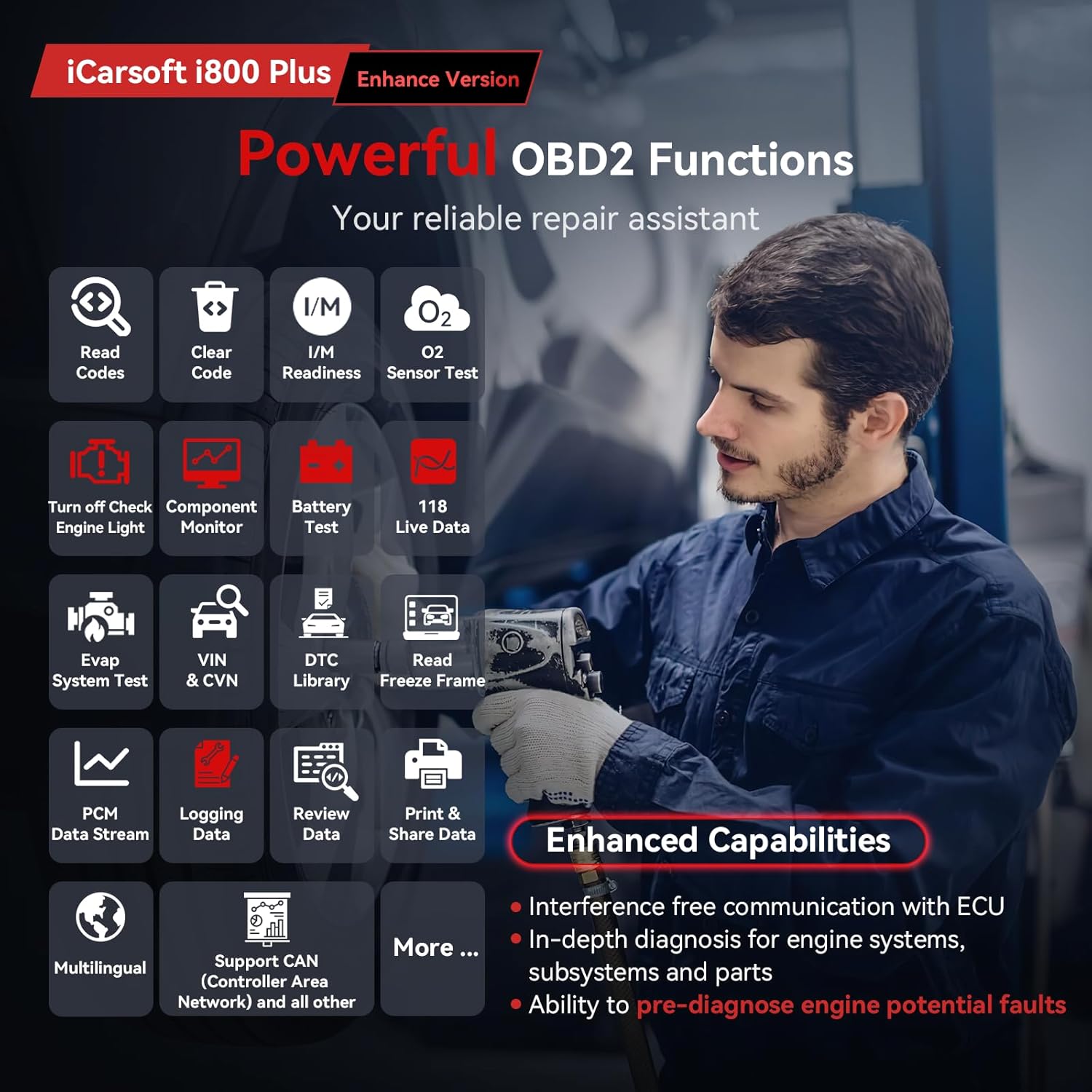
Image: The iCarsoft i800 Plus displaying its comprehensive OBD2 functions.
4.1. Read & Clear Fault Codes
This function allows you to retrieve Diagnostic Trouble Codes (DTCs) from the vehicle's Engine Control Unit (ECU) and clear them. Clearing codes will turn off the Check Engine Light (MIL).
- 메인 메뉴에서 선택하세요 'OBDII/EOBD'.
- 선택하다 'Read Codes' 에게 view 현재, 보류 중 및 영구 코드.
- 코드를 지우려면 다음을 선택하세요. 'Erase Codes'. Confirm the action when prompted. Ensure the ignition is on but the engine is off before clearing codes.
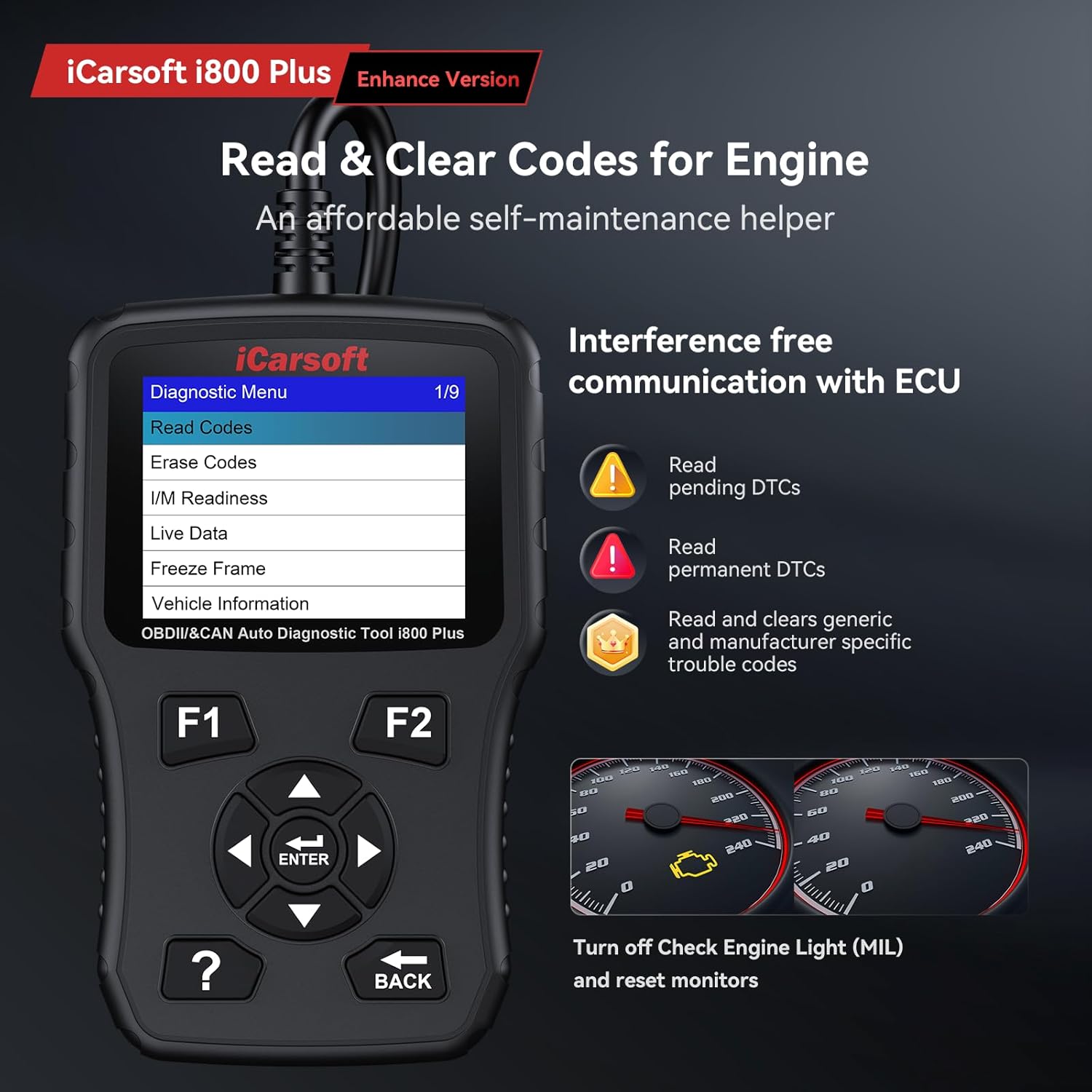
Image: The scanner's screen showing options for reading and erasing 코드.
4.2. I/M 준비
The I/M Readiness function checks the status of the vehicle's emission-related monitoring systems to determine if they are ready for an inspection. A 'Ready' status indicates that the system has completed its diagnostic tests.
- 메인 메뉴에서 선택하세요 'OBDII/EOBD'.
- 선택하다 'I/M Readiness' 에게 view the status of various monitors (e.g., Misfire Monitor, Fuel System Monitor, Catalyst Monitor).
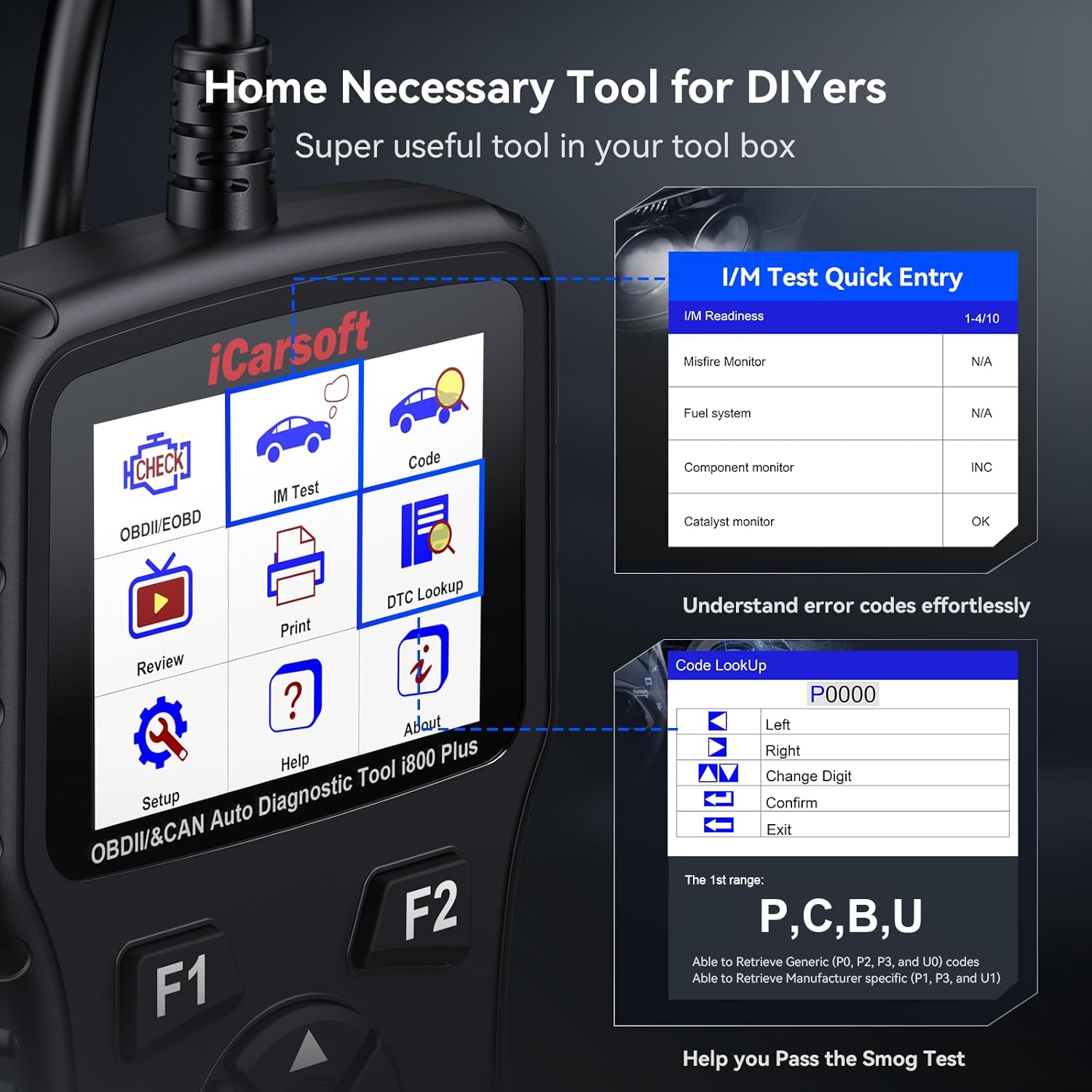
Image: The scanner displaying I/M Readiness monitor status.
4.3. Live Data Monitor
Monitor real-time data from the vehicle's sensors and components. This includes parameters such as engine speed, ignition coil voltage, transmission temperature, oil pressure, coolant temperature, and short-term fuel trim. This data can be displayed in text or graphical format.
- 메인 메뉴에서 선택하세요 'OBDII/EOBD'.
- 선택하다 'Live Data'. You can select specific parameters to view or choose 'All Supported' to see all available data.
- Use the arrow keys to scroll through data and the 'ENTER' button to switch between text and graph views.
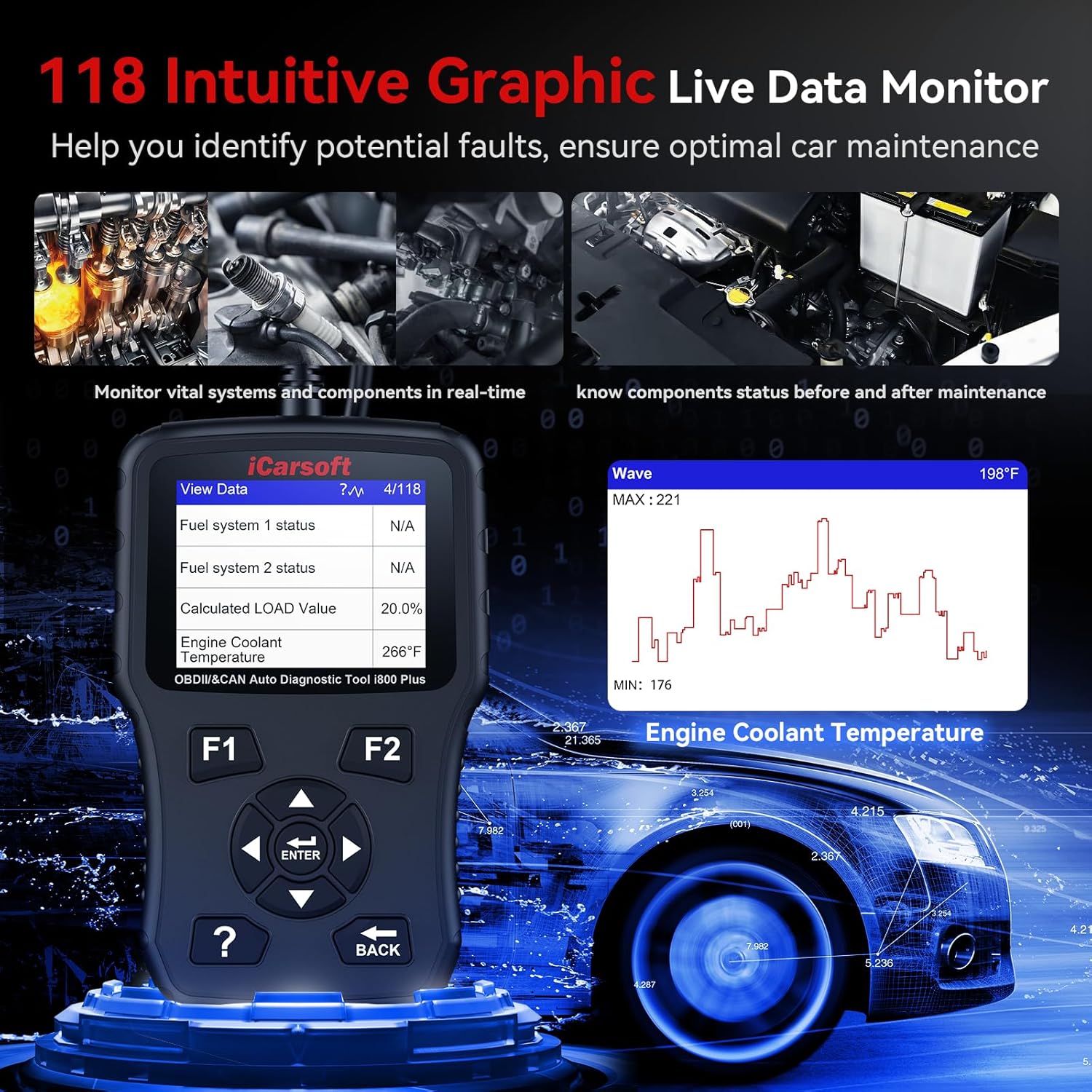
Image: The scanner displaying live data in both numerical and graphical formats.
4.4. 정지 화면 데이터
When an emission-related fault occurs, the ECU stores a 'freeze frame' of vehicle operating conditions at the time of the fault. This data can help identify the cause of the problem.
- 메인 메뉴에서 선택하세요 'OBDII/EOBD'.
- 선택하다 'Freeze Frame' 에게 view 저장된 데이터.
4.5. O2 Monitor Test
This function retrieves the oxygen sensor monitor test results for the most recently completed tests from the vehicle's on-board computer.
- 메인 메뉴에서 선택하세요 'OBDII/EOBD'.
- 선택하다 'O2 Monitor Test' and select the desired sensor to view its test results.
4.6. DTC 조회
The built-in DTC library allows you to look up definitions for generic and manufacturer-specific trouble codes directly on the device.
- 메인 메뉴에서 선택하세요 'DTC Lookup'.
- Enter the DTC code using the arrow keys to change digits and 'ENTER' to confirm.
4.7. Battery Charging System Check
Monitor the vehicle's battery health and charging system status. This helps prevent vehicle startup failures or electrical issues caused by battery problems.
- 메인 메뉴에서 선택하세요 'OBDII/EOBD'.
- 선택하다 'Battery Test' 에게 view detailed battery voltage information, often presented with a dynamic graph.
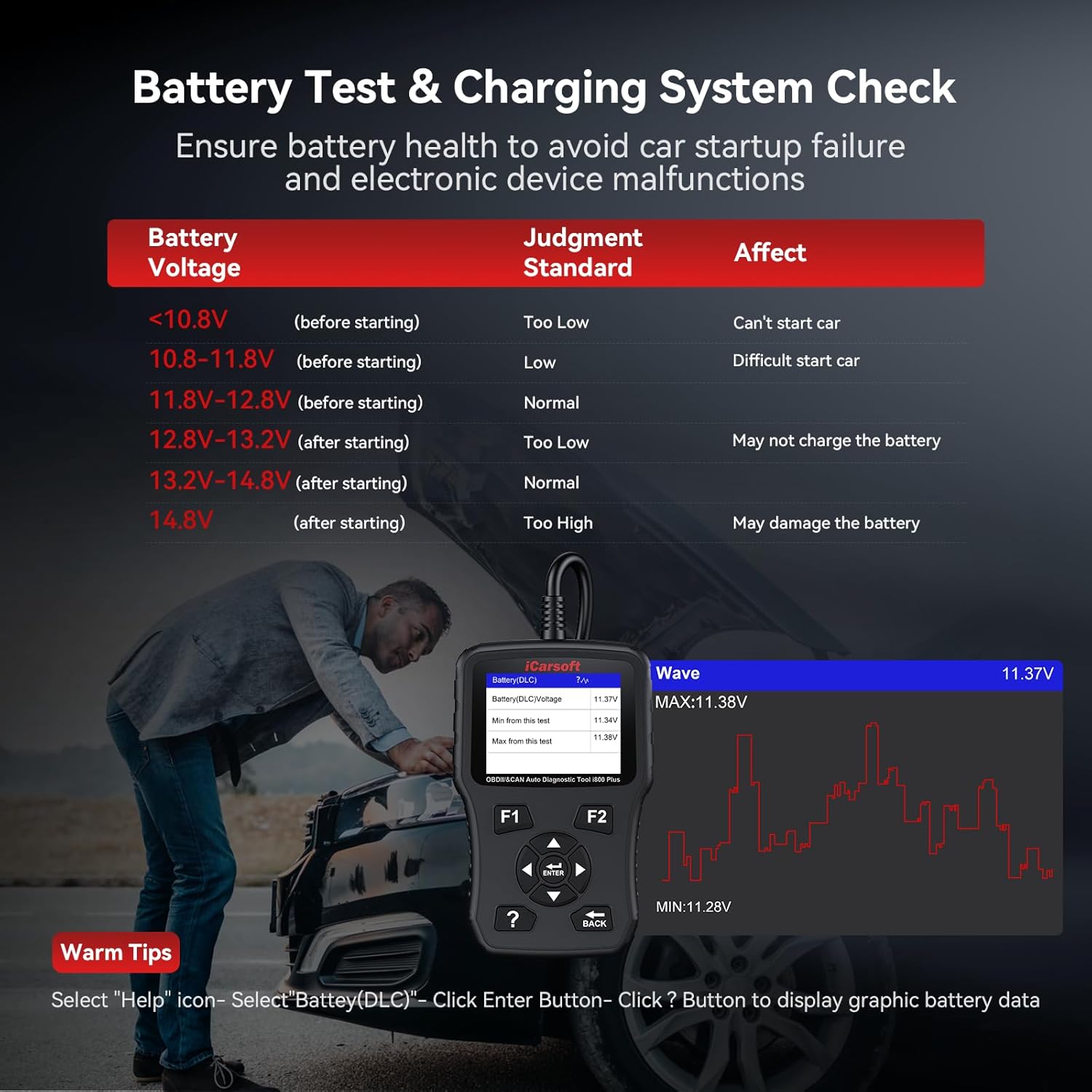
Image: The scanner displaying battery voltage and charging system status.
5. 유지관리
5.1. 소프트웨어 업데이트
iCarsoft provides lifetime free updates for the i800 Plus scanner. Regularly updating the software ensures access to the newest car parameter database for in-depth engine system diagnosis and improved communication with ECU modules. Connect the device to a computer via the provided USB cable and visit the official iCarsoft web업데이트 지침 및 소프트웨어는 해당 사이트에서 확인할 수 있습니다.
5.2. 청소
장치를 청소하려면 부드러운 damp 천. 화면이나 c를 손상시킬 수 있는 연마성 세척제나 용제를 사용하지 마십시오.asing.
6. 문제 해결
6.1. 호환성 문제
Due to manufacturer restrictions on certain ECUs and systems in newer or specific car models, compatibility issues may arise. If you encounter any problems, please contact iCarsoft technical support for assistance.

Image: Global vehicle compatibility map for the iCarsoft i800 Plus.
6.2. 장치 전원이 켜지지 않음
Ensure the scanner is securely connected to the vehicle's OBDII port and the vehicle's ignition is in the 'ON' position. If the issue persists, try connecting the scanner to a different vehicle to rule out a vehicle-specific power supply problem.
7. 사양
| 특징 | 세부 사항 |
|---|---|
| 상표 | iCarsoft |
| 모델 | i800 플러스 |
| 품목 무게 | 12 온스 |
| 패키지 크기 | 7.95 x 4.84 x 2.09 인치 |
| 전원 | 코드식 전기 |
| 운영 체제 | Windows 10 (for updates) |
| 화면 크기 | 2.8 인치 |
| 한국어: | 850030851307 |
| 첫 번째 이용 가능 날짜 | 8년 2023월 XNUMX일 |
8. 보증 및 지원
The iCarsoft i800 Plus comes with a 1-year warranty. iCarsoft also provides lifetime free updates and lifetime free hardware repair. For any concerns or technical support, please contact iCarsoft customer service.