
소개
The TAXNELE THC30A is a digital programmable timer switch designed for automatic control of various electrical equipment. It features daily and weekly programming capabilities with up to 20 ON/OFF settings, a manual override function, and a built-in lithium battery for power-off memory. This manual provides detailed instructions for installation, operation, and maintenance to ensure safe and efficient use of your timer switch.
안전 정보
- 설치 또는 유지 관리 전에 전원 공급 장치가 분리되어 있는지 확인하십시오.
- 설치는 자격을 갖춘 전기 기술자 또는 관련 지식이 있는 사람이 수행해야 합니다.
- 최대 부하 용량인 30A/5000W를 초과하지 마십시오.
- 장치를 물과 극한의 온도에서 멀리하세요.
- Verify correct wiring connections to prevent damage to the device or connected appliances.
제품 특징
- 프로그래밍 가능한 제어: Up to 20 ON/OFF settings per day or week.
- 전원 끄기 메모리: Built-in 3V lithium battery maintains timing, display, and data storage for up to 3 years during power interruptions.
- 높은 정밀도: Industrial-grade chip for accurate timing.
- 수동 재정의: Allows temporary or permanent manual control.
- LCD 디스플레이: Clear digital display for easy programming and monitoring.
- Din Rail Mount: 표준 DIN 레일에 쉽게 설치할 수 있도록 설계되었습니다.
- 다양한 용도: Suitable for street lights, neon lamps, advertising signs, production equipment, and home appliances.

Figure 1: The THC30A timer switch highlighting its power-off memory function, which retains data for up to 3 years using a built-in CR2032 lithium battery.

Figure 2: The THC30A timer switch featuring a 30A big load relay for stable and safe operation with various electrical loads.
제품 구성 요소 및 디스플레이
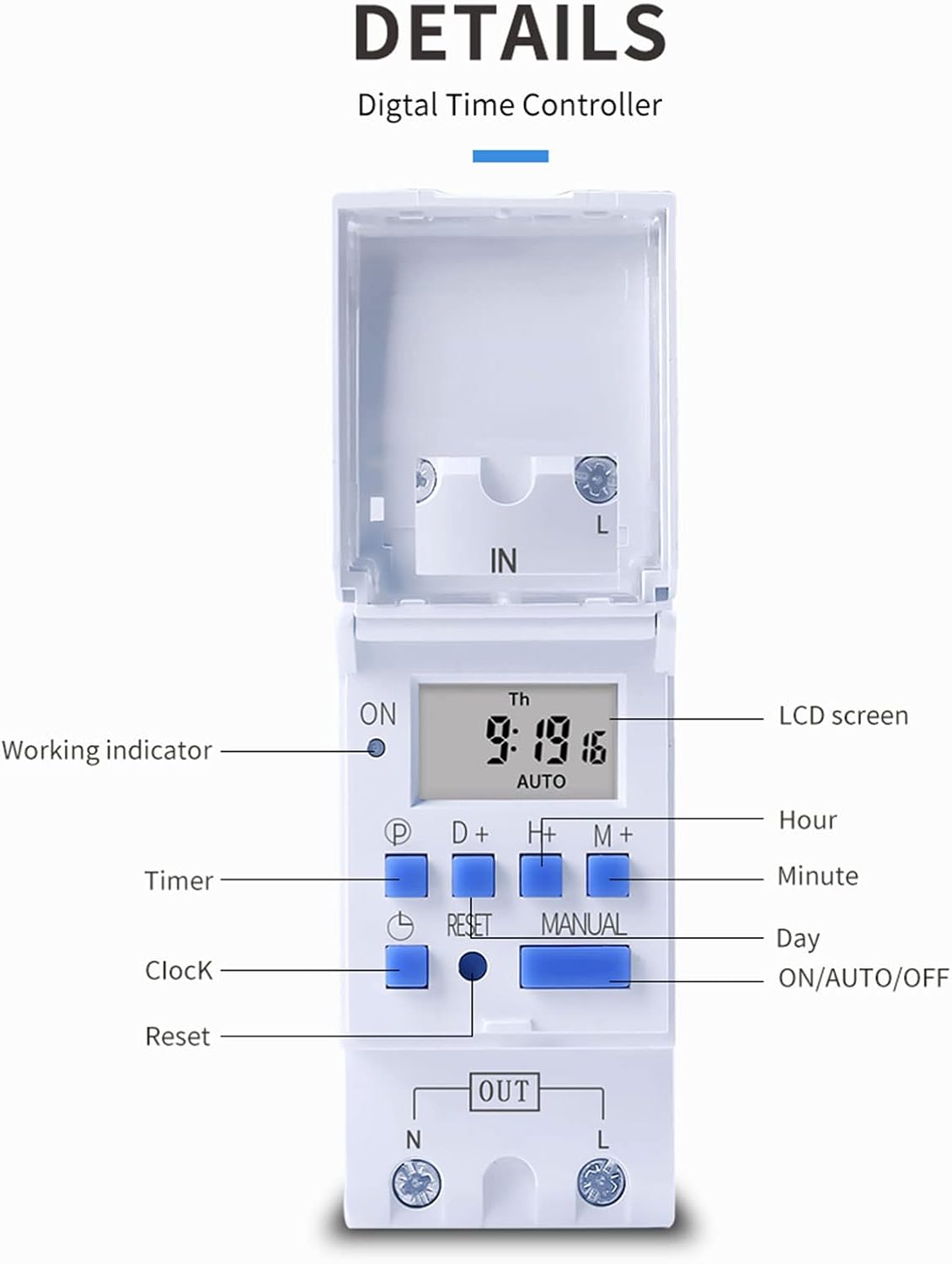
그림 3: 상세 view of the THC30A timer switch's LCD screen and control buttons. Labels include Working indicator, Timer, Clock, Reset, P (Program), D+ (Day), H+ (Hour), M+ (Minute), Manual, and ON/AUTO/OFF status.
- LCD 화면: Displays current time, day, and ON/OFF status.
- 작동 표시기: LED light indicating operation status.
- P 버튼: 프로그래밍 모드로 들어갑니다.
- D+ Button: Adjusts day in clock setting or program.
- H+ Button: Adjusts hour in clock setting or program.
- M+ Button: Adjusts minute in clock setting or program.
- 시계 버튼: Returns to clock display or exits programming mode.
- 재설정 버튼: Clears all settings and resets the timer.
- 수동 버튼: 켜짐, 자동, 꺼짐 모드 간 전환 기능을 제공합니다.
명세서
| 매개변수 | 값 |
|---|---|
| 모델 | THC30A |
| 현재 평가 | 30A |
| 전력 정격 | 5000와트 |
| 권tage 옵션 | 12V DC AC, 24V DC AC, 48V DC AC, 110V AC, 220V AC |
| 시간 오류 | ≤2 seconds/day |
| 표시하다 | 액정표시장치 |
| 타이밍 범위 | 1분에서 168시간(7일)까지 |
| 켜기/끄기 설정 | 20개 그룹 |
| 작동 온도 | -20℃ ~ 50℃ |
| 치수 | 86 x 36 x 65mm (3.38 x 1.41 x 2.56 inches) |
| 파워 리저브 | 3V Lithium battery (CR2032 type) for 3 years data retention |

Figure 4: Dimensions of the THC30A timer switch, showing measurements for height, width, and depth for proper installation planning.
설정 및 설치
1. 장착
The THC30A timer switch is designed for DIN rail mounting. Securely attach the device to a standard 35mm DIN rail in an appropriate electrical enclosure.
2. 배선
경고: Ensure all power is disconnected before performing any wiring.
Connect the input power supply to the "IN" terminals (N for Neutral, L for Live). Connect the load (e.g., light, appliance) to the "OUT" terminals (N for Neutral, L for Live). The timer acts as a switch for the live wire. Refer to the wiring diagram below for correct connections.

Figure 5: Simplified wiring diagram for the THC30A timer switch. The new version offers direct power output, simplifying connections compared to older models.
- 입력(입력): Connect your main power supply (e.g., AC 12V, 24V, 48V, 110V, 220V) to these terminals.
- 출력(출력): Connect your electrical load (e.g., light, motor) to these terminals. The timer controls the power flow to this output.
작동 지침
1. 초기 설정/초기화
처음 사용 시 또는 장시간 전원을 끈 후tag예, 화면이 비어 있을 수 있습니다. 버튼을 누르십시오. 다시 놓기 button (located in a small hole, use a pointed object) to clear all settings and initialize the timer. The LCD will display "0:00" and "AUTO".
2. 현재 시간 및 요일 설정
- 를 누르고 계세요 시계 단추.
- 잡고 있는 동안 시계, 누르다 D+ to set the current day (Monday to Sunday).
- 잡고 있는 동안 시계, 누르다 H+ 현재 시간을 설정합니다(0-23).
- 잡고 있는 동안 시계, 누르다 M+ 현재 분(0-59)을 설정합니다.
- 릴리스하다 시계 버튼을 클릭하세요. 이제 시간이 설정되었습니다.
3. 켜짐/꺼짐 주기 프로그래밍
이 타이머는 최대 20개의 켜짐/꺼짐 프로그램을 지원합니다. 각 프로그램은 켜짐 시간과 꺼짐 시간으로 구성됩니다.
- 를 누르세요 P button once. The display will show "1 ON". This is for the first ON setting.
- 누르다 D+ to select the day(s) for this ON event. You can choose a single day, specific days, or blocks of days (e.g., Mon-Fri, Sat-Sun, Mon-Sun).
- 누르다 H+ 첫 번째 ON 이벤트 시간을 설정하기 위해.
- 누르다 M+ 첫 번째 ON 이벤트의 시간을 분으로 설정합니다.
- 를 누르세요 P button again. The display will show "1 OFF". This is for the first OFF setting.
- 2~4단계를 반복하여 첫 번째 OFF 이벤트의 날짜, 시간 및 분을 설정합니다.
- 계속 누르기 P to cycle through "2 ON", "2 OFF", up to "20 ON", "20 OFF" and set additional programs as needed.
- 원하는 프로그램을 모두 설정한 후, 시계 프로그래밍 모드를 종료하고 현재 시간 표시로 돌아가려면 이 버튼을 누르십시오.
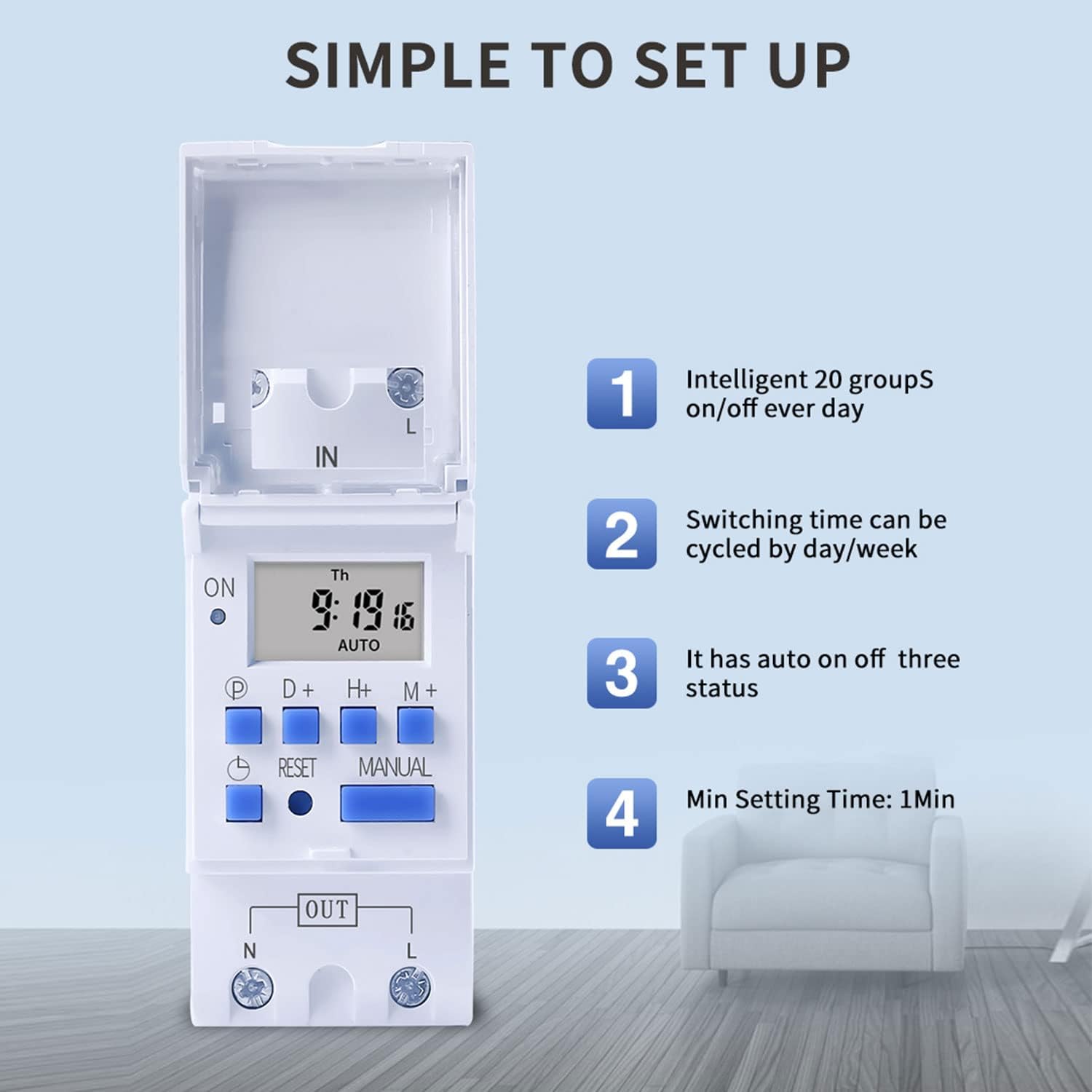
Figure 6: Visual guide to the simple setup of the THC30A timer, highlighting its 20 ON/OFF groups, daily/weekly cycling, auto ON/OFF status, and minimum 1-minute setting time.
4. 수동 조작
를 누르세요 수동 button to cycle through the output modes:
- 에: 출력이 지속적으로 켜져 있어 모든 프로그램을 무시합니다.
- 자동 : The output operates according to the programmed ON/OFF cycles. This is the standard operating mode.
- OFF : 출력은 모든 프로그램을 무시하고 지속적으로 꺼져 있습니다.
타이머가 켜져 있는지 확인하세요 자동차 프로그래밍된 작업이 작동하기 위한 모드입니다.
유지
- Keep the timer clean and free from dust. Use a dry, soft cloth for cleaning.
- 연마성 세척제나 용제를 사용하지 마십시오.
- The internal lithium battery (CR2032) has a long lifespan (up to 3 years). If the display consistently goes blank after power outages, the battery may need replacement. This should be done by a qualified technician.
문제 해결
| 문제 | 가능한 원인 | 해결책 |
|---|---|---|
| 디스플레이가 비어 있습니다. | 전원 공급 없음; 내부 배터리 방전. | Check power connections. Press the Reset button. If problem persists, internal battery may need replacement. |
| Timer does not switch ON/OFF as programmed. | Timer is not in AUTO mode; incorrect program settings; current time/day is wrong. | 누르다 수동 until "AUTO" is displayed. Verify program settings (ON/OFF times, days). Check and correct current time and day. |
| 출력은 항상 켜짐이거나 항상 꺼짐입니다. | 타이머는 수동으로 켜짐 또는 꺼짐 모드로 설정할 수 있습니다. | 누르다 수동 "AUTO"가 표시될 때까지. |
| 전원이 꺼지면 프로그램이 손실됩니다.tage. | Internal backup battery is depleted. | The internal CR2032 battery may need replacement. Contact support if necessary. |
응용 프로그램
The TAXNELE THC30A timer switch is versatile and can be used in various applications to automate electrical devices:

그림 7: 예amples of common applications for the THC30A timer switch, including street light control, home appliance control, battery charging control, and advertising light control.
- Street Light Control: Automate the turning ON/OFF of street lights based on time.
- Home Appliance Control: Schedule operation of water heaters, fans, or other household devices.
- Battery Charging Control: Manage charging cycles for batteries to prevent overcharging.
- Advertising Light Control: Program display times for neon signs and advertising boards.
- 생산 장비: Control machinery operation in industrial settings.
보증 및 지원
For warranty information or technical support, please refer to the contact details provided with your purchase or visit the official TAXNELE web사이트. 구매 증빙 자료로 구매 영수증을 보관하세요.