
1. 서론
Thank you for choosing the XTUGA D900 Dual UHF Wireless Microphone System. This system is designed to provide high-quality audio transmission for various applications, including karaoke, DJ events, weddings, church services, business meetings, classroom activities, and live performances. This manual will guide you through the setup, operation, and maintenance of your new wireless microphone system.
The XTUGA D900 features dual handheld microphones with adjustable echo, treble, and bass controls, paired with a versatile mini receiver that offers both 3.5mm and 6.35mm output options for broad compatibility with audio devices.

Image: The XTUGA D900 system is suitable for performances, family entertainment, classroom speeches, and program hosting.
2. 패키지 내용
모든 품목이 들어 있는지 확인하려면 패키지를 확인하세요.
- 2 x XTUGA D900 Handheld Wireless Microphones
- 1 x Mini Wireless Receiver (with 3.5mm jack)
- 1 x 6.35mm Adapter (for receiver)
- USB 충전 케이블 1개 (수신기용)
- 마이크용 미끄럼 방지 링 2개
- 사용자 설명서
3. 제품 특징
- 고품질 사운드: Clear voice transmission without feedback or distortion.
- Dual UHF Wireless System: Two microphones operating on independent UHF channels (ChA and ChB), each with 50 adjustable frequencies (573-599 MHz range) to prevent interference.
- On-Microphone Controls: Each handheld microphone features direct controls for volume, 7 levels of echo adjustment, and 5 levels of treble/bass adjustment.
- Versatile Receiver: Mini wireless receiver with a 3.5mm output, convertible to 6.35mm for wide compatibility with various audio equipment.
- 긴 무선 범위: Stable signal transmission up to 20 meters (65 feet).
- 충전식 수신기: Built-in battery provides up to 8 hours of use on a 4-hour charge.
- 블루투스 재생: The receiver supports Bluetooth connectivity for playing background music from a smartphone or other devices.

Image: Close-up of the XTUGA D900 microphone displaying its multifunctional adjustment capabilities for echo, volume, treble, and bass.
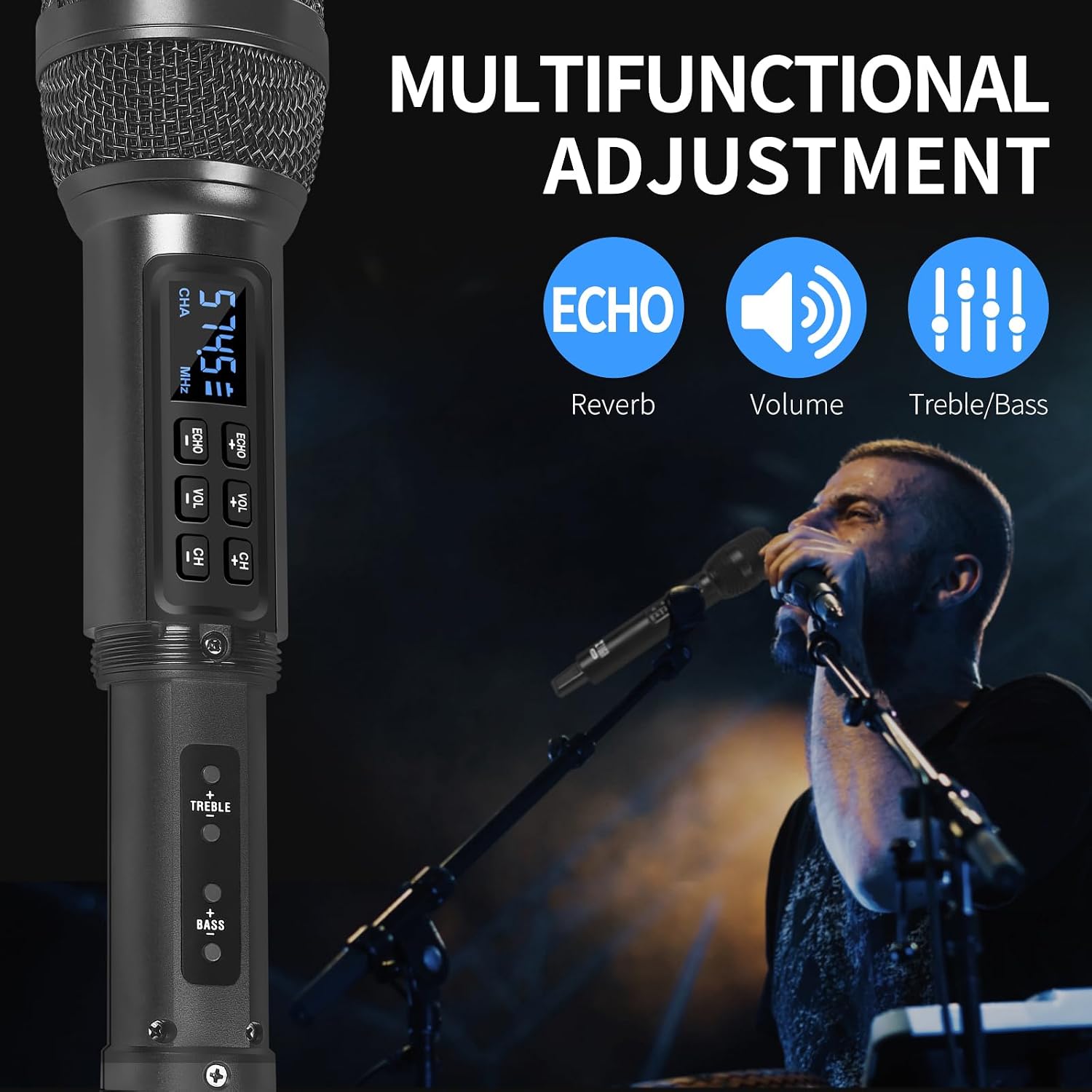
Image: The XTUGA D900 handheld microphone featuring a digital display for frequency and channel information.
4. 설정 가이드
4.1. 수신기 연결
- Identify Output: Determine if your audio device (e.g., amplifier, mixer, speaker, soundbar, PC) requires a 3.5mm or 6.35mm input.
- 수신기 연결:
- For 3.5mm input: Directly plug the mini wireless receiver's 3.5mm jack into your device's audio input port.
- For 6.35mm input: Attach the provided 6.35mm adapter to the receiver's 3.5mm jack, then plug it into your device's 6.35mm audio input port.
- 수신기 전원 켜기: Press and hold the POWER button on the receiver until the indicator lights illuminate.
4.2. 마이크 설정
- 배터리 삽입: Open the battery compartment of each microphone and insert two AA batteries (not included), ensuring correct polarity.
- 마이크 전원 켜기: Press and hold the power button on each microphone. The display will light up, showing the channel and frequency.
- 자동 페어링: The microphones and receiver should automatically pair. The RF indicator lights (A.RF, B.RF) on the receiver will turn solid blue when a microphone is successfully connected.

Image: Connectivity diagram illustrating how to connect the XTUGA D900 microphone and receiver to different audio systems using 3.5mm or 6.35mm inputs. Note: Not recommended for small speakers under 15 watts.

Image: The XTUGA D900 system, showing two microphones and the receiver, highlighting a stable 20-meter wireless signal range.
5. 사용 설명서
5.1. 마이크 컨트롤
- 전원 켜기/끄기: Press and hold the power button on the microphone for 2-3 seconds.
- 볼륨 조절: Press the 'VOL +' or 'VOL -' buttons on the microphone to adjust the microphone's output volume.
- 에코 조정: Press the 'ECHO +' or 'ECHO -' buttons to cycle through 7 levels of echo effect.
- 고음/저음 조절: Press the 'TREBLE +' or 'TREBLE -' buttons to adjust the treble. Press the 'BASS +' or 'BASS -' buttons to adjust the bass. There are 5 levels for each.
- 주파수 조정 : Press the 'CH +' or 'CH -' buttons to change the operating frequency. Each microphone (ChA and ChB) has 50 selectable frequencies to avoid interference.

Image: Two XTUGA D900 microphones illustrating the frequency adjustment buttons (CH+/-) and their digital displays.
5.2. Receiver Bluetooth Playback
The receiver supports Bluetooth connectivity for playing background music from a compatible device.
- 블루투스 활성화: 수신기의 전원이 켜져 있는지 확인하세요.
- 편성: On your smartphone or Bluetooth-enabled device, search for Bluetooth devices and select "X168" to connect.
- 음악 재생: Once connected, you can play music from your device, and the audio will be transmitted through the receiver to your connected sound system.

Image: The XTUGA D900 receiver demonstrating Bluetooth playback functionality, connected to a smartphone.
6. 배터리 정보
6.1. Receiver Battery
- The receiver has a built-in rechargeable battery.
- To charge, connect the receiver to a USB power source using the provided USB charging cable.
- 완전 충전에는 일반적으로 약 4시간이 소요되며, 최대 8시간 동안 연속 사용이 가능합니다.
- The POWER indicator light on the receiver will show charging status.
6.2. Microphone Batteries
- Each microphone requires two AA batteries (not included).
- Replace batteries when the microphone display indicates low power or when audio quality degrades.
- 최적의 성능을 위해 항상 새롭고 품질 좋은 배터리를 사용하십시오.

Image: The XTUGA D900 receiver highlighting its strong battery life, offering up to 8 hours of operation after a 4-hour charge.
7. 유지관리
- 청소: Wipe the microphones and receiver with a soft, dry cloth. Do not use liquid cleaners or solvents.
- 저장: 시스템은 직사광선과 극한의 온도를 피해 서늘하고 건조한 곳에 보관하세요.
- 배터리 관리 : Remove AA batteries from microphones if not used for an extended period to prevent leakage. Charge the receiver's battery periodically if stored for long durations to maintain battery health.
- 손질: Avoid dropping the microphones or receiver, as this can damage internal components.
8. 문제 해결
| 문제 | 가능한 원인 | 해결책 |
|---|---|---|
| 마이크에서 소리가 나지 않음 |
|
|
| Sound distortion or interference |
|
|
| Receiver Bluetooth not connecting |
|
|
9. 사양
| 특징 | 세부 사항 |
|---|---|
| 상표 | 엑스투가 |
| 모델명 | XTUGA D900 |
| 연결 기술 | UHF Wireless, Auxiliary, Bluetooth (Receiver) |
| 커넥터 유형 | 3.5mm Jack, 6.35mm Jack (with adapter) |
| 마이크 폼 팩터 | 핸드헬드 |
| 주파수 범위 | 573 MHz - 599 MHz (30 adjustable frequencies per channel) |
| 주파수 수 | 50 frequencies per channel (ChA and ChB) |
| 무선 범위 | 최대 20미터(65피트) |
| 수신기 배터리 수명 | 최대 8시간 (4시간 충전 후) |
| 마이크 전원 | 2 x AA Batteries (per microphone, not included) |
| 호환 장치 | PC, Smartphone, TV, Tablets, Laptops, Power Amplifiers, Mixers, Speakers, Soundbars, Bus Audio |
| 특별 기능 | Volume Control, 7-level Echo Adjustment, 5-level Treble Adjustment, 5-level Bass Adjustment |
| 포함된 구성 요소 | 2 Microphones, 1 Mini Wireless Receiver, 1 6.35mm Adapter, 1 USB Charging Cable |
| 원산지 | 중국 |
10. 안전 정보
- 장치를 비나 습기에 노출시키지 마십시오.
- 장치를 분해하지 마십시오. 모든 정비는 자격을 갖춘 기술자에게 맡기십시오.
- 열원 및 화기에서 멀리하십시오.
- 현지 규정에 따라 배터리를 책임감 있게 폐기하세요.
- Avoid using the system near strong electromagnetic fields, which may cause interference.
11. 보증 및 지원
XTUGA products are designed for reliability and performance. For warranty information or technical support, please refer to the warranty card included with your purchase or contact XTUGA customer service through the retailer where you purchased the product.
보증 청구를 위해 구매 증빙서류를 보관하세요.