
1. 안전 정보
Please read all safety information before operating the Silverlit TOOKO My First Mist-Projecting Activity Truck. Keep this manual for future reference.
- 경고: 작은 부품이 포함되어 있어 질식 위험이 있으므로 36개월 미만 어린이에게는 적합하지 않습니다.
- Adult supervision is recommended during play, especially when filling the water tank.
- 장난감을 물에 담그지 마세요.
- 배터리를 올바른 극성으로 삽입했는지 확인하십시오. 오래된 배터리와 새 배터리를 혼용하거나, 종류가 다른 배터리를 사용하지 마십시오.
- 장난감을 장기간 사용하지 않을 경우 배터리를 제거하십시오.
- Use only clean tap water for the mist effect. Do not add any other liquids or chemicals.
2. 제품 오버view
The Silverlit TOOKO My First Mist-Projecting Activity Truck is an interactive toy designed for young children aged 2 years and above. It features a unique mist effect, sound and light effects, and a simple 'Press & Go' function for easy operation.

3. 패키지 내용
아래 나열된 모든 품목이 패키지에 포함되어 있는지 확인하세요.
- 1 x Silverlit TOOKO My First Mist-Projecting Activity Truck
- 1 x Water Container (for mist effect)
- 사용 설명서(본 문서)
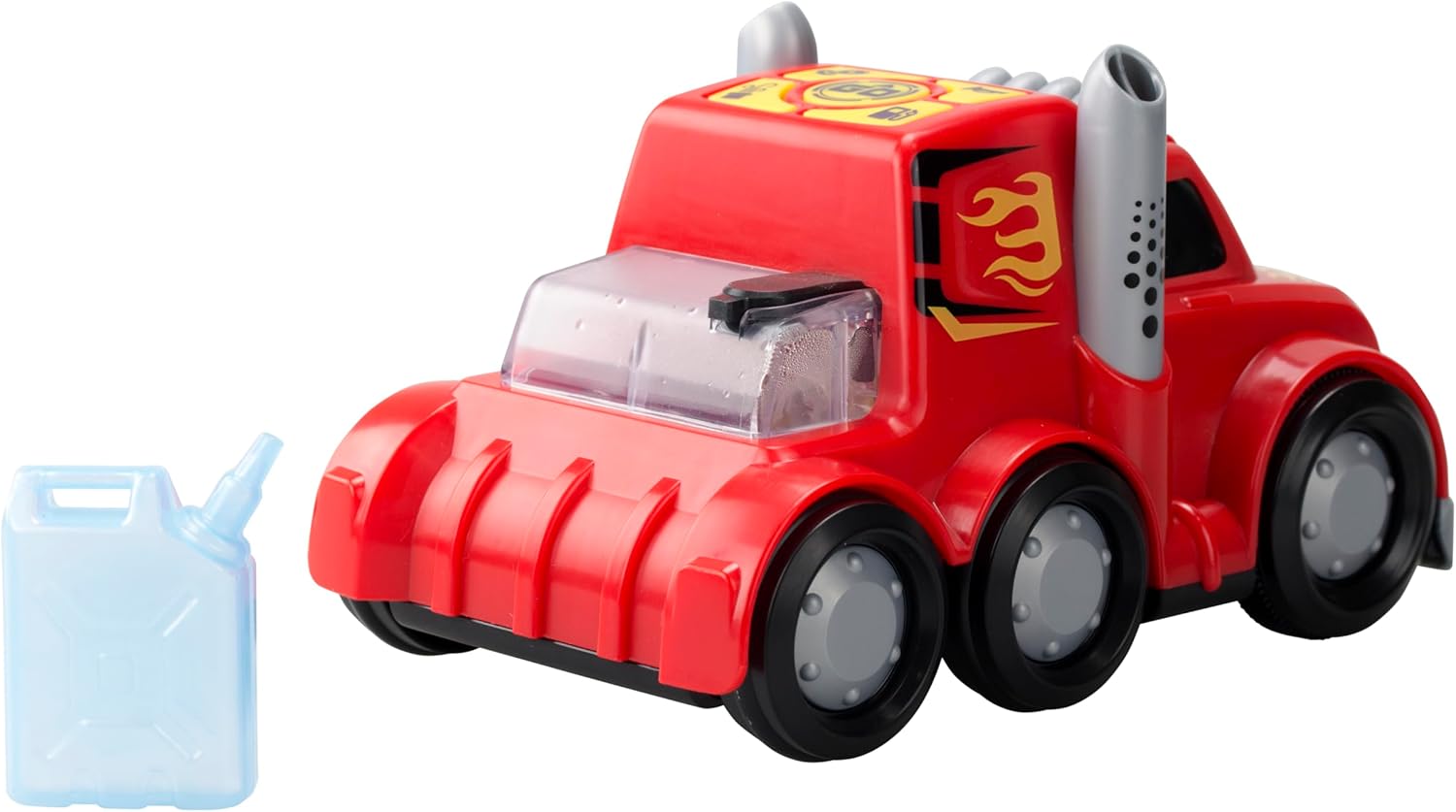
4. 설정
4.1 배터리 설치
The truck requires 3 x AAA batteries (not included) for operation.
- 트럭 하단에 있는 배터리함을 찾으세요.
- Using a screwdriver (not included), unscrew the battery compartment cover.
- 3개의 새로운 AAA 배터리를 넣고, 배터리 칸 내부에 표시된 대로 올바른 극성(+/-)을 확인하세요.
- 배터리실 커버를 교체하고 나사로 고정합니다.
4.2 Water Filling for Mist Effect
To activate the mist effect, the water tank needs to be filled.
- Locate the water tank opening on the top rear of the truck.
- Fill the provided water container with clean tap water.
- Carefully pour the water from the container into the truck's water tank opening. Do not overfill.
- Ensure the water tank cap (if present) is securely closed after filling.

5. 사용 설명서
5.1 전원 켜기/끄기
Locate the power switch on the underside or side of the truck. Slide the switch to the 'ON' position to power on the toy. Slide it to 'OFF' to power off.
5.2 Press & Go Function
The truck features a simple 'Press & Go' mechanism for forward movement.
- Ensure the truck is powered on.
- Press the designated 'Go' button on the top panel of the truck.
- The truck will move forward for a short distance.

5.3 Mist Effect Activation
Once the water tank is filled and the truck is powered on, the mist effect can be activated.
- Press the dedicated mist button on the control panel.
- Mist will be projected from the exhaust pipes, simulating a real misting truck.
5.4 음향 및 조명 효과
The truck is equipped with integrated sound and light features.
- These effects typically activate automatically when the truck is in motion or when specific buttons (e.g., horn button) are pressed.
- Refer to the icons on the control panel for specific sound functions.
6. 유지관리
6.1 청소
- 부드러운 천으로 트럭을 닦으세요.amp 옷감. 강한 화학 물질이나 연마성 세제를 사용하지 마십시오.
- 장난감을 보관하기 전에 완전히 말랐는지 확인하세요.
6.2 보관
- 장난감은 직사광선을 피해 시원하고 건조한 곳에 보관하세요.
- 장난감을 장기간 사용하지 않을 경우 누출을 방지하기 위해 배터리를 제거하십시오.
- Empty the water tank completely before storing to prevent mold or residue buildup.
7. 문제 해결
| 문제 | 가능한 원인 | 해결책 |
|---|---|---|
| Truck does not move or power on. | 배터리가 소진되었거나 올바르게 설치되지 않았습니다. | Replace batteries with new ones, ensuring correct polarity. Check power switch is ON. |
| Mist effect is not working. | Water tank is empty or mist nozzle is blocked. | Refill the water tank with clean tap water. Gently check the mist nozzle for any obstructions. |
| Sound or light effects are not working. | Batteries are low or a specific button is not pressed. | Replace batteries. Ensure the correct button for the desired effect is pressed. |
8. 사양
| 특징 | 세부 사항 |
|---|---|
| 모델 번호 | SL-81478 |
| 상표 | 실버라이트 |
| 치수(길이 x 너비 x 높이) | 23.01 x 10.8 x 14cm(9.06 x 4.25 x 5.51인치) |
| 무게 | 290.3그램(0.64파운드) |
| 재료 | 플라스틱 |
| 전원 | 배터리 구동 |
| 배터리 유형 | 3 x AAA (Alkaline recommended, not included) |
| 추천연령 | 24개월 이상 |
| 특별 기능 | Mist effect, Sound effects, Light effects, Press & Go function |
9. 보증 및 지원
본 제품은 재료 및 제조상의 결함에 대해 표준 제조업체 보증이 적용됩니다. 보증 청구를 위해 구매 증빙 자료를 보관해 주십시오.
For technical support, troubleshooting assistance, or warranty inquiries, please contact Silverlit customer service through their official web제품을 구매한 사이트 또는 소매업체.
참고: 보증 조건은 지역에 따라 다를 수 있습니다.