
VR-robot build-in
VR-robot MP3 Player User Manual
Model: build-in
소개
구매해주셔서 감사합니다asing the VR-robot MP3 Player. This device is designed to provide a versatile and portable entertainment experience, featuring music playback, video viewing, FM radio, voice recording, and e-book reading capabilities. With its compact design and expandable storage, it is ideal for various activities such as running, walking, or simply enjoying your favorite media on the go. This manual will guide you through the setup, operation, maintenance, and troubleshooting of your new MP3 player.
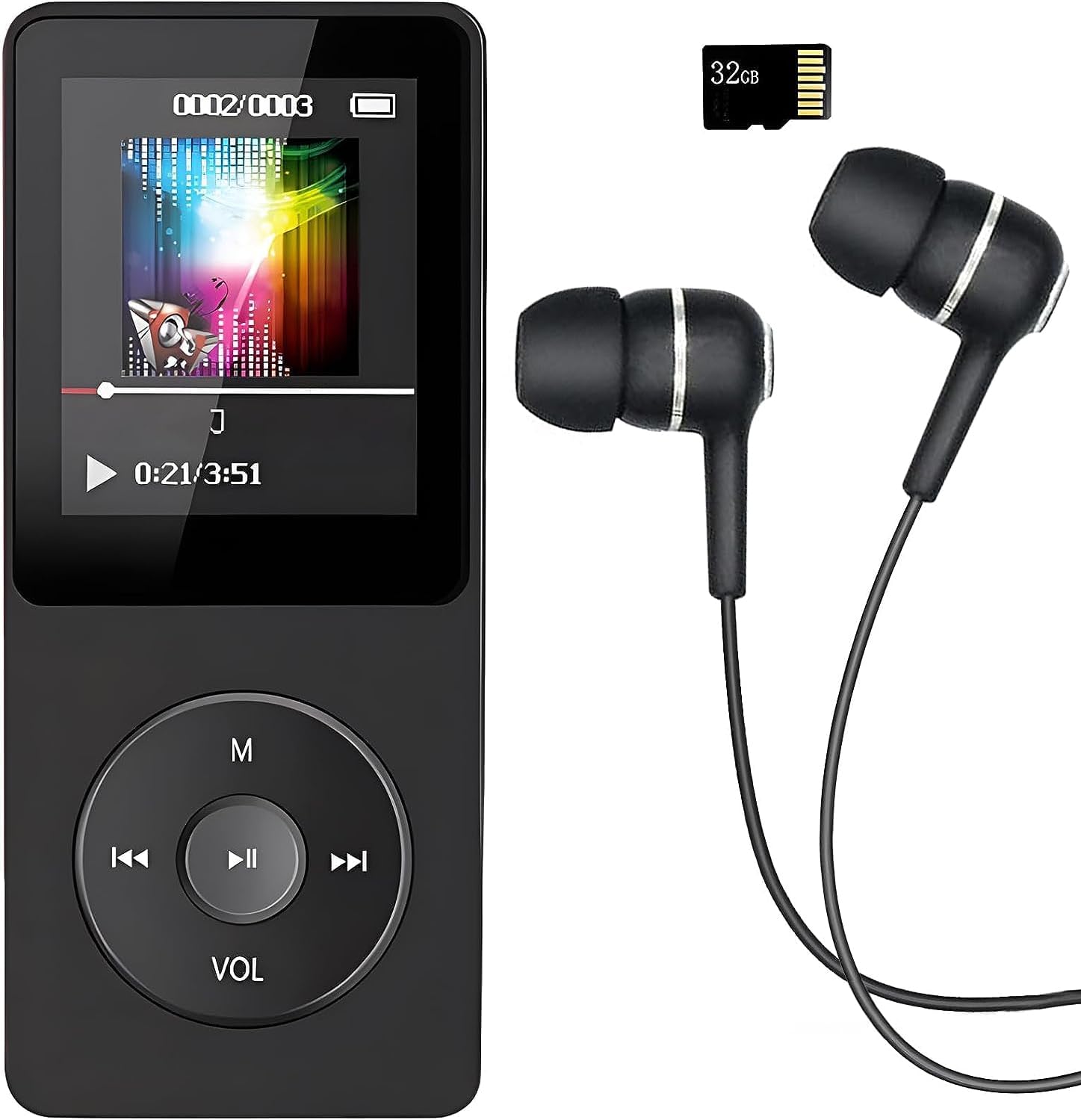
Image: The VR-robot MP3 Player, showcasing its compact design, screen, control buttons, and the included 32GB Micro SD card and wired earphones.
설정
1. 장치 충전
Before first use, fully charge the MP3 player. Connect the device to a USB power adapter (not included) or a computer's USB port using the provided USB cable. The battery indicator on the screen will show charging progress. A full charge typically takes 2-3 hours and provides up to 10 hours of music playback.
2. 마이크로 SD 카드 삽입
Your MP3 player comes with a 32GB Micro SD card. Locate the Micro SD card slot on the side of the device. Gently insert the Micro SD card into the slot until it clicks into place. The device supports Micro SD cards up to 128GB for expanded storage.

Image: A hand inserting a blue Micro SD card into the dedicated slot on the side of the VR-robot MP3 Player, illustrating the expandable storage feature.
3. Connecting to a Computer for File 옮기다
To transfer music, videos, photos, or e-books to your MP3 player, connect it to your computer using the USB cable. The device will appear as a removable disk drive. You can then drag and drop file파일을 기기의 해당 폴더 또는 삽입된 마이크로 SD 카드에 저장하십시오.
작동 지침
기본 탐색
The MP3 player features a central control pad with directional buttons and a central play/pause button. The 'M' button typically serves as a menu or back button, while 'VOL' controls volume. Navigate through menus and select options using these buttons.
음악 재생
The player supports multiple audio formats including MP3, WMA, APE, WAV, and FLAC. For optimal sound quality, the device incorporates a professional intelligent digital noise reduction chip. Connect the included earphones or use the built-in speaker for audio output.

Image: A person wearing headphones, illustrating the high-fidelity sound experience provided by the MP3 player, with text indicating support for various audio formats.
- 주악: Select "Music" from the main menu, then browse by artist, album, song, or folder.
- 볼륨 조절: Use the 'VOL' button to adjust the playback volume.
- AB 반복: This function allows you to loop a specific segment of an audio track. Select the start point (A) and end point (B) during playback.
비디오 재생
The MP3 player supports video playback. Ensure your video files are in a compatible format for smooth playback. Refer to the device specifications for supported video formats.
FM 라디오
To use the FM radio function, connect wired headphones to the device, as they serve as the antenna. Navigate to the "FM Radio" option in the main menu. You can then auto-scan for stations or manually tune to a specific frequency (87.5 MHz - 108 MHz).

Image: A person with an earphone in, surrounded by circular graphics indicating various FM radio frequencies, demonstrating the FM radio capability of the MP3 player.
음성 레코더
The built-in voice recorder allows you to capture audio notes or lectures. Select "Record" from the main menu to start a new recording. Recordings are typically saved in WAV format.

Image: The VR-robot MP3 Player displaying a recording interface, with a child studying in the background, highlighting its use as a voice recorder.
E 책 독자
호환되는 전자책을 불러오세요 files onto your device to read on the go. Navigate to the "E-Book" section to access your digital library.
알람 기능
The device includes an alarm function. Set alarms through the settings menu for reminders or as a wake-up call.
폴더 찾아보기
입장 files directly by browsing folders. This is useful for organizing different types of media or for audiobooks where tracks are separated into specific folders.

Image: The VR-robot MP3 Player screen displaying icons for E-Book, Alarm, Record, Music, Folder, FM Radio, A-B Repeat, and Video, illustrating its diverse functionalities.
유지
- 청소: 부드럽고 마른 천을 사용하여 기기를 닦으세요. 액체 세척제나 연마재는 사용하지 마세요.
- 저장: MP3 플레이어는 직사광선과 극한 온도 변화를 피해 서늘하고 건조한 곳에 보관하십시오.
- 배터리 관리 : 배터리 수명을 연장하려면 배터리를 자주 완전히 방전하지 마십시오. 장시간 사용하지 않더라도 정기적으로 충전하십시오.
- 소프트웨어 업데이트: 제조사 확인해보세요 web최적의 성능을 보장하기 위해 정기적으로 사이트를 방문하여 사용 가능한 펌웨어 업데이트를 확인하십시오.
문제 해결
| 문제 | 가능한 원인 / 해결책 |
|---|---|
| 장치가 켜지지 않습니다. | Battery is depleted. Charge the device for at least 30 minutes. If still unresponsive, try a different USB cable or charging port. |
| 전송할 수 없습니다 file장치에 s. | Ensure the USB cable is securely connected. Try a different USB port on your computer. The device might be in charging mode; check if it needs to be set to "Media Device (MTP)" or "USB Storage" mode. |
| 음악 files are not playing or are corrupted. | 음악이 나오는지 확인 files are in a supported format (MP3, WMA, APE, WAV, FLAC). Ensure files are not corrupted. Re-transfer the file필요한 경우 s. |
| FM Radio signal is weak or non-existent. | Ensure wired headphones are properly plugged in, as they act as the antenna. Try moving to an area with better signal reception. |
| Albums/folders are not separated correctly. | 당신의 음악을 보장하세요 files have correct ID3 tags and are organized into distinct folders on the device's storage. Some players may combine tracks if metadata is inconsistent. |
| 음성 녹음이 작동하지 않습니다. | Check if there is sufficient storage space. Ensure the microphone is not obstructed. |
명세서
- 상표: VR 로봇
- 모델 이름: build-in
- 메모리 저장 용량: 32 GB (Micro SD card included), supports up to 128 GB
- 연결 기술 : 블루투스, USB
- 특별 기능: Video Playback, Voice Recorder, FM Radio, E-Book Reader, Built-in Speaker
- 화면 크기: 3.5인치
- 색상: 검은색
- 품목 무게: 2.89 온스
- 배터리: 1개의 리튬 이온 배터리 필요(포함)
- 패키지 크기: 4.84 x 2.87 x 1.42 인치
- 포함된 구성 요소: MP3 Player, 32GB Micro SD Card, Earphone, USB Cable
보증 및 지원
Your VR-robot MP3 Player comes with a 12개월 보증 구매일로부터 적용됩니다. 이 보증은 제조상의 결함을 보장하며 제품의 품질을 보증합니다.
If you encounter any problems or have questions regarding your device, please do not hesitate to contact our professional after-sales service team. You can typically find contact information on the seller's page or through your purchase platform. We are committed to providing a quick and satisfactory response to ensure your satisfaction.
For further assistance, please refer to the VR-robot store on Amazon: VR-robot Store
Ask a question about this manual
Ask about setup, troubleshooting, compatibility, parts, safety, or missing instructions. Manuals+ will review the question and use this page’s manual context to help answer it.