
1. 제품 오버view
This manual provides detailed instructions for the installation, operation, and maintenance of your YUNTX Android 14 Car Stereo. This unit is designed to enhance your driving experience with advanced features such as integrated CarPlay, Android Auto, DSP, GPS navigation, Bluetooth 5.0, and support for a 360-degree camera system.
주요 특징:
- 운영 체제: 안드로이드 14
- 메모리: 6GB 램 + 128GB 롬
- 프로세서: Octa Core-2.0GHz (Rockchip AC8257)
- 표시하다: 9-inch IPS 2.5D Digital Touchscreen (1280*600 resolution)
- 오디오 출력: 4*50W (TDA7851 Amplifier, 64-band DSP Equalizer)
- 연결성: Integrated Wireless/Wired CarPlay & Android Auto, Bluetooth 5.0, Wi-Fi, 4G (optional)
- 항해: Pre-installed online and offline GPS navigation apps with 3D map support
- 멀티미디어: Mirror Link, AM/FM Radio with RDS (NXP TEF7708 IC), 4K Video Playback
- 추가 기능: Steering Wheel Control support, OBD (optional), 360 Camera support (optional), Split Screen function, Multicolor Illumination.
2. 설정 및 설치
2.1 호환성
This car stereo is compatible with the following vehicle models:
- 푸조 107 (2005-2014)
- Toyota Aygo (2005-2014)
- Citroen C1 (2005-2014)
If you are unsure about compatibility, please contact customer support with a photo of your car's dashboard.

Image: Comparison of dashboard before and after installation, showing the YUNTX car stereo integrated with the OEM panel.
2.2 패키지 내용
아래 나열된 모든 품목이 패키지에 포함되어 있는지 확인하세요.
- 차량용 스테레오 유닛 1개
- 1 x 전원 케이블
- 1 x RCA Output Cable A
- 1 x RCA Output Cable B
- 1 x RCA Output Cable C
- 1 x RCA Output Cable D
- 1 x GPS 안테나
- 1 x USB 케이블
- 1 x 외부 마이크
- 1 x 라디오 안테나
- 1 x 후면 View Camera (4 LED)
- 설치 브래킷
- 사용 설명서 (본 문서)

Image: Visual representation of all included accessories and cables in the package.
2.3 Wiring Diagram and Installation Tips
Refer to the following diagram for proper wiring connections. Professional installation is recommended.

Image: Detailed wiring diagram showing connections for power, speakers, GPS antenna, USB, RCA outputs, microphone, and other accessories.
주요 연결:
- 전원 소켓: Connect to your vehicle's power harness. Ensure correct polarity.
- GPS 안테나 : 시야가 트인 곳에 설치하세요 view 최적의 신호 수신을 위해 하늘을 살펴보세요.
- USB 케이블 : For connecting USB devices or for wired CarPlay/Android Auto.
- RCA Output Sockets: 외부 연결을 위해 amp앰프, 서브우퍼 또는 추가 디스플레이.
- 후방 카메라 입력: 동봉된 후면부를 연결하세요 view camera. The unit automatically switches to reverse mode when the vehicle is in reverse gear.
- 외부 마이크: Connect for clearer hands-free communication.
- ANT(안테나): 차량의 라디오 안테나를 연결하세요.
- KEY1/KEY2: For steering wheel control connections.
3. 사용 설명서
3.1 기본 작업
- 전원 켜기/끄기: Press and hold the power button on the unit or use the vehicle's ignition. The unit supports fast boot.
- 터치스크린: Navigate the interface by tapping, swiping, and pinching on the IPS 2.5D display.
- 볼륨 조절: Adjust using the physical buttons or on-screen controls.
3.2 CarPlay 및 Android Auto
The unit features integrated wireless and wired CarPlay and Android Auto. This allows you to seamlessly integrate your smartphone for navigation, music, calls, and messages.
- 연결: Connect your iPhone via USB or wirelessly for CarPlay. Connect your Android phone via USB or wirelessly for Android Auto.
- 기능: Access voice control (Siri/Google Assistant), make calls, send messages, use navigation apps, and play music directly from your phone.
3.3 디지털 사운드 프로세서(DSP)
The built-in DSP with a 64-band equalizer allows for precise audio tuning. You can independently adjust front and rear speakers, control surround sound, and manage speaker delay for optimal sound effects.
3.4 GPS 내비게이션
The unit comes with pre-installed online and offline GPS navigation applications. It supports 3D maps and voice guidance.
- 온라인 탐색: Requires an internet connection (Wi-Fi or optional 4G modem).
- 오프라인 지도: 인터넷 연결 없이 사용할 수 있도록 지도를 다운로드하세요.
- 동시 작동: You can listen to radio, Bluetooth audio, or USB/SD media while navigating.
3.5 블루투스 5.0
Bluetooth 5.0 provides stable and fast connections for hands-free calls and music streaming.
- 핸즈프리 통화: Sync your phonebook, make and receive calls directly from the stereo.
- 블루투스 음악 : 스마트폰이나 기타 블루투스 지원 기기에서 오디오를 스트리밍하세요.
3.6 미러 링크
Mirror Link allows you to display and control your smartphone's screen on the car stereo's display via USB cable or Wi-Fi connection.
3.7 라디오
The unit features an integrated AM/FM tuner with RDS (Radio Data System) for enhanced radio experience.
- 자동 튜닝: Scan and save radio stations.
- RDS: 방송국 정보, 곡 제목, 그리고 교통 정보(가능한 경우)를 표시합니다.
3.8 스티어링 휠 컨트롤
The unit supports your vehicle's original steering wheel controls, allowing you to conveniently change tracks, adjust volume, and manage calls without taking your hands off the wheel.
3.9 360 Camera Support
The system supports an optional 360-degree panoramic camera system (B09ZL1PGXM) for a comprehensive view around your vehicle, enhancing safety during parking and maneuvering.
3.10 분할 화면 기능
Utilize the split-screen feature to run two applications simultaneously, such as navigation and music playback, for improved multitasking.
3.11 Multicolor Illumination & Languages
Customize the button illumination colors to match your vehicle's interior or your personal preference. The system supports up to 196 languages for the user interface.

Image: Screenshots of the car stereo's user interface demonstrating features like IPS display, DSP settings, 360 camera view, 4G/WiFi connectivity, Mirror-Link, Split-Screen, Steering Wheel Control, Fastboot, and Quick Reversing Mode.
Image: User interface showing options for multicolor button illumination and language selection with various national flags.
4. 유지관리
차량용 스테레오의 수명과 최적의 성능을 유지하려면 다음 유지 관리 지침을 따르십시오.
- 청소: 부드럽고 마른 천으로 화면과 본체를 닦아주세요. 잘 지워지지 않는 얼룩은 살짝 두드려 닦아내세요.amp천에 물이나 화면에 안전한 세척제를 묻혀 닦아주세요. 연마재나 강한 화학 물질은 사용하지 마세요.
- 온도: 본 제품을 극한의 온도, 장시간 직사광선 또는 높은 습도에 노출시키지 마십시오.
- 소프트웨어 업데이트: 시스템이 효율적으로 실행되고 최신 기능과 보안 패치가 있는지 확인하기 위해 제조업체에서 정기적으로 소프트웨어 업데이트를 확인하세요.
- 사이: 모든 케이블이 단단히 연결되어 있는지 확인하십시오. 연결이 느슨하면 간헐적인 문제가 발생할 수 있습니다.
5. 문제 해결
If you encounter any issues with your YUNTX car stereo, refer to the following troubleshooting tips:
| 문제 | 가능한 원인 | 해결책 |
|---|---|---|
| 장치의 전원이 켜지지 않습니다. | 전원 연결이 느슨하거나, 퓨즈가 끊어지거나, 차량 배터리에 문제가 있습니다. | 전원 케이블과 연결부를 점검하십시오. 차량 퓨즈를 점검하십시오. 차량 배터리가 충전되어 있는지 확인하십시오. |
| 소리가 나지 않거나 오디오가 왜곡됩니다. | 볼륨이 너무 낮거나, 스피커 선이 분리되었거나, 오디오 설정이 잘못되었습니다. | Increase volume. Check speaker wire connections. Verify audio settings in DSP. |
| GPS 신호가 끊어졌거나 부정확합니다. | GPS 안테나가 잘못 설치되었거나 장애물에 막혔습니다. | GPS 안테나가 깨끗한지 확인하십시오. view 하늘의. 안테나 연결을 확인하세요. |
| 블루투스 연결 문제. | Bluetooth not enabled, device out of range, pairing error. | Ensure Bluetooth is enabled on both devices. Move devices closer. Re-pair the device. |
| CarPlay/Android Auto not working wirelessly. | Compatibility issue, software glitch, incorrect settings. | Ensure your phone and the stereo's software are up to date. Try a wired connection. Consult customer support if the issue persists, as some users have reported this. |
| 터치스크린이 응답하지 않습니다. | System freeze, temporary software error. | Restart the unit by turning off the vehicle ignition and restarting. If available, use the reset button (refer to unit diagram). |
If these solutions do not resolve the issue, please contact YUNTX customer support for further assistance.
6. 사양
Detailed technical specifications for the YUNTX Android 14 Car Stereo:
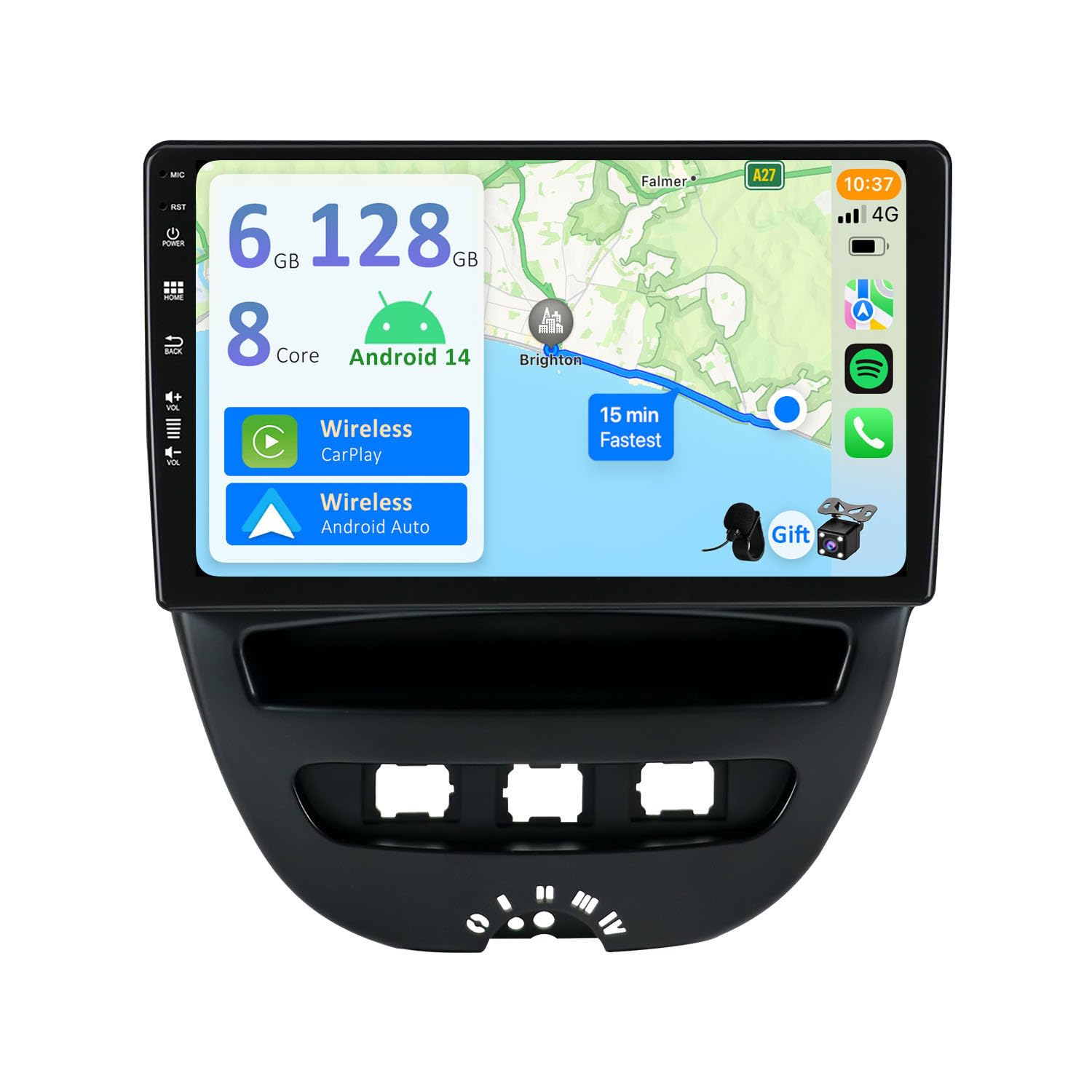
Image: Infographic summarizing key specifications including Android 14, 6GB RAM, 128GB ROM, Octa Core CPU, Bluetooth 5.0, IPS screen, 4K video, DSP, CarPlay, and Android Auto.
| 특징 | 사양 |
|---|---|
| 운영 체제 | 안드로이드 14 |
| 숫양 | 6GB LPDDR4 |
| 집시 남자 | 128GB SSD |
| CPU | Rockchip AC8257 Octa Core, up to 2.0GHz |
| 표시하다 | 9-inch IPS 2.5D Digital Touchscreen, 1280*600 HD Resolution |
| 오디오 출력 전력 | 4*50W (TDA7851 Amp리피어) |
| 디에스피(DSP) | Built-in 64-band Equalizer |
| 블루투스 | 블루투스 5.0 |
| 라디오 IC | NXP TEF7708 (AM/FM with RDS) |
| 연결성 | Wi-Fi, USB, Optional 4G Modem (B089KGJT61) |
| 비디오 디코딩 | H.264, H.265/HEVC (Supports 4K/3840x2160 pixels VideoHD 1080P) |
| USB/SD 지원 | 최대 500GB |
| 호환 장치 | 스마트폰 |
| 제어 방법 | 만지다 |
| 오디오 출력 유형 | RCA, 블루투스 |
| 오디오 채널 수 | 2.0 (Surround Sound Configuration) |
| 의 수 Ampliifier 채널 | 4 |
| Internet Applications | Pandora, Spotify (via Android apps) |
7. 보증 및 지원
For warranty information and customer support, please refer to the documentation provided with your purchase or visit the official YUNTX web사이트. 보증 청구를 위해 구매 증빙 자료를 보관하세요.
If you require technical assistance or have questions not covered in this manual, please contact YUNTX customer service directly.