
EZFIX DVR: EF-D08E4B2-1L Camera
EZFIX 유선 보안 카메라 시스템 사용 설명서
상표: 이지픽스
모델: DVR: EF-D08E4B2-1L Camera
소개
This manual provides comprehensive instructions for the installation, operation, and maintenance of your EZFIX Wired Security Camera System. This system is designed to provide reliable 24/7 surveillance with 1080P HD full-color night vision, advanced motion detection, and remote access capabilities. Please read this manual thoroughly before using the product to ensure proper setup and optimal performance.
상자 안에 무엇이 들어있나요?
Upon unpacking, please verify that all components listed below are present and in good condition.
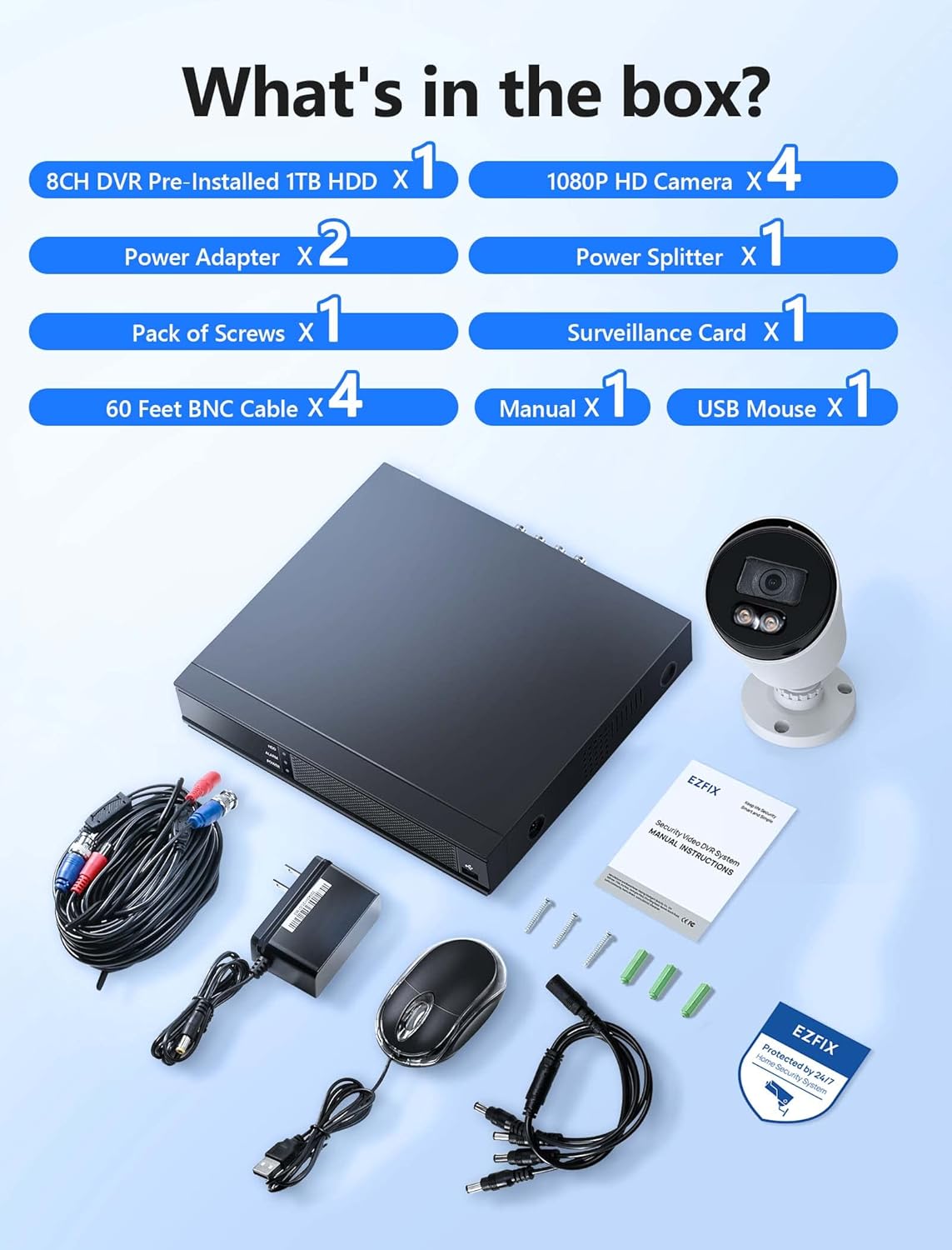
Image: All components included in the EZFIX Security Camera System package.
- 1 x 8CH DVR with Pre-installed 1TB HDD
- 4 x EZFIX 1080P HD Security Cameras
- 2 x 전원 어댑터
- 1 x Power Splitter
- 4 x 60ft BNC 케이블
- 1 x 나사 팩
- 1 x USB 마우스
- 1 x 사용자 매뉴얼(이 문서)
- 1 x Surveillance Card
설치 가이드
Follow these steps to set up your EZFIX security camera system.
1. DVR 및 카메라 배치
- Choose a secure, well-ventilated location for the DVR, away from direct sunlight and moisture.
- Plan the camera locations to cover desired areas, ensuring clear lines of sight and access to power. The cameras are IP66 waterproof, suitable for both indoor and outdoor use.

Image: EZFIX camera demonstrating IP66 waterproof rating for indoor and outdoor use.
2. 시스템 연결
- 카메라를 DVR에 연결하세요: Use the provided BNC cables to connect each camera to the corresponding video input port on the back of the DVR.
- 카메라에 전원을 연결하세요: Use the power adapters and power splitter to provide power to all cameras.
- DVR을 모니터에 연결하세요: Connect the DVR to a monitor or TV using an HDMI or VGA cable (not included) to view 실시간 영상 및 접속 설정.
- USB 마우스 연결: Plug the included USB mouse into a USB port on the DVR for navigation.
- 네트워크에 연결(선택 사항이지만 권장): For remote access and online features, connect the DVR to your router using an Ethernet cable (not included).
- 전원 켜기: Connect the DVR's power adapter to the DVR and then to a power outlet. The system will boot up.

Image: Connection diagram for the EZFIX DVR and cameras.
3. 초기 시스템 구성
- Follow the on-screen prompts to complete the initial setup, including setting the date/time, creating a password, and configuring network settings if connected.
- Ensure the 1TB HDD is recognized and formatted for recording.
작동 지침
살다 View 및 디스플레이
Once powered on, the DVR will display the live video feed from all connected cameras on your monitor. You can switch between single-camera view 및 멀티 카메라 그리드 view DVR 인터페이스를 사용합니다.

Image: 24/7 Supervision System displaying multiple camera feeds.
1080P HD Full-Color Night Vision
The EZFIX cameras feature 1080P Full HD resolution for clear daytime and nighttime viewing. With built-in infrared LEDs, the cameras provide up to 100ft of night vision in dark conditions, capturing details even in low light.

Image: Day and night vision comparison showcasing 1080P FHD and Full-Color Night Vision.
Advanced Motion Detection & Instant Alerts
Configure motion detection zones and sensitivity through the DVR settings. When motion is detected, the system can send instant alerts via email and push notifications to your authorized mobile application, ensuring you are immediately aware of any activity.

Image: Motion detection and alert features with notification options.
24/7 Continuous Recording & Playback
The DVR, equipped with a 1TB hard drive, supports continuous 24/7 recording. The system utilizes advanced H.265+ video compression technology, which maintains high video quality while maximizing storage space and reducing file size by up to 50% compared to H.264. Older recordings are automatically overwritten as the HDD fills up.

Image: Benefits of H.265+ Video Compression.
다시view 기록된 footage, access the playback function on the DVR. You can search for specific recordings by time, event, or image. The system supports intelligent playback, allowing you to quickly find relevant moments.

Image: Intelligent Playback interface on monitor and mobile device.
원격 접속
Access your security system remotely from your smartphone, tablet, or computer. Download the authorized application (e.g., Rview Pro App) from the App Store or Google Play. After installing, add your DVR device using its unique ID or QR code to view 인터넷 연결만 있으면 어디서든 실시간 영상 시청, 녹화 영상 재생, 알림 수신이 가능합니다.
Image: Remote access via mobile app and computer interface.
유지
- 카메라 청소: 카메라 렌즈는 부드러운 천으로 주기적으로 청소하세요.amp 깨끗한 이미지 품질을 위해 천을 사용하십시오. 연마성 세척제는 사용하지 마십시오.
- 케이블 검사: Regularly check all cables for wear, damage, or loose connections, especially for outdoor cameras.
- 소프트웨어 업데이트: Check the DVR's system settings for available firmware updates to ensure optimal performance and security.
- 하드 드라이브 상태: Monitor the health of the 1TB HDD through the DVR's system information to prevent data loss.
문제 해결
| 문제 | 가능한 원인 | 해결책 |
|---|---|---|
| 모니터에 영상이 표시되지 않습니다. | 케이블 연결이 헐거워졌거나, 모니터의 입력 소스가 잘못 표시되었거나, DVR 전원이 켜져 있지 않을 수 있습니다. | HDMI/VGA 케이블 연결 상태를 확인하십시오. 모니터가 올바른 입력으로 설정되어 있는지 확인하십시오. DVR 전원이 켜져 있는지 확인하십시오. |
| 움직임 감지 알림이 없습니다. | Motion detection not enabled, sensitivity too low, incorrect detection zone. | Enable motion detection in DVR settings. Adjust sensitivity and detection zones. Ensure network connection for alerts. |
| 원격 접속이 작동하지 않습니다. | DVR not connected to internet, incorrect app settings, firewall issues. | Verify DVR's network connection. Check app settings (device ID, password). Ensure router firewall is not blocking access. |
| Recording issues (no recording, incomplete). | 하드디스크 용량 부족, 하드디스크 오류, 녹화 예약 설정 안 됨. | Check HDD status and ensure it's formatted. Verify recording schedule. If HDD is faulty, consider replacement. |
명세서
| 특징 | 세부 사항 |
|---|---|
| 상표 | 이지픽스 |
| 연결 기술 | 열광한 |
| 비디오 캡처 해상도 | 1080p |
| 특별 기능 | 1080P HD Full-Color Night Vision, Compatible System, Easy Installation, Motion Sensor, IP66 Waterproof |
| 채널 수 | 8 |
| 메모리 저장 용량 | 1 TB (expandable up to 6TB) |
| 색상 | White Wired Home Security Cameras System |
| 전원 | 교류/직류 |
| 품목 치수(L x W x H) | 14.76 x 11.61 x 11.82 인치 |
| 추천 용도 | Surveillance (home, office, warehouse, shopping mall, garden) |
| 호환 장치 | Smartphones, Personal Computers, TV, Tablets, Cameras, Laptops |
| 저조도 기술 | 밤의 색깔 |
| 나이트 비전 범위 | 82피트(약 25미터) |
| 프레임 속도 | 30fps |
| 녹화 모드 | Continuous Motion Detection |
| 총 USB 포트 | 2 |
| 하드웨어 인터페이스 | 이더넷 |
| 렌즈 유형 | 와이드 앵글 |
| 비디오 입력 | BNC, CVBS |
| View잉 각도 | 82.2도 |
보증 및 지원
Your EZFIX Security Camera System comes with a 1년 보증 구매일로부터 12개월 동안 제조상의 결함에 대해 보증이 적용됩니다. 본 보증은 제조상의 결함에 한하며, 12개월 이내에 교체품을 제공해 드립니다.
EZFIX is committed to providing excellent customer service. We offer:
- Quick replies to inquiries within 24 hours.
- 평생 서비스 및 기술 지원.
For technical assistance, troubleshooting, or warranty claims, please refer to the contact information provided on the product packaging or the official EZFIX web지원팀에 문의하실 때는 모델 번호와 구매 정보를 미리 준비해 주세요.
Ask a question about this manual
Ask about setup, troubleshooting, compatibility, parts, safety, or missing instructions. Manuals+ will review the question and use this page’s manual context to help answer it.