
1. 제품 오버view
The Cudy GS108D is an 8-port Gigabit Ethernet Network Switch designed for expanding your network connectivity. It offers high-speed data transfer for devices such as computers, IPTVs, printers, NAS, game consoles, and routers. Featuring a plug-and-play design, fanless operation, and energy-efficient technology, this switch provides a reliable and quiet solution for both home and office networks.

이미지: 앞면 view of the Cudy GS108D switch, highlighting its 8 Gigabit Ethernet ports and LED indicators.
주요 특징:
- 8 개의 기가비트 이더넷 포트 : 여러 장치에 고속 유선 연결을 제공합니다.
- 플러그 앤 플레이: Requires no software installation or configuration for immediate use.
- 팬리스 디자인: Ensures quiet operation, suitable for any environment.
- 에너지 효율성: Compliant with IEEE802.3az standard, saving power when ports are idle.
- 다양한 장착: 책상 위에 놓거나 벽에 장착하는 두 가지 방식으로 사용할 수 있습니다.
2. 패키지 내용
패키지에 다음 품목이 포함되어 있는지 확인하십시오.
- Cudy GS108D 8-Port Gigabit Ethernet Network Switch
- 전원 어댑터
- 사용 설명서(본 문서)
- 이더넷 케이블 (지역/패키지에 따라 다를 수 있음)

Image: Contents of the Cudy GS108D package, showing the switch, power adapter, and an Ethernet cable.
3. 물리적 설명
전면 패널:
The front panel features eight 10/100/1000 Mbps RJ45 ports. Each port has an associated LED indicator to show link/activity status.
- 전원 LED: 스위치의 전원 상태를 나타냅니다.
- 링크/액트 LED(1-8):
- 솔리드 그린: A device is connected and the link is active.
- 녹색 깜박임: 포트에서 데이터가 전송되거나 수신되고 있습니다.
- 끄다: No device is connected or the link is inactive.

이미지: 상세 view of the Cudy GS108D's front panel, showing the 8 RJ45 ports and their corresponding LED indicators.
후면 패널 :
후면 패널에는 일반적으로 전원 입력 포트가 있습니다.
치수:
The compact design of the GS108D allows for flexible placement. Approximate dimensions are 138mm (5.43") L x 61.5mm (2.42") W x 24mm (0.94") H.
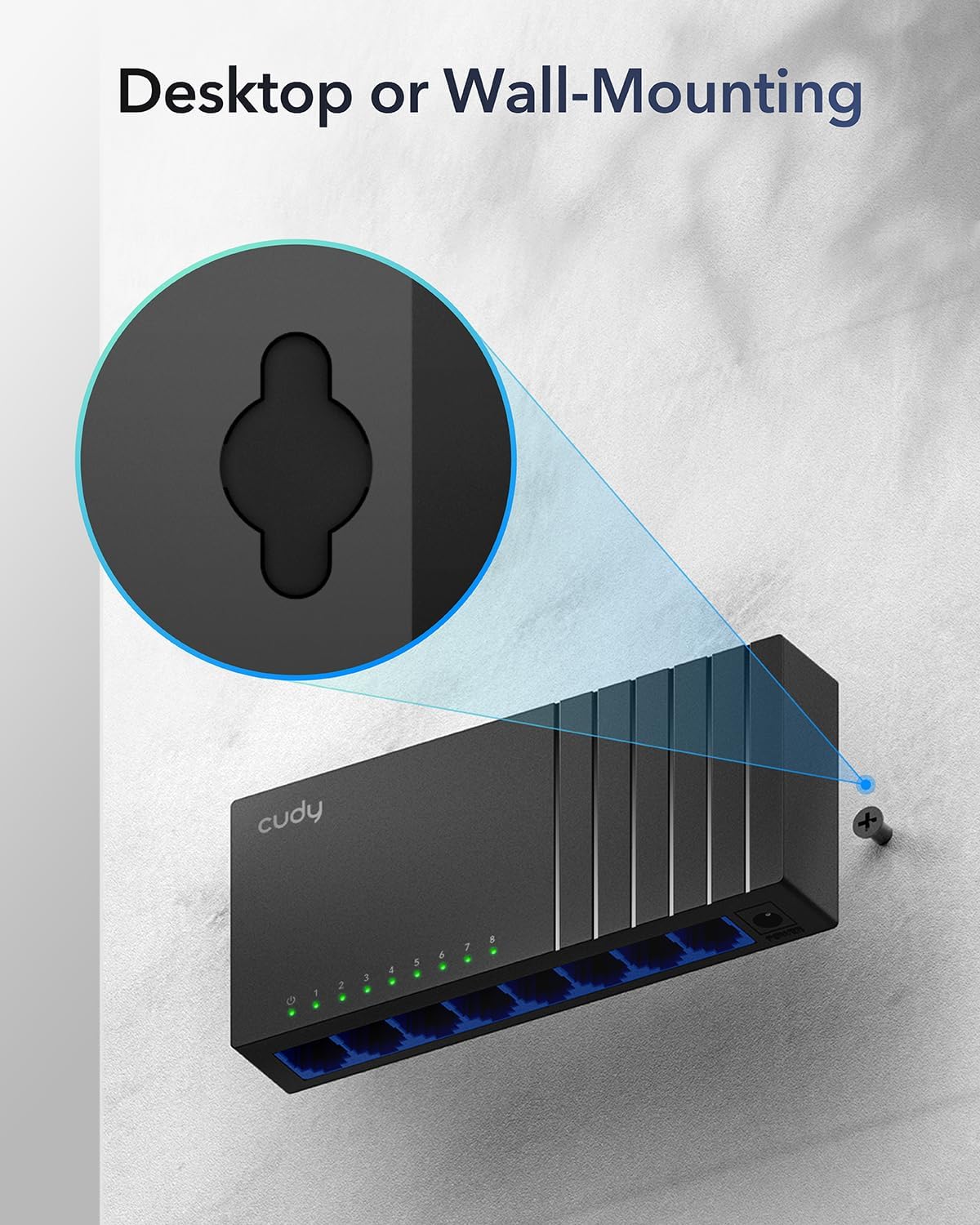
Image: The Cudy GS108D switch with its compact dimensions clearly indicated.
4. 설정 지침
The Cudy GS108D switch is designed for simple plug-and-play installation. No complex configuration is required.
1단계: 전원 연결
- Connect one end of the provided power adapter to the power port on the rear panel of the GS108D switch.
- 전원 어댑터의 다른 쪽 끝을 표준 전기 콘센트에 꽂습니다.
- 전면 패널의 전원 LED가 켜지는지 확인하여 스위치에 전원이 공급되고 있는지 확인하십시오.

Image: The Cudy GS108D switch with its power adapter connected and ready for use.
2단계: 장치 연결
- Connect your network devices (e.g., computer, router, NAS, game console) to any of the 8 RJ45 ports on the front panel using standard Ethernet cables (Cat5e or higher recommended for Gigabit speeds).
- Ensure the Link/Act LED for each connected port illuminates, indicating a successful connection. If the LED is flashing, data is being transmitted.

Image: A laptop being connected to the Cudy GS108D switch with an Ethernet cable, demonstrating a typical setup.
3단계: 장착 옵션
The GS108D supports both desktop placement and wall mounting.
- 데스크탑 배치: 스위치를 평평하고 안정적인 표면에 놓기만 하면 됩니다.
- 벽면 장착: The switch features mounting slots on its underside. Use appropriate screws (not included) to secure the switch to a wall.

Image: The Cudy GS108D switch shown with its wall-mounting slots, illustrating how it can be securely attached to a wall.
5. 사용 설명서
Once connected, the Cudy GS108D operates automatically without further user intervention.
자동 협상
Each port on the switch automatically detects the network speed (10/100/1000 Mbps) and duplex mode (Half/Full Duplex) of the connected device and adjusts accordingly for optimal performance.
트래픽 최적화
The switch features a 4 Mbit packet buffer to ensure stable and efficient data forwarding, reducing packet loss and improving overall network performance, especially during high traffic loads.
Energy Efficiency (IEEE 802.3az)
The GS108D incorporates energy-efficient Ethernet technology. It automatically adjusts power consumption based on cable length and network traffic, reducing energy usage when ports are idle or when connected devices are turned off.

Image: Visual representation of the power-saving feature, showing reduced energy consumption when ports are idle.
장거리 전송
The switch supports long-distance Ethernet cable runs, allowing for reliable data transmission up to 170 meters (557 feet) with Cat5e or higher Ethernet cables.

Image: Illustration of the Cudy GS108D's capability for long-distance transmission, up to 170 meters, requiring Cat5e or higher cables.
6. 유지관리
To ensure optimal performance and longevity of your Cudy GS108D switch, follow these maintenance guidelines:
- 놓기: 스위치를 직사광선, 열원, 과도한 습기를 피해 서늘하고 건조한 곳에 보관하세요. 기기 주변에 충분한 통풍이 유지되도록 하세요.
- 청소: 부드럽고 마른 천으로 스위치 외부를 닦으세요. 액체나 에어로졸 세척제는 사용하지 마세요.
- 힘: Use only the provided power adapter. Disconnect the power adapter during electrical storms or when unused for long periods.
- 케이블 : Ensure all Ethernet cables are securely connected and free from damage.
7. 문제 해결
If you encounter issues with your Cudy GS108D switch, refer to the following common troubleshooting steps:
전원이 없습니다
- 전원 어댑터가 스위치와 작동하는 콘센트에 제대로 연결되어 있는지 확인하십시오.
- 다른 장치를 연결해 전원 콘센트가 작동하는지 확인하세요.
- Verify that the Power LED on the switch is illuminated. If not, try a different power outlet.
포트에 링크/활동 없음
- Ensure the Ethernet cable is securely plugged into both the switch port and the connected device.
- 케이블 손상 여부를 확인하기 위해 다른 이더넷 케이블을 사용해 보세요.
- 해당 장치를 스위치의 다른 포트에 연결하십시오.
- Verify that the connected device (e.g., computer, router) is powered on and its network adapter is enabled.
- If connecting to a router, ensure the router's port is active.
느린 네트워크 속도
- Ensure you are using Cat5e or higher Ethernet cables for Gigabit speeds. Older Cat5 cables may limit speed.
- Check the Link/Act LED for the port. A solid green light indicates a Gigabit connection. If it's amber or off, there might be a speed mismatch or connection issue.
- Verify that the connected devices also support Gigabit Ethernet.
- 동시에 발생하는 고대역폭 활동을 제한하여 네트워크 혼잡을 줄입니다.
8. 사양
| 특징 | 설명 |
|---|---|
| 상표 | 쿠디 |
| 모델 번호 | GS108D |
| 포트 수 | 8 |
| 인터페이스 | RJ45 |
| 데이터 전송 속도 | 초당 1000메가비트(기가비트) |
| 스위치 유형 | 이더넷 스위치 |
| 호환 장치 | Camera, Desktop, Laptop, Router |
| 권tage | 28볼트 (전원 어댑터 입력) |
| 작동 온도 | 화씨 40도에서 화씨 104도(섭씨 4.4도에서 40도) |
| 케이스 재질 종류 | 플라스틱 |
| 품목 치수(L x W x H) | 7.87" x 5.91" x 5.91" (Product packaging dimensions, actual device is smaller) |
| 품목 무게 | 200그램 |
9. 보증 및 지원
보증 정보:
The Cudy GS108D 8-Port Gigabit Ethernet Network Switch comes with a 2년 보증 구매일로부터 1년입니다. 보증 청구를 위해 구매 증빙 자료를 보관해 주십시오. 본 보증은 정상적인 사용 상태에서 발생하는 재료 및 제조상의 결함에 적용됩니다.
기술 지원:
For technical assistance, troubleshooting, or further inquiries, please visit the official Cudy website or contact Cudy customer support. Cudy is committed to delivering high-performance, user-friendly communication technology and provides resources to help you with your product.
지원 자료, FAQ 및 연락처 정보는 다음에서 자주 찾아볼 수 있습니다. Cudy Store on Amazon or the main Cudy web대지.