
소개
This manual provides detailed instructions for the installation, operation, and maintenance of your Strong SRT 7040 Digital Satellite HD Receiver. Please read this manual carefully before using the device to ensure proper functionality and to prevent damage.

Image: The Strong SRT 7040 DTT Tuner and its retail packaging.
The Strong SRT 7040 is a Full HD digital satellite receiver designed for Free-To-Air (FTA) channels. It features a USB port for multimedia playback and software updates, and supports Dolby Audio for enhanced sound quality.
1. 설정
1.1 풀기
모든 구성품을 포장에서 조심스럽게 꺼내세요. 다음 품목이 모두 있는지 확인하세요.
- Strong SRT 7040 DTT Tuner
- 리모컨(AAA 배터리 2개 포함)
- 전원 어댑터
- 사용자 설명서
1.2 장치 연결
Follow these steps to connect your SRT 7040 receiver:
- 위성 입력: Connect your satellite dish cable to the 토 인 수신기 뒷면에 있는 포트.
- 비디오 출력(HDMI): HDMI 케이블을 연결하세요 HDMI 수신기의 HDMI 포트를 TV의 HDMI 입력 단자에 연결하세요.
- Video Output (SCART): 또는 구형 텔레비전의 경우 SCART 케이블을 연결하십시오. TV스카트 수신기의 포트를 텔레비전의 SCART 입력 단자에 연결하십시오.
- Audio Output (Digital): For digital audio, connect a coaxial cable from the COAXIAL S/PDIF port to your digital audio amp리퍼.
- Audio Output (Analog): For analog audio, connect RCA cables from the AUDIO R/L ports to your audio Hi-Fi amp리퍼.
- USB 장치: If desired, connect a USB storage device to the USB port for multimedia playback or software updates.
- 힘: 전원 어댑터를 12V === 1.5A 수신기의 입력 단자에 연결한 다음 어댑터를 벽면 콘센트에 꽂으세요.

Image: Rear panel connections of the Strong SRT 7040 DTT Tuner, showing SAT IN, HDMI, TV SCART, COAXIAL S/PDIF, AUDIO R/L, USB, and Power input.
1.3 최초 설치 및 채널 검색
Upon first power-on, the receiver will guide you through an initial setup wizard. Follow the on-screen prompts to select your language, country, and perform an automatic channel scan. This process will detect and store all available satellite channels.
2. 사용 설명서
2.1 원격 제어view
The included remote control allows you to access all functions of the SRT 7040. Insert the two AAA batteries into the remote control, ensuring correct polarity.

Image: The remote control for the Strong SRT 7040 DTT Tuner, showing buttons for power, numbers, volume, channel, menu, and special functions.
2.2 기본 기능
- 힘: 를 누르세요 힘 button to turn the receiver on or off (standby mode).
- 채널 선택: 사용하세요 CH+ / CH- buttons to change channels sequentially, or use the numeric keypad to enter a channel number directly.
- 볼륨 조절: 사용하세요 볼륨+ / 권 음량을 조절하는 버튼입니다.
- 무음: 를 누르세요 음소거 오디오를 일시적으로 음소거하는 버튼입니다.
2.3 메뉴 탐색
를 누르세요 메뉴 메인 메뉴에 접근하려면 버튼을 누르세요. 화살표 키( )를 사용하세요.UP, 아래에, 왼쪽, 오른쪽옵션을 탐색하려면 OK 선택을 확인하려면 누르세요. EXIT to return to the previous screen or live TV.
2.4 특수 기능
- 타이머: The receiver supports programming timers for recording or switching to specific channels at scheduled times. Access this feature via the menu.
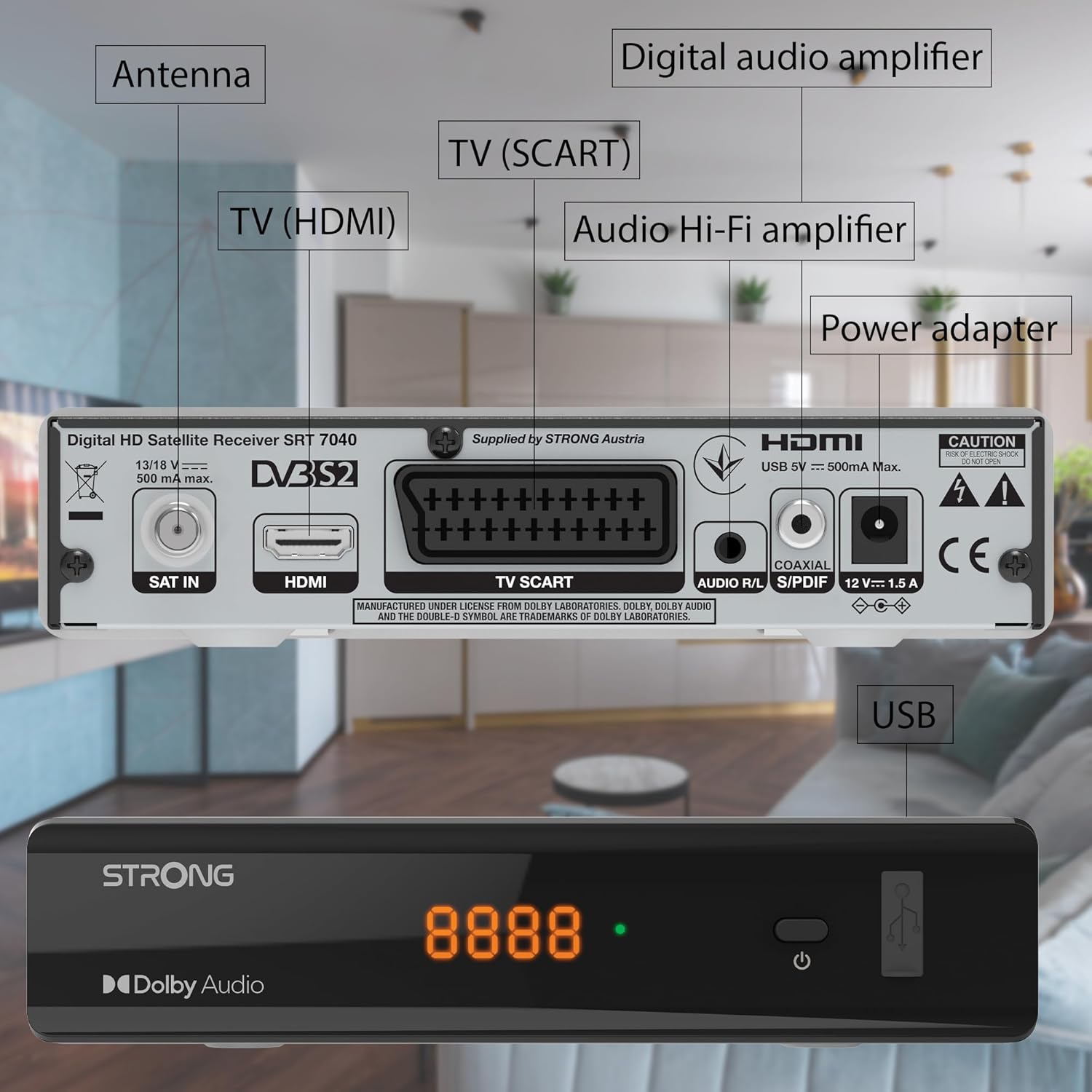
Image: The Strong SRT 7040 DTT Tuner displaying a timer icon, indicating its scheduling capabilities.
- 즐겨찾기 목록: Create customized lists of your preferred channels for quick access.
- 자막: Enable or disable subtitles for compatible broadcasts using the 보결 리모컨의 버튼을 누르세요.
- 전자 프로그램 가이드(EPG): 를 누르세요 전자책 버튼을 view program information for upcoming broadcasts.
- 돌비 오디오: The receiver supports Dolby Audio for a high-quality sound experience.

Image: The Strong SRT 7040 DTT Tuner with the Dolby Audio logo, illustrating its sound processing capability.
3. 유지관리
3.1 청소
To clean the receiver, disconnect it from the power supply. Use a soft, dry cloth to wipe the exterior. Do not use liquid cleaners, aerosols, or abrasive materials, as these can damage the finish or internal components.
3.2 소프트웨어 업데이트
정기적으로 제조업체를 확인하십시오 website for available software updates. Updates can improve performance, add new features, or resolve issues. Software updates are typically performed via the USB port following specific instructions provided with the update file.
3.3 안전 정보
- 수신기를 열지 마십시오.asing. 내부에는 사용자가 수리할 수 있는 부품이 없습니다. 모든 수리는 자격을 갖춘 기술자에게 맡기십시오.
- 수신기를 직사광선, 열원 및 습기로부터 멀리하십시오.
- 기기의 과열을 방지하기 위해 기기 주변에 적절한 환기가 이루어지도록 하십시오.
- 제공된 전원 어댑터만 사용하십시오.
4. 문제 해결
If you encounter problems with your SRT 7040, consult the following table before contacting support.
| 문제 | 가능한 원인 | 해결책 |
|---|---|---|
| 전원이 없습니다 | 전원 어댑터가 연결되지 않았습니다. 전원 콘센트에 결함이 있습니다. | Check power adapter connection; Try a different power outlet |
| 신호 없음 / 검은색 화면 | Satellite cable loose or disconnected; Incorrect input selected on TV; Satellite dish alignment issue | Check SAT IN cable connection; Ensure TV is on correct HDMI/SCART input; Perform a channel scan; Consult a professional for dish alignment if necessary |
| 리모컨이 작동하지 않습니다 | 배터리가 방전되었거나 잘못 삽입된 경우; 리모컨과 수신기 사이에 장애물이 있는 경우 | Replace batteries; Ensure correct polarity; Remove any obstructions; Point remote directly at receiver |
| 화질이 좋지 않음 | Weak satellite signal; Incorrect display settings | Check satellite signal strength in menu; Adjust TV display settings; Ensure Full HD content is being broadcast |
5. 사양
The following are the technical specifications for the Strong SRT 7040 Digital Satellite HD Receiver:
- 모델: SRT 7040 (SAT FTA Full HD)
- 상표: 강한
- 치수: 3.39 x 6.46 x 1.38인치(8.6 x 16.4 x 3.5cm)
- 품목 무게: 9.2온스(260그램)
- 색상: 검은색
- 연결 기술 : USB
- 권tage: 100 - 240V
- 빈도: 50~60Hz
- 전력 소비량: 18 kWh (operational, typical)
- 작동 온도 범위: 0ºC ~ 40ºC
- 상대 습도: 10% - 95%
- 배터리: AAA 배터리 2개(리모컨 포함)
- 사양 충족: 디비에스-S2
- 포함 사항: Wally Receiver
6. 보증 및 지원
For warranty information and technical support, please refer to the warranty card included in your product packaging or visit the official Strong web사이트. 보증 청구를 위해 구매 증빙 자료로 구매 영수증을 보관하세요.
For further assistance, you may contact Strong customer service through the contact details provided on their official web대지.


