
1. 서론
구매해주셔서 감사합니다asing the Sharp QT-CD290 Portable CD MP3 Cassette Boombox. This device offers versatile audio playback options including CD, MP3 CD, cassette tapes, AM/FM radio, and an auxiliary input for external devices. This manual provides essential information for the safe and efficient operation of your new boombox. Please read these instructions thoroughly before use and retain them for future reference.
2. 안전 정보
안전한 작동을 보장하고 손상을 방지하려면 다음 예방 조치를 준수하세요.
- 본 제품을 비, 습기 또는 극한의 온도에 노출시키지 마십시오.
- 라디에이터, 난방 장치, 스토브 또는 기타 장치(예: 열원) 근처에 장치를 두지 마십시오. amp열을 생성하는 발전기.
- 환기구를 막지 마십시오. 공기가 원활하게 흐르도록 장치 주변에 충분한 공간을 확보하십시오.
- Use only the specified batteries (6 x UM-2/C size). Ensure correct polarity when inserting batteries.
- 오래된 건전지와 새 건전지, 다른 종류의 건전지를 혼용하지 마세요.
- 장기간 기기를 사용하지 않을 경우에는 배터리를 제거하세요.
- Clean the unit only with a dry cloth. Do not use liquid cleaners or aerosol cleaners.
- 이 제품을 직접 수리하려고 하지 마십시오. 모든 서비스는 자격을 갖춘 서비스 담당자에게 문의하십시오.
- 장치를 강한 자기장으로부터 멀리 두십시오.
3. 제품 오버view
Familiarize yourself with the components of your Sharp QT-CD290 boombox.

그림 1: 전면 view of the Sharp QT-CD290 Portable CD MP3 Cassette Boombox with the telescopic antenna extended. This image shows the main control panel, CD compartment, cassette deck, and stereo speakers.
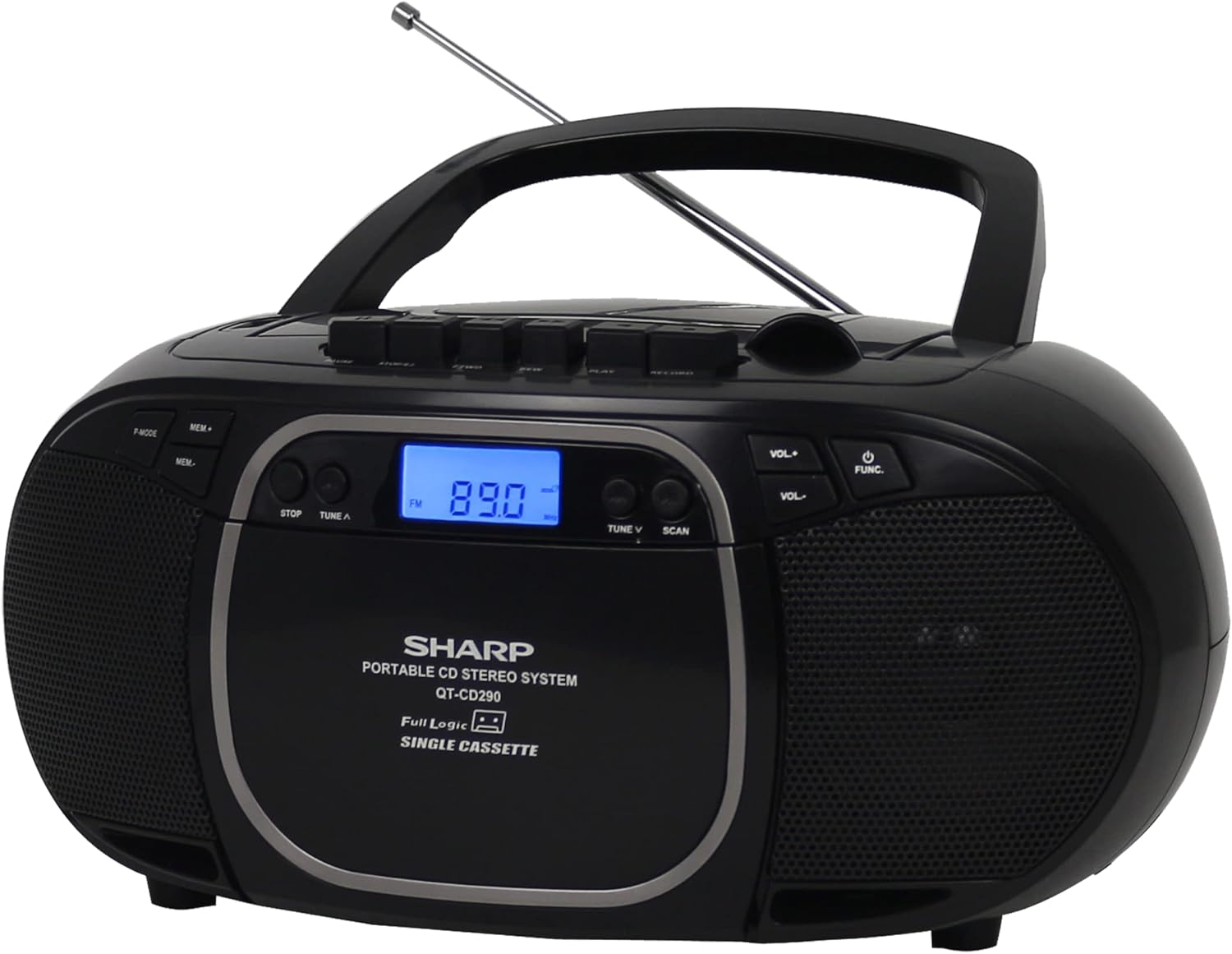
그림 2: 전면 view of the Sharp QT-CD290 Portable CD MP3 Cassette Boombox with the telescopic antenna retracted. This view highlights the compact design when not using the radio function.
주요 구성 요소:
- 상단 투입식 CD 수납부: For playing audio CDs and MP3 CDs.
- 카세트 데크: 카세트테이프 재생 및 녹음용.
- AM/FM 튜너: Built-in radio for receiving AM and FM broadcasts.
- Telescopic FM Antenna: FM 수신 성능 향상을 위한 확장형 안테나.
- 보조 입력(AUX IN): 외부 오디오 장치를 연결하기 위한 3.5mm 잭입니다.
- LCD 디스플레이: Shows current function, track number, radio frequency, etc.
- 제어 버튼: Power, Function, Volume, Play/Pause, Stop, Skip/Search, Record, etc.
- 스테레오 스피커: 오디오 출력을 위한 내장 스피커.
4. 설정
4.1 장치 전원 공급
The Sharp QT-CD290 boombox is designed for portable use and operates solely on batteries. It does not include an AC power adapter and cannot be powered directly from a wall outlet.
- Locate the battery compartment on the underside or rear of the unit.
- 배터리 덮개를 엽니다.
- Insert six (6) UM-2/C size batteries, ensuring the correct polarity (+/-) as indicated inside the compartment.
- 배터리 덮개를 단단히 닫으세요.
Note: For optimal performance and to prevent battery leakage, use high-quality alkaline batteries and replace all batteries at the same time.
5. 사용 설명서
5.1 일반 제어
Familiarize yourself with the main control buttons:
- POWER/FUNC: Press to turn the unit ON/OFF. Press repeatedly to cycle through functions (CD/MP3, TAPE, AM, FM, AUX).
- 볼륨+ / 볼륨-: 볼륨 레벨을 조절합니다.
- 멈추다: Stops playback for CD/MP3 or Cassette.
- 재생/일시 정지: Starts or pauses CD/MP3 playback.
- SKIP/SEARCH (◀◀ / ▶▶): Skips tracks on CD/MP3. Fast forwards/rewinds on cassette.
- TUNE ▲ / ▼: Tunes radio frequency up or down.
- 주사: Automatically scans for radio stations.
- MEM : Stores or recalls radio presets.
- P 모드: Programs CD/MP3 playback order.
- 기록: Initiates cassette recording (from CD, Radio, or AUX).
5.2 CD/MP3 재생
- 를 누르세요 전원/기능 button repeatedly until 'CD' or 'MP3' appears on the display.
- 상단 CD 삽입구 덮개를 여세요.
- CD나 MP3 CD를 라벨 면이 위를 향하게 하여 스핀들에 놓습니다.
- CD 수납공간 커버를 단단히 닫으세요.
- 를 누르세요 재생/일시정지 버튼을 눌러 재생을 시작합니다.
- 사용 SKIP/SEARCH (◀◀ / ▶▶) to navigate between tracks. Hold to fast forward or rewind within a track.
- 누르다 멈추다 재생을 종료합니다.
5.3 카세트 재생 및 녹음
재생:
- 를 누르세요 전원/기능 화면에 'TAPE'가 나타날 때까지 버튼을 반복해서 누르세요.
- 카세트 데크 도어를 여세요.
- 카세트테이프의 열린 면이 위를 향하도록 삽입하십시오.
- 카세트 데크 도어를 닫으세요.
- 를 누르세요 놀다 button on the cassette controls to start playback.
- 사용 SKIP/SEARCH (◀◀ / ▶▶) 빨리 감기 또는 되감기 기능을 위해.
- 누르다 멈추다 재생을 종료합니다.
녹음:
- 카세트 데크에 빈 카세트 테이프 또는 녹음 가능한 카세트 테이프를 넣으세요.
- Select the desired source (CD, AM/FM Radio, or AUX) using the 전원/기능 단추.
- Start playback on the source (e.g., play a CD, tune to a radio station).
- 를 누르세요 기록 button on the cassette controls. The PLAY button will also engage.
- 녹음을 중지하려면 멈추다 button on the cassette controls.
5.4 AM/FM 라디오 작동
- 를 누르세요 전원/기능 화면에 'AM' 또는 'FM'이 나타날 때까지 버튼을 반복해서 누르세요.
- For FM reception, extend the telescopic antenna fully and adjust its position for best reception. For AM reception, rotate the entire unit for best signal.
- 사용하세요 TUNE ▲ / ▼ 원하는 방송국을 수동으로 선택할 수 있는 버튼.
- 또는 다음을 누릅니다. 주사 버튼을 누르면 자동으로 다음 역을 검색하여 정차합니다.
- 방송국을 프리셋으로 저장하려면 해당 방송국에 맞춘 다음 버튼을 누르세요. 멤 단추. 사용하다 TUNE ▲ / ▼ 사전 설정 번호를 선택한 다음 누르세요 멤 다시 확인합니다.
- 사전 설정을 불러오려면 누르세요. 멤 그리고 사용하다 TUNE ▲ / ▼ 원하는 프리셋 번호를 선택합니다.
5.5 Using the Aux Input
- 를 누르세요 전원/기능 화면에 'AUX'가 나타날 때까지 버튼을 반복해서 누르세요.
- 3.5mm 오디오 케이블(별도 구매)의 한쪽 끝을 붐박스의 AUX IN 단자에 연결하십시오.
- 오디오 케이블의 다른 쪽 끝을 헤드폰 잭 또는 외부 기기(예: 스마트폰, MP3 플레이어)의 오디오 출력 단자에 연결하십시오.
- Start playback on your external device. The audio will be routed through the boombox speakers.
- 를 사용하여 볼륨을 조정합니다. VOL + / VOL- buttons on the boombox and/or the volume control on your external device.
6. 유지관리
Proper care and maintenance will ensure the longevity of your boombox.
- 장치 청소: 외부를 부드럽고 마른 천으로 닦으십시오. 연마성 세척제, 왁스 또는 용제를 사용하지 마십시오.
- CD 렌즈 청소: CD 재생에 문제가 발생하면 시중에서 판매하는 CD 렌즈 클리너 디스크를 사용하십시오.
- 카세트 헤드 청소: Periodically clean the cassette head, pinch roller, and capstan with a cotton swab lightly damp이소프로필 알코올로 소독함.
- 배터리 관리 : Remove batteries if the unit is not used for extended periods to prevent leakage.
- 저장: 제품을 직사광선과 먼지를 피해 서늘하고 건조한 곳에 보관하십시오.
7. 문제 해결
휴대용 오디오 기기(붐박스)에 문제가 발생하면 다음 표를 참조하여 해결 방법을 확인하십시오.
| 문제 | 가능한 원인 | 해결책 |
|---|---|---|
| 전원이 없습니다 | 배터리가 방전되었거나 잘못 삽입되었습니다. | Replace with new UM-2/C size batteries, ensuring correct polarity. |
| CD/MP3 skips or does not play | CD is dirty, scratched, or inserted incorrectly. CD lens is dirty. | Clean the CD with a soft cloth. Try another CD. Clean the CD lens with a cleaner disc. Ensure CD is inserted label-side up. |
| 라디오 수신 불량 | Antenna not extended/adjusted. Weak signal. Interference. | For FM, fully extend and adjust the telescopic antenna. For AM, rotate the unit. Move the unit away from other electronic devices. |
| 카세트 재생 시 소리가 왜곡되거나 먹먹하게 들립니다. | Cassette head is dirty or demagnetized. Tape is old or damaged. | Clean the cassette head, pinch roller, and capstan. Try a different tape. |
| No sound from Aux Input | Incorrect function selected. Cable not connected properly. External device volume too low. | Ensure 'AUX' function is selected. Check cable connections. Increase volume on both the boombox and the external device. |
8. 사양
Technical specifications for the Sharp QT-CD290 Portable CD MP3 Cassette Boombox:
| 특징 | 세부 사항 |
|---|---|
| 상표 | 날카로운 |
| 모델 | QT-CD290 |
| 호환 가능한 미디어 유형 | CD, MP3 CD, Cassette |
| 튜너 기술 | AM/FM 스테레오 |
| 오디오 출력 모드 | 스테레오 재생 |
| 출력 전력 | 2.4 watts (1.2 W x 2 RMS) |
| 전원 | Battery Powered (6 x UM-2/C size batteries, not included) |
| 커넥터 유형 | Auxiliary (3.5mm input) |
| Compatible Devices (Aux) | Speaker, Headphone, Smartphone, Laptop, Tablet, MP3 Players, TV |
| 제품 크기(L x W x H) | 23.88 x 12.45 x 22.35cm(9.4 x 4.9 x 8.8인치) |
| 품목 무게 | 1.36kg(3파운드) |
| 블루투스 지원 | 아니요 |
9. 보증 및 지원
For warranty information or technical support regarding your Sharp QT-CD290 boombox, please refer to the warranty card included with your purchase or visit the official Sharp Electronics website for your region. You may also contact Sharp customer service directly for assistance.