
오랄-B iO M10.4B4.2A
Oral-B iO 시리즈 10 전동칫솔 사용 설명서
Model: iO M10.4B4.2A | Brand: Oral-B
소개
The Oral-B iO Series 10 Electric Toothbrush represents the pinnacle of oral care technology, designed to provide a professional clean feeling and enhanced gum health. This manual provides comprehensive instructions for setup, operation, maintenance, and troubleshooting to ensure optimal performance and longevity of your device.
중요한 안전 정보
Please read all instructions carefully before using this product. Failure to follow these instructions could result in injury or damage to the product.
- 3세 미만 어린이에게는 적합하지 않습니다.
- 3개월마다 브러시 헤드를 교체하거나, 브러시 헤드가 마모된 경우 더 짧은 기간 내에 교체하세요.
- 식이 보충제에 대한 진술은 FDA에서 평가하지 않았으며, 어떠한 질병이나 건강 상태를 진단, 치료, 치유 또는 예방하기 위한 것이 아닙니다.
무엇이 포함됩니까?
- 오랄비 iO 시리즈 10 전동 칫솔 손잡이
- iO Sense Smart Charger with Real-time Feedback
- 교체용 칫솔 헤드 4개
- 여행 케이스 충전

Figure 1: Complete Oral-B iO Series 10 package contents, showing the Cosmic Black toothbrush handle, iO Sense charger, four brush heads, and charging travel case.
설정
초기 충전
Before first use, fully charge your Oral-B iO Series 10 toothbrush. Place the toothbrush handle onto the iO Sense Smart Charger. The display on the handle and the charger will indicate the charging progress. A full charge typically takes approximately 3 hours.

Figure 2: The Oral-B iO Series 10 toothbrush and iO Sense charger as packaged, ready for initial setup.
브러시 헤드 부착
Align the brush head with the magnetic shaft on the toothbrush handle and gently push it into place until it clicks securely. The iO Series 10 uses a unique magnetic attachment for easy and secure brush head changes.

Figure 3: The toothbrush handle with different brush heads and the iO Sense charger, illustrating the magnetic attachment system.
작동 지침
전원 켜기/끄기 및 모드 선택
Press the power button to turn the toothbrush on. Use the mode selection button to cycle through the 7 available brushing modes: Daily Clean, Sensitive, Gum Care, Intense Clean, Super Sensitive, Tongue Clean, and Whitening. The interactive color display on the handle will show the selected mode.

Figure 4: The interactive display on the toothbrush handle, showing the 2-minute timer and mode selection options.
Pressure Sensor Guidance
The visible pressure sensor protects your gums by alerting you if you brush too hard or too softly. The light ring around the brush head will illuminate: green for just right pressure, red for too much pressure, and white for too light pressure. Adjust your brushing force accordingly.

Figure 5: Visual representation of the pressure sensor feedback, indicating optimal and excessive pressure.
iO Sense Smart Charger and App Integration
The iO Sense charger provides real-time feedback on brushing coverage, time, and pressure directly via the charger's display, even without opening the Oral-B app. For a more detailed experience, sync your toothbrush with the free Oral-B app via Bluetooth. The app offers live coaching, tracks your brushing style across 6 zones, and helps you set long-term oral health goals.

Figure 6: The iO Sense charger and Oral-B app working together to provide comprehensive brushing data.
Official Product Video: Oral-B iO Series 10 Electric Toothbrush Overview
Video 1: This official video from Oral-B provides a comprehensive overview of the iO Series 10 Electric Toothbrush, highlighting its key features such as the iO Sense smart charger, interactive display, and micro-vibrating bristles for a professional clean.
유지
칫솔 청소하기
사용 후에는 손잡이를 켠 상태에서 브러시 헤드를 흐르는 물에 깨끗이 헹구세요. 브러시 헤드를 분리하여 손잡이와 브러시 헤드를 따로 세척하세요. 손잡이는 물로 깨끗이 닦으세요.amp 천. 충전기를 물에 담그지 마십시오.
브러시 헤드 교체
For optimal cleaning results, replace your Oral-B iO brush head every 3 months, or sooner if the bristles become splayed or worn. The toothbrush display will also indicate when it's time for a replacement.
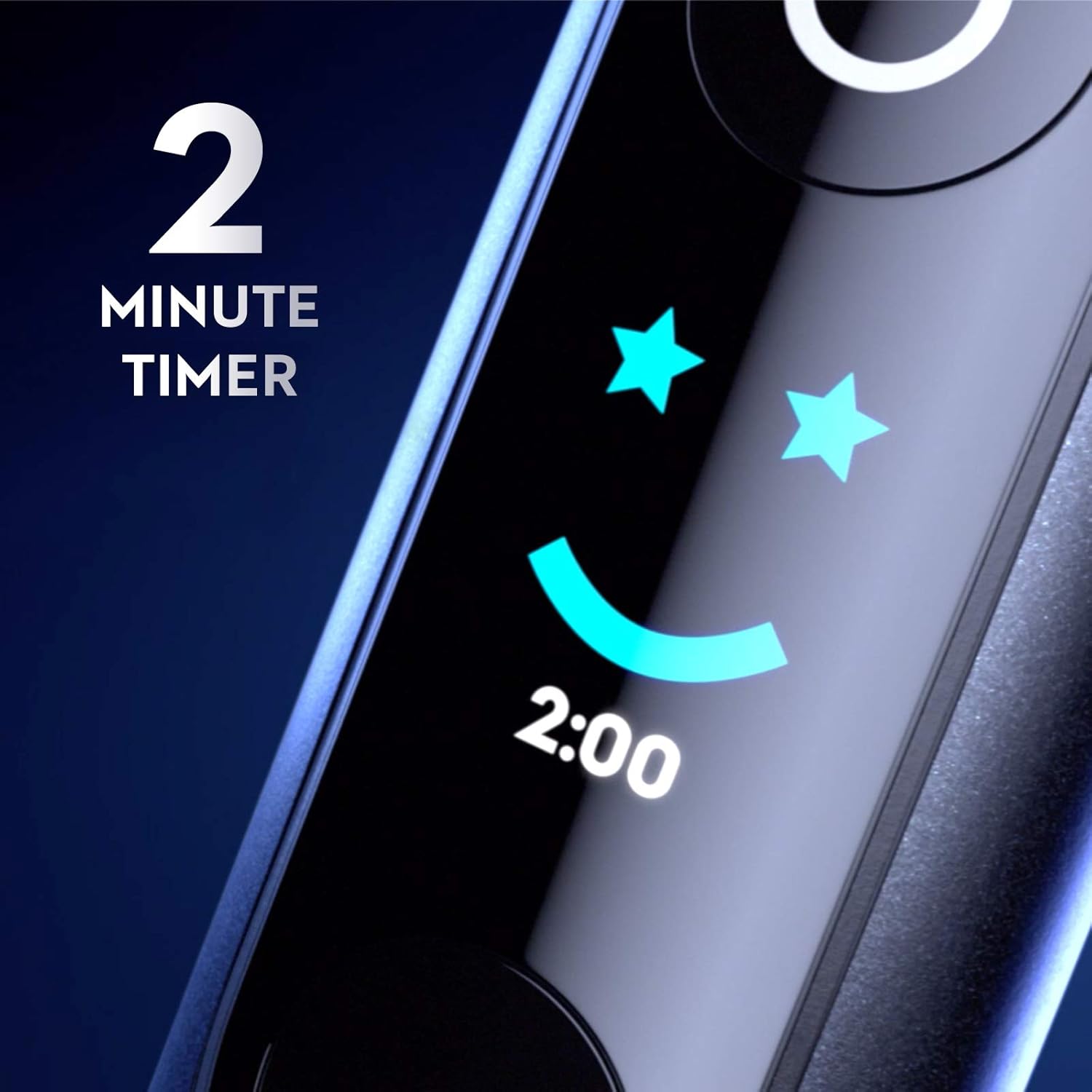
Figure 7: A pack of Oral-B iO Series 10 replacement brush heads, essential for maintaining optimal oral hygiene.
Charging and Travel
The iO Series 10 features a 3-hour fast charger. The charging travel case allows for convenient charging on the go, ensuring your toothbrush is always ready for use. The display on the handle always tracks your battery level.
비디오 2: 이 짧은 사전view video demonstrates the charging process of the Oral-B iO Series 10 toothbrush on its iO Sense charger, highlighting the quick charge capability.
문제 해결
| 문제 | 가능한 원인 | 해결책 |
|---|---|---|
| Toothbrush not charging. | Improper placement on charger, power outlet issue. | Ensure toothbrush is correctly seated on the iO Sense charger. Check power connection to the outlet. |
| 앱이 칫솔에 연결되지 않습니다. | Bluetooth is off, app not updated, interference. | Ensure Bluetooth is enabled on your device. Update the Oral-B app to the latest version. Restart both the toothbrush and your device. |
| Pressure sensor always red/white. | Brushing too hard/soft consistently. | Adjust brushing pressure until the light ring turns green. Refer to operating instructions for proper technique. |
명세서
- 제품 크기: 7.01 x 3.94 x 9.96인치; 1.72파운드
- 품목 모델 번호: iO M10.4B4.2A
- 배터리: 1개의 리튬 이온 배터리 필요(포함)
- 제조업체: 프록터앤갬블
- 연령대 (설명): 성인
- 특징: 압력 센서
- 전원: 배터리 구동
- 항목 견고성 설명: 부드러운
보증 및 지원
Oral-B offers a 30-day money-back guarantee for carefree switching to their electric toothbrushes. For detailed warranty information, product support, or to register your product, please visit the official Oral-B website or contact their customer service. Contact details can typically be found on the product packaging or the Oral-B brand store.
Oral-B Store: Visit the Oral-B Store on Amazon
관련 문서 - iO M10.4B4.2A
 |
Oral-B PRO 전동칫솔 사용 설명서 오랄비 프로 전동 칫솔의 종합 사용 설명서입니다. 기능, 사용 방법, 세척, 유지 관리 및 보증 정보를 포함하고 있으며, 다국어 지원 및 안전 지침이 포함되어 있습니다. |
 |
Oral-B SMARTSERIES 4000-5000 전동칫솔 사용 설명서 오랄비 스마트시리즈 4000-5000 전동 칫솔의 설치, 사용, 기능, 유지 관리, 문제 해결 및 보증 정보를 모두 포함하는 종합 사용자 설명서입니다. |
 |
Oral-B Pro 3 TRIZONE 500-5000 전동칫솔 사용 설명서 본 사용 설명서는 오랄비 프로 3 트라이존 전동 칫솔의 설치, 사용, 세척 및 문제 해결 방법을 자세히 설명합니다. 다양한 칫솔질 모드, 칫솔모, 안전 수칙에 대한 정보도 포함되어 있습니다. |
 |
전동 칫솔용 교체 브러시 헤드 사용 설명서 오랄비 및 브라운 전동 칫솔과 호환되는 교체용 칫솔모에 대한 자세한 사용 설명서, 제품 상세 정보, 의학적 경고 및 면책 조항이 포함되어 있습니다. |
 |
Oral-B Toothbrush Charger User Guide: Europlug Model User guide for the Oral-B Europlug Electric Toothbrush Charger, detailing specifications, compatibility with Braun Oral-B models (3709, D12, D16, D20, P2000, HL-3757), setup, charging, care, safety, and troubleshooting. |
 |
Oral-B Professional Care 1000 전동칫솔 사용 설명서 오랄비 프로페셔널 케어 1000 전동 칫솔의 설치, 사용, 세척, 안전 수칙, 환경 관련 고지 사항 및 미국/캐나다 지역 보증 정보를 포함한 종합적인 사용자 설명서입니다. |
Ask a question about this manual
Ask about setup, troubleshooting, compatibility, parts, safety, or missing instructions. Manuals+ will review the question and use this page’s manual context to help answer it.