
1. 서론
This manual provides comprehensive instructions for the YUNTX DAB-4G+64G Android 14 car radio, specifically designed for Ford Tourneo, Transit, and Custom models manufactured between 2013 and 2021. It covers essential information regarding product features, installation, operation, and maintenance to ensure optimal performance and user experience. Please read this manual thoroughly before installation and use.
2. 패키지 내용
Carefully unpack the box and verify that all the following items are included. If any items are missing or damaged, please contact customer support.

이미지: 이상view of the YUNTX car radio and its complete set of accessories.
- YUNTX Android 14 Car Radio Unit
- Power Socket Cable
- USB 케이블(x2)
- 라디오 안테나
- RCA 출력 소켓 케이블(A, B, C)
- DAB 안테나
- GPS 안테나
- 후방 카메라
- 외부 마이크
- 사용 설명서 (본 문서)
3. 호환성
This YUNTX car radio is compatible with the following vehicle models:
- Ford Tourneo (2013-2021)
- 포드 트랜짓 (2013-2021)
- Ford Custom (2013-2021)
If you are unsure about compatibility with your specific vehicle, please contact our technical support team at yuntx_techsupport@163.com and provide a photo of your car's dashboard for verification.
4. 주요 특징
- 운영 체제: 안드로이드 14
- 프로세서: Octa-Core 2.5 GHz (A53)
- 메모리: 4GB 램 + 64GB 롬
- 표시하다: 9-inch IPS 2.5D Capacitive Touchscreen, 1024*600 Resolution
- 오디오 출력: 4*50W, Built-in DSP with 64-band Equalizer
- Integrated DAB+: Digital Audio Broadcasting for high-quality radio reception
- CarPlay 및 Android Auto: Wired/Wireless support for seamless smartphone integration
- 연결성: Built-in WiFi, 4G Internet support (requires optional 4G dongle), Bluetooth 5.0
- 항해: Online and offline GPS navigation with 3D maps and voice guidance
- 미러 링크: Display and control your smartphone screen on the car radio
- 분할 화면: Run two applications simultaneously
- 라디오 튜너: AM/FM with RDS (Radio Data System)
- 스티어링 휠 제어: Supports original steering wheel button functions
- 카메라 지원 : Rear camera input (included), 360 camera support (optional)
- OBD Support: Compatible with most Bluetooth OBD2 and WiFi OBD scanners (optional adapter required)

이미지: 자세한 내용view of the YUNTX car radio's core specifications.

Image: Visual representation of the car radio's advanced functionalities.
5. 설정 및 설치
Professional installation is recommended for car radios. Ensure the vehicle's ignition is off and the battery is disconnected before beginning installation.
5.1 설치 전 확인
- 모든 패키지 내용물이 있는지 확인하세요.
- Confirm vehicle compatibility.
5.2 설치 단계(일반 가이드)
- 기존 차량용 라디오 장치와 대시보드 트림을 조심스럽게 제거하십시오.
- Connect the main power socket cable from the new unit to the vehicle's wiring harness.
- Connect the GPS antenna, DAB antenna, and radio antenna to their respective ports on the new unit. Position the antennas in locations with clear signal reception (e.g., dashboard, windshield).
- Connect the external microphone for hands-free calling. Route the cable discreetly to a suitable location near the driver.
- If installing the rear camera, route its cable from the back of the vehicle to the radio unit and connect it to the designated input.
- Connect any additional RCA output cables for external amplifiers or monitors, if applicable.
- Carefully slide the new YUNTX car radio into the dashboard opening.
- Secure the unit and reattach any removed dashboard trim.
- 차량 배터리를 다시 연결하고 장치의 작동 여부를 테스트하십시오.
Image: Visual comparison of the dashboard before and after car radio installation.
6. 사용 설명서
6.1 기본 작업
- 전원 켜기/끄기: 일반적으로 이 장치는 차량 시동을 켜면 함께 켜집니다. 수동으로 제어하려면 전원 버튼(있는 경우)을 길게 누르십시오.
- 터치스크린: 9인치 IPS 터치스크린에서 탭, 스와이프, 핀치 동작을 통해 인터페이스를 탐색하세요.
- 볼륨 조절: 화면상의 조절 버튼이나 차량의 스티어링 휠에 있는 조절 버튼을 사용하여 볼륨을 조절하십시오.
6.2 CarPlay 및 Android Auto
Connect your iPhone or Android smartphone via USB or wirelessly to access CarPlay or Android Auto. This allows you to use navigation, make calls, send messages, and play music directly from your phone's interface on the car radio screen.
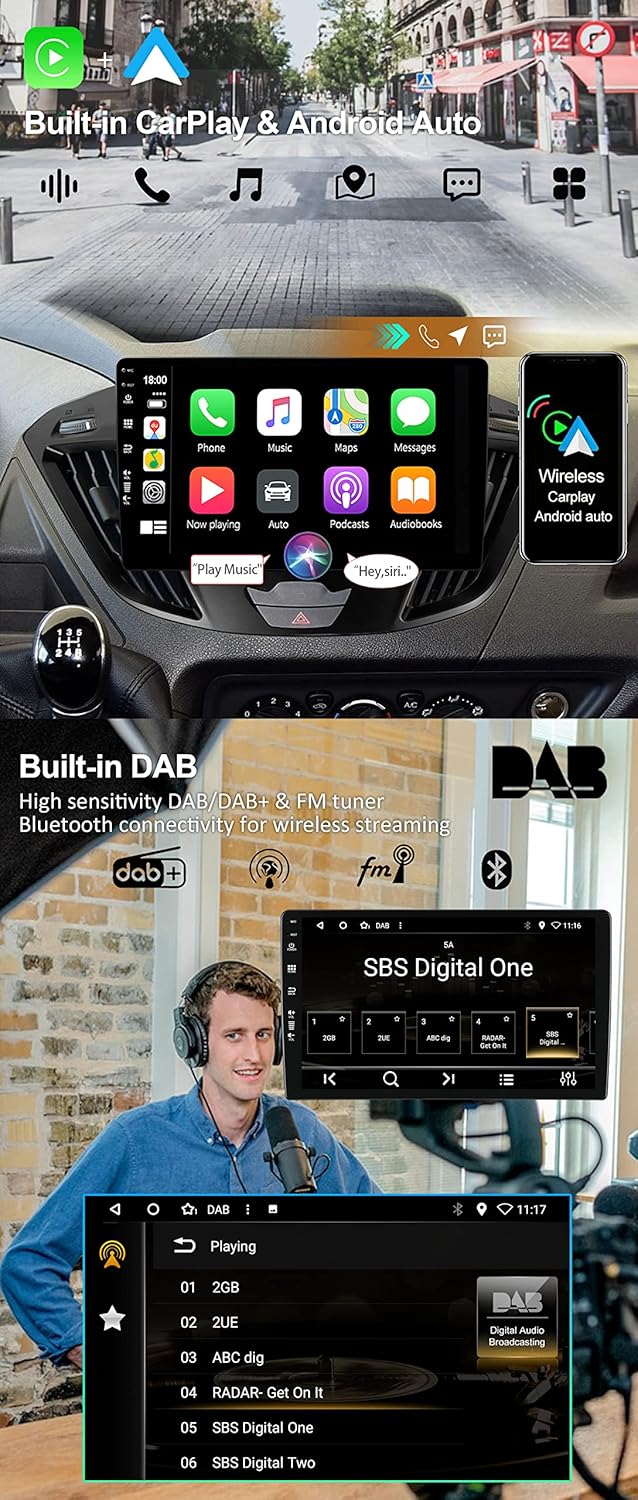
Image: CarPlay and Android Auto interfaces, and DAB+ radio in operation.
6.3 DAB+ 라디오
Access digital radio stations by selecting the DAB+ application. Enjoy a wider selection of stations and superior sound quality compared to traditional FM radio. The system automatically scans and lists available DAB stations.
6.4 DSP 오디오 설정
Utilize the built-in Digital Sound Processor (DSP) with its 64-band equalizer to customize your audio experience. Adjust frequency bands, balance, fader, and other sound effects to match your preferences.
6.5 GPS 내비게이션
The unit supports both online and offline GPS navigation. Use pre-installed map applications or download your preferred navigation apps from the Google Play Store. The system provides 3D maps and voice guidance. You can listen to radio or Bluetooth audio while navigating.
6.6 블루투스 5.0
Pair your smartphone via Bluetooth for hands-free calling and audio streaming. The system supports quick contact search and phonebook synchronization. To pair, go to Bluetooth settings on the car radio and your phone, search for the device, and connect.
6.7 미러 링크
Use the Mirror Link function to display and control your smartphone's screen directly on the car radio. Connect your phone via USB cable or Wi-Fi as per the on-screen instructions.
6.8 분할 화면
The split-screen feature allows you to run two applications simultaneously, such as navigation on one side and music on the other. To activate, long-press the recent apps button or follow the specific app instructions.
6.9 스티어링 휠 컨트롤
Configure the car radio to work with your vehicle's original steering wheel controls. Access the 'Steering Wheel Control' settings in the unit's menu to map functions like volume, track change, and mode selection to your steering wheel buttons.
6.10 Quick Reversing Mode
When the vehicle is put into reverse gear, the car radio automatically switches to the rear camera display, providing a clear view 안전한 주차와 차량 조작을 위해 차량 뒤쪽 공간을 확보하세요.
7. 사양
| 특징 | 사양 |
|---|---|
| 상표 | 윤텍스 |
| 모델 번호 | DAB-4G+64G |
| 운영 체제 | 안드로이드 14 |
| 프로세서 | 옥타코어 2.5GHz |
| 숫양 | 4GB |
| 집시 남자 | 64GB |
| 화면 유형 | IPS 2.5D Capacitive Touchscreen |
| 화면 크기 | 9인치 |
| 해결 | 1024*600 |
| 오디오 출력 전력 | 4*50W |
| DSP 이퀄라이저 | 64밴드 |
| 블루투스 버전 | 5.0 |
| 연결성 | Bluetooth, USB, Wi-Fi, 4G (optional dongle) |
| USB 포트 | 2 |
| 특별 기능 | DAB+, CarPlay, Android Auto, DSP, GPS, Mirror Link, Split Screen, Steering Wheel Control, Rear Camera Input, OBD Support |
| 호환 장치 | 스마트폰 |
| 오디오 출력 모드 | 스테레오 재생 |
| 서라운드 사운드 구성 | 4.0 |
| 비디오 인코딩 | H.264, MPEG-4 |
8. 문제 해결
If you encounter issues with your YUNTX car radio, please refer to the following common troubleshooting steps:
- 전원 없음: 모든 전원 연결부와 퓨즈를 점검하십시오. 차량의 시동이 켜져 있는지 확인하십시오.
- 소리 없음: Verify speaker connections, check volume levels, and ensure the mute function is not active. Check DSP settings.
- GPS 신호 문제: GPS 안테나가 올바르게 설치되었는지, 그리고 시야가 확보되었는지 확인하십시오. view 하늘의.
- 블루투스 페어링 문제: Ensure Bluetooth is enabled on both the car radio and your smartphone. Delete previous pairings and try again.
- 터치스크린이 반응하지 않음: 기기를 다시 시작해 보세요. 문제가 지속되면 공장 초기화가 필요할 수 있습니다(참고: 초기화 시 모든 사용자 데이터가 삭제됩니다).
- 시스템 지연/멈춤: Close unnecessary background applications. If persistent, consider a factory reset.
For more complex issues, please contact our technical support team.
9. 유지관리
To ensure the longevity and optimal performance of your YUNTX car radio, follow these maintenance guidelines:
- 청소: 부드럽고 마른 천으로 화면과 외부를 닦으세요. 잘 지워지지 않는 얼룩은 가볍게 두드려 닦아내세요.amp천에 물이나 화면에 안전한 세척제를 묻혀 닦아주세요. 연마재나 강한 화학 물질은 사용하지 마세요.
- 소프트웨어 업데이트: Periodically check for available software updates through the unit's settings or the manufacturer's web사이트를 최신 상태로 유지하고 버그 수정 사항을 적용하세요.
- 환경 조건: 본 제품을 극한의 온도, 장시간 직사광선 또는 과도한 습기에 노출시키지 마십시오.
10. 지원 및 보증
For technical assistance, compatibility inquiries, or any other support needs, please contact our dedicated technical support team:
이메일: yuntx_techsupport@163.com
Please include your product model number (DAB-4G+64G) and a detailed description of your issue when contacting support.
Information regarding product warranty is typically provided with your purchase documentation or can be found on the product's official sales page. Please retain your proof of purchase for warranty claims.