
1. 서론
The Moondrop Littlewhite is a high-fidelity Bluetooth neckband designed to provide a superior wireless audio experience for compatible in-ear monitors (IEMs). It integrates advanced audio technologies to ensure high-quality sound transmission and clear communication. This manual provides instructions for setup, operation, maintenance, and troubleshooting.

Image 1.1: Moondrop Littlewhite Bluetooth Neckband. This image displays the overall design of the Littlewhite neckband.
2. 제품 오버view
The Littlewhite neckband features a lightweight design with integrated controls and universal 0.78 2-pin connectors for attaching your preferred IEMs. It is equipped with a Qualcomm QCC5144 Bluetooth chip and a CS43131 DAC for high-resolution audio.
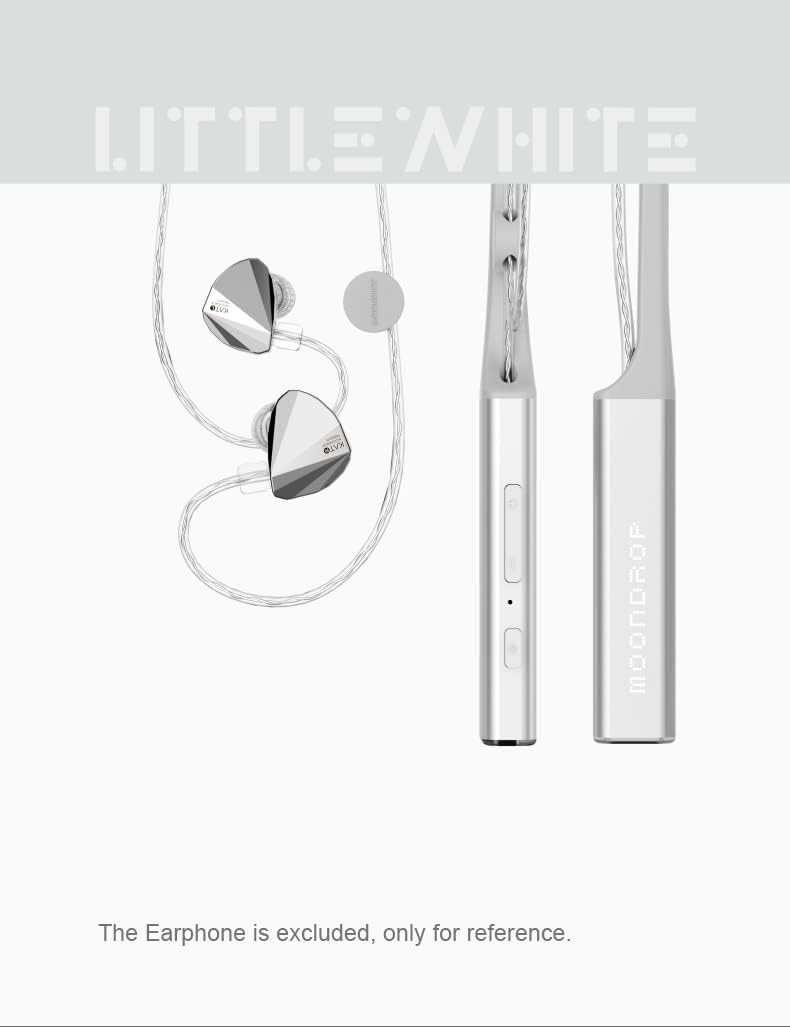
이미지 2.1: 클로즈업 view of the Moondrop Littlewhite neckband controls. This image highlights the buttons and ports on the neckband.
3. 설정 지침
3.1 장치 충전
Before first use, fully charge the Littlewhite neckband. Connect the provided USB Type-C charging cable to the charging port on the neckband and a compatible USB power source. A full charge typically takes approximately 2 hours.
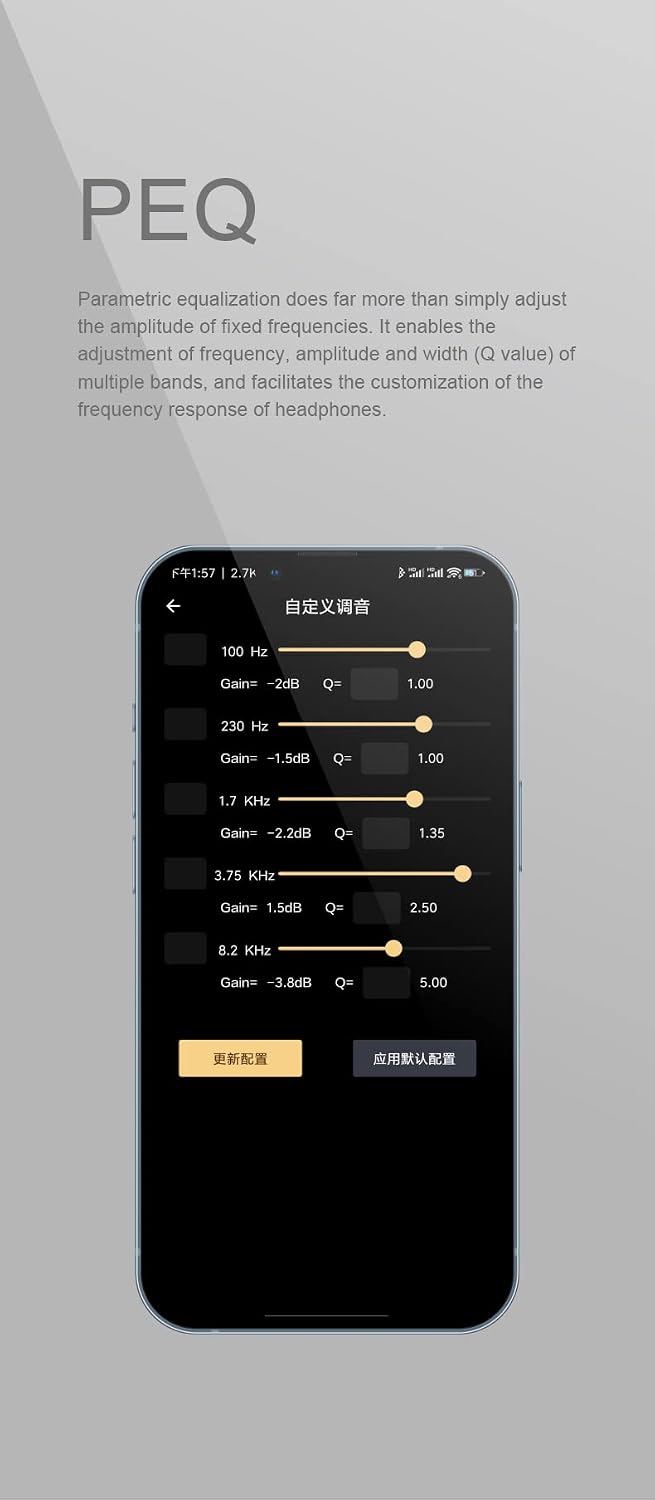
Image 3.1: Moondrop Littlewhite neckband connected to a charging cable. This image demonstrates how to connect the charging cable to the device.
3.2 Attaching In-Ear Monitors (IEMs)
The Littlewhite neckband is compatible with most IEMs that use a 0.78 2-pin connector. Carefully align the pins of your IEMs with the receptacles on the neckband and push them gently until they are securely connected. Ensure correct left and right orientation.

Image 3.2: Close-up of the universal 0.78 2-pin jack. This image shows the connector type for attaching IEMs.
3.3 블루투스 페어링
- Ensure the Littlewhite neckband is powered off.
- 전원 버튼을 길게 눌러 표시등이 깜박이면 페어링 모드임을 나타냅니다.
- 기기(스마트폰, 태블릿 등)에서 Bluetooth를 활성화하고 사용 가능한 기기를 검색하세요.
- Select "Moondrop Littlewhite" from the list of found devices.
- 연결되면 표시등은 모델에 따라 파란색으로 계속 켜져 있거나 꺼집니다.
4. 사용 설명서
4.1 전원 켜기/끄기
- 전원 켜기: 전원 표시등이 켜질 때까지 전원 버튼을 약 3초간 길게 누르세요.
- 전원 끄기 : 전원 버튼을 약 5초간 길게 눌러 표시등이 꺼지도록 합니다.
4.2 미디어 제어
The neckband features touch controls for media playback:
- 재생/일시 중지: 다기능 버튼을 한 번 누르세요.
- 다음 트랙: 다기능 버튼을 두 번 누르세요.
- 이전 트랙 : 다기능 버튼을 세 번 누르세요.
4.3 통화 관리
Manage phone calls using the integrated controls:
- 전화 받기/종료: 다기능 버튼을 한 번 누르세요.
- 전화 거부: 다기능 버튼을 2초 동안 길게 누릅니다.
4.4 볼륨 조절
Adjust the playback volume using the dedicated volume buttons on the neckband.
4.5 Adjustable Cable Length
The Littlewhite neckband features adjustable cable length mechanisms to customize the fit and reduce cable slack. Slide the adjusters along the cables to achieve your desired length.

Image 4.1: User adjusting the cable length of the neckband. This image illustrates how to customize the cable length for a comfortable fit.
5. 고급 기능
5.1 HiFi Audio Architecture
The Littlewhite neckband is engineered with a Qualcomm flagship Bluetooth master control chip QCC5144 and a CS43131 DAC. This architecture supports high bit rate transmission protocols and provides ample processing power for sound quality optimization and lossless transmission.
5.2 LHDC Bluetooth HiFi Audio Transmission Protocol Support
The Littlewhite supports the LHDC HiFi Bluetooth audio transmission protocol. When connected to a mobile phone compatible with LHDC, it offers lossless Bluetooth audio transmission, delivering sound quality beyond standard CD levels.

Image 5.1: The LHDC logo, indicating support for the LHDC HiFi audio transmission protocol.
5.3 aptX Adaptive High-Quality / Low-Delay Bluetooth Audio Transmission Protocol Support
The neckband also supports the aptX Adaptive Bluetooth audio transmission protocol. This allows for automatic switching between high-quality audio-visual and low-latency gaming experiences when paired with a compatible mobile device.

Image 5.2: The aptX Adaptive logo, signifying support for this high-quality, low-latency audio codec.
5.4 Superior Beamforming Microphone Environment Noise Cancellation (ENC)
The Littlewhite utilizes beamforming technology for effective Environmental Noise Cancellation. By optimizing the placement of two MEMS microphones, it significantly reduces environmental noise during calls without compromising call quality, offering a clear communication experience.

Image 5.3: A person using the Moondrop Littlewhite neckband for a phone call. This illustrates the use of the beamforming microphone for clear communication.
5.5 VDSF Targeted Headphone Optimization
This function optimizes the sound for compatible MOONDROP active in-ear headphones. It compensates the headphones to the VDSF Target Response through DSP digital signal processing, improving the balance and restoration of the audio. VDSF Target Response is a frequency response curve based on HRTF (head related transfer function) and B&K HATS diffusion, aiming for an ideal room preference curve.

Image 5.4: A frequency response graph illustrating VDSF targeted headphone optimization. This graph shows the target frequency response curve.
5.6 Parametric Equalization (PEQ)
Parametric Equalization (PEQ) allows for precise adjustment of frequency, amplitude, and bandwidth (Q value) of multiple bands. This feature facilitates detailed customization of the headphone's frequency response to suit individual preferences.

Image 5.5: Screenshot of a Parametric Equalization (PEQ) interface. This image shows various frequency, gain, and Q-value settings for audio customization.
5.7 제품 비디오
Video 5.1: Official product video for the Moondrop Littlewhite Neckband Bluetooth Cable. This video demonstrates the product in use and highlights its features.
6. 유지관리
6.1 청소
- Wipe the neckband and cables with a soft, dry cloth.
- 독한 화학 물질, 세척 용제 또는 강한 세제를 사용하지 마십시오.
- 충전 포트에 먼지나 이물질이 없는지 확인하세요.
6.2 보관
- 본 기기는 직사광선과 극한의 온도를 피해 시원하고 건조한 곳에 보관하세요.
- 케이블이 손상되지 않도록 과도하게 구부리거나 비틀지 마십시오.
7. 문제 해결
If you encounter issues with your Moondrop Littlewhite neckband, refer to the following common solutions:
| 문제 | 가능한 원인 | 해결책 |
|---|---|---|
| 장치 전원이 켜지지 않음 | 배터리 부족; 기기 고장 | Charge the device fully. If the issue persists, contact support. |
| 기기와 페어링할 수 없습니다 | Not in pairing mode; Device Bluetooth off; Interference | Ensure the neckband is in pairing mode. Check your device's Bluetooth settings. Move closer to your device. |
| 소리가 나지 않거나 음질이 좋지 않음 | IEMs not connected properly; Low battery; Incorrect audio source; Codec issues | Ensure IEMs are securely attached. Charge the neckband. Verify audio output settings on your device. Some users have reported issues with LHDC activation; try aptX Adaptive if available. |
| 충전 문제 | Faulty cable/charger; Port obstruction; Internal issue | Try a different USB-C cable and charger. Clean the charging port. If the device refuses to charge or only charges partially, contact support. |
| App not detecting device (if applicable) | App compatibility; Firmware issue | Ensure the app is updated. Check for firmware updates for the neckband. Some users have reported app functionality issues; use hardware controls if the app is not functional. |
8. 사양
| 특징 | 세부 사항 |
|---|---|
| 상표 | 문드롭 |
| 모델명 | LITTLE WHITE |
| 연결 기술 | 블루투스 |
| 블루투스 버전 | 5.2 |
| 블루투스 범위 | 15 미터 |
| 제어 유형 | 미디어 제어 |
| 제어 방법 | 만지다 |
| 배터리 충전 시간 | 2시간 |
| 배터리 평균 수명 | 12시간 |
| 소음 제어 | 환경 소음 제거 |
| 오디오 드라이버 유형 | 동적 드라이버 |
| 주파수 범위 | 20Hz-20kHz±0.5dB |
| 인클로저 재료 | 실리콘 |
| 호환 장치 | 핸드폰 |
| 방수 레벨 | 방수가 되지 않음 |
| 추가 기능 | 가벼움 |
9. 보증 및 지원
9.1 보증 정보
The Moondrop Littlewhite Neckband Bluetooth Cable Earphones come with a one-year manufacturer's warranty from the date of purchase. This warranty covers defects in materials and workmanship under normal use. It does not cover damage caused by misuse, accidents, unauthorized modifications, or normal wear and tear.
9.2 고객 지원
For technical assistance, warranty claims, or product inquiries, please contact Moondrop customer support through their official web제품 구매처 또는 판매처에 문의하세요. 지원팀에 문의하실 때는 구매 증빙 자료와 제품 모델 정보를 준비해 주세요.