1. 제품 오버view
This replacement remote control is designed to operate various devices including TV, audio players, video players, and projectors, specifically compatible with the Motorola 4K Android TV Stick DVM4KA01 and similar Android TV Boxes. It functions via infrared (IR) communication.
주요 특징
- Dedicated replacement remote control.
- No programming or setup required; simply install new batteries.
- Constructed from durable ABS material for comfortable handling.
- Tested for functionality prior to delivery.
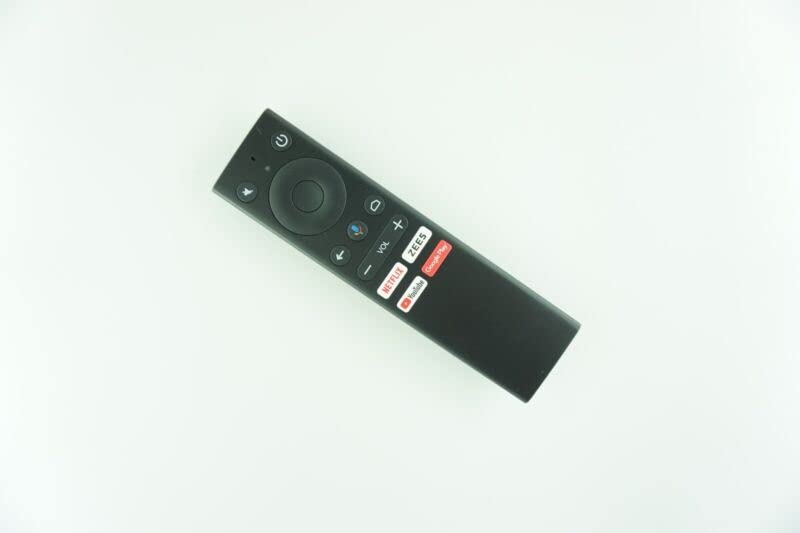
Image of the black replacement remote control. It features a power button, mute button, navigation pad, back button, home button, voice control button, volume up/down buttons, and dedicated buttons for Netflix, ZEES, YouTube, and Google Play.
2. 설정
배터리 설치
The remote control requires 2 AAA batteries (not included). Follow these steps to install them:
- 리모콘 뒷면에서 배터리함을 찾으세요.
- 배터리실 커버를 밀어서 엽니다.
- AAA 배터리 2개를 넣고 양극(+)과 음극(-) 단자가 배터리함 내부의 표시기와 올바르게 맞춰졌는지 확인합니다.
- 배터리 덮개를 단단히 닫으세요.
중요한 배터리 정보:
- 오래된 배터리와 새 배터리를 섞어서 사용하지 마십시오.
- 서로 다른 유형의 배터리를 섞어서 사용하지 마십시오.
- 장기간 리모컨을 사용하지 않을 경우 배터리를 제거하십시오.
초기 설정
This replacement remote control typically requires no programming or complex setup. Once batteries are installed, it should be ready for immediate use with compatible devices.
3. 사용 설명서
기본 동작
Point the remote control directly at the device you wish to operate. Ensure there are no obstructions between the remote and the device's IR receiver.
버튼 기능
- 전원 버튼: 연결된 장치를 켜거나 끕니다.
- 음소거 버튼: 오디오를 음소거하거나 음소거 해제합니다.
- 탐색 패드(원형): Use the directional buttons (Up, Down, Left, Right) to navigate menus and select items. The center button acts as an 'OK' or 'Enter' button.
- 뒤로가기 버튼: 이전 화면 또는 메뉴로 돌아갑니다.
- 홈 버튼: Returns to the main home screen of the device.
- 음성 제어 버튼: Activates voice commands (if supported by your device and configured).
- Volume Buttons (VOL +/-): 오디오 볼륨을 높이거나 낮춥니다.
- Dedicated App Buttons (Netflix, ZEES, YouTube, Google Play): 이러한 스트리밍 애플리케이션에 직접 액세스할 수 있도록 제공합니다.
메모: As this is a replacement remote, some advanced functions of your original remote may not be supported. This is not indicative of a defective product.
4. 유지관리
청소
리모컨을 청소할 때는 부드럽고 마른 천으로 살살 닦아주세요. 액체 세제나 연마성 소재는 리모컨 표면이나 내부 부품을 손상시킬 수 있으므로 사용하지 마십시오.
배터리 교체
Replace batteries when the remote's performance degrades or it stops responding. Follow the battery installation steps outlined in the 'Setup' section.
5. 문제 해결
일반적인 문제 및 솔루션
| 문제 | 가능한 원인 | 해결책 |
|---|---|---|
| 리모콘이 응답하지 않음 | 배터리가 방전되었거나 잘못 설치되었습니다. | 배터리 방향을 확인하고 새 AAA 배터리로 교체하십시오. |
| Remote not controlling device | Obstruction between remote and device; remote out of range; device not compatible. | Ensure clear line of sight to device's IR receiver. Move closer to the device. Verify device compatibility (e.g., Motorola 4K Android TV Stick DVM4KA01). |
| 일부 기능이 작동하지 않습니다 | This is a replacement remote, and some specific functions of the original remote may not be replicated. | This is expected behavior for a replacement remote. Focus on core functions. |
If issues persist after troubleshooting, please contact the seller for further assistance.
6. 사양
제품 사양
- 모델 호환성: Motorola 4K Android TV Stick DVM4KA01, various TV/Audio/Projector devices.
- 연결 기술 : 적외선 (IR)
- 전원: AAA 배터리 2개(포함되지 않음)
- 재료: ABS 플라스틱
- 색상: Black or white (color may vary)
- 지원되는 최대 장치 수: 1
- 제조업체: 전자 리모컨
메모: 사양은 사전 고지 없이 변경될 수 있습니다.
7. 보증 및 지원
반품 정책
This product is subject to a 30-day return policy for refund or replacement. Please refer to your purchase details for specific terms.
고객 지원
For technical assistance or inquiries regarding this product, please contact the seller directly through your purchase platform. Providing your original remote part number or unit model may help in resolving specific compatibility questions.
