
1. 서론
Thank you for choosing the MLOVE BV230 Portable Bluetooth Speaker. This manual provides essential information for setting up, operating, and maintaining your speaker. The BV230 is designed for portability, delivering high-quality audio with enhanced bass, and features IP56 dust and water resistance, making it suitable for various environments.
2. 패키지 내용
패키지에 모든 품목이 들어 있는지 확인하세요.
- 1 x MLOVE BV230 Bluetooth Speaker
- 1 x USB 유형 C 충전 케이블
- 1 x 라니어드
- 1 x 사용 설명서(이 문서)
3. 제품 오버view
스피커의 구성 요소와 제어 장치에 대해 알아보세요.
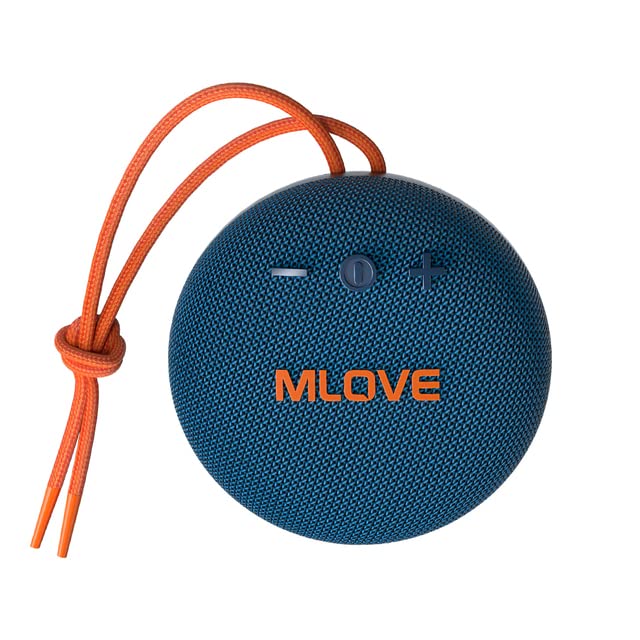
그림 3.1: 앞쪽 view of the MLOVE BV230 speaker, showing the power button, volume controls, and MLOVE branding.
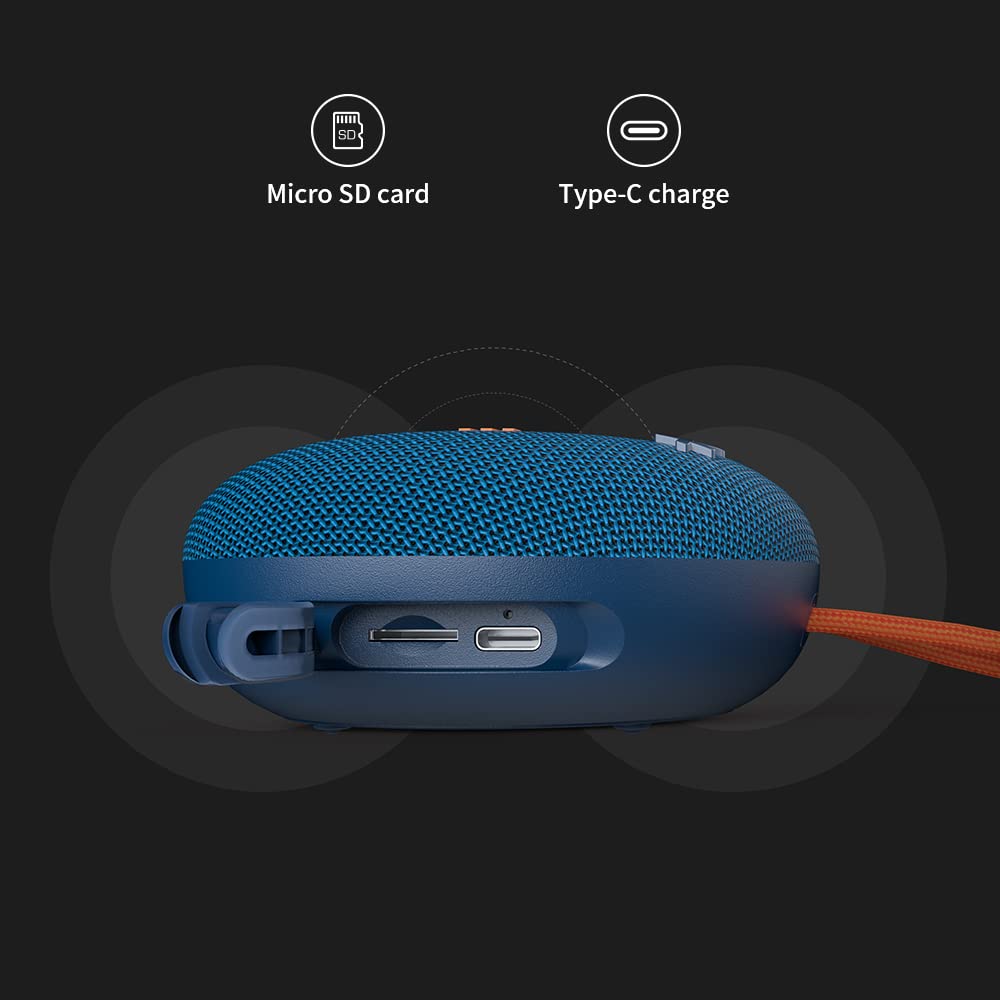
그림 3.2: 옆 view of the MLOVE BV230 speaker, highlighting the Micro-SD card slot and the USB Type-C charging port, protected by a rubber flap.
제어 버튼:
- 전원 버튼: 길게 눌러 전원을 켜거나 끌 수 있습니다. 짧게 눌러 음악을 재생/일시 정지하거나 전화를 받거나 끊을 수 있습니다.
- 볼륨 높이기(+): 짧게 누르면 볼륨이 커지고, 길게 누르면 다음 트랙으로 넘어갑니다.
- 볼륨 낮추기(-): 짧게 누르면 볼륨이 감소합니다. 길게 누르면 이전 트랙으로 돌아갑니다.
4. 설정
4.1 스피커 충전
처음 사용하기 전에 스피커를 완전히 충전하세요.
- Open the rubber flap on the side of the speaker to expose the charging port.
- Connect the included USB Type-C charging cable to the speaker's charging port.
- 케이블의 다른 쪽 끝을 USB 전원 어댑터(포함되지 않음)나 컴퓨터의 USB 포트에 연결합니다.
- The charging indicator light will illuminate during charging and turn off once fully charged. A full charge takes approximately 3 hours.
4.2 전원 켜기/끄기
- 전원을 켜려면: 약 2~3초 동안 전원 버튼을 길게 눌러 안내음이 들리도록 합니다.
- 전원을 끄려면: 약 2~3초 동안 전원 버튼을 길게 눌러 안내음이 들리도록 합니다.
4.3 블루투스 페어링
Connect your BV230 speaker to a Bluetooth-enabled device.
- 스피커 전원이 켜져 있고 블루투스 페어링 모드인지 확인하십시오(LED가 깜빡이는 것으로 표시됨).
- 기기(스마트폰, 태블릿 등)에서 Bluetooth를 활성화하고 사용 가능한 기기를 검색하세요.
- Select "BV230" from the list of found devices.
- 연결되면 스피커에서 음성 확인음이 울리고 LED 표시등이 더 이상 깜박이지 않습니다.
- 스피커는 전원이 켜지면 범위 내(최대 10m)에 있는 경우 마지막으로 페어링된 장치에 자동으로 다시 연결됩니다.
4.4 True Wireless Stereo(TWS) 페어링
Connect two MLOVE BV230 speakers for a true wireless stereo experience.

그림 4.1: Two BV230 speakers demonstrating True Wireless Stereo (TWS) pairing for enhanced audio.
- Ensure both BV230 speakers are powered on and not connected to any other Bluetooth device.
- 스피커 중 하나(기본 스피커)의 전원 버튼을 두 번 누르세요. 그러면 스피커가 TWS 페어링 모드로 진입합니다.
- 두 스피커는 자동으로 서로를 검색하여 연결됩니다. TWS 페어링이 성공하면 소리로 확인 메시지가 들립니다.
- Now, connect your Bluetooth device to the primary speaker (the one you initiated TWS pairing on) as described in Section 4.3.
- 이제 두 스피커에서 모두 스테레오로 오디오가 재생됩니다.
4.5 마이크로 SD 카드 재생
Play music directly from a Micro-SD card.
- 스피커 측면에 있는 고무 덮개를 여세요.
- Insert a Micro-SD card (with supported audio files) into the Micro-SD card slot until it clicks into place.
- The speaker will automatically switch to Micro-SD card playback mode.
- Use the Power button for play/pause and the Volume +/- buttons for track control.
5. 사용 설명서
5.1 음악 재생
- 재생/일시 중지: 전원 버튼을 짧게 누릅니다.
- 볼륨 업: '+' 버튼을 짧게 누르세요.
- 볼륨 작게 : '-' 버튼을 짧게 누르세요.
- 다음 트랙: '+' 버튼을 길게 누르세요.
- 이전 트랙 : '-' 버튼을 길게 누르세요.
5.2 핸즈프리 통화
내장 마이크를 통해 블루투스로 연결하면 핸즈프리 통화가 가능합니다.

그림 5.1: The BV230 speaker facilitating a hands-free call, demonstrating its built-in microphone functionality.
- 전화 받기: Short press the Power button when an incoming call is received.
- 통화 종료: 통화 중에 전원 버튼을 짧게 누르세요.
- 전화 거부: Long press the Power button when an incoming call is received.
6. 유지관리
6.1 청소
To maintain the speaker's appearance and functionality:
- 부드러운 천으로 스피커를 닦고 damp 옷감.
- 연마성 세척제, 알코올, 화학 용제는 사용하지 마세요.
- Ensure the charging port and Micro-SD slot are dry before use or charging.
6.2 방수 및 방진(IP56)
The MLOVE BV230 speaker is rated IP56, meaning it is protected against dust ingress and can withstand water jets from any direction. This makes it suitable for outdoor use and splashes.

그림 6.1: The BV230 speaker in water, illustrating its IP56 water resistance.
- Ensure the rubber flap covering the charging port and Micro-SD slot is securely closed to maintain water and dust resistance.
- Do not intentionally submerge the speaker in water for extended periods.
- Avoid exposing the speaker to saltwater or other chemicals, as this may damage the seals.
- If the speaker gets wet, wipe it dry before charging or opening the port flap.
6.3 보관
- 스피커는 직사광선과 극한의 온도를 피해 시원하고 건조한 곳에 보관하세요.
- 장기간 보관할 경우, 배터리 수명 연장을 위해 몇 달에 한 번씩 배터리를 약 50% 정도 충전하십시오.
7. 문제 해결
If you encounter issues with your speaker, refer to the following solutions:
| 문제 | 가능한 해결책 |
|---|---|
| 스피커의 전원이 켜지지 않습니다. | 배터리가 충전되어 있는지 확인하십시오. USB Type-C 케이블을 사용하여 스피커를 전원에 연결하십시오. |
| 블루투스로 페어링할 수 없습니다. |
|
| 소리가 나지 않거나 볼륨이 작습니다. |
|
| TWS 페어링이 실패합니다. |
|
| 충전 문제입니다. |
|
8. 사양
Key technical specifications for the MLOVE BV230 speaker:
| 특징 | 세부 사항 |
|---|---|
| 모델명 | BV230 |
| 치수(길이 x 너비 x 높이) | 100.8 x 100.8 x 46 mm (approx. 108D x 46W x 108H Millimeters) |
| 품목 무게 | 198 g (approx. 280 g with packaging) |
| 스피커 출력 전력 | 5 와트 |
| 배터리 용량 | 1500mAh 리튬 폴리머 |
| 노는 시간 | 최대 8시간(70% 볼륨) |
| 충전 시간 | 약 3시간 |
| 충전 포트 | USB 타입-C |
| 블루투스 버전 | 5.0 |
| 무선 범위 | 최대 10미터(33피트) |
| 방수 및 방진 | IP56 |
| 재료 | 구조 |
| 제어 방법 | 만지다 |
| 오디오 출력 모드 | 스테레오 (TWS 페어링 포함) |
9. 보증 및 지원
The MLOVE BV230 Portable Bluetooth Speaker comes with a 12개월 보증 구매일로부터 제조상의 결함에 대한 보증을 제공합니다.
For technical support, warranty claims, or further assistance, please contact your retailer or the manufacturer directly. Please retain your proof of purchase for warranty service.