
NJSJ ME6S
NJSJ Gaming Microphone User Manual
Model: ME6S
Your guide to setting up and using your NJSJ Gaming Microphone.
1. 서론
The NJSJ ME6S Gaming Microphone is a high-quality USB condenser microphone designed for gaming, streaming, podcasting, and recording. It features a quick-touch mute button, vibrant RGB lighting, a gain control knob, and a 3.5mm headphone jack for real-time monitoring. Its plug-and-play design ensures easy setup across various platforms.
2. 상자 안에 무엇이 들어있나요?
- 1 x USB Microphone with Custom Shock Mount and Pop Filter
- 1 x USB-A to USB-C Cable (1.8 m / 6 ft)
- 1 x Metal Tripod Stand (Disc Base and Support Rod)
- USB-A-USB-C 어댑터 1개
- 1 x 사용자 설명서

3. 설정 가이드
- 마이크 스탠드 조립: Screw the support rod into the disc base. Attach the microphone with its shock mount to the top of the support rod. Ensure all connections are secure.
- USB 케이블 연결: Insert the USB-C end of the provided 1.8m cable into the USB-C port at the bottom of the microphone.
- 장치에 연결: Insert the USB-A end of the cable into an available USB port on your PC, laptop, PS4/PS5, or Mac. If your device only has USB-C ports, use the included USB-A to USB-C adapter.
- 플러그 앤 플레이: The microphone is plug-and-play and does not require any additional drivers for most operating systems (Windows, Mac OS, PlayStation). Your system should automatically recognize the device.
- 마이크 위치 조정: Position the microphone on your desk. You can adjust the angle of the microphone on its stand for optimal sound capture.

4. 사용 설명서
- Quick Touch Mute Button:
The microphone features a convenient touch-sensitive mute button located on the top. Tap once to mute or unmute the microphone. When muted, the RGB lighting will turn off, and when unmuted, the RGB lighting will illuminate, providing a clear visual indicator of its status.
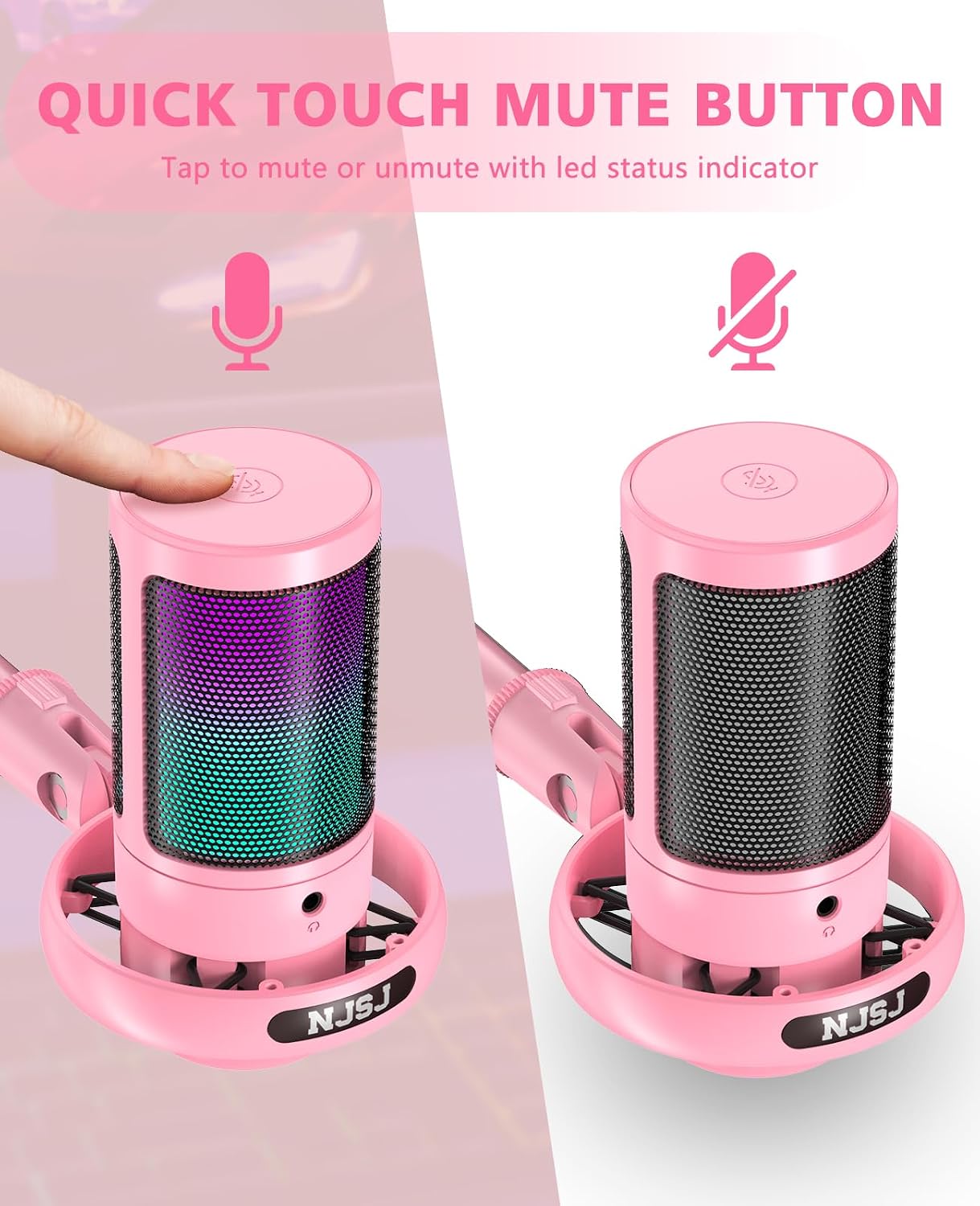
Image: Quick touch mute button with LED status indicator. - Gradient RGB Lighting:
The microphone is equipped with dynamic RGB LED lighting that automatically cycles through multiple colors, enhancing your gaming atmosphere. The lighting also visually indicates the microphone's operational status (on/off). To reduce the brightness of the RGB light, long-press the mute button. Long-press again to restore brightness.

Image: Gradient RGB lighting effects. - Mic Gain Knob and Real-time Monitoring:
A 3.5mm headphone jack is located on the front of the microphone for real-time audio monitoring. Connect your headphones to this jack to hear your voice as it's being captured. The gain control knob, located at the bottom of the microphone, allows you to easily adjust the microphone's sensitivity and volume to achieve optimal recording levels and ensure clear audio output.

Image: Mic gain knob for volume adjustment. 
Image: Real-time monitoring via headphone jack. - 우수한 음질:
The microphone features a premium 14mm audio chipset and a high sampling rate of 192kHz/24Bit, ensuring clear, smooth, and vivid sound capture. The cardioid polar pattern focuses on your voice, effectively reducing background noise for perfect voice reproduction.
- Noise Reduction Accessories:
The included pop filter and shock mount help to minimize unwanted noise caused by breathing, plosives, or desk vibrations, ensuring your audience hears a clearer and smoother voice.
5. 유지관리
- 청소: 마이크 표면을 닦을 때는 부드럽고 마른 천을 사용하십시오. 액체 세척제나 연마성 재료는 사용하지 마십시오.
- 저장: 마이크는 직사광선과 극한의 온도를 피해 시원하고 건조한 곳에 보관하세요.
- 손질: 마이크를 떨어뜨리거나 충격을 가하지 않도록 주의해서 다루십시오. 내부 부품이 손상될 수 있습니다.
6. 문제 해결
- 사운드 출력 없음:
- USB 케이블이 마이크와 장치에 모두 단단히 연결되어 있는지 확인하세요.
- Check your device's sound settings to ensure the NJSJ microphone is selected as the input device.
- Verify the microphone is not muted (check the RGB light status).
- Adjust the gain knob on the microphone to increase volume.
- Try connecting the microphone to a different USB port or another device to rule out port issues.
- 왜곡되거나 음질이 낮은 오디오:
- 마이크가 음원에서 너무 멀리 떨어져 있지 않고 올바른 위치에 있는지 확인하십시오.
- Check for any obstructions between the microphone and the sound source.
- Adjust the gain knob to prevent clipping (distortion) or to increase clarity.
- 파열음을 줄이려면 팝 필터가 올바르게 설치되었는지 확인하십시오.
- 주변 환경의 배경 소음을 확인하고 최소화하도록 노력하십시오.
- RGB Lights Remain On After PC Shutdown:
- Some USB ports on computers may continue to supply power even when the PC is off. To turn off the RGB lights completely, disconnect the USB cable from the computer or use a power strip with a switch to cut power to the PC's peripherals.
- 기기에서 마이크를 인식하지 못했습니다:
- 컴퓨터나 기기를 다시 시작하세요.
- 다른 USB 포트를 사용해보십시오.
- 운영 체제가 최신 상태인지 확인하세요.
- Verify compatibility (Note: Not compatible with Xbox).
7. 사양
| 특징 | 설명 |
|---|---|
| 모델 | ME6S |
| 연결 기술 | USB |
| 마이크 폼 팩터 | Boundary / Desktop |
| 극성 패턴 | 단방향 (카디오이드) |
| Samp링율 | 192KHz / 24비트 |
| 주파수 응답 | 30Hz - 20kHz |
| 신호 대 잡음비 (SNR) | 70데시벨 |
| 임피던스 | 2.2 kiloohm |
| 전원 | 유선 전기(USB) |
| 재료 | 금속, 플라스틱 |
| 무게 | 400그램 |
| 호환 장치 | Laptop, Gaming Console (PS4/PS5), PC, Smartphone (with adapter) |
| 특별 기능 | RGB LED, Tap-to-Mute, Detachable USB-C Cable (1.8m), Plug and Play, Desktop Mic |
8. 보증 및 지원
NJSJ offers a 24개월 보증 연장 (registration required) for your product, along with lifetime free consultation service. For any questions, technical support, or warranty claims, please contact NJSJ customer service. Our dedicated support team is ready to assist you.
The NJSJ brand, established in 2012, specializes in the design, development, and sale of microphones and audio products. We are committed to creating excellent audio products and providing high standards of service globally.

Ask a question about this manual
Ask about setup, troubleshooting, compatibility, parts, safety, or missing instructions. Manuals+ will review the question and use this page’s manual context to help answer it.