소개
This manual provides essential instructions for the setup, operation, and maintenance of your new Generic replacement remote control. This remote is designed to be compatible with the Insignia NS-S4000 iPod Dock Clock Radio. Please read this manual thoroughly to ensure proper use and to maximize your product experience.
중요 참고 사항: This remote control is an infrared (IR) replacement and does not require any programming or code setup. It is designed to function immediately upon battery installation, provided it is compatible with your specific Insignia NS-S4000 unit.
설정
1. 배터리 설치
리모컨에는 AAA 배터리 두 개(2)가 필요합니다(별매). 다음 단계에 따라 설치하세요.
- 리모콘 뒷면에서 배터리함을 찾으세요.
- 탭을 누른 상태에서 배터리함 덮개를 아래로 밀어서 여세요.
- AAA 배터리 2개를 넣고 양극(+)과 음극(-) 단자가 배터리 보관함 내부 표시와 올바르게 맞춰지도록 합니다.
- 배터리 덮개를 제자리에 밀어 넣어 딸깍 소리가 날 때까지 밀어 넣습니다.

그림 1: 뒤로 view 리모컨의 배터리 칸을 보여주는 사진.
2. 초기 사용
Once batteries are installed, the remote control is ready for use. Point the remote directly at your Insignia NS-S4000 iPod Dock Clock Radio and press any function button to begin operation. No additional pairing or programming is required.
작동 지침
The remote control provides access to various functions of your Insignia NS-S4000. Refer to the image below for button identification and their primary functions.
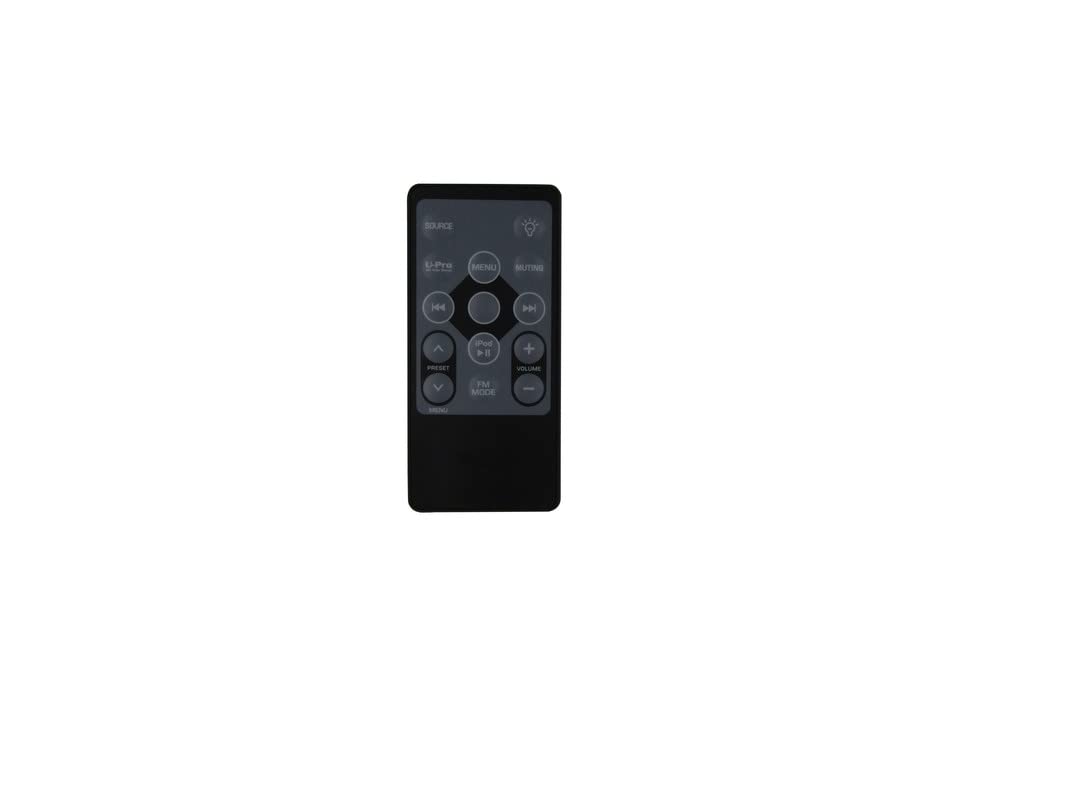
그림 2: 전면 view 버튼 레이아웃이 있는 리모컨.
버튼 기능:
- 원천: Toggles between available input sources (e.g., iPod, FM Radio, AUX).
- 음소거: 오디오 출력을 음소거하거나 음소거 해제합니다.
- 빛 (bulb icon): Controls the display backlight or brightness settings.
- 사전 설정 (Up/Down arrows): Navigates through saved radio presets or menu options.
- 메뉴 (Left side): Enters or exits the main menu system.
- 메뉴 (Center button within navigation cluster): Confirms a selection within the menu.
- iPod Play/Pause: Starts or pauses playback for a docked iPod device.
- 앞으로 건너뛰기 (>>|): Skips to the next track on an iPod or tunes to the next radio station.
- 뒤로 건너뛰기 (|<<): Skips to the previous track on an iPod or tunes to the previous radio station.
- 볼륨 +: 오디오 볼륨을 높입니다.
- 용량 -: 오디오 볼륨을 낮춥니다.
- FM 모드: Directly switches to FM radio mode.
- 아이팟: Directly switches to iPod dock mode.
유지
배터리 교체
Replace batteries when the remote control's range decreases or it stops responding. Always replace both batteries at the same time with new AAA batteries. Do not mix old and new batteries, or different types of batteries.
청소
부드럽고 마른 천으로 리모컨을 닦으세요. 액체 세제나 연마제는 표면이나 내부 부품을 손상시킬 수 있으므로 사용하지 마세요.
저장
장기간 리모컨을 사용하지 않을 경우, 누출과 잠재적 손상을 방지하기 위해 배터리를 제거하세요.
문제 해결
- 리모컨이 응답하지 않음:
- Ensure the remote is pointed directly at the Insignia NS-S4000.
- 배터리가 극성(+/-)이 올바르게 설치되었는지 확인하십시오.
- 배터리를 새 AAA 배터리로 교체하세요.
- Ensure there are no obstructions between the remote and the Insignia unit.
- 제한된 범위:
- 배터리를 교체하세요.
- Ensure you are within a reasonable distance and line of sight of the Insignia unit.
- 작동하지 않는 특정 기능:
- Verify that the function you are trying to use is supported by your Insignia NS-S4000 unit. Refer to your original Insignia NS-S4000 manual.
- Ensure the correct source (e.g., iPod, FM) is selected on the Insignia unit for the function to be active.
명세서
| 제품 유형 | 교체 용 리모콘 |
| 호환성 | Insignia NS-S4000 iPod Dock Clock Radio |
| 연결 기술 | 적외선 (IR) |
| 필요한 배터리 | AAA 2개(포함되지 않음) |
| 특징 | Ergonomic design, No setup or code needed |
| ASIN | B0BYJCLPPM |
보증 정보
No specific manufacturer's warranty information is provided for this Generic replacement remote control. Please refer to the return policy of your retailer or seller for details regarding returns or exchanges.
고객 지원
For further assistance or if you encounter issues not covered in this manual, please contact the seller from whom you purchased this remote control. They can provide specific support related to your purchase.


