
1. 서론
Thank you for choosing the LFF DAB/FM Digital Radio YT81107. This manual provides essential information for the safe and efficient use of your new radio. Please read these instructions carefully before operating the device and retain them for future reference.
안전 정보
- 화재나 감전을 방지하기 위해 장치를 비나 습기에 노출시키지 마십시오.
- c를 열지 마세요asing. 모든 서비스는 자격을 갖춘 담당자에게 의뢰하세요.
- 지정된 전원 어댑터나 배터리만 사용하세요.
- 극한의 온도, 직사광선, 먼지가 많은 환경을 피하세요.
2. 제품 오버view
The LFF DAB/FM Digital Radio YT81107 offers versatile listening options with DAB+ and FM radio, Bluetooth connectivity, and convenient features like a dual alarm and sleep timer. Its compact design and dual power options make it suitable for various environments.
주요 특징
- DAB+ and FM Digital Radio Tuner
- Bluetooth Connectivity for Audio Streaming
- 풀 컬러 LCD 디스플레이
- 60 Preset Stations (30 DAB+, 30 FM)
- 듀얼 알람 시계 기능
- 조정 가능한 수면 타이머
- 3.5mm 헤드폰 잭
- AC Power Adapter or Battery Operated (4x AA batteries, not included)

그림 2.1: 전면 view of the LFF DAB/FM Digital Radio highlighting its main features.
컨트롤 및 구성 요소
Familiarize yourself with the buttons and ports on your radio:

그림 2.2: 전면 및 상단 view of the radio with labeled controls.
- 전원 / 모드 버튼 : Turns the radio on/off and switches between modes (DAB, FM, Bluetooth).
- 메뉴/정보 버튼: Accesses menu settings or displays station information.
- 알람 버튼: 알람을 설정하고 관리합니다.
- 사전 설정 버튼(1-5): Quickly access saved favorite stations.
- Volume Knob/Select: 돌려서 볼륨을 조절하거나 메뉴를 탐색하고, 눌러서 선택을 확정하세요.
- Tuning/Scroll Buttons: 스테이션이나 메뉴 옵션을 탐색합니다.
- 표시하다: Full-color LCD screen.
- 스피커: 통합 오디오 출력.
- 안테나: 라디오 수신용 확장형 텔레스코픽 안테나.
- DC IN 포트: AC 전원 어댑터를 연결합니다.
- 헤드폰 잭: 개인적인 청취를 위한 3.5mm 출력.
- 배터리 칸: Located on the back for 4x AA batteries.
3. 설정
라디오 전원 켜기
Your radio can be powered by the included AC adapter or by batteries for portable use.
- AC 전원: Connect the supplied AC adapter to the DC IN port on the back of the radio and plug it into a standard wall outlet.
- 배터리 전원: Open the battery compartment on the back and insert 4x 1.5V AA (LR6) batteries (not included), ensuring correct polarity. Close the compartment securely.

Figure 3.1: Power options and physical dimensions of the radio.
안테나 조정
최적의 라디오 수신을 위해 텔레스코픽 안테나를 완전히 펼치십시오. 신호 품질이 가장 좋아지도록 안테나 위치를 조정하십시오.
4. 사용 설명서
전원 켜기/끄기 및 모드 선택
- 를 누르세요 전원/모드 라디오를 켜거나 끄는 버튼입니다.
- While on, press the 전원/모드 button repeatedly to cycle through available modes: DAB, FM, and Bluetooth.
DAB/FM 라디오 작동
Ensure the antenna is fully extended for best reception.

Figure 4.1: Radio reception ranges and preset capacity.
- 자동 스캔: DAB 또는 FM 모드에서 메뉴/정보 button to initiate an automatic scan for available stations. The radio will store them automatically.
- 수동 조정 : 사용하세요 Tuning/Scroll 주파수를 수동으로 조절하는 버튼입니다.
- 역 선택: 회전하다 Volume Knob/Select to browse through available stations. Press the knob to select a station.
- 사전 설정 저장: 방송국을 저장하려면 원하는 방송국에 맞춘 다음, 다음 버튼 중 하나를 길게 누르세요. 프리셋 버튼(1-5) until the display confirms it's saved. You can save up to 30 DAB+ and 30 FM stations.
- 사전 설정 불러 오기 : 다음 중 하나를 짧게 누르세요. 프리셋 버튼(1-5) 저장된 방송국을 불러오려면.
블루투스 모드
스마트폰, 태블릿 또는 기타 블루투스 지원 기기를 연결하여 오디오를 무선으로 스트리밍하세요.
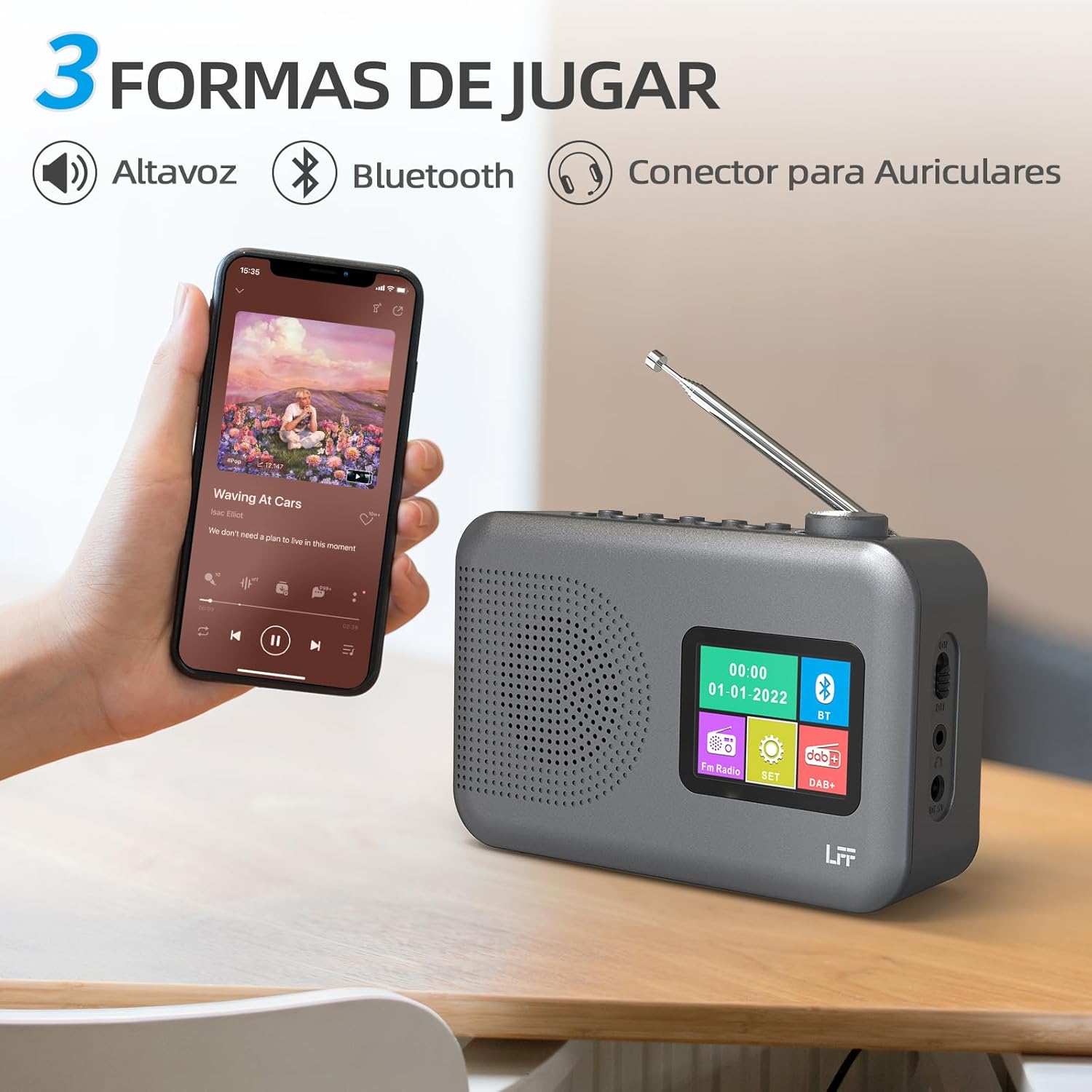
Figure 4.2: Bluetooth connectivity and audio playback options.
- 라디오를 블루투스 모드로 전환하려면 다음을 사용하세요. 전원/모드 버튼을 누르세요. 디스플레이에 "블루투스 페어링" 또는 이와 유사한 메시지가 표시됩니다.
- On your device, enable Bluetooth and search for "LFF YT81107" (or similar).
- 페어링할 라디오를 선택하세요. 연결되면 라디오 스피커를 통해 기기의 오디오를 재생할 수 있습니다.
- Adjust volume using the radio's 볼륨 노브 or your connected device.
알람 시계 기능
최대 두 개의 독립적인 경보를 설정할 수 있습니다.
- 를 누르세요 경보 button to enter alarm settings.
- 사용하세요 Tuning/Scroll 버튼 및 Volume Knob/Select to set the alarm time, source (DAB, FM, or buzzer), and frequency (daily, weekdays, weekends, once).
- 를 누르세요 경보 버튼을 다시 눌러 알람을 확인하고 작동시키세요.
- When an alarm sounds, press any button (except Power) to snooze, or press the 전원/모드 버튼을 눌러 끕니다.
슬립 타이머
취침 타이머 기능은 설정된 시간이 지나면 라디오가 자동으로 꺼지도록 해줍니다.

Figure 4.3: Sleep timer function in use.
- 를 누르세요 메뉴/정보 버튼을 눌러 메인 메뉴에 액세스합니다.
- Navigate to the "Sleep Timer" option using the Tuning/Scroll 버튼을 누르고 Volume Knob/Select.
- Select your desired duration (15, 30, 45, 60, 90, or 120 minutes) and confirm. The radio will automatically turn off after the selected time.
헤드폰 사용
For private listening, connect standard 3.5mm headphones to the headphone jack on the side of the radio. The internal speaker will be muted automatically.
Note: This radio does not support Bluetooth headphones. The 3.5mm headphone jack is for wired headphones only.
5. 유지관리
- 청소: 부드럽고 마른 천으로 라디오를 닦으세요. 연마성 세제나 용제를 사용하지 마세요.
- 배터리 교체: If using batteries, replace all four AA batteries when the low battery indicator appears on the display or when performance degrades. Ensure proper disposal of old batteries.
- 저장: 장기간 라디오를 보관할 경우, 누출을 방지하기 위해 배터리를 제거하세요.
6. 문제 해결
| 문제 | 가능한 원인 | 해결책 |
|---|---|---|
| 전원이 없습니다 | AC 어댑터가 연결되지 않았거나 고장났거나, 배터리가 방전되었거나 잘못 삽입되었습니다. | Check AC adapter connection and power outlet. Replace batteries or ensure correct polarity. |
| 라디오 수신 불량 | 안테나가 확장되지 않음; 신호가 약한 영역; 간섭. | 텔레스코픽 안테나를 최대한 확장하고 조정하세요. 라디오를 다른 위치로 옮겨보세요. |
| 블루투스가 연결되지 않습니다 | Radio not in Bluetooth mode; device not in pairing mode; radio already connected to another device. | Ensure radio is in Bluetooth mode. Put your device in pairing mode. Disconnect from other Bluetooth devices. |
| 알람이 울리지 않음 | Alarm not activated; volume too low; incorrect alarm settings. | Check alarm settings and ensure it is enabled. Increase volume. Verify alarm time and source. |
7. 사양
| 특징 | 세부 사항 |
|---|---|
| 모델 번호 | YT81107 |
| 상표 | LFF 확장 |
| 튜닝 기술 | DAB+, FM |
| 지원되는 라디오 대역 | DAB+ (174.928 - 239.2 MHz), FM (87.5 - 108 MHz) |
| 연결성 | 블루투스, 3.5mm 헤드폰 잭 |
| 전원 | AC Adapter (included), 4x 1.5V AA (LR6) Batteries (not included) |
| 치수(길이 x 너비 x 높이) | 16.1cm x 5.9cm x 10.9cm |
| 색상 | 회색 |
| 특별 기능 | DAB Radio, DAB Plus Radio, DAB+ Radio, FM Radio, Color Display, Bluetooth, Dual Alarm, Sleep Timer |
| 호환 장치 | Headphones, MP3 Player, Smartphone, Laptop, Speaker, Tablet |
8. 보증 및 지원
LFF is committed to providing high-quality products. If you encounter any quality issues with your LFF DAB/FM Digital Radio YT81107, please contact us directly. Our customer support team is available to assist you and resolve any problems you may experience.
구체적인 보증 조건 및 연락처 정보는 구매 서류를 참조하십시오.