
1. 서론
The WORKPRO W159025 is a versatile cordless 3.6V grass and hedge trimmer designed for efficient garden maintenance. This tool features a dual-purpose design, allowing for quick conversion between a grass shear and a hedge trimmer. Its lightweight and compact design, combined with Type-C USB charging, makes it convenient for various trimming tasks around your garden.
This manual provides essential information for the safe and effective use, maintenance, and troubleshooting of your WORKPRO W159025 trimmer. Please read it thoroughly before first use and keep it for future reference.
2. 중요 안전 지침
화재, 감전, 신체 상해의 위험을 줄이려면 전기 제품을 사용할 때 항상 기본적인 안전 예방 조치를 따르세요.
- 모든 지침 읽기: 도구의 조작법과 올바른 사용법을 익혀보세요.
- 눈 보호 장비 착용: 트리머를 작동할 때는 항상 안전 안경이나 고글을 착용하세요.
- 주변을 깨끗하게 유지하세요: 작업 공간에 잔해물, 어린이 및 애완동물이 없는지 확인하십시오.
- 우발적인 시작을 방지하세요: Ensure the safety lock button and operating switch are not engaged unintentionally.
- 올바른 충전기를 사용하세요: Only use a 5V/2A adapter for charging. Using a 5V/1A adapter may trigger overvoltage protection and prevent charging.
- 블레이드 검사: Before each use, check blades for damage or wear. Replace if necessary.
- 안전한 블레이드: Ensure blades are correctly installed and secured before operation.
- 손대지 마세요: Never touch the blades while the tool is operating or connected to power.
- 안전하게 보관하세요: 도구는 어린이의 손이 닿지 않는 건조하고 안전한 곳에 보관하세요.
3. 패키지 내용
포장을 풀 때 모든 품목이 있는지 확인하세요.
- WORKPRO W159025 Main Unit
- Grass Shear Blade (75mm cutting width)
- Hedge Trimmer Blade (120mm cutting width, 7.8mm max cutting diameter)
- Type-C USB Cable (1m)
- 사용자 설명서
4. 제품 오버view
The WORKPRO W159025 features a compact and ergonomic design for comfortable use. Key components include:
- TPR Handle: 편안하고 안정적인 그립감을 제공합니다.
- 안전 잠금 버튼: 실수로 작동하는 것을 방지합니다.
- Operating Switch: Activates the blades.
- 블레이드 릴리스 버튼: 빠르고 간편하게 공구 없이 날을 교체할 수 있습니다.
- Type-C 충전 포트: 편리한 충전을 위해.
- LED Charging Indicator Light: Displays charging status (Red: Charging, Green: Fully Charged, Yellow: Approx. 50% charged).
- 교체 가능한 블레이드: Includes both grass shear and hedge trimmer blades.

Figure 1: WORKPRO W159025 Component Diagram
5. 설정
5.1. 배터리 충전
The device is powered by a 3.6V rechargeable battery. Before first use, fully charge the battery.
- 장치에서 Type-C 충전 포트를 찾으세요.
- 제공된 USB 타입 C 케이블을 충전 포트에 연결하십시오.
- USB 케이블의 다른 쪽 끝을 5V/2A USB 전원 어댑터(별도 구매)에 연결하십시오.
- The LED indicator light will show red during charging. It will turn green when fully charged (approximately 2-3 hours). A yellow light indicates approximately 50% charge.

그림 2: Type-C 충전
5.2. 날 교체
The WORKPRO W159025 allows for easy, tool-free blade changes between the grass shear and hedge trimmer blades.
- 장치가 꺼져 있고 전원에서 분리되어 있는지 확인하십시오.
- Push the two blade release buttons on either side of the blade housing.
- Carefully remove the installed blade.
- Align the desired blade (grass shear or hedge trimmer) with the pins on the main unit.
- Press the blade firmly into place until it clicks securely.

Figure 3: Blade Change Mechanism
6. 사용 설명서
6.1. 전원 켜기 / 끄기
The WORKPRO W159025 features a dual safety mechanism to prevent accidental starts.
- To start the tool, simultaneously press the safety lock button (located on the top of the handle) and the operating switch (trigger).
- Once the tool starts, you can release the safety lock button, and the tool will continue to operate as long as the operating switch is pressed.
- To turn off the tool, release the operating switch.

Figure 4: Safety Lock and Operating Switch
6.2. Using the Grass Shear
Attach the grass shear blade for trimming grass in small areas, around edges, or where larger mowers cannot reach.
- 잔디깎이 날이 단단히 고정되어 있는지 확인하십시오.
- Hold the tool firmly with both hands, if possible, or one hand if comfortable and safe.
- Activate the tool as described in Section 6.1.
- Move the tool steadily across the grass, maintaining a consistent height. The cutting width is 75mm.
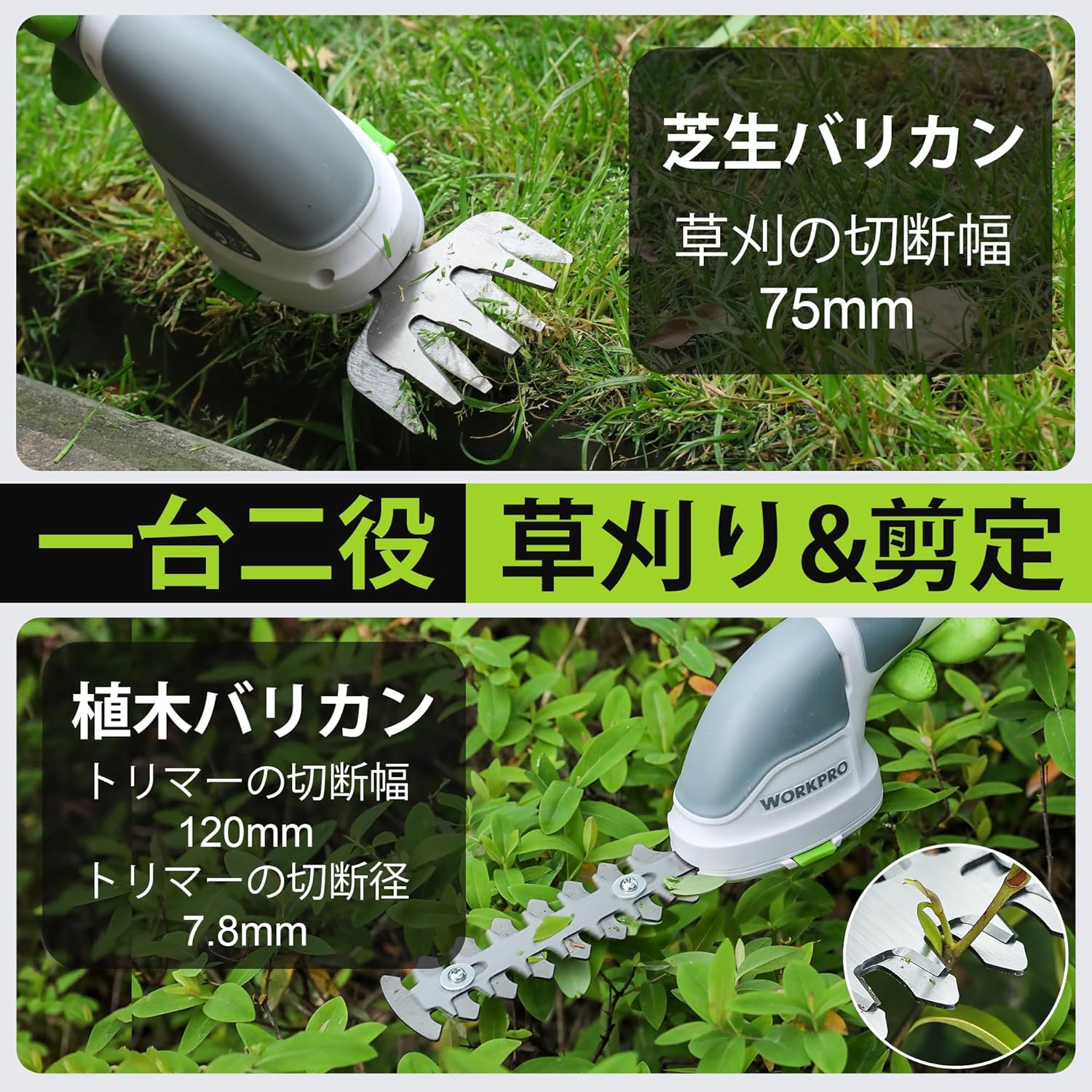
Figure 5: Grass Shearing Operation
6.3. 가지치기 기계 사용하기
Attach the hedge trimmer blade for shaping shrubs and hedges. The cutting width is 120mm, and the maximum cutting diameter is 7.8mm.
- Ensure the hedge trimmer blade is securely attached.
- Hold the tool firmly, ensuring a stable grip.
- Activate the tool as described in Section 6.1.
- Move the trimmer smoothly along the hedge, cutting small amounts at a time. Avoid forcing the blades through thick branches.
- The handle can rotate 180 degrees for improved ergonomics and access to different angles. To rotate the handle, press the handle rotation button (if present, otherwise manually rotate if designed for it) and adjust to the desired position.

Figure 6: Hedge Trimming Operation
Video 1: Demonstrates the WORKPRO W159025 in action, showing blade changes, safety features, and use as both a grass shear and hedge trimmer. It highlights the 180-degree handle rotation feature.
7. 유지관리
7.1. Cleaning and Blade Care
- Always ensure the tool is switched off and the battery is removed (if applicable) before cleaning or performing maintenance.
- Clean the blades after each use to remove sap, debris, and dirt. Use a stiff brush and a damp cloth. For stubborn residue, a blade cleaner or light oil can be used.
- Periodically apply a thin layer of machine oil to the blades to prevent rust and ensure smooth operation.
- Inspect blades for sharpness and damage. Dull or damaged blades can reduce efficiency and increase strain on the motor. Replace worn blades as needed.
7.2. 보관
- 공구는 직사광선과 극한 온도 변화를 피해 건조하고 통풍이 잘 되는 곳에 보관하십시오.
- 보관하기 전에 칼날이 깨끗하고 건조하며 가볍게 기름칠되어 있는지 확인하세요.
- Keep the tool out of reach of children and unauthorized persons.
8. 문제 해결
| 문제 | 가능한 원인 | 해결책 |
|---|---|---|
| 도구가 시작되지 않음 | 배터리가 부족하거나 방전되었습니다. Safety lock button not pressed simultaneously with operating switch 블레이드가 걸렸습니다. | 배터리를 완전히 충전하십시오 Ensure both buttons are pressed together Clear any obstructions from the blades (with tool off) |
| 불량한 절단 성능 | 무디거나 손상된 칼날 Excessive material being cut Blades are dirty or sticky | 블레이드 교체 Cut smaller sections at a time Clean and lubricate blades |
| 배터리가 충전되지 않음 | Incorrect power adapter (e.g., 5V/1A) 충전 케이블이 손상됨 Charging port is dirty | Use a 5V/2A USB power adapter Try a different Type-C USB cable 충전 포트를 청소하십시오 |
9. 사양
| 특징 | 세부 사항 |
|---|---|
| 상표 | 워크프로 |
| 모델 번호 | W159025 |
| 전원 | 배터리 구동(3.6V) |
| 배터리 유형 | 리튬이온 |
| 충전 포트 | Type-C USB |
| 충전 시간 | Approx. 2-3 hours (with 5V/2A adapter) |
| 무부하 작동 시간 | 약 40분 |
| No-Load Stroke Rate | 1100회/분 |
| 잔디깎이 절단 폭 | 75mm |
| 헤지 트리머 절단 폭 | 120mm |
| Max Cutting Diameter (Hedge Trimmer) | 7.8mm |
| 블레이드 소재 | 스테인리스 스틸 |
| Product Weight (without blade) | 0.37kg |
| 한국어: | 820909687412 |
10. 보증 및 지원
For warranty information, technical support, or replacement parts, please contact WORKPRO customer service or refer to the official WORKPRO web사이트. 구매 증빙 자료로 구매 영수증을 보관하세요.
추가 지원이 필요하면 다음을 방문하세요. 아마존의 WORKPRO 스토어.