
솔리옴 S40-4G
SOLIOM S40 3G/4G LTE Cellular Solar Security Camera
사용자 설명서
1. 서론
Thank you for choosing the SOLIOM S40 3G/4G LTE Cellular Solar Security Camera. This manual provides detailed instructions for the proper installation, operation, and maintenance of your camera. Please read this manual thoroughly before using the product to ensure correct usage and to prevent damage.
중요한 안전 정보:
- 카메라가 떨어지지 않도록 안정적인 위치에 설치하십시오.
- 카메라를 극한 온도나 부식성 환경에 노출시키지 마십시오.
- Use only the recommended power accessories.
- 어린이의 손이 닿지 않는 곳에 보관하세요.
2. 제품 오버view
2.1 제품 구성품
The SOLIOM S40 camera package typically includes the following items:
- SOLIOM S40 3G/4G LTE Cellular Solar Security Camera
- 태양광 패널
- 장착 브래킷 및 나사
- USB 충전 케이블
- Nano SIM Card (pre-installed or included separately)
- Micro SD Card (pre-installed or included separately)
- 사용 설명서 (본 문서)
2.2 주요 특징
- 3G/4G LTE Connectivity: Operates without Wi-Fi, ideal for remote locations.
- 태양열 전원: Equipped with a solar panel for continuous power, reducing the need for manual recharging.
- 1080p 풀 HD 비디오: 선명하고 자세한 비디오 제공tage.
- 팬 및 틸트 기능: Offers 355° horizontal pan and 90° vertical tilt for wide area coverage.
- PIR 모션 감지: Advanced passive infrared sensor detects human and animal movement, minimizing false alarms.
- 컬러 나이트 비전: Enhanced night vision capabilities with spotlight for full-color view저조도 조건에서 촬영 중입니다.
- 양방향 오디오 : 실시간 통신을 위한 마이크와 스피커가 내장되어 있습니다.
- IP66 내후성: 다양한 기상 조건에서 야외 사용에 적합한 내구성 있는 디자인입니다.
- 로컬 및 클라우드 스토리지: Supports Micro SD card storage and optional cloud storage.

Figure 2.1: SOLIOM S40 Camera with Solar Panel

Figure 2.2: Camera operating in a remote location without Wi-Fi or power outlet.
3. 설정
3.1 시작하기 전에
- 배터리 충전: Before initial use, fully charge the camera's internal battery using the provided USB cable. Connect the USB cable to the camera's charging port and a 5V/2A USB power adapter (not included).
- SIM 카드 삽입: Ensure the Nano SIM card is active and has a data plan. Open the rubber cover on the camera body to access the SIM card slot. Insert the Nano SIM card with the gold contacts facing down, following the diagram.
- 마이크로 SD 카드 삽입: If not pre-installed, insert a Micro SD card (up to 128GB, Class 10 or higher recommended) into the designated slot for local video storage.

Figure 3.1: SIM and SD Card Installation
3.2 앱 다운로드 및 계정 등록
Download the 'SOLIOM+' app from the App Store (iOS) or Google Play Store (Android). Follow the on-screen instructions to register a new account and log in.
3.3 카메라 페어링
- Open the SOLIOM+ app and tap 'Add Device' or the '+' icon.
- Select '4G Camera' from the device list.
- Follow the in-app prompts to scan the QR code on the camera or manually enter the device ID.
- 연결되면 카메라 이름을 지정하고 라이브 방송을 시작할 수 있습니다. view주고받음.
3.4 물리적 설치
Choose a suitable location for installation, ensuring good 4G signal reception and sufficient sunlight exposure for the solar panel. The camera is IP66 weather-resistant, suitable for outdoor environments.
- 카메라 장착: Use the provided mounting bracket and screws to securely attach the camera to a wall or pole. Ensure the camera has a clear line of sight to the area you wish to monitor.
- Positioning the Solar Panel: Mount the solar panel in a location that receives direct sunlight for several hours a day. Connect the solar panel cable to the camera's charging port.

Figure 3.2: Wire-Free Installation with Solar Power

Figure 3.3: IP66 Weather-resistant Design
4. 운영
4.1 앱 인터페이스 끝view
Upon opening the SOLIOM+ app, you will see a list of your connected cameras. Tap on a camera to access its live view 및 제어 옵션.
4.2 라이브 View 및 재생
- 살다 View: Tap on the camera feed to see real-time video.
- 재생: 기록된 foo에 액세스tage from the Micro SD card or cloud storage via the playback option in the app. You can filter by date and time.
4.3 팬/틸트 제어
라이브에서 view interface, use the on-screen joystick or directional arrows to remotely control the camera's pan (355° horizontal) and tilt (90° vertical) movements to adjust the view잉 각도.

Figure 4.1: Pan and Tilt Functionality
4.4 동작 감지 및 알림
The camera uses PIR (Passive Infrared) technology for accurate motion detection. When motion is detected, the camera can:
- 스마트폰으로 푸시 알림을 보내세요.
- Record video clips to the SD card or cloud.
- Activate the built-in spotlight and/or siren alarm.
Adjust motion detection sensitivity and alert settings within the app to suit your needs.
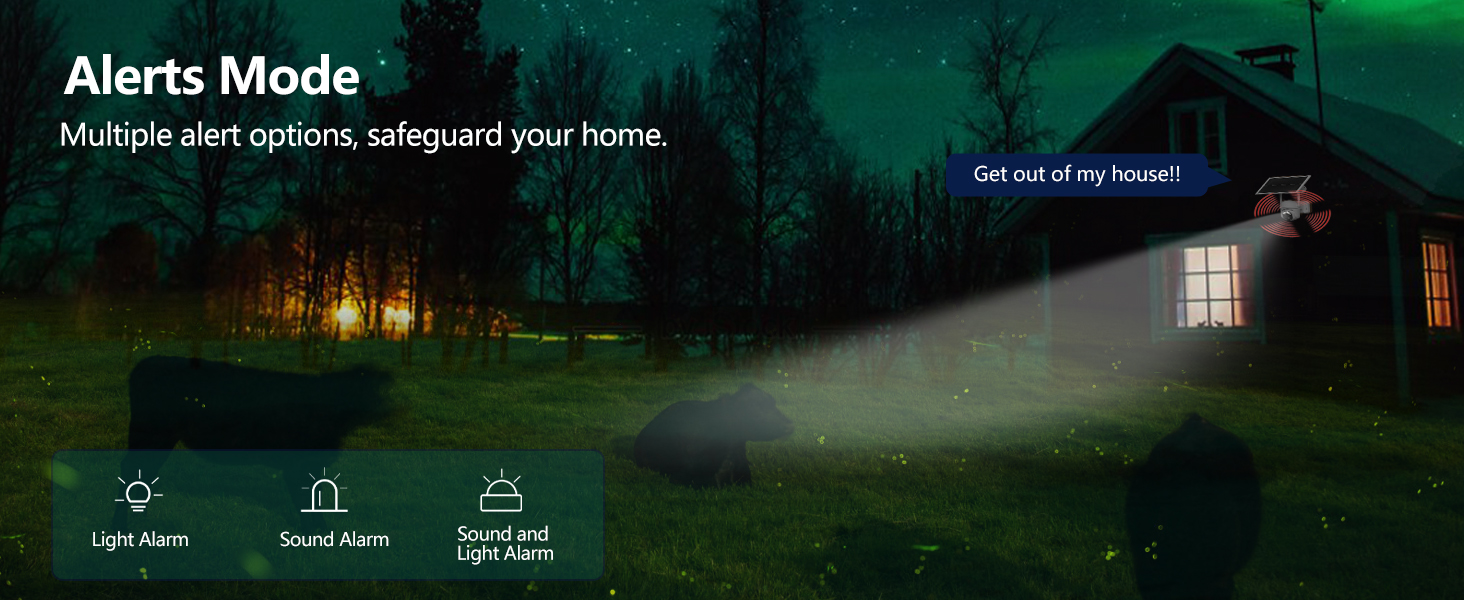
Figure 4.2: Alerts Mode (Light and Sound Alarm)
4.5 야간 투시경
The SOLIOM S40 features advanced night vision modes:
- 적외선 나이트 비전: 완전한 어둠 속에서도 선명한 흑백 영상을 제공합니다.
- 컬러 나이트 비전: When motion is detected or manually activated, the built-in spotlight illuminates the area, allowing for full-color video recording at night.

Figure 4.3: Day and Night Vision Comparison
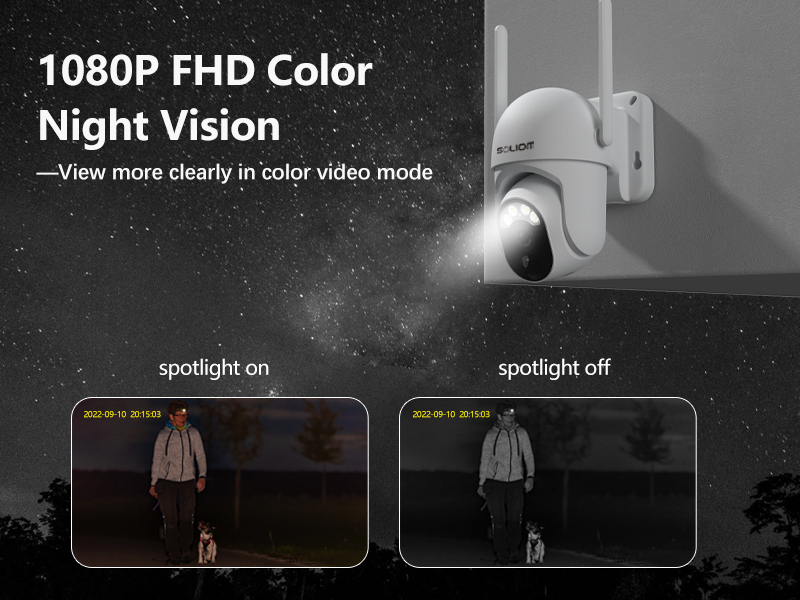
Figure 4.4: Color Night Vision with Spotlight
4.6 양방향 오디오
Use the microphone and speaker icons in the app's live view to enable two-way communication. This allows you to speak to visitors or deter intruders remotely.
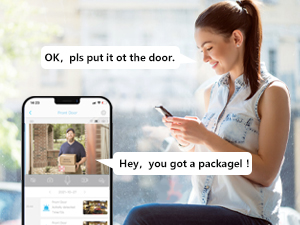
그림 4.5: 양방향 오디오 통신
5. 유지관리
- 청소: 카메라 렌즈와 태양 전지 패널을 부드러운 천으로 주기적으로 청소하십시오.amp cloth to ensure optimal performance. Do not use harsh chemicals.
- 배터리 상태: While the solar panel provides continuous charging, ensure the solar panel is free from obstructions and receives adequate sunlight. If the camera's battery level drops significantly, manually charge it via USB.
- 펌웨어 업데이트: Check the SOLIOM+ app regularly for firmware updates. Keeping your camera's firmware up-to-date ensures optimal performance and security.
- SD 카드 관리 : If using an SD card, periodically check its storage capacity and format it through the app if necessary to maintain recording efficiency.
6. 문제 해결
- 카메라 오프라인:
- 카메라 설치 위치에서 4G 신호 강도를 확인하세요.
- Ensure the SIM card is properly inserted and has an active data plan.
- 카메라 배터리가 충전되어 있는지 확인하십시오.
- Restart the camera by pressing the reset button (if applicable) or power cycling.
- 낮은 비디오 품질:
- 카메라 렌즈를 청소하세요.
- 특히 야간에는 적절한 조명을 확보하십시오.
- Check 4G signal stability.
- 동작 감지가 작동하지 않음:
- Adjust PIR sensitivity settings in the app.
- 카메라의 view 장애물이 없습니다.
- Check the motion detection schedule in the app.
- Battery Not Charging via Solar:
- 태양광 패널이 깨끗하고 이물질이 없는지 확인하세요.
- 태양광 패널이 매일 몇 시간 동안 직사광선을 받을 수 있도록 설치되어 있는지 확인하십시오.
- 태양광 패널과 카메라를 연결하는 케이블을 확인하십시오.
- 앱에 연결할 수 없습니다:
- 스마트폰의 인터넷 연결이 안정적인지 확인하세요.
- Verify the camera is powered on and has a working SIM card.
- Try resetting the camera (refer to the reset button location near the SIM/SD card slots).
7. 사양
| 특징 | 사양 |
|---|---|
| 모델 번호 | S40-4G |
| 연결성 | 3G/4G LTE (SIM Card required) |
| 전원 | 배터리 구동, 태양열 구동 |
| 비디오 해상도 | 1080 Pixels (Full HD) |
| 팬 각도 | 355도 |
| 기울기 각도 | 90도 |
| 분야 View | 360 Degrees (Pan/Tilt combined) |
| 나이트 비전 | Infrared, Color Night Vision (with Spotlight) |
| 동작 감지 | PIR 모션 센서 |
| 오디오 | 양방향 오디오 |
| 저장 | Micro SD Card (up to 128GB), Cloud Storage (subscription required) |
| 내후성 | IP66 |
| 치수(길이 x 너비 x 높이) | 3 x 3 x 5 인치 |
| 품목 무게 | 2.48파운드 |
8. 보증 및 지원
8.1 보증 정보
SOLIOM products typically come with a limited warranty. Please refer to the warranty card included with your product or visit the official SOLIOM web자세한 보증 약관은 해당 사이트에서 확인하세요.
8.2 고객 지원
If you encounter any issues or have questions not covered in this manual, please contact SOLIOM customer support. Contact information can usually be found on the SOLIOM official web사이트 또는 제품 포장에 표시되어 있습니다.
최신 정보와 지원 리소스를 보려면 다음 사이트를 방문하세요. SOLIOM Official Store on Amazon
Ask a question about this manual
Ask about setup, troubleshooting, compatibility, parts, safety, or missing instructions. Manuals+ will review the question and use this page’s manual context to help answer it.