
1. 서론
This manual provides essential information for the safe and efficient operation of your DATOUBOSS 2000W 48V Pure Sine Wave Power Inverter. Please read these instructions carefully before installation and use. Keep this manual for future reference.
2. 안전 지침
부상이나 인버터 및 연결된 장치의 손상을 방지하려면 항상 다음 안전 예방 조치를 준수하세요.
- Ensure the inverter is connected to a 48V DC power source only. Connecting to an incorrect voltag손상을 초래할 수 있습니다.
- 인버터를 비, 습기 또는 극한의 온도에 노출시키지 마십시오.
- Ensure adequate ventilation around the inverter to prevent overheating. Do not block the cooling fans.
- 인버터 c를 열지 마십시오.asing. 내부에는 사용자가 수리할 수 있는 부품이 없습니다. 모든 수리는 자격을 갖춘 기술자에게 맡기십시오.
- Keep flammable materials away from the inverter.
- Always connect the ground wire properly before operation.
- Disconnect the power source before making any connections or disconnections.
보호 기능
이 인버터는 안전한 작동을 보장하기 위해 다양한 보호 기능을 갖추고 있습니다.

이미지 2.1: Six Protection Circuit Functions. This image displays the various safety mechanisms integrated into the inverter, including protection against low voltag전자, 높은 볼륨tage, short circuits, overheating, overload, and reverse polarity connections.
- 낮은 볼륨tage 알람: The buzzer sounds twice at 1 Hz intervals.
- 낮은 볼륨tage 보호: The buzzer sounds continuously three times at 1 Hz intervals, and output is shut off.
- 낮은 볼륨tage 복구: Output automatically restores when voltage returns to safe levels, and the buzzer stops.
- 오버볼tage 보호: The buzzer sounds four times at 1 Hz intervals, and output is shut off.
- 오버볼tage 복구: Output automatically restores when voltage returns to safe levels, and the buzzer stops.
- 과열 보호: At 80°C ±5°C, the buzzer sounds five times at 1 Hz intervals, and output is shut off.
- 과부하 보호: Automatic shutdown for 10 seconds, followed by automatic recovery for 5 seconds. If overload persists, it locks after three consecutive attempts.
- 단락 보호: Immediate shutdown for 1 second, then locks.
3. 패키지 내용
패키지에 모든 품목이 들어 있는지 확인하세요.
- 1 x DATOUBOSS 2000W 48V Pure Sine Wave Power Inverter
- 2 x Connection Cables (for DC input)
- 1 x 사용자 매뉴얼(이 문서)
- 1 x 원격 제어
4. 제품 오버view
Familiarize yourself with the components of your inverter:

이미지 4.1: Inverter Front Panel and Connections. This image highlights the various input/output ports, the digital display, power switch, ground wire connection, and the internal heat dissipation fans.
주요 특징:
- 순수 사인파 출력: 민감한 전자 장비에 적합한 깨끗하고 안정적인 전원을 제공합니다.
- 고성능 출력: 2000W continuous power, 4000W peak power.
- 다중 출력 포트: Two EU standard AC outlets, two 5V 2.1A USB ports, one QC3.0 fast charging port, and one Type-C port.
- 효율적인 냉각: Equipped with two intelligent cooling fans that activate based on temperature and load.
- 원격 제어: 원거리에서도 편리하게 조작할 수 있습니다.
- 디지털 디스플레이: 입력 볼륨 표시tage, 출력 볼륨tage, and other operational status.
5. 사양
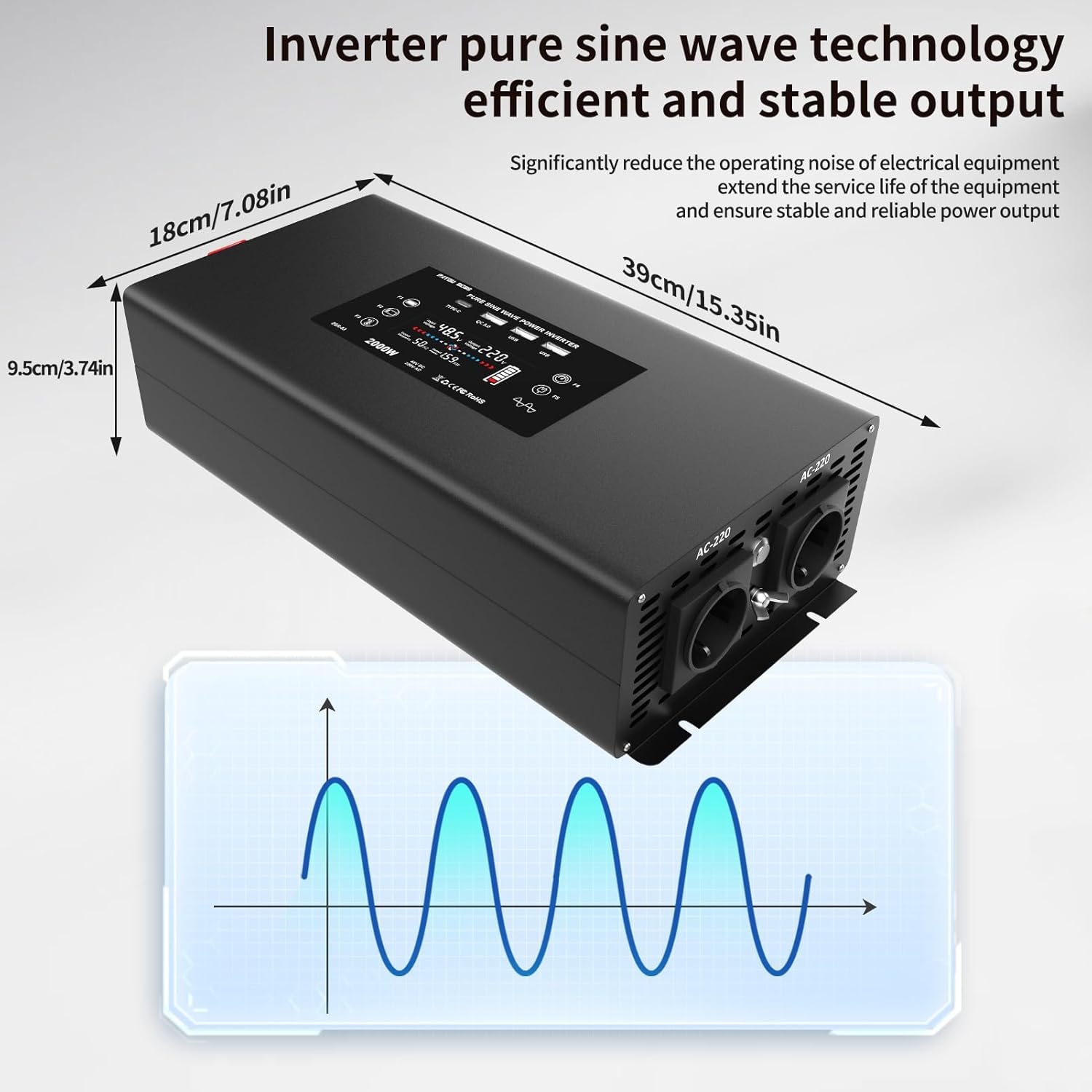
이미지 5.1: Inverter Dimensions and Pure Sine Wave Output. This image provides the physical measurements of the inverter and visually represents its pure sine wave technology for stable power delivery.
| 매개변수 | 값 |
|---|---|
| 모델 번호 | DN03-48V-2000W |
| 공칭 입력 Voltage | 48V DC(40-60V DC) |
| 공칭 출력 볼륨tage | 220-240V AC |
| 연속 전력 | 2000 와트 |
| 피크 파워 | 4000 와트 |
| 출력파형 | 순수한 사인 웨이브 |
| Waveform THD | ≤3% |
| 무부하 전류 | 0.8A |
| 변환 효율성 | ≥90% |
| 입력 오버볼륨tage 보호 | 60V ±0.3V DC |
| 입력 언더볼tage 보호 | 40V ±0.3V DC |
| 과열 보호 | 80°C ±5°C |
| 냉각 방식 | 팬 냉각 |
| 제품 크기(L x W x H) | 39cm x 18cm x 9.5cm |
| 제품 인증 | CE, FCC, RoHS |
| 색상 | 검은색 |
6. 설치 및 설정
올바른 설치를 위해 다음 단계를 따르세요.
- 위치를 선택하세요: 직사광선, 열원 및 가연성 물질을 피해 건조하고 통풍이 잘 되는 장소를 선택하십시오. 인버터 주변에 공기 흐름을 위한 충분한 공간을 확보하십시오.
- 설치: Securely mount the inverter on a stable surface using appropriate fasteners.
- DC 입력 연결:
- 인버터의 전원 스위치가 꺼져 있는지 확인하세요.
- Connect the supplied DC cables to the inverter's DC input terminals. Ensure correct polarity: red cable to positive (+), black cable to negative (-).
- Connect the other ends of the DC cables to your 48V battery bank. Again, ensure correct polarity. Tighten all connections securely to prevent loose contacts and arcing.
- 접지: Connect the inverter's ground terminal to a reliable earth ground using a suitable ground wire. This is crucial for safety.
- 초기 전원 켜기: After all connections are secure, switch on the 48V DC power source (e.g., battery switch). Then, press the power button on the inverter or use the remote control to turn it ON. The display should illuminate, indicating operational status.
7. 사용 설명서
켜기/끄기:
- 켜려면: Press the power button on the inverter or the ON button on the remote control. The display will show input/output voltage.
- 끄기: Press the power button on the inverter or the OFF button on the remote control. The display will turn off.
AC 기기 연결하기:
The inverter provides two EU standard AC outlets. Ensure the total power consumption of your devices does not exceed 2000W.
- Plug your AC appliances into the AC outlets on the inverter.
- Turn on your appliances.
USB 충전 포트 사용 방법:
The inverter features two standard USB ports (5V 2.1A), one QC3.0 fast charging port, and one Type-C port.
- Connect your USB-compatible devices (e.g., smartphones, tablets) to the appropriate USB or Type-C port.
- The inverter will automatically provide power for charging.

이미지 7.1: Wide Compatibility. This image illustrates the diverse range of appliances and devices that can be powered by the inverter, including laptops, coffee machines, and various household electronics.
원격 제어 작동:
The included remote control allows you to power the inverter on and off from a distance, offering convenience, especially if the inverter is installed in a less accessible location.
- Point the remote control towards the inverter.
- Press the ON button to activate the inverter.
- Press the OFF button to deactivate the inverter.
8. 유지관리
정기적인 유지보수는 인버터의 최적 성능과 수명 연장을 보장합니다.
- 청소: 인버터 외부는 부드럽고 마른 천으로 정기적으로 청소하십시오. 액체 세척제나 용제는 사용하지 마십시오.
- 통풍: Ensure the cooling vents and fans are free from dust and obstructions. The intelligent cooling fans help dissipate heat efficiently.
- 사이: Regularly check all DC input and ground connections to ensure they are tight and free from corrosion.
- 저장: If storing the inverter for an extended period, ensure it is clean, dry, and stored in a cool, well-ventilated area. Disconnect it from the power source.
9. 문제 해결
일반적인 문제와 해결 방법은 다음 표를 참조하세요.
| 문제 | 가능한 원인 | 해결책 |
|---|---|---|
| 인버터가 켜지지 않습니다 | No DC input power; Loose connections; Blown fuse (external) | 배터리 연결 및 용량 확인tage; Ensure cables are securely fastened; Check external fuses. |
| 낮은 볼륨tage Alarm/Protection (Buzzer sounds 2-3 times) | 배터리 용량tage too low (below 40V DC) | Recharge or replace the battery. Reduce load. |
| 오버볼tage Protection (Buzzer sounds 4 times) | 입력 볼륨tage too high (above 60V DC) | Check charging system or battery voltage. Disconnect from source if voltage는 불안정하다. |
| Overheat Protection (Buzzer sounds 5 times) | Inverter is too hot (above 80°C) | Reduce load; Ensure proper ventilation; Clean cooling vents/fans. Allow to cool down. |
| 과부하 보호 | Connected load exceeds 2000W continuous power | Reduce the total load by disconnecting some appliances. The inverter will attempt to restart. |
| 단락 보호 | Short circuit in connected appliance or wiring | Disconnect all AC loads. Check appliances and wiring for short circuits. Restart the inverter. |
| No AC output, but inverter is ON | Appliance fault; Internal protection triggered | Check if the appliance is working correctly. Refer to protection functions above. |
If the problem persists after following these troubleshooting steps, please contact customer support.
10. 보증 및 지원
제조업체 보증:
This DATOUBOSS inverter comes with a 1년 제조사 보증 구매일로부터. 본 보증은 정상적인 사용 중 발생하는 재료 및 제조상의 결함에 적용됩니다. 오용, 사고, 무단 개조 또는 부적절한 설치로 인한 손상은 보증되지 않습니다.
고객 지원:
For technical assistance, warranty claims, or any questions regarding your DATOUBOSS inverter, please contact the seller or manufacturer directly. Please have your product model number (DN03-48V-2000W) and proof of purchase available when contacting support.