
1. 서론
This manual provides essential information for the safe and efficient operation of your Tbest AT2-1500X Variable Frequency Drive (VFD) speed controller. Please read this manual thoroughly before installation, operation, or maintenance to ensure proper use and prevent potential hazards.
The Tbest AT2-1500X VFD is designed for controlling the speed of single-phase AC motors up to 1.5 kW. It features a unique control method for high torque, precision, and a wide speed regulation range. Its robust design offers good anti-trip performance and adaptability to various environmental conditions, including power fluctuations, temperature, humidity, and dust interference. The VFD incorporates optimized PWM control technology and electromagnetic compatibility for low noise and reduced electromagnetic interference.
2. 안전수칙
경고: Failure to follow these safety instructions may result in death, severe injury, or serious damage to the inverter.
- Always ensure the power supply is disconnected before performing any wiring or maintenance on the VFD.
- Do not touch the VFD terminals when power is applied, as this can cause severe damage to the inverter.
- Do not install the VFD in environments with flammable materials to avoid fire hazards.
- The ground terminal of the inverter must be properly and securely grounded.
- Avoid installing the VFD in environments with explosive gases to prevent explosion hazards.
- Only qualified personnel should perform internal inspections or repairs of the VFD. Incorrect procedures can lead to damage or injury.

그림 1: 전면 view of the VFD showing the control panel and safety warning label.
3. 제품 특징
- 고성능: Utilizes a unique control method to achieve high torque, high precision, and a wide speed regulation range.
- 향상된 안정성: Features good anti-trip performance and adaptability to power fluctuations, temperature, humidity, and dust interference.
- Low Noise & EMI: Optimized PWM control technology and electromagnetic compatibility minimize operational noise and electromagnetic interference.
- User-Friendly Wiring: Easy to use and connect with screw terminals for convenient wiring.
- 효율적인 열 발산: Designed with a large heat sink to ensure effective heat dissipation and prolonged operational life.
4. 사양
| 매개변수 | 값 |
|---|---|
| 모델 | AT2-1500X |
| 적용범위 | 만능인 |
| 파워 페이즈 | 단상 |
| 정격 전류 | 8아 |
| 정격 볼륨tage | AC 220 V (Single Phase) |
| 공급량tage | 낮은 볼륨tage |
| Suitable Motor Power | 1.5kW(XNUMXkW) |
| 필터 | 없음 |
| DC Power Source Type | 현재 유형 |
| 제어 방법 | V/F Open-Loop Control |
| 조정 가능한 출력 볼륨tage 방법 | PWM 제어 |
| 크기(대략) | 12.5 x 12.5 x 18cm |
| 제품 참조 번호 | Tbesth8d7koib43 |

그림 2: 후면 view of the VFD, highlighting cooling and terminal access.

그림 3: 하단 view of the VFD, illustrating the heat sink design for efficient cooling.
5. 설정 및 설치
Proper installation is crucial for the safe and reliable operation of the VFD. Ensure all safety precautions are followed before proceeding.
5.1 장착
- Mount the VFD in a clean, dry, and well-ventilated area, away from direct sunlight, excessive heat, moisture, and dust.
- Ensure sufficient clearance around the VFD for proper airflow, especially around the heat sink and cooling fans.
- Avoid mounting on flammable surfaces.
5.2 배선
All wiring must be performed by a qualified electrician and in accordance with local electrical codes.
- 전력 입력(L, N): Connect the single-phase AC 220V power supply to the 'L' and 'N' terminals.
- 모터 출력(U, V, W): Connect the single-phase AC motor to the 'U', 'V', and 'W' terminals. For single-phase motors, typically two of these terminals are used, or specific wiring instructions for your motor should be followed.
- 접지(GND): 접지 단자를 안정적인 접지에 연결하십시오. 이는 안전을 위해 매우 중요합니다.
- 제어 터미널: The VFD includes additional control terminals for external control signals (e.g., start/stop, speed reference). Refer to the detailed wiring diagram for specific connections.

그림 4: 상세 view of the VFD's screw terminals for electrical connections.
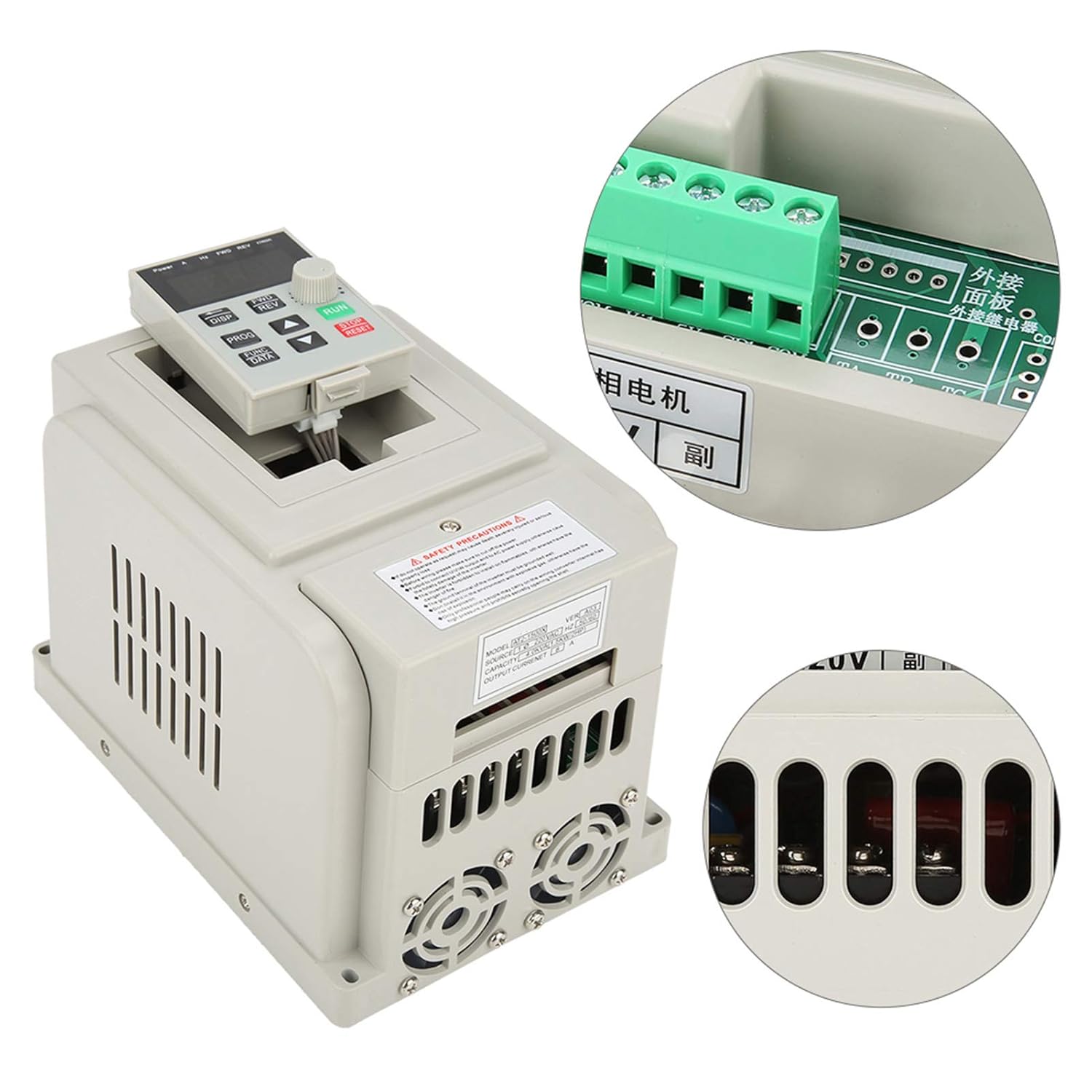
그림 5: 이상view of the VFD with a focus on the control panel and wiring interface.
6. 사용 설명서
The VFD features an intuitive control panel for easy operation.

Figure 6: Control panel of the Tbest AT2-1500X VFD.
6.1 제어판 이상view
- 표시하다: Shows operational parameters such as frequency, current, voltage, 그리고 속도.
- DISP 버튼: Cycles through different display parameters.
- 전진/후진 버튼: Controls the forward and reverse direction of the motor.
- 프로그램 버튼: Enters programming mode to adjust VFD parameters.
- FUNC/DATA Button: Used to select functions or confirm data entry in programming mode.
- 위/아래 화살표 버튼: Adjusts parameter values or navigates through menus.
- 회전식 손잡이: Provides fine adjustment for speed or parameter values.
- 실행 버튼(녹색): 모터를 시작합니다.
- 정지/재설정 버튼(빨간색): 모터를 멈추거나 오류 조건을 재설정합니다.
6.2 기본 작업
- 전원 켜기: Ensure all wiring is correct and secure, then apply power to the VFD. The display will illuminate.
- 주파수/속도 설정: Use the Up/Down arrow buttons or the rotary knob to set the desired output frequency (and thus motor speed). The display will show the current frequency.
- 시동 모터: 를 누르세요 달리다 button to start the motor. The VFD will accelerate the motor to the set frequency.
- 방향 전환: If configured, use the 정방향/역방향 buttons to change the motor's rotation direction.
- 정지 모터: 를 누르세요 정지/리셋 button to stop the motor. The VFD will decelerate the motor to a stop.
- 매개변수 조정: For advanced settings, press the 음식물 button to enter programming mode. Use the arrow buttons and 기능/데이터 button to navigate and modify parameters. Refer to the full programming manual (if available) for detailed parameter descriptions.
7. 유지관리
정기적인 유지관리는 VFD의 수명과 최적의 성능을 보장합니다.
- 청소: Periodically clean the VFD's exterior, especially the ventilation openings and heat sink fins, to prevent dust accumulation. Use a soft, dry cloth. Do not use liquid cleaners.
- 팬 검사: Check the cooling fans for proper operation and ensure they are free from obstructions. Replace noisy or malfunctioning fans.
- 터미널 확인: Annually, inspect all wiring terminals for tightness and signs of corrosion or overheating. Retighten connections as necessary (ensure power is off).
- 환경 조건: 작동 환경이 지정된 온도 및 습도 범위 내에 유지되도록 하세요.
8. 문제 해결
이 섹션에서는 일반적인 문제에 대한 지침을 제공합니다. 복잡한 문제의 경우 기술 지원팀에 문의하십시오.
| 문제 | 가능한 원인 | 해결책 |
|---|---|---|
| 모터가 시동되지 않습니다 | No power, incorrect wiring, STOP/RESET button pressed, parameter error. | Check power supply. Verify wiring connections. Press RUN. Check VFD parameters. |
| 모터가 잘못된 속도로 작동합니다 | Incorrect frequency setting, motor parameters not matched. | Adjust frequency using rotary knob/arrow buttons. Verify motor parameters in VFD settings. |
| VFD displays an error code | 과전류, 과전압tag전자, 언더볼tage, overheat, motor overload. | Note the error code. Press STOP/RESET. Consult the full VFD manual for specific error code meanings and solutions. Check motor load and power supply. |
| 과도한 소음 또는 진동 | Motor imbalance, mechanical issue, VFD parameter mismatch. | Inspect motor and mechanical connections. Review VFD motor parameters. |
9. 보증 및 지원
Specific warranty information for the Tbest AT2-1500X VFD is not provided in this manual. For details regarding warranty coverage, technical support, or service, please contact your retailer or the manufacturer directly. Ensure you have your product model number (AT2-1500X) and any purchase documentation available when seeking support.