
소개
Thank you for choosing the Hodozzy 9310W 2 Din Car Stereo. This manual provides detailed instructions for installation, operation, maintenance, and troubleshooting to ensure optimal performance and user experience. Please read this manual thoroughly before using the device and keep it for future reference.
패키지 내용
포장을 풀 때 아래 나열된 모든 품목이 들어 있고 상태가 양호한지 확인하세요.
- 1 x Hodozzy 9310W Car MP5 Player
- 1 x 전원 케이블
- 1 x USB 케이블
- 안테나 헤드 1개
- 1 x 원격 제어
- 1 x 2 Din Frame
- 1 x 사용자 설명서
- 1 x 장착 브래킷
- 4 x 나사
- 1 x 마이크
- 후방 카메라 1대
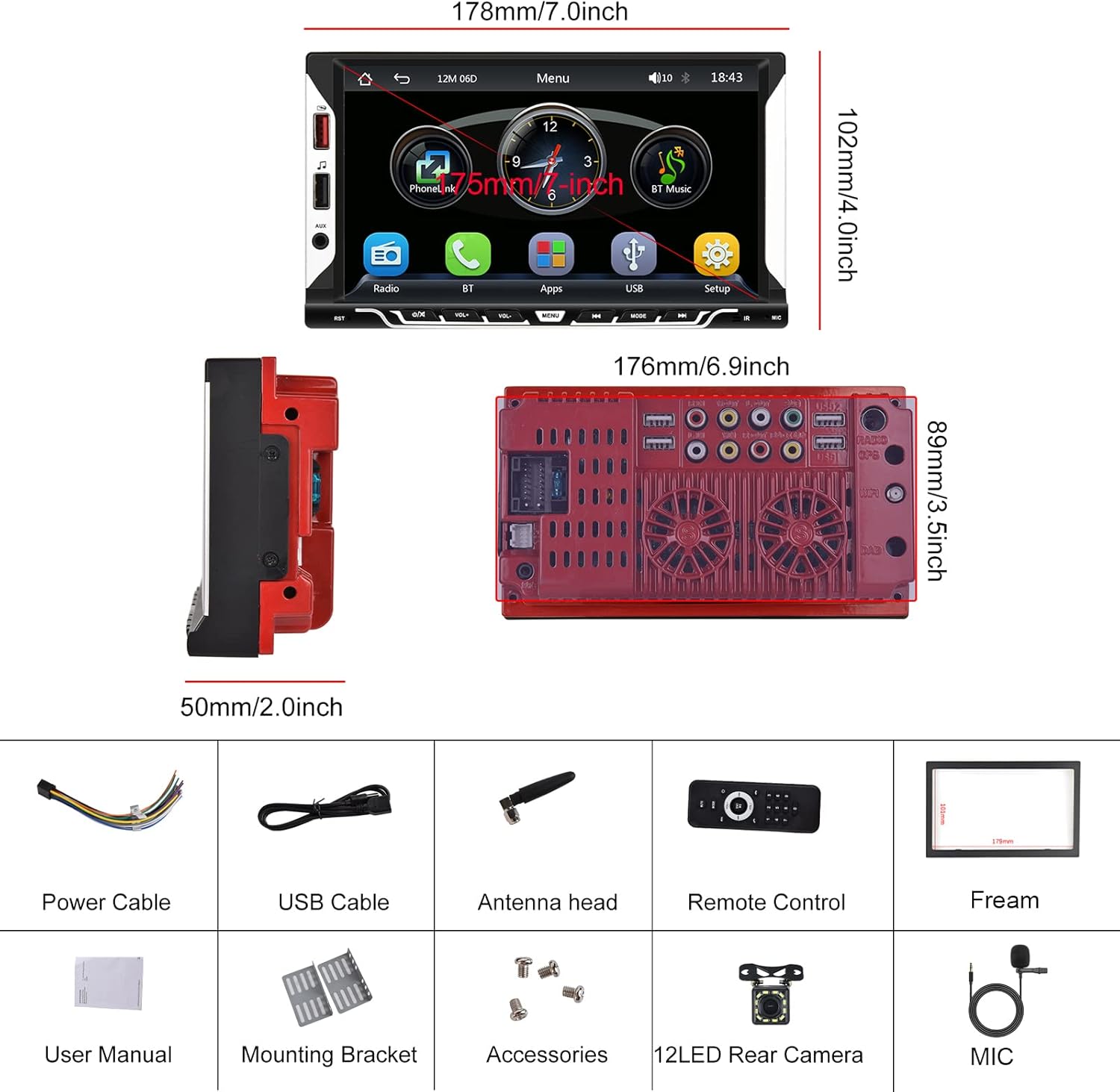
Image: Hodozzy 9310W Car Stereo package contents, showing the main unit, power cable, USB cable, antenna, remote control, frame, user manual, mounting bracket, screws, microphone, and reversing camera.
설정 및 설치
배선도
Refer to the following diagram for proper wiring connections. Incorrect wiring can damage the device or your vehicle's electrical system. If you are unsure, consult a professional installer.
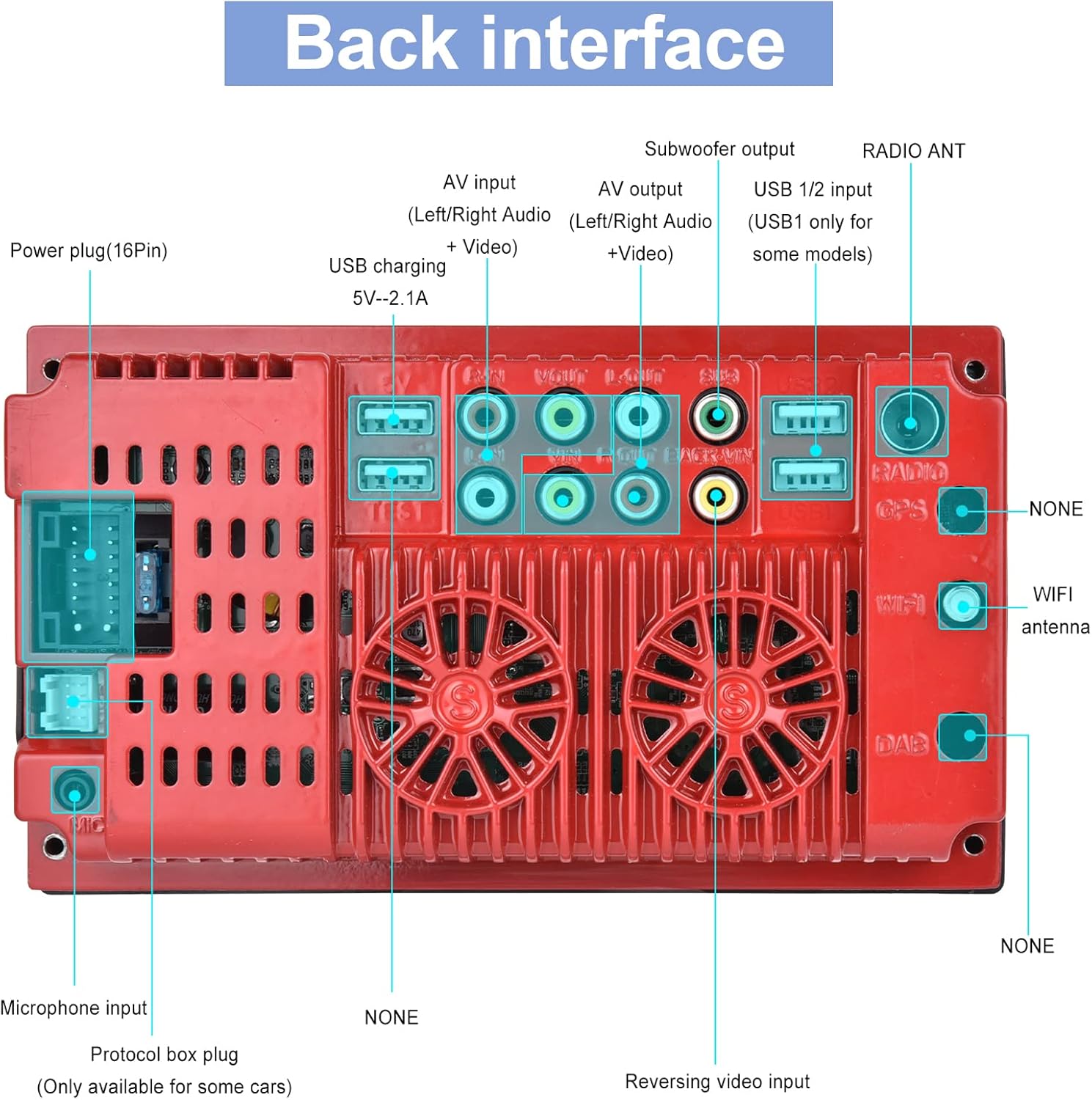
Image: Back interface of the Hodozzy 9310W Car Stereo, detailing connections for power (16-pin), AV input/output, subwoofer output, USB 1/2, radio antenna, microphone input, protocol box plug, and reversing video input.
- 전원 케이블 : Connect the yellow wire to the constant 12V power supply, the red wire to the accessory (ACC) 12V power supply, and the black wire to ground.
- 스피커 전선: Connect the speaker wires to your vehicle's speakers, ensuring correct polarity for each channel (Front Left, Front Right, Rear Left, Rear Right).
- 후방 카메라 입력: Connect the reversing camera's video output to the 'Reversing Video Input' port. Connect the camera's power to the vehicle's reverse light circuit.
- USB 포트: Use the USB 2.0 ports for media playback, smartphone charging, or connecting a designated USB DVR.
- 보조 입력: AUX 입력을 통해 외부 오디오 장치를 연결합니다.
- 마이크로폰: 핸즈프리 작동 시 통화 품질 향상을 위해 외부 마이크를 연결하십시오.
- 라디오 안테나: Connect your vehicle's radio antenna to the 'RADIO ANT' port.
설치
Install the mounting brackets to the sides of the car stereo using the provided screws. Slide the unit into the 2 Din opening in your vehicle's dashboard until it clicks into place. Secure the unit using the mounting frame and screws.
작동 지침
기본 작업
- 전원 켜기/끄기: 전면 패널이나 리모컨의 전원 버튼을 누르세요.
- 볼륨 조절: Use the volume knob or buttons on the front panel/remote to adjust the sound level.
- 터치스크린: Navigate through menus and functions by touching the 7-inch display.
무선 CarPlay 및 Android Auto
This unit supports wireless CarPlay for iPhone and wireless Android Auto for Android phones, allowing seamless integration of your smartphone's features.
- 스마트폰에서 Bluetooth가 활성화되어 있는지 확인하세요.
- On the car stereo, go to the CarPlay/Android Auto application.
- 검색 and select your car stereo's Bluetooth name on your phone.
- 두 기기의 페어링 코드를 확인하세요.
- 연결되면 CarPlay 또는 Android Auto가 자동으로 실행됩니다.
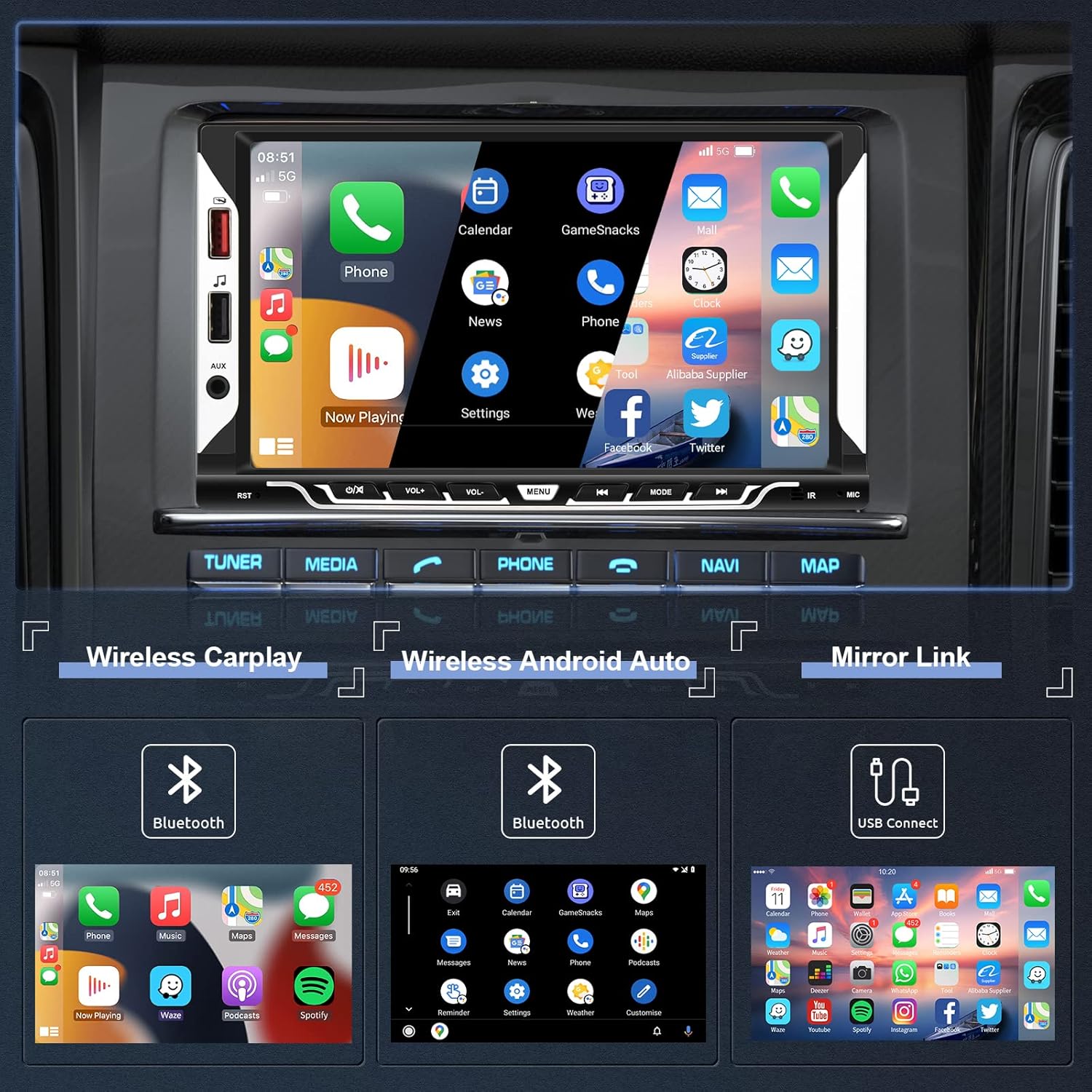
Image: The car stereo screen showing the main interface with options for Wireless CarPlay, Wireless Android Auto, and Mirror Link. Below, examples of CarPlay, Android Auto, and Mirror Link interfaces are displayed.
미러 링크 기능
Mirror Link allows you to display your smartphone's screen directly on the car stereo's display via a USB cable.
- 정품 USB 케이블을 사용하여 스마트폰을 차량용 스테레오에 연결하세요.
- Follow the on-screen prompts on both your phone and the car stereo to enable screen mirroring.
블루투스 연결
The integrated Bluetooth 5.1 module enables hands-free calling and wireless audio streaming.
- 스마트폰에서 블루투스를 활성화하세요.
- 차량용 스테레오에서 블루투스 메뉴로 이동하세요.
- 검색 available devices and select the car stereo's Bluetooth name.
- Confirm the pairing. You can now make/receive calls and play music wirelessly.

Image: The top section shows the Bluetooth interface for pairing devices, making calls, and accessing music and address book. The bottom section displays the EQ System settings with a 10-band equalizer and preset sound modes like Jazz, Classic, Rock, Pop, and User.
FM 라디오
Access FM radio stations with clear reception and 18 preset memory slots.
- 자동 스캔: The unit can automatically scan and save strong FM stations.
- 수동 조정 : Manually tune to desired frequencies.
- 사전 설정된 방송국: Save your favorite stations to the 18 preset buttons for quick access.

Image: The top section illustrates the FM Radio interface, showing frequency display (87.50 MHz), signal strength, and preset station buttons (P1-P6). The bottom section shows the Steering Wheel Control (SWC) setup menu, allowing users to program various functions to their vehicle's steering wheel buttons.
스티어링 휠 컨트롤(SWC)
If your vehicle supports steering wheel controls, you can configure them to operate the car stereo for convenience and safety.
- Access the 'Steering Wheel Controls' settings menu.
- Follow the on-screen instructions to map your steering wheel buttons to specific functions (e.g., volume up/down, next/previous track, mode).
후방 카메라 기능
포함된 후방 카메라가 선명한 영상을 제공합니다. view 차량 뒤쪽 공간을 확보하여 주차 및 후진 시 안전성을 향상시킵니다.
- When the vehicle is shifted into reverse gear, the car stereo will automatically display the camera feed on the screen.
- The display includes parking guidelines to assist with precise maneuvering.
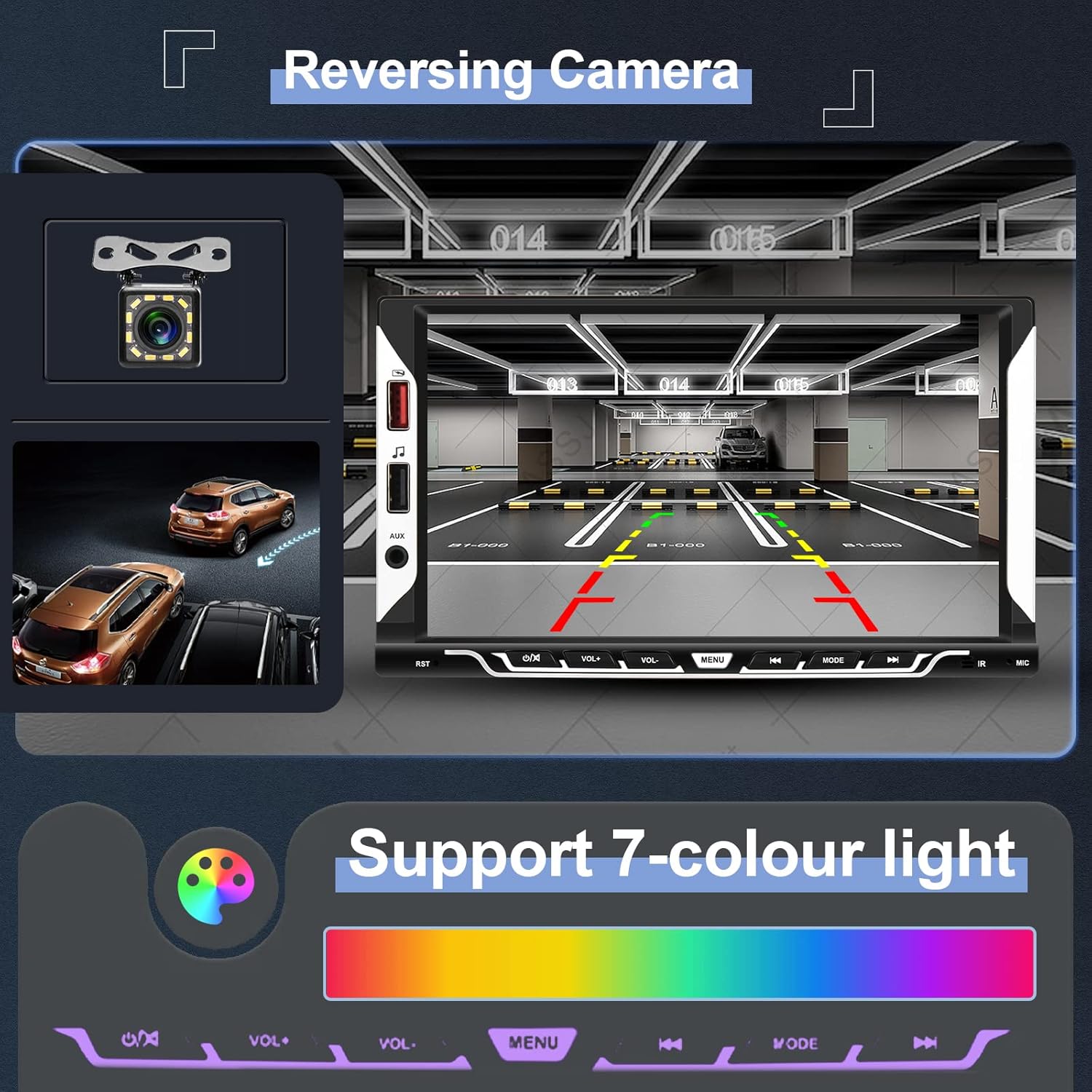
Image: The top section shows the reversing camera view on the car stereo screen, complete with parking guidelines and a clear image of the rear environment. The bottom section illustrates the 7-color light support, allowing users to customize the button illumination colors.
EQ System
Adjust the audio output to your preference using the built-in 10-band equalizer and various preset sound effects (Jazz, Classic, Rock, Pop, User).
UI 사용자 정의
Personalize your car stereo's appearance:
- 백라이트 설정: Choose from 7 different button illumination colors or set them to cycle automatically.
- 배경화면: Select from various themed UI wallpapers.
유지
- 화면 청소: 부드럽고 보풀이 없는 천을 사용하여 터치스크린을 부드럽게 닦으세요. 연마성 세척제나 용제는 사용하지 마세요.
- 일반 관리 : Keep the unit free from dust and moisture. Do not expose it to extreme temperatures.
- 소프트웨어 업데이트: Check the official Hodozzy web최적의 성능과 새로운 기능을 보장하기 위해 사용 가능한 소프트웨어 업데이트가 있는지 사이트를 확인하십시오.
문제 해결
| 문제 | 가능한 원인 | 해결책 |
|---|---|---|
| 전원이 없습니다 | 잘못된 전원 배선; 퓨즈 단선; 차량 배터리 방전. | Check power cable connections (yellow, red, black). Inspect vehicle fuses. Ensure vehicle battery is charged. |
| 소리가 나지 않습니다 | 스피커 선이 분리되었습니다. 볼륨이 너무 낮습니다. 음소거 기능이 활성화되었습니다. | Verify speaker wire connections. Increase volume. Check if the unit is muted. |
| 블루투스가 연결되지 않습니다 | 휴대폰/스테레오에서 블루투스가 활성화되어 있지 않거나, 페어링 과정이 잘못되었습니다. | Ensure Bluetooth is active on both devices. Restart Bluetooth on both devices. Re-attempt pairing. |
| CarPlay/Android Auto가 실행되지 않습니다 | Incorrect Bluetooth connection; Phone software issue; USB cable issue for Mirror Link. | Ensure stable Bluetooth connection for wireless. For Mirror Link, use an original USB cable. Restart phone and stereo. |
| 후방 카메라 영상이 표시되지 않습니다 | Camera wiring incorrect; Camera power issue; Reverse trigger wire not connected. | Check camera video input and power connections. Ensure the reverse trigger wire is correctly connected to the vehicle's reverse light. |
| Unit freezes or is unresponsive | 일시적인 소프트웨어 오류입니다. | Press the reset button (usually a small hole requiring a pin) or disconnect power for a few minutes and reconnect. |
명세서
| 모델 | 9310와트 |
| 체계 | F133 |
| 화면 크기 | 7.0인치 |
| 화면 해상도 | 1024*600 |
| 권tage | 12V |
| 오디오 Amp리퍼 | 7388 |
| 출력 전력 | 4*45W |
| 블루투스 버전 | 5.1 |
| USB 인터페이스 | USB2.0 |
| 입력 반전 | 영어: CVBS(미국) |
| 무선 범위 | FM 87.5-108.0MHz (유럽) |
| 작동 온도 | -20℃ ~ 70℃ |
| 지원되는 오디오 형식 | MP3 / WMA / WAV / APE / FLAC |
| 지원되는 비디오 형식 | MKV/AVI/TS/TP/MP4/M4V (Max bitrate 50-80Mbps) |
| 특별 기능 | Wireless Apple CarPlay, Wireless Android Auto, Mirror Link, Bluetooth, FM Radio, Reversing Camera Input, Steering Wheel Control |
치수
Image: Diagram showing the dimensions of the Hodozzy 9310W car stereo. The front panel measures 178mm (7.0 inches) in width and 102mm (4.0 inches) in height. The main body has a width of 176mm (6.9 inches), a height of 89mm (3.5 inches), and a depth of 50mm (2.0 inches).
보증 정보
The Hodozzy 9310W Car Stereo comes with a 2-year replacement warranty. This warranty covers manufacturing defects and ensures that your product will be replaced if it fails due to such issues within two years from the date of purchase. Please retain your proof of purchase for warranty claims.
고객 지원
For any questions, technical assistance, or warranty claims, please contact Hodozzy customer support. We offer lifetime support for our products.
- 이메일: hodozzyofficial@163.com
- 응답 시간: 저희는 18시간 이내에 문의에 답변드리는 것을 목표로 하고 있습니다.