
1. 서론
구매해주셔서 감사합니다asing the LFF LDR113-EU Kitchen Radio. This manual provides essential information for the safe and efficient operation of your device. Please read it thoroughly before use and retain it for future reference.
The LFF LDR113-EU is a versatile kitchen radio featuring DAB+, FM, and Bluetooth connectivity. It includes dual alarms, a sleep timer, and 60 station presets, designed for both tabletop use and under-cabinet mounting.
2. 안전 정보
- 전원: 제공된 전원 어댑터만 사용하세요. 볼륨을 확인하세요.tage는 귀하의 지역 전원 공급 장치와 일치합니다.
- 물과 습기: Do not expose the device to water, rain, or excessive moisture. Avoid placing liquids near the radio.
- 통풍: 기기 주변에 적절한 환기가 이루어지도록 하십시오. 환기구를 막지 마십시오.
- 열: 장치를 라디에이터, 난방 장치, 스토브 또는 기타 열을 발생시키는 기기와 같은 열원으로부터 멀리 두십시오.
- 청소: 청소하기 전에 전원을 차단하십시오. 부드럽고 마른 천을 사용하십시오. 액체 세척제나 스프레이형 세척제는 사용하지 마십시오.
- 서비스: 이 제품을 직접 수리하려고 하지 마십시오. 모든 서비스는 자격을 갖춘 서비스 담당자에게 문의하십시오.
- 놓기: Place the radio on a stable, level surface or mount it securely according to the instructions.
3. 패키지 내용
패키지에 모든 품목이 들어 있는지 확인하세요.
- LFF LDR113-EU Kitchen Radio
- 전원 어댑터
- 장착 키트(나사, 스페이서, 장착 템플릿)
- 사용 설명서 (본 문서)
4. 제품 오버view
라디오의 구성 요소와 제어 장치에 대해 알아보세요.

그림 4.1: 앞쪽 view of the LFF LDR113-EU Kitchen Radio, showing the LCD display on the left, control buttons in the center, and a large rotary knob on the right. The buttons include power, mode, menu, info, preset, timer/sleep, and navigation arrows. The rotary knob is for volume and selection.

그림 4.2: Diagram illustrating the key features of the LFF Kitchen Radio, including DAB/DAB+ radio, FM radio, two alarms, sleep timer, Bluetooth connectivity, and 60 station presets.
4.1. 컨트롤 및 디스플레이
- LCD 컬러 디스플레이: 현재 모드, 방송국 정보, 시간 및 설정을 표시합니다.
- 전원 버튼: 라디오를 켜거나 끕니다.
- 모드 버튼: DAB+, FM, 블루투스 모드 간 전환이 가능합니다.
- 메뉴/정보 버튼: Accesses menu options or displays station information.
- 사전 설정 버튼(1-5): Quick access to saved stations.
- 타이머/수면 버튼: 취침 타이머 또는 알람 기능을 설정합니다.
- 탐색 버튼(위/아래/왼쪽/오른쪽): Navigates through menus and station lists.
- Rotary Knob (Volume/Enter): Adjusts volume, scrolls through options, and confirms selections.
5. 설정
5.1. 전원 연결
- 전원 어댑터를 라디오 뒷면의 DC IN 포트에 연결하십시오.
- 전원 어댑터를 벽면 콘센트에 꽂으세요.
- 라디오가 켜지거나 대기 모드로 전환됩니다.
5.2. Initial Scan (DAB+ and FM)
Upon first power-on, the radio will typically perform an automatic scan for DAB+ and FM stations. If not, follow these steps:
- 를 누르세요 방법 버튼을 눌러 DAB+ 또는 FM 모드를 선택하세요.
- For DAB+, the radio will usually initiate a full scan automatically. If not, navigate to the 'Full Scan' option in the DAB+ menu and press the rotary knob to confirm.
- For FM, navigate to the 'Auto Scan' option in the FM menu and press the rotary knob to confirm.
- The radio will search for available stations and store them.

그림 5.1: The LFF Kitchen Radio's LCD color screen displaying the main menu with icons for Digital Radio (DAB+), FM Radio, and Bluetooth, indicating available modes.
6. 사용 설명서
6.1. 전원 켜기/끄기
를 누르세요 힘 button to turn the radio on or off (standby mode).
6.2. 모드 선택
를 누르세요 방법 button repeatedly to cycle through DAB+, FM, and Bluetooth modes.
6.3. DAB+ 라디오 운영
- In DAB+ mode, use the 위/아래 navigation buttons or the rotary knob to browse available stations.
- Press the rotary knob to select a station.
- 누르다 메뉴/정보 에게 view 방송국 정보(예: 프로그램 유형, 신호 강도).
6.4. FM 라디오 작동
- FM 모드에서는 다음을 사용합니다. 위/아래 navigation buttons to tune to stations manually.
- 를 누르고 계세요 위/아래 buttons for automatic station seeking.
- 누르다 메뉴/정보 에게 view 역 정보.
6.5. 블루투스 연결
Connect your smartphone or other Bluetooth-enabled device to the radio.
- 를 누르세요 방법 button to select Bluetooth mode. The display will show 'Bluetooth Pairing'.
- 모바일 기기에서 블루투스를 활성화하고 사용 가능한 기기를 검색하세요.
- Select 'LFF LDR113-EU' from the list of devices.
- Once connected, the radio display will show 'Bluetooth Connected'. You can now play audio from your device through the radio.
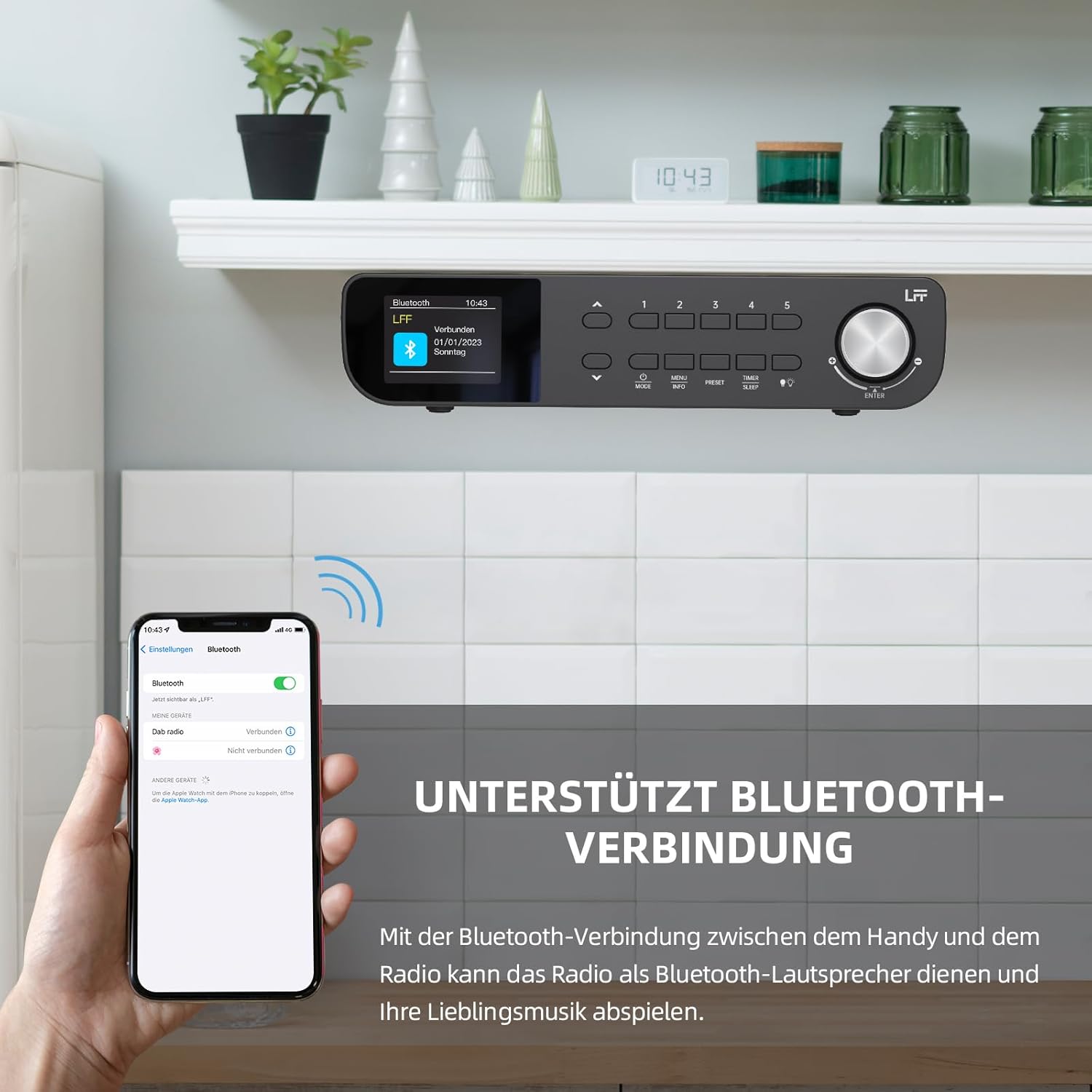
그림 6.1: The LFF Kitchen Radio displaying a successful Bluetooth connection, with a smartphone screen showing the radio as a connected device.

그림 6.2: 클로즈업 view of the radio's display indicating 'LFF' and 'Connected' under the Bluetooth menu, confirming a successful pairing.
6.6. 알람 설정
이 라디오에는 두 개의 독립적인 알람 기능이 있습니다.
- 를 누르세요 타이머/수면 button repeatedly until 'Alarm 1' or 'Alarm 2' appears.
- Use the navigation buttons and rotary knob to set the alarm time, source (DAB+, FM, or Buzzer), and frequency (daily, weekdays, weekends, once).
- Confirm settings by pressing the rotary knob.

그림 6.3: Close-up of the radio's display showing the current time and options to activate or deactivate Alarm 1 and Alarm 2.
6.7. 취침 타이머
취침 타이머 기능은 설정된 시간이 지나면 라디오가 자동으로 꺼지도록 해줍니다.
- 를 누르세요 타이머/수면 button repeatedly until 'Sleep Timer' appears.
- Use the navigation buttons or rotary knob to select the desired sleep duration (e.g., 15, 30, 60 minutes).
- 회전식 손잡이를 눌러 확인하십시오.

그림 6.4: Close-up of the radio's display showing the 'Sleep Timer' setting, with an option to set the duration, for example, to 30 minutes.
6.8. 사전 설정
최대 60개의 즐겨찾는 채널을 저장하여 빠르게 접속하세요.
- 사전 설정을 저장하려면: 원하는 방송국을 선택하세요. 다음 중 하나를 길게 누르세요. 사전 설정(1-5) buttons until 'Preset Saved' appears. For additional presets, use the 'Preset Store' option in the menu.
- 프리셋 불러오기: 다음 중 하나를 짧게 누르세요. 사전 설정(1-5) buttons. For other presets, navigate to 'Preset Recall' in the menu.
6.9. LED 라이트
The radio includes an integrated LED light, useful for illuminating the area below if mounted under a cabinet.
- 를 누르세요 빛 button (if available, or navigate through menu) to turn the LED light on or off.

그림 6.5: The LFF Kitchen Radio mounted under a kitchen cabinet, with its integrated LED light providing illumination to the countertop below.
6.10. 디스플레이 밝기
Adjust the display backlight brightness to suit your environment.
- Access the 'Display' or 'Settings' menu.
- Select 'Brightness' and choose from High, Medium, or Low settings.

그림 6.6: A visual comparison of the LFF Kitchen Radio's display at three different backlight brightness levels: High, Medium, and Low, demonstrating the adjustable visibility.
7. 장착 지침
The LFF LDR113-EU Kitchen Radio offers flexible placement options: tabletop or under-cabinet mounting.
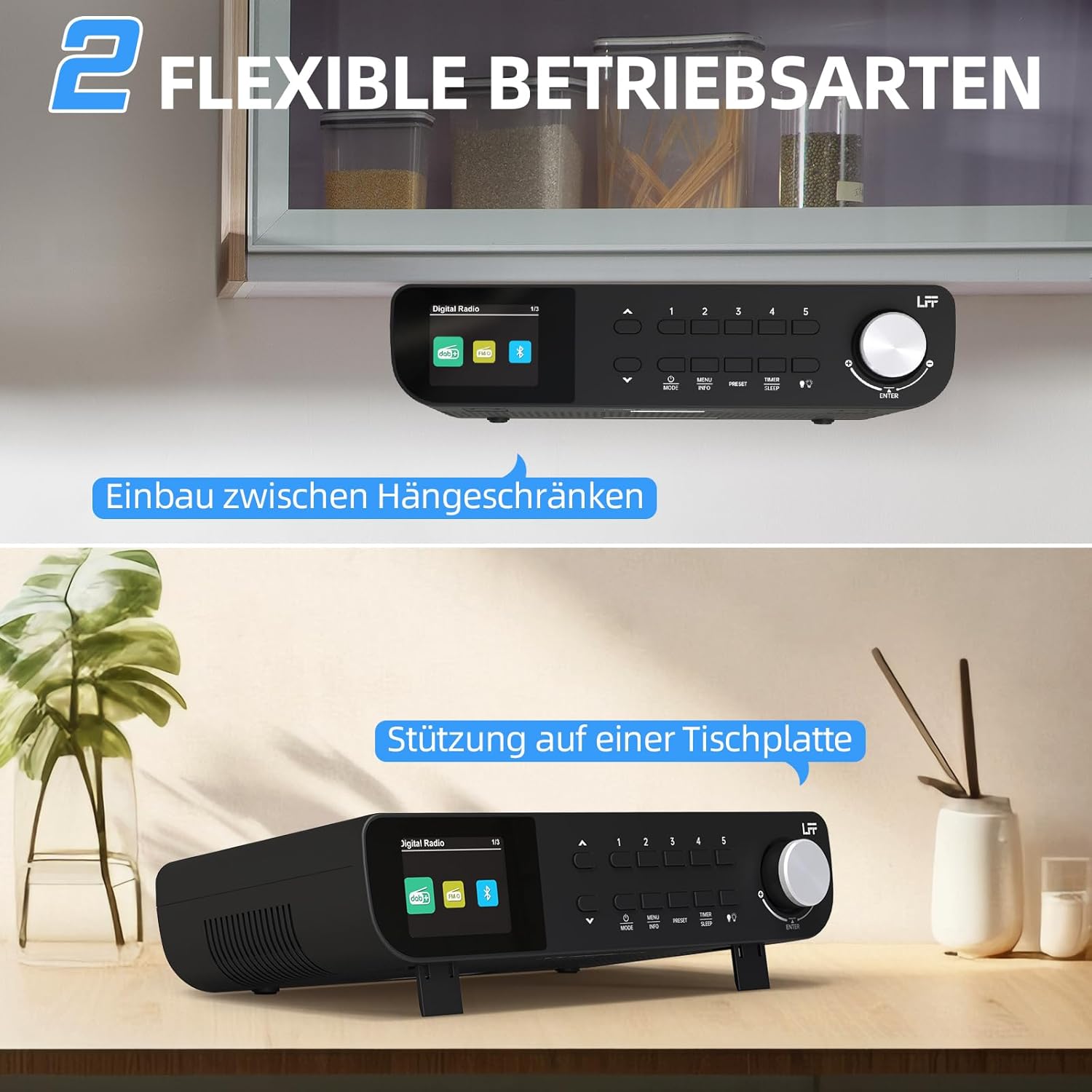
그림 7.1: The LFF Kitchen Radio displayed in two common installation scenarios: mounted underneath a kitchen cabinet and placed freestanding on a tabletop.
7.1. 테이블 상판 배치
Simply place the radio on a stable, flat surface. Ensure it is not near the edge to prevent accidental falls.
7.2. Under-Cabinet Mounting
For under-cabinet installation, use the provided mounting kit.
- 위치 준비: Choose a suitable location under a kitchen cabinet, ensuring there is enough space and access to a power outlet.
- 드릴 구멍 표시: Use the provided mounting template to mark the drill holes on the underside of the cabinet.
- 드릴 파일럿 홀: 표시된 위치에 파일럿 구멍을 뚫습니다.
- Attach Mounting Plate (if applicable): Some models may include a separate mounting plate. Attach this to the cabinet using the screws.
- Secure the Radio: Align the radio with the mounting holes or plate and secure it using the provided screws. Ensure it is firmly attached.
- 전원 연결: 전원 어댑터를 연결하세요.

그림 7.2: Detailed diagram showing the steps for under-cabinet mounting, including measuring distances (e.g., 58mm) and securing the radio with screws.
8. 유지관리
- 청소: To clean the radio, disconnect it from the power supply. Use a soft, dry, lint-free cloth. Do not use abrasive cleaners, waxes, or solvents.
- 안테나: Ensure the antenna is extended for optimal reception in DAB+ and FM modes. Handle it gently to avoid damage.
- 저장: 라디오를 장기간 보관할 경우 전원을 차단하고 서늘하고 건조한 곳에 보관하십시오.
9. 문제 해결
| 문제 | 가능한 원인 | 해결책 |
|---|---|---|
| 전원이 없습니다 | 전원 어댑터가 연결되지 않았거나 콘센트에 결함이 있습니다. | 전원 연결을 확인하세요. 다른 콘센트에 꽂아 보세요. |
| DAB+/FM 수신 불량 | 안테나가 확장되지 않았거나, 신호가 약하거나, 간섭이 있습니다. | Fully extend the antenna. Reposition the radio. Perform a full scan. |
| 블루투스가 연결되지 않습니다 | Radio not in pairing mode, device too far, or already connected to another device. | Ensure radio is in Bluetooth mode. Move device closer. Disconnect from other devices. |
| 소리가 나지 않습니다 | 볼륨이 너무 낮거나, 음소거가 활성화되었거나, 모드가 잘못되었습니다. | Increase volume. Check if mute is active. Ensure correct mode (DAB+, FM, Bluetooth). |
| 디스플레이가 작동하지 않음 | Brightness too low or device malfunction. | Adjust display brightness. If problem persists, contact support. |
10. 사양

그림 10.1: Diagram showing the dimensions of the LFF Kitchen Radio: 250mm length, 146mm width, and 55mm height.
| 특징 | 세부 사항 |
|---|---|
| 상표 | LFF 확장 |
| 모델 번호 | LDR113-EU |
| 색상 | 검은색 |
| 연결성 | 블루투스 |
| 튜닝 기술 | DAB Plus, FM |
| 전원 | 전기 케이블 |
| 빈도 | 108MHz (FM 최대 주파수) |
| 치수(길이 x 너비 x 높이) | 250mm x 146mm x 55mm |
| 사전 설정 | 60 |
| 표시하다 | LCD 컬러 화면 |
| 특별 기능 | Dual Alarms, Sleep Timer, Under-cabinet mounting option, LED Light |
11. 보증 및 지원
This product comes with a standard manufacturer's warranty. Please refer to the warranty card included in your package for specific terms and conditions. For technical support, troubleshooting assistance, or warranty claims, please contact your retailer or the LFF customer service department.