
소개
This manual provides essential information for the safe and efficient use of your ONN 42-Inch Full HD LED Smart TV, Model 100018254. Please read these instructions thoroughly before operating your television and retain them for future reference.
상자 안에 무엇이 들어있나요?
설치를 진행하기 전에 모든 구성 요소가 있는지 확인하세요.
- ONN 42-Inch Full HD LED Smart TV
- 원격 제어
- TV 스탠드(2개)
- TV 스탠드용 나사
- 전원 코드
- 빠른 시작 가이드(이 설명서에는 포함되지 않음)

이미지: 앞면 view of the ONN 42-inch Smart TV displaying the Roku TV home screen with various streaming app icons like Netflix, Disney+, Apple TV, Hulu, Peacock, and Roku Channel. The TV is black with slim bezels and two stand feet.
설정
1. TV 스탠드 부착
- 손상을 방지하기 위해 TV 화면이 아래쪽을 향하도록 부드럽고 깨끗한 표면에 조심스럽게 놓으십시오.
- 각 스탠드 부품을 TV 하단의 해당 나사 구멍에 맞춰 정렬하십시오.
- 제공된 나사를 사용하여 각 스탠드 부품을 고정하십시오. 나사가 단단히 조여졌는지 확인하십시오.

Image: A diagram illustrating the dimensions of the ONN 42-inch TV, showing its width as 43 inches and height as 37 inches when placed on its stand.
2. 벽면 장착 (선택 사항)
This TV is compatible with VESA standard wall mounts. Refer to your wall mount's instructions for proper installation. Ensure the wall mount can support the weight of the television.

이미지: 후면 view of the ONN 42-inch TV, highlighting the VESA mounting screw holes in a square pattern and various input ports on the side and bottom right.
3. 장치 연결
케이블 박스, 게임 콘솔, 블루레이 플레이어 등의 외부 기기를 TV의 입력 포트에 연결하세요.
- HDMI : For high-definition audio and video. Use an HDMI cable to connect devices like set-top boxes, game consoles, or streaming sticks.
- USB: USB 저장 장치를 연결하여 미디어를 재생하려면 files.
- 와이파이: For internet connectivity to access smart TV features and streaming services.
4. 초기 전원 켜기 및 설정 마법사
- 전원 코드를 TV에 꽂은 다음 벽면 콘센트에 꽂습니다.
- 리모컨이나 TV 본체의 전원 버튼을 누르세요.
- Follow the on-screen instructions to complete the initial setup, including language selection, network connection (Wi-Fi), channel scanning, and linking to your Roku account (if applicable).
TV 조작하기
1. 원격 제어view
리모컨을 사용하면 TV 인터페이스를 탐색하고 다양한 기능을 제어할 수 있습니다.
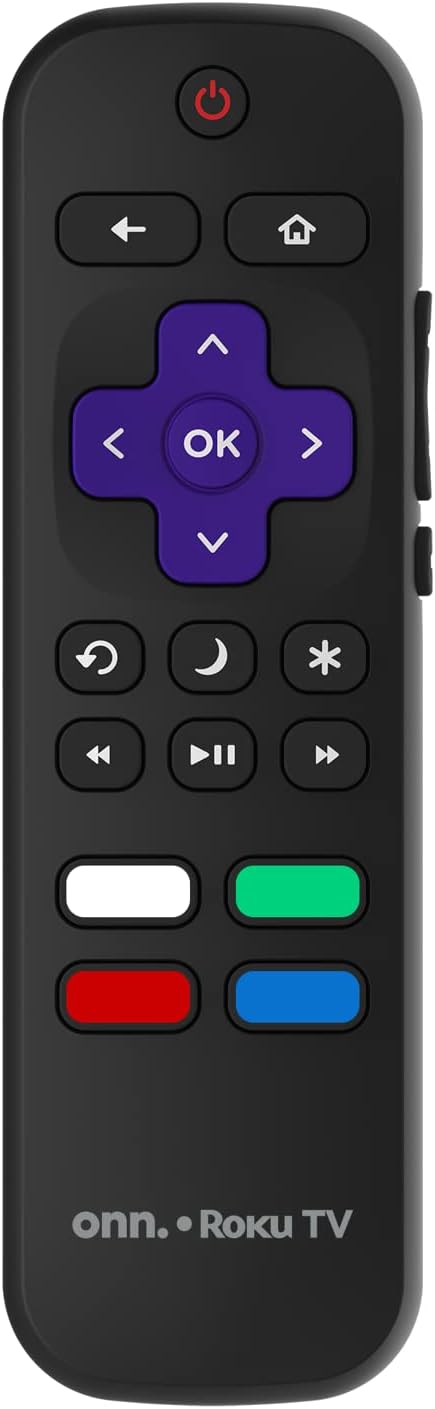
Image: The ONN Roku TV remote control, featuring a power button, directional pad, OK button, home button, back button, volume controls, and dedicated buttons for popular streaming services.
- 전원 버튼: TV를 켜거나 끕니다.
- Directional Pad (D-Pad) & OK: 메뉴를 탐색하고 선택 사항을 확인합니다.
- 홈 버튼: Roku TV 홈 화면으로 돌아갑니다.
- 뒤로가기 버튼: 이전 화면 또는 메뉴로 돌아갑니다.
- 볼륨 높이기/낮추기: 오디오 볼륨을 조절합니다.
- 음소거 버튼: 오디오를 음소거하거나 음소거 해제합니다.
- 채널 위/아래: 채널을 변경합니다(안테나/케이블 입력용).
- 전용 앱 버튼: Quick access to popular streaming services like Netflix, Hulu, etc.
2. 스마트 TV 기능
Your ONN Smart TV provides access to a wide range of streaming content and smart functionalities.
- 스트리밍 서비스: Access pre-installed apps like Netflix, YouTube, and many more through the Roku Channel Store.
- 음성 제어: Compatible with Alexa and Google Assistant for hands-free control (requires a separate compatible voice assistant device).
- 자동 소프트웨어 업데이트: The TV will automatically update its software when connected to the internet, ensuring you have the latest features and security.
3. 입력 선택
To switch between connected devices (e.g., cable box, game console), use the 입력 button on your remote or select the desired input from the Roku TV home screen.
4. 화면 및 사운드 설정
Access the TV's settings menu to customize picture and sound preferences. Navigate to 설정 > TV 화면 설정 or 설정 > 오디오 to adjust options like brightness, contrast, color, sound mode, and equalizer settings.
유지
1. 화면 청소
- 청소하기 전에는 항상 TV를 끄고 전원 코드를 뽑으세요.
- 부드럽고 보푸라기가 없는 천을 사용하여 약간 damp물이나 특수 스크린 세척제로 세척하세요.
- 세척제를 화면에 직접 뿌리지 마세요. 천에 먼저 묻혀 사용하세요.
- 연마성 세척제, 알코올, 벤젠, 희석제 등은 화면을 손상시킬 수 있으므로 사용하지 마세요.
2. 소프트웨어 업데이트
Ensure your TV is connected to the internet to receive automatic software updates. These updates improve performance, add features, and enhance security. You can manually check for updates in the 설정 > 시스템 > 시스템 업데이트 메뉴.
문제 해결
TV에 문제가 발생하면 다음의 일반적인 해결책을 참조하세요.
전원이 없습니다
- 전원 코드가 TV와 벽면 콘센트에 모두 단단히 꽂혀 있는지 확인하세요.
- 다른 장치를 연결하여 벽면 콘센트가 제대로 작동하는지 확인하세요.
- 리모컨이 아닌 TV 자체의 전원 버튼을 눌러보세요.
화면 없음 / 왜곡된 화면
- 올바른 입력 소스가 선택되었는지 확인하세요(예: HDMI 1, HDMI 2).
- TV와 외부 장치 간의 모든 케이블 연결을 확인하세요.
- 가능하면 다른 HDMI 케이블을 사용해 보세요.
- TV 메뉴에서 화면 설정(밝기, 명암)을 조정하세요.
소리 없음 / 소리 약함
- Check if the TV is muted or if the volume is turned down.
- Ensure external audio devices (soundbars, receivers) are properly connected and powered on.
- TV 메뉴에서 오디오 설정을 확인하세요.
네트워크 연결 문제
- Verify your Wi-Fi router is powered on and functioning.
- 라우터와 모뎀을 다시 시작하세요.
- 이동하다 설정 > 네트워크 > 연결 확인 TV에서 문제를 진단해 보세요.
- 올바른 Wi-Fi 비밀번호를 입력했는지 확인하세요.
명세서
| 특징 | 세부 사항 |
|---|---|
| 모델 번호 | 100018254 |
| 화면 크기 | 42 인치 |
| 디스플레이 기술 | 주도의 |
| 해결 | 1080p(풀 HD) |
| 새로 고침 빈도 | 60Hz |
| 연결성 | USB, 와이파이 |
| 지원되는 인터넷 서비스 | Netflix, YouTube (and others via Roku platform) |
| 제어 방법 | Voice (via Alexa & Google Assistant compatible devices), Remote Control |
| 장착 유형 | 벽걸이형(VESA 호환) |
| 색상 | 검은색 |
| 한국어: | 671227025567 |

Image: Energy Guide label for Television Model 100018254, indicating an estimated yearly energy cost of $11 based on 12 cents per kWh and 5 hours use per day.
보증 및 지원
For warranty information and technical support, please refer to the documentation included with your purchase or visit the official ONN support web대지. 보증 청구를 위해 구매 영수증을 보관하십시오.