
1. 서론
Thank you for choosing the JOOAN 2K Outdoor PTZ Security Camera. This manual provides detailed instructions to help you install, operate, and maintain your camera effectively. This camera is designed for outdoor surveillance, offering 2K resolution, 360° pan/tilt functionality, two-way audio, motion detection, and various night vision modes to enhance your home security.
2. 상자 안에 무엇이 들어있나요?
- 1x JOOAN 2K Outdoor PTZ Security Camera
- 1x Power Adapter & 1x USB Cable
- 1x 사용자 설명서
- 1x 나사 가방(장착용)
3. 제품 오버view
The JOOAN 2K Outdoor PTZ Security Camera features a robust design suitable for outdoor environments. It includes dual antennas for stable 2.4G Wi-Fi connectivity, a high-resolution lens, IR lights, and floodlights for enhanced night vision. The camera's pan and tilt mechanism allows for extensive coverage.
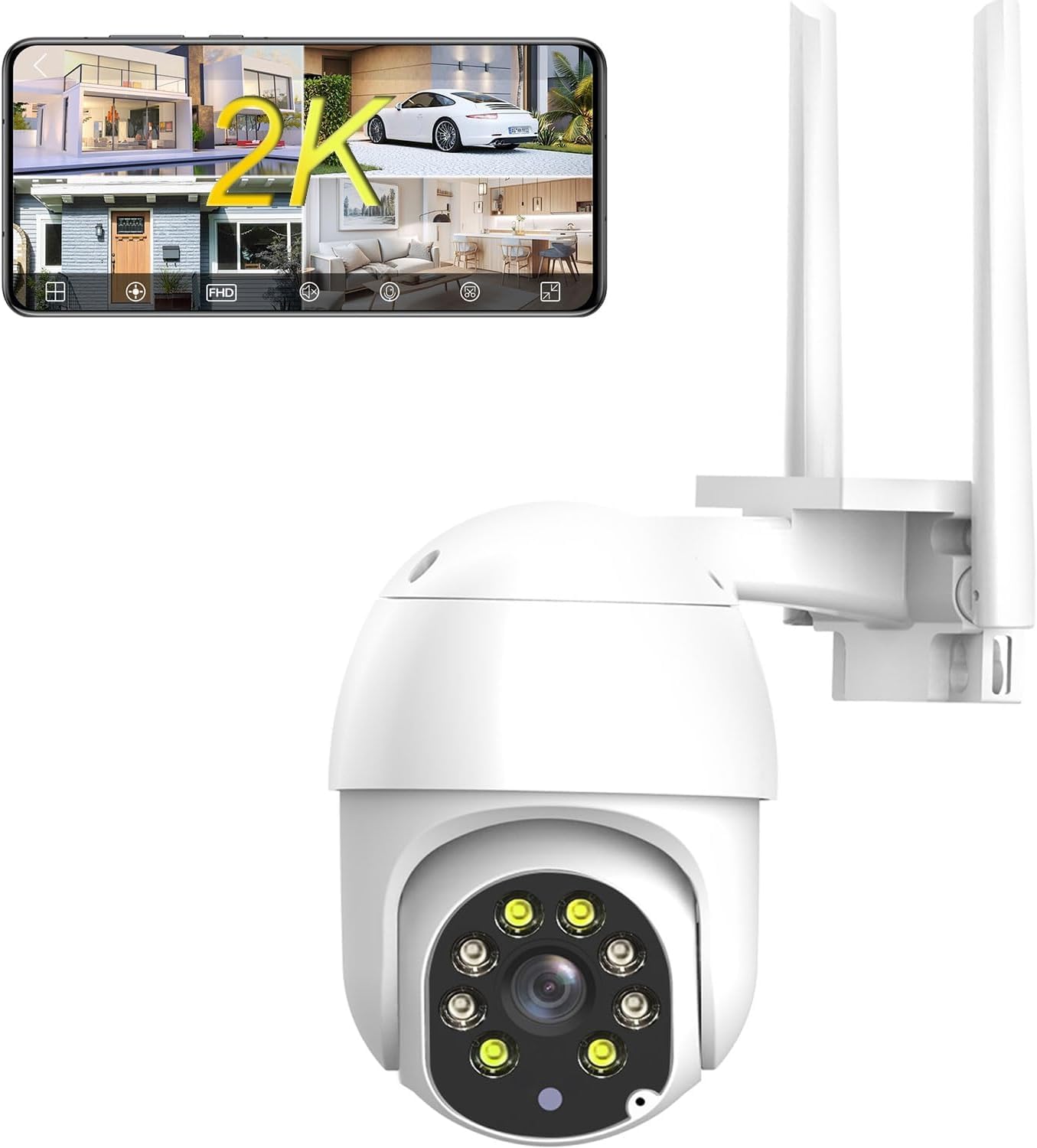
그림 3.1: 전면 view of the JOOAN 2K Outdoor PTZ Security Camera with dual antennas.

그림 3.2: 뒤로 view of the camera, showing the model number Q8T-U and power input.
4. 설정
4.1 앱 다운로드 및 등록
To control your camera, download the 'cam720' app from the App Store (iOS) or Google Play (Android). Register an account using your email address. A verification code will be sent to your email for account activation.

Figure 4.1: Scan the QR code to download the 'cam720' app.
4.2 Power On and Reset
- Connect the camera to power using the provided adapter and USB cable.
- 카메라의 전원이 켜질 때까지 기다립니다.
- Locate the reset button (usually a small pinhole) on the camera. Use a pin or paperclip to press and hold the reset button until you hear a 'Di' sound. Continue holding until you hear 'Di-Di-'. This indicates the camera has been reset and is ready for connection.
메모: For initial setup, place the camera close to your phone and Wi-Fi router.
Video 4.1: Official guide demonstrating the Wi-Fi connection steps, including app download, power-on, and reset procedures for the JOOAN security camera.
4.3 Wi-Fi 연결
- Open the 'cam720' app and tap the '+' icon to add a device.
- Follow the on-screen prompts to select your Wi-Fi network (2.4G only) and enter the password.
- The app will guide you through connecting the camera to your network. Ensure your phone is connected to the same 2.4G Wi-Fi network.

Figure 4.2: The camera connects to your 2.4GHz Wi-Fi network via its dual antennas.
4.4 장착 옵션
The camera supports both wall and ceiling installation. Use the provided screw bag to securely mount the camera in your desired location. Ensure the mounting surface is stable and can support the camera's weight.

Figure 4.3: Illustration of wall mount and ceiling mount installation methods.
4.5 SD 카드 설치
The camera supports up to a 256GB SD card (not included) for local storage. Locate the SD card slot, typically under a protective cover on the camera body. Insert the SD card with the contacts facing the correct direction until it clicks into place. Ensure the cover is properly sealed after installation to maintain weather resistance.

Figure 4.4: The camera supports local storage via an SD card and optional cloud storage.
5. 사용 설명서
5.1 Remote Control via App (PTZ & Digital Zoom)
Use the 'cam720' app to remotely control the camera's pan (355°) and tilt (90°) movements, providing 360° coverage. The app also allows for 5x digital zoom to view 더 자세히 살펴보세요.

Figure 5.1: Control camera movement and zoom directly from your smartphone app.
5.2 양방향 오디오
The camera features a built-in microphone and speaker, enabling two-way audio communication. Through the app, you can listen to the camera's surroundings and speak through the camera to visitors or deter intruders.

그림 5.2: 양방향 오디오를 통해 카메라를 통해 실시간으로 소통할 수 있습니다.
Video 5.1: Official demonstration of the 2K security camera's two-way audio feature, showing interaction with a person at the door.
5.3 스마트 동작 감지 및 알림
The camera features smart motion detection. When a moving object enters the monitoring area, the camera will trigger an alarm sound and send a message push notification to your phone. You can customize detection sensitivity (high, medium, low) to minimize false alarms.

Figure 5.3: Motion detection activates an alarm and sends alerts to your mobile device.
5.4 야간 투시 모드
The camera supports both IR (infrared) night vision for black and white footage in low light, and full-color night vision using its integrated floodlights for clearer, more detailed nighttime surveillance.

Figure 5.4: Day vision compared to black and white night vision.
5.5 기록 및 저장
Recordings can be stored locally on an SD card (up to 256GB) or via optional cloud storage. Cloud storage offers up to 30 days of video history, ensuring your data is secure even if the camera is compromised.

Figure 5.5: The camera supports 24/7 recording with H.265 compression, SD card, and cloud storage options.
5.6 다중 사용자 공유
The camera supports multi-user sharing, allowing administrators to share real-time video access with family and friends through the app.

Figure 5.6: Share live camera feeds with authorized users.
6. 유지관리
6.1 내후성
The camera is IP66 weatherproof, designed to withstand various outdoor conditions including rain, snow, and storms. Ensure all connections are properly sealed during installation to maintain its waterproof rating.

Figure 6.1: The camera is built to withstand harsh weather conditions.
6.2 청소
카메라 렌즈와 하우징을 부드러운 천으로 주기적으로 청소하십시오.amp cloth to ensure clear image quality. Avoid using harsh chemicals or abrasive materials that could damage the camera.
7. 문제 해결
| 문제 | 가능한 원인 | 해결책 |
|---|---|---|
| 카메라가 Wi-Fi에 연결되지 않습니다 | Incorrect Wi-Fi password; 5G Wi-Fi network; Camera too far from router; Incorrect reset procedure. | Ensure correct 2.4G Wi-Fi password. Confirm router is 2.4G compatible. Move camera closer to router. Perform reset again until 'Di-Di-' sound. |
| No image or black screen in app | Camera not powered on; Network connection issue; App malfunction. | Check power connection. Verify Wi-Fi signal strength. Restart camera and app. |
| 동작 감지 알림이 수신되지 않았습니다. | Motion detection disabled; App notifications off; Low sensitivity setting. | Enable motion detection in app settings. Check phone notification settings. Adjust sensitivity to medium or high. |
| SD 카드가 녹화되지 않습니다 | SD card full or faulty; Incorrect format; SD card not inserted correctly. | Check SD card status in app. Format SD card via app. Reinsert SD card. Replace if faulty. |
8. 사양
- 모델: Q8T-U
- 비디오 캡처 해상도: 1296p (3MP 유효 정지 이미지 해상도)
- 연결성: 2.4G Wi-Fi (Powerline; only 2.4g wifi), Bluetooth
- 팬/틸트: 355° 팬, 90° 틸트
- 디지털 줌: 5X
- 야간 투시경: IR Night Vision, Color Night Vision (with floodlights)
- 오디오: 양방향 오디오 (내장 마이크 및 스피커)
- 저장: 마이크로 SD 카드(최대 256GB), 클라우드 스토리지
- 내후성: IP66 방수
- 전원: 유선 전기 (5볼트, 7.5와트)
- 치수: 5.4 x 4.7 x 4 인치
- 무게: 1.26파운드
- 제어 방법: 앱, 원격
- 호환 장치: Phone (Android, iOS)
9. 보증 및 지원
보증 정보 및 기술 지원에 대해서는 제조업체의 공식 웹사이트를 참조하십시오. web사이트에서 확인하거나 고객 서비스에 직접 문의하세요. 구매 증빙 자료로 구매 영수증을 보관하세요.
Manufacturer: JOOAN
추가 지원을 받으려면 다음을 방문하세요. 아마존의 JOOAN 스토어.