
1. 서론
The Schlage Encode Smart Wi-Fi Lever Lock provides convenient and secure keyless entry for your home. With built-in Wi-Fi, this smart lock connects directly to your home network, allowing remote control and monitoring via the Schlage Home app. It supports up to 100 access codes, offers customizable notifications, and integrates with popular smart home platforms like Amazon Alexa and Google Assistant. Designed for durability and security, it is ideal for various doors including garage, side, and interior doors where controlled access is desired.
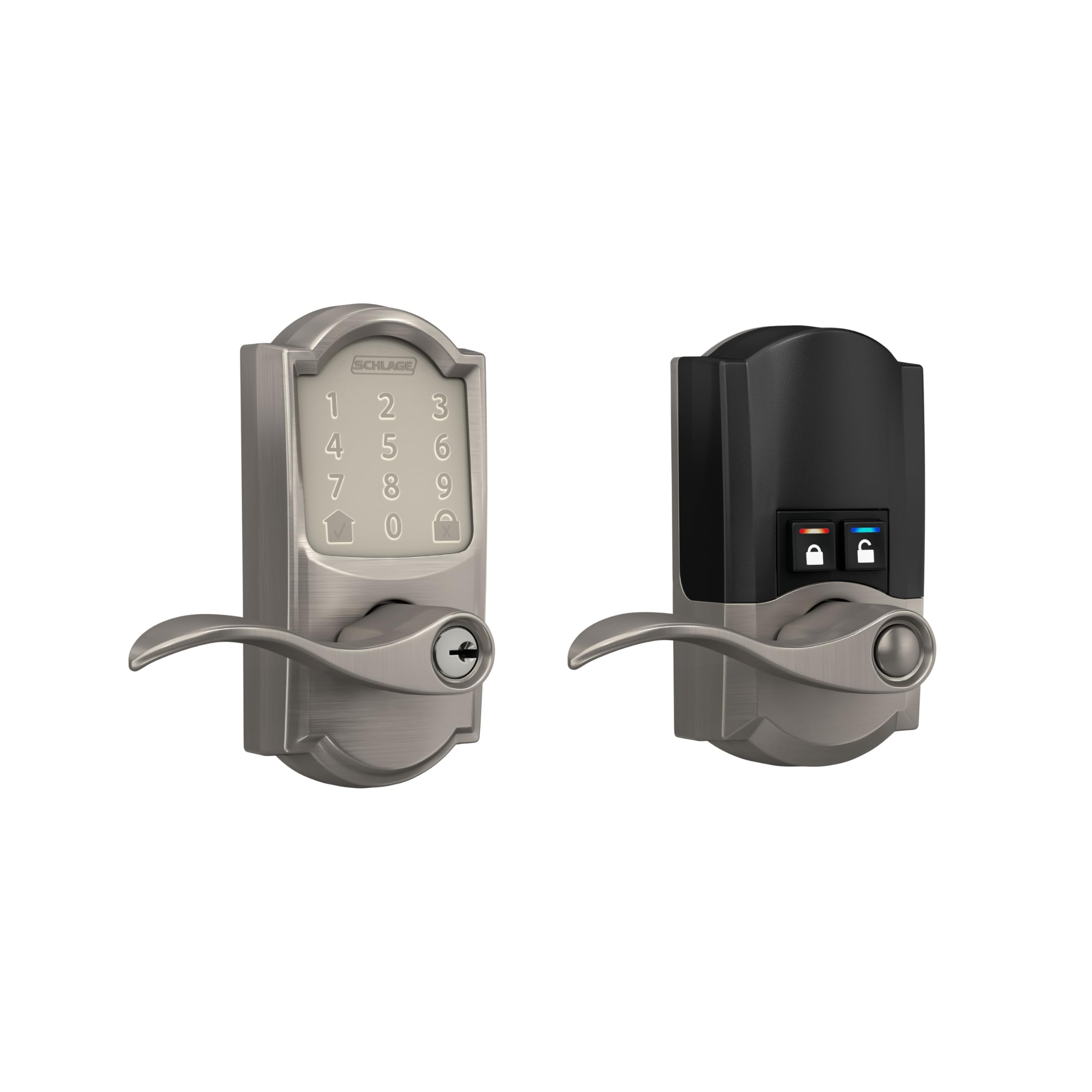
Figure 1: Schlage Encode Smart Wi-Fi Lever Lock (Satin Nickel)
2. 주요 특징
- ANYWHERE ACCESS: Built-in Wi-Fi allows secure connection to your home network for remote control and monitoring via the Schlage Home app, no additional accessories needed.
- 마음의 평화: 원격으로 잠금/잠금 해제, 최대 100개의 액세스 코드 관리 view 잠금 기록을 확인하고, 사용자 정의 알림을 받으세요.
- ADVANCED SECURITY: Secure, encrypted connection; built-in, customizable alarm for door movement and forced entry attempts; fingerprint-resistant touchscreen; certified highest residential Security, Durability and Finish rating by BHMA industry experts.
- 간편한 설치: Installs in minutes with just a screwdriver, no hardwiring required; reversible levers fit right and left handed doors; fits standard doors with 1-3/8 in to 1-3/4 in door thickness and 2-3/8 in or 2-3/4 in backset.
- COME AND GO WITH EASE: Auto-lock feature with various time delay options; convenient control buttons on the interior for quick unlocking.
- SECURE AND STYLISH: Available in traditional and contemporary styles with multiple finishes, offering premium quality and craftsmanship.
- BATTERY-OPERATED: Uses four AA batteries (included); up to six months of battery life with typical use; low-battery indicator on lock touchscreen and in Schlage Home app; one physical backup key included.

그림 2: 이상view of Schlage Encode Smart Wi-Fi Lever features.
3. 패키지 내용
The Schlage Encode Smart Wi-Fi Lever Lock package includes all necessary components for installation and immediate use:
- Schlage Encode Smart Wi-Fi Lever Lock (Exterior and Interior Assemblies)
- 설치 하드웨어
- 설치 지침
- AA 배터리 4개
- One Physical Backup Key

그림 3: 상자 안에 들어 있는 내용물.
4. 설치
Installation of the Schlage Encode Smart Wi-Fi Lever Lock is designed to be straightforward, requiring only a screwdriver. No hardwiring is necessary.
- 문 준비: Ensure your door meets the standard thickness (1-3/8 in to 1-3/4 in) and backset (2-3/8 in or 2-3/4 in) requirements.
- 오래된 하드웨어 제거: Carefully remove any existing door hardware.
- 래치 및 스트라이크 플레이트 설치: Follow the included instructions to install the new latch and strike plate.
- 외부 어셈블리 설치: Position the exterior keypad assembly on the door. The reversible levers accommodate both right and left-handed doors.
- 내부 조립 설치: Connect the interior assembly, ensuring the wiring harness is properly routed and connected.
- 배터리 삽입: Install the four AA batteries into the interior assembly.
- 테스트 작업: Verify that the lock operates smoothly both manually and electronically.

Figure 4: Easy installation with a screwdriver.
Video 1: Official product video demonstrating the Schlage Encode Smart WiFi Lever.
5. 설정 및 구성
After physical installation, configure your lock using the Schlage Home app:
- 앱 다운로드 : Download the Schlage Home app from your device's app store.
- 계정 생성: 새 계정을 등록하거나 이미 계정이 있는 경우 로그인하세요.
- 장치 추가: Follow the in-app instructions to add your new Schlage Encode lock. This typically involves scanning a QR code or entering a serial number.
- Wi-Fi에 연결: The app will guide you through connecting the lock to your home's Wi-Fi network. No additional hub is required.
- Program Access Codes: Create and manage up to 100 unique 4-8 digit access codes for family, friends, or service providers. You can set permanent, recurring, or temporary codes.
- 설정 사용자 정의: Adjust auto-lock times, enable/disable the built-in alarm, and set up notifications for lock activity.

그림 5: Schlage Home 앱을 사용하여 잠금 장치를 관리하는 방법.
6. 사용 설명서
6.1. Keypad Operation (Exterior)
- 잠금 해제하려면: Touch the keypad to activate it. Enter your 4-8 digit access code. The lock will unlock, and you can turn the lever to open the door.
- 잠그려면: Press the dedicated lock button (usually a padlock icon) on the keypad. The lock will engage automatically.
6.2. Manual Operation (Interior)
From the interior side of the door, you have two buttons for quick control:
- 잠금 버튼: Press the lock button to secure the door.
- 잠금 해제 버튼: Press the unlock button to disengage the lock.
You can also use the physical key for manual override if needed.
7. 스마트 홈 통합
The Schlage Encode Smart Wi-Fi Lever Lock offers seamless integration with various smart home ecosystems:
- 아마존 알렉사: Pair your lock with Amazon Alexa for voice control. You can ask Alexa to lock or unlock your door (with a voice PIN for unlocking).
- 구글 어시스턴트: Connect to Google Assistant for similar voice commands and smart home routines.
- Airbnb Compatible: Ideal for rental properties, the lock can integrate with Airbnb to automatically generate and manage access codes for guests, expiring upon their departure.

Figure 6: Smart home compatibility.
8. 유지관리
8.1. 배터리 교체
The lock is powered by four AA batteries, providing approximately six months of battery life with typical use. The lock features a low-battery indicator on the touchscreen and within the Schlage Home app to provide advance notice for replacement.
- Access the battery compartment on the interior assembly (refer to the full installation guide for specific instructions).
- 오래된 배터리를 제거하세요.
- 극성을 확인하여 새 AA 배터리 4개를 삽입하십시오.
- 배터리 칸을 닫습니다.
8.2. 청소
To clean the touchscreen and exterior of the lock, use a soft, damp 천으로 닦으세요. 마감재나 전자 부품을 손상시킬 수 있는 연마성 세척제나 용제는 사용하지 마세요.
9. 문제 해결
- 잠금이 응답하지 않음: 배터리 잔량을 확인하세요. 배터리가 부족하면 교체하세요. 잠금 장치가 제대로 설치되었고 모든 연결이 안전한지 확인하세요.
- Wi-Fi 연결 문제: Verify your home Wi-Fi network is active and the signal strength at the door is adequate. Re-pair the lock with the Schlage Home app if necessary. If Wi-Fi drops, the lock will still operate using previously saved codes.
- 키패드가 켜지지 않음: The keypad is touch-sensitive. Ensure you are touching the screen firmly. If still unresponsive, check battery levels.
- 실물 키가 작동하지 않습니다: The physical key is designed to turn the mechanism that controls the lever, not directly retract the latch. Ensure the key is fully inserted and turned correctly.
- Door Alarm Triggering: The lock has a built-in alarm for door movement and forced entry attempts. Adjust sensitivity or disable the alarm through the Schlage Home app if it's triggering unnecessarily.
10. 사양
| 특징 | 세부 사항 |
|---|---|
| 상표 | 슐라지 |
| 모델 번호 | FE789WBCAM619ACC |
| 잠금 유형 | 키패드 |
| 재료 | 아연 |
| 품목 치수(L x W x H) | 3 x 3 x 5.88 인치 |
| 품목 무게 | 4.25 파운드 |
| 색상 | 새틴 니켈 |
| 스타일 이름 | 카멜롯 |
| 연결 프로토콜 | 블루투스, Wi-Fi |
| 제어 방법 | 만지다 |
| 컨트롤러 유형 | Amazon Alexa, Google Assistant |
| 전원 | AA 배터리 4개(포함) |
| 도어 두께 호환성 | 1-3/8인치에서 1-3/4인치까지 |
| 백셋 호환성 | 2-3/8인치 또는 2-3/4인치 |

Figure 7: Product Dimensions (Camelot Trim)
11. 보증 및 지원
The Schlage Encode Smart Wi-Fi Lever Lock is backed by a limited lifetime mechanical and finish warranty, and a limited three-year electronics warranty. For full details, please refer to the official Schlage warranty documentation. Warranty is valid only on purchases shipped from and sold by Amazon or Buildcom.
추가 지원, 기술 지원 또는 보증 청구에 대해서는 공식 SCHLAGE를 방문하세요. web사이트를 방문하거나 고객 서비스에 문의하세요.