소개
This manual provides essential instructions for the proper use and maintenance of your Kawai Universal Mini HD Satellite Remote Control. This remote is designed for seamless compatibility with various Kawai satellite receiver models, including Kw 900, Kw 6820, Kn 650, Kw 2000, 6850, 6950, and 8400. Please read this manual thoroughly before operating the device to ensure optimal performance and longevity.
제품 끝view
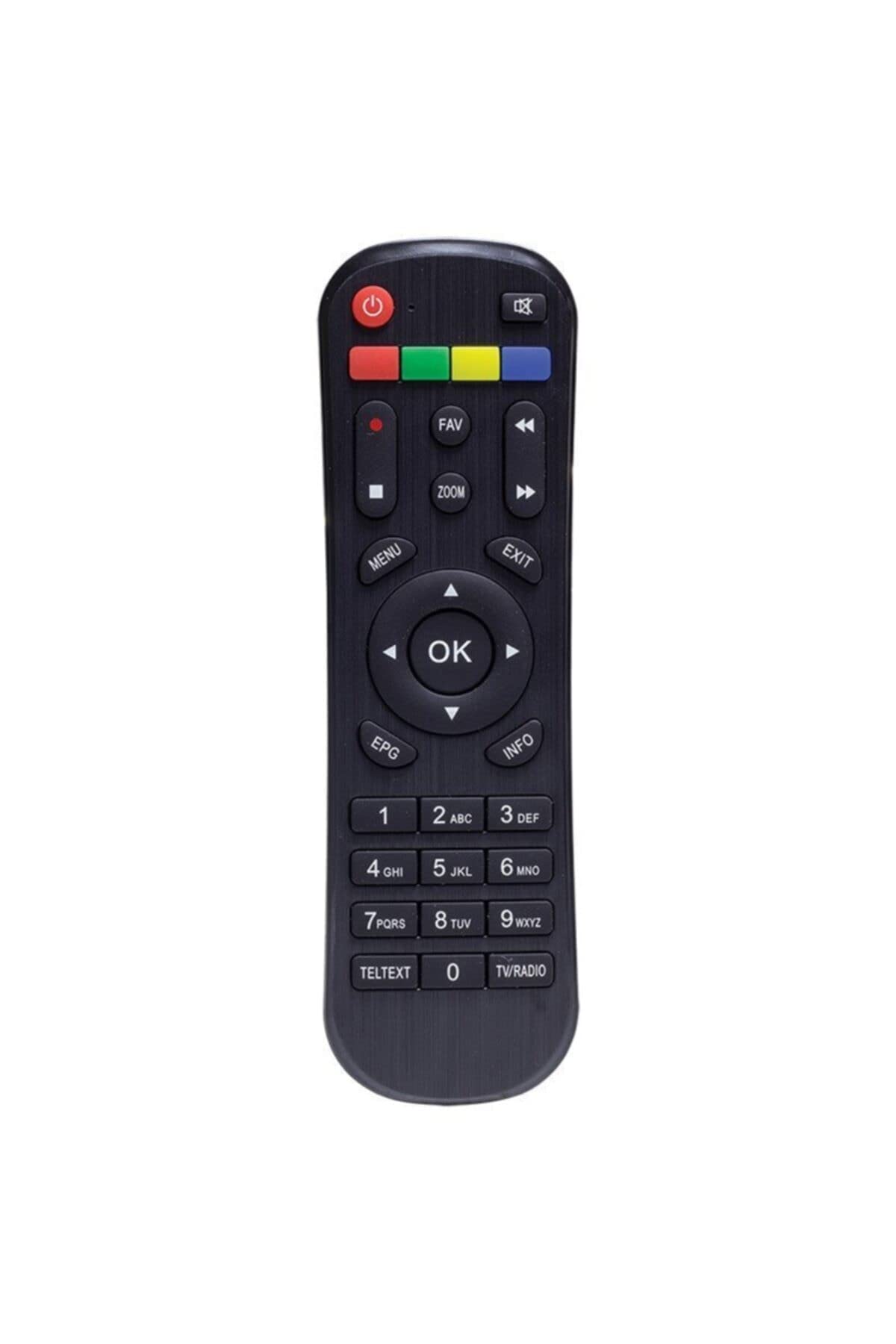
그림 1: 앞쪽 view of the Kawai Universal Mini HD Satellite Remote Control. This image displays the ergonomic design and button layout of the remote, highlighting its compact size and standard control functions.
The Kawai Universal Mini HD Satellite Remote Control is a compact and efficient device designed to provide full control over your compatible Kawai satellite receiver. Its intuitive button layout ensures ease of use for channel navigation, volume control, menu access, and other essential functions.
설정
1. 배터리 설치
- 리모콘 뒷면에서 배터리함을 찾으세요.
- 배터리 덮개를 아래쪽으로 또는 화살표 방향으로 밀어서 여세요.
- AAA 배터리 2개(별매)를 넣으세요. 배터리함 안쪽의 그림과 같이 양극(+)과 음극(-) 단자가 일치하는지 확인하십시오.
- 배터리 덮개를 다시 밀어서 제자리에 고정하고 딸깍 소리가 날 때까지 밀어 넣습니다.
2. 초기 사용
This remote control is pre-programmed for compatibility with the listed Kawai satellite receiver models. No additional pairing or setup is typically required. Simply point the remote at your satellite receiver and begin operation.
- Ensure there are no obstructions between the remote control and the satellite receiver.
- Confirm that the satellite receiver is powered on.
작동 지침
Familiarize yourself with the primary functions of the remote control buttons:
- 전원 버튼 (●): Turns the satellite receiver on or off.
- 채널 위/아래(채널+/-): 텔레비전 채널을 변경합니다.
- 볼륨 업/다운(볼륨+/-): 오디오 볼륨을 조절합니다.
- 음소거 (음소거): 오디오 출력을 음소거합니다.
- 숫자 버튼(0-9): 채널 번호를 직접 입력하세요.
- 메뉴 (메뉴): Accesses the satellite receiver's main menu.
- 탐색 버튼(▲ ▼ ◀ ▶): 메뉴 옵션을 탐색합니다.
- OK/Enter (OK): 메뉴에서 선택한 내용을 확인합니다.
- Exit/Back (EXIT): Exits current menu or returns to the previous screen.
- 정보(정보): 프로그램 정보를 표시합니다.
Specific button functions may vary slightly depending on your Kawai satellite receiver model. Refer to your receiver's manual for detailed information on advanced features.
유지
청소
리모컨을 청소하려면 부드럽고 마른 천을 사용하세요. 잘 지워지지 않는 오염은 가볍게 닦아주세요.amp천에 물이나 순한 비연마성 세제를 묻혀 닦으십시오. 강한 화학 물질, 용제 또는 연마재는 리모컨 표면과 내부 부품을 손상시킬 수 있으므로 사용하지 마십시오.
배터리 교체
Replace batteries when the remote control's response becomes sluggish or stops functioning. Always replace both batteries simultaneously with new ones of the same type (AAA). Do not mix old and new batteries, or different types of batteries, as this can lead to leakage or damage.
- Remove old batteries promptly to prevent leakage.
- 사용한 배터리는 현지 규정에 따라 폐기하십시오.
문제 해결
| 문제 | 가능한 원인 | 해결책 |
|---|---|---|
| 리모컨이 작동하지 않습니다. |
|
|
| 일부 버튼이 작동하지 않습니다. |
|
|
명세서
- 상표: Kawai (Listed as Generic by seller)
- 제조업체: 일반적인
- ASIN: B0BW4KLTDS
- 첫 번째 가능한 날짜: 17년 2023월 XNUMX일
- 호환성: Kawai Kw 900, Kw 6820, Kn 650, Kw 2000, 6850, 6950, 8400 Mini HD Satellite Receivers
- 전원: AAA 배터리 2개(포함되지 않음)
보증 및 지원
For warranty information and technical support, please refer to the documentation provided with your original Kawai satellite receiver or contact the retailer from whom you purchased this remote control. Keep your purchase receipt as proof of purchase.
For further assistance, you may also visit the official Kawai website or contact their customer service department if available in your region.


