
소개
This manual provides detailed instructions for the installation, operation, and maintenance of your Aqualin Garden Irrigation Timer Controller. This device is designed to automate your garden watering, ensuring efficient and precise irrigation for your plants.

Figure 1: Aqualin Garden Irrigation Timer Controller, showing the main dial and connections.
제품 끝view 및 구성 요소
The Aqualin Irrigation Timer Controller is a robust device designed for outdoor use. It features a user-friendly dial for setting irrigation schedules and standard connections for easy integration into your existing watering system.
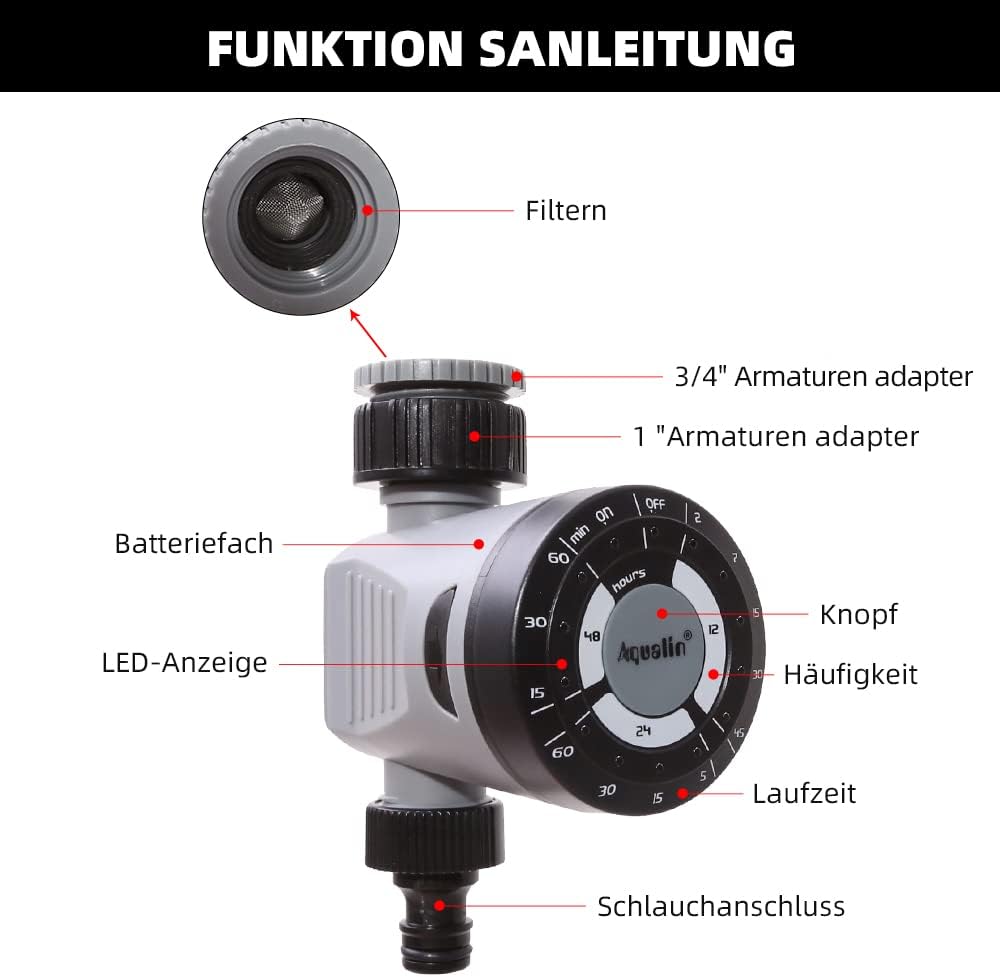
Figure 2: Diagram illustrating the main components of the Aqualin Irrigation Timer, including the filter, 3/4" and 1" faucet adapters, battery compartment, LED indicator, control knob, frequency settings, duration settings, and hose connection.
주요 구성 요소는 다음과 같습니다.
- 컨트롤 다이얼 : Used to set watering frequency and duration.
- 입구 연결 : For connecting to a standard garden faucet (includes adapters for 3/4" and 1" sizes).
- 콘센트 연결: For connecting to a garden hose or irrigation system.
- 배터리 칸: Houses the power source for the timer.
- LED 표시등: 상태 피드백을 제공합니다.

Figure 3: The Aqualin Irrigation Timer shown with its included 3/4" and 1" faucet adapters, ready for installation.
설정 및 설치
배터리 설치
The timer requires 2 AAA batteries for operation. Follow these steps to install the batteries:
- Press the two buttons located on the sides of the timer to open the battery compartment.
- 배터리함 덮개를 조심스럽게 제거합니다.
- Insert 2 x LR03/AAA 1.5V Alkaline batteries, ensuring correct polarity (+/-).
- 배터리 칸 덮개를 다시 끼우고 제자리에 단단히 고정되었는지 확인하세요.
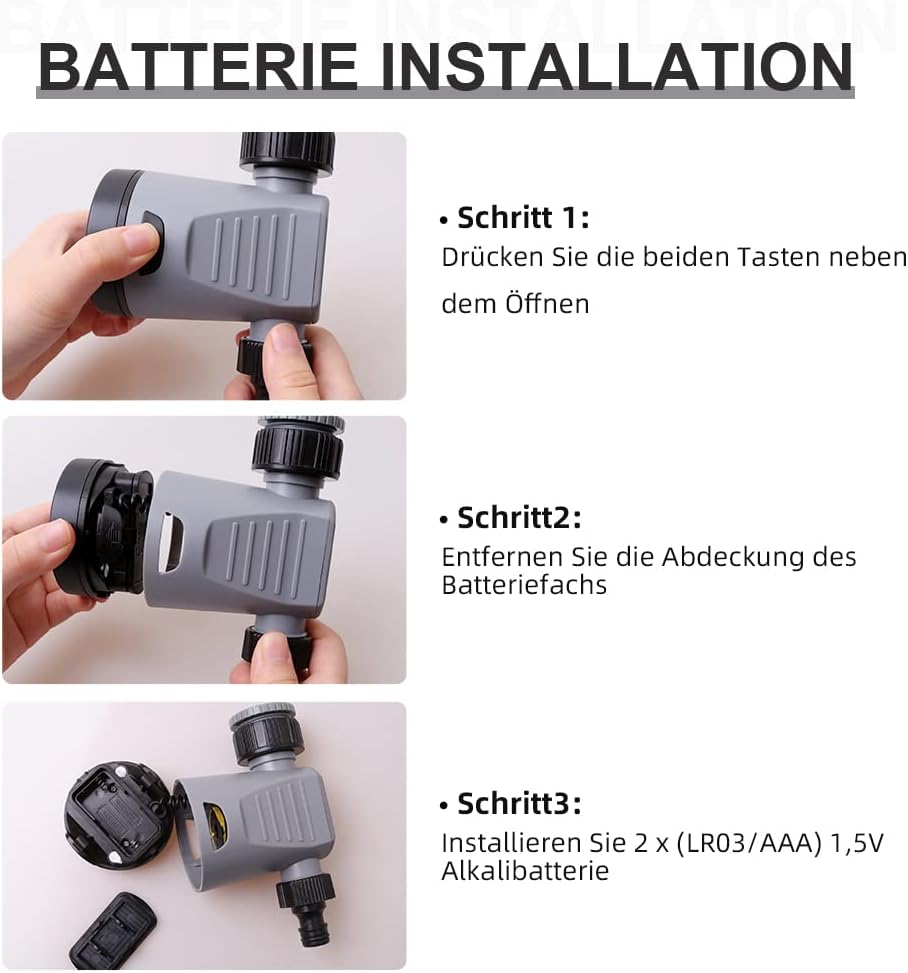
Figure 4: Step-by-step guide for installing batteries into the Aqualin Irrigation Timer. This shows pressing side buttons, removing the cover, and inserting AAA batteries.
타이머 연결하기
- Ensure the timer is in the "OFF" position before connecting.
- Screw the timer's inlet connection onto your outdoor faucet. Use the appropriate adapter (3/4" or 1") if necessary to ensure a snug, leak-free fit.
- Connect your garden hose or irrigation system to the timer's outlet connection.
- Slowly turn on your faucet to full pressure. The timer is designed to operate under standard water pressure (1-8 bar).
작동 지침
The Aqualin Irrigation Timer offers flexible programming options for automated watering and a manual override function.
Setting Automatic Irrigation Cycles
The timer allows you to set three different irrigation cycles based on frequency and duration:
- 빈도: Select from options such as every 12 hours, every 24 hours, or every 48 hours.
- 지속: Choose watering durations from 2 minutes up to 60 minutes, depending on the selected frequency. For examp르 :
- Every 12 hours: 2, 7, 15, 30, 45 minutes
- Every 24 hours: 5, 15, 30, 60 minutes
- Every 48 hours: 15, 30, 60 minutes
To set a cycle, rotate the main dial to align the desired frequency and duration settings. The timer will automatically begin the programmed schedule.
수동 관개
To water immediately or outside of the programmed schedule, you can use the manual function:
- Rotate the dial to the "ON" position to start watering manually.
- Rotate the dial to the "OFF" position to stop manual watering.
Using the manual "ON/OFF" function will temporarily override any active automatic program.
Delay Function (Controlled Irrigation)
In situations such as heavy rainfall or when you need to temporarily pause the irrigation program, you can use the delay function. This function allows you to delay the next scheduled watering cycle.
- The delay function range is from 1 to 23 hours, increasing in 1-hour increments.
- Consult the dial markings for specific delay settings.

Figure 5: The Aqualin Irrigation Timer effectively watering a garden, demonstrating its practical application.
유지
To ensure the longevity and optimal performance of your Aqualin Irrigation Timer, follow these maintenance guidelines:
- 청소: 타이머 외부를 주기적으로 청소하십시오.amp 천으로 닦아주세요. 연마성 세제를 사용하거나 기기를 물에 담그지 마세요.
- 필터 유지 관리: The inlet connection contains a filter to prevent debris from entering the timer. Regularly inspect and clean this filter to ensure unrestricted water flow.
- 배터리 교체: Replace batteries when the LED indicator shows low power or if the timer stops functioning as expected. Always use fresh alkaline batteries.
- 겨울철 : Before the first frost, disconnect the timer from the faucet and hose. Drain any remaining water from the unit and store it indoors in a dry, protected area to prevent freezing damage.
문제 해결
| 문제 | 가능한 원인 | 해결책 |
|---|---|---|
| 타이머가 작동하지 않아 물이 공급되지 않습니다. |
|
|
| Timer not turning off. |
|
|
| 연결부에서 물이 새고 있습니다. |
|
|
명세서
| 특징 | 세부 사항 |
|---|---|
| 상표 | Aqualin |
| 모델 번호 | 21113 |
| 재료 유형 | Kunststoff(플라스틱) |
| 전원 | AAA 배터리 2개 (필수) |
| 품목 무게 | 0.21 킬로그램 |
| 패키지 크기 | 11.8 x 11.6 x 6.9cm |
| 설정 수 | 4 (referring to frequency/duration combinations) |
| 색상 | 검은색 또는 흰색 |

Figure 6: Visual representation of key product specifications for the Aqualin Irrigation Timer, including brand, weight, pressure, power, frequency, and runtime.
보증 및 지원
Aqualin is committed to customer satisfaction. If you encounter any issues or have questions regarding your irrigation timer, our after-sales team is available to assist you.
- Our support team aims to respond to your requests within 12 hours.
- 구체적인 보증 내용 및 연락처는 구매 서류를 참조하십시오.
For further assistance, please visit the official Aqualin web해당 사이트를 이용하거나 구매 플랫폼을 통해 판매자에게 직접 연락하세요.