
1. 서론
This manual provides comprehensive instructions for the installation, operation, and maintenance of your owltron Home Security Camera. Please read this manual thoroughly before using the product to ensure proper functionality and safety. Keep this manual for future reference.
The owltron Home Security Camera is designed to provide reliable surveillance for your home, pets, or nursery. It features 2-way audio, WiFi connectivity, motion detection, and night vision capabilities.
2. 제품 오버view
The owltron Home Security Camera is a compact and versatile device. Below are its main components and features.

그림 2.1: 전면 view of the owltron Home Security Camera, showing the lens and main body.
주요 특징:
- 1080P HD 해상도: 선명하고 자세한 비디오 제공tage.
- 양방향 오디오: 카메라를 통해 실시간 통신이 가능합니다.
- WiFi 연결성: Enables wireless connection to your home network for remote access.
- 동작 감지: 카메라 시야 내에서 감지된 움직임을 알려줍니다. view.
- 야간 투시경: Ensures clear monitoring even in low-light or dark conditions.
- Dome Form Factor: Designed for discreet placement and wide coverage.
- 벽걸이형: Can be securely mounted for optimal positioning.

Figure 2.2: The owltron camera is designed with an IP65 rating, indicating resistance to dust and water splashes, suitable for various indoor environments.

Figure 2.3: Illustration of the camera's night vision capabilities, providing clear images in low-light conditions.
3. 설정
Follow these steps to set up your owltron Home Security Camera:
- 카메라 포장 풀기: Carefully remove all components from the packaging. Verify that all accessories are present.
- 전원 켜기: Connect the power adapter to the camera's power port and plug it into a standard electrical outlet. The camera will power on and initiate its startup sequence.
- 앱 다운로드: 검색 the "owltron" app (or specified app in product documentation) on your smartphone's app store (iOS or Android) and install it.
- 계정 생성: 앱을 열고 화면의 지시에 따라 새 사용자 계정을 만들거나 이미 계정이 있는 경우 로그인하세요.
- 장치 추가: In the app, select "Add Device" or the '+' icon. Choose your camera model from the list.
- Wi-Fi에 연결: 카메라의 2.4GHz Wi-Fi 네트워크 연결 방법은 앱의 안내를 따르세요. 일반적으로 앱에서 생성된 QR 코드를 카메라 렌즈로 스캔하거나 Wi-Fi 자격 증명을 입력하는 방식으로 연결됩니다.
- 카메라 장착: Once connected, decide on the optimal mounting location. Use the provided mounting hardware to secure the camera to a wall or ceiling. Ensure the camera has a clear view 모니터링하려는 영역의
- 최종 조정: Adjust the camera's angle and pan/tilt (if applicable) through the app to achieve the desired view적용 범위.
For detailed visual guides, refer to the in-app tutorials or the manufacturer's official support web대지.
4. 사용 설명서
Once your owltron Home Security Camera is set up, you can begin monitoring and utilizing its features through the mobile application.
4.1 라이브 View 그리고 녹음
- 실시간 영상 보기: Open the owltron app and select your camera from the device list to view 라이브 비디오 피드.
- 수동 녹음: 라이브 방송 중 녹화 버튼을 누르세요 view interface to manually start or stop video recording. Recordings are saved to your phone or the camera's storage (if a microSD card is installed).
- 스크린샷: Use the screenshot button to capture still images from the live feed.
4.2 양방향 오디오
- 말하다: 라이브에서 view, press and hold the microphone icon to speak through the camera's speaker. Release to stop speaking.
- 듣다: The camera's microphone is active by default, allowing you to hear audio from the camera's environment.
4.3 동작 감지 및 알림
- 활성화/비활성화: 앱에서 카메라 설정으로 이동하여 동작 감지 기능을 활성화 또는 비활성화하세요.
- 감광도: 잘못된 경보를 최소화하려면 동작 감지 감도를 조정하세요.
- 알림: Configure push notifications to receive alerts on your smartphone when motion is detected.
4.4 야간 투시경
The camera automatically switches to night vision mode in low-light conditions. Some models may offer different night vision modes (e.g., infrared, full-color night vision) which can be configured in the app settings.
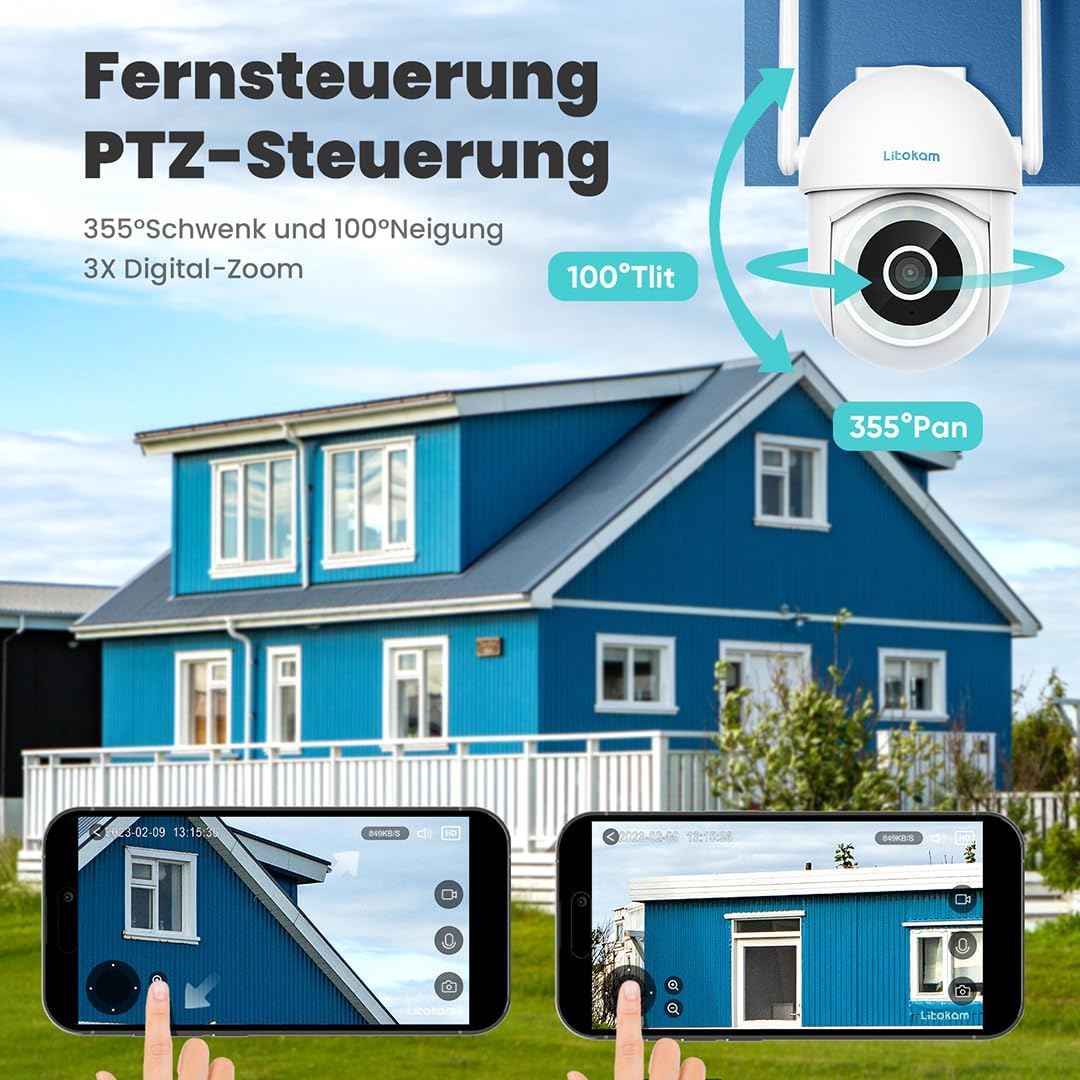
그림 4.1: 예ample of the mobile application interface for controlling camera pan and tilt functions.
5. 유지관리
Regular maintenance ensures the longevity and optimal performance of your owltron Home Security Camera.
- 렌즈 청소: Gently wipe the camera lens with a soft, dry, lint-free cloth to remove dust or smudges. Do not use harsh chemicals or abrasive materials.
- 연결 확인: Periodically inspect all cable connections (power, network) to ensure they are secure.
- 소프트웨어 업데이트: Keep the camera's firmware and the mobile app updated to the latest versions. Updates often include performance improvements and security enhancements. Check for updates within the app settings.
- 환경 조건: Ensure the camera is operating within its specified temperature and humidity ranges. While rated IP65, avoid direct exposure to heavy rain or prolonged submersion.
6. 문제 해결
If you encounter issues with your owltron Home Security Camera, refer to the following common problems and solutions:
| 문제 | 가능한 원인 | 해결책 |
|---|---|---|
| 카메라 오프라인/Wi-Fi에 연결할 수 없음 | Weak Wi-Fi signal, incorrect Wi-Fi password, camera too far from router, router issues. |
|
| 비디오 품질이 좋지 않음 | Dirty lens, insufficient lighting, weak network connection. |
|
| 동작 감지가 작동하지 않거나 오경보가 너무 많습니다. | Motion detection disabled, sensitivity too low/high, environmental factors (e.g., shadows, moving branches). |
|
| 양방향 오디오 문제 | Microphone/speaker muted, app permissions, network latency. |
|
문제가 지속되면 고객 지원팀에 문의하세요.
7. 사양
| 특징 | 세부 사항 |
|---|---|
| 상표 | owltron |
| 모델 번호 | O1 |
| 효과적인 비디오 해상도 | 1080 픽셀 |
| 무선 통신 기술 | 와이파이 |
| 연결 프로토콜 | 와이파이 |
| 폼 팩터 | 둥근 천장 |
| 장착 유형 | 벽걸이형 |
| 경고 유형 | 모션 전용 |
| 국제 보호 등급 | IP65 |
| 품목 무게 | 1.34파운드 |
| 패키지 크기 | 7.44 x 7.01 x 4.37 인치 |
| 왓tage | 3 와트 |
| 배터리가 필요하세요? | 아니요 |
| 제품의 권장 용도 | 아기 모니터링 |
| 호환 장치 | 스마트폰 |
| 비디오 캡처 형식 | MPEG-4 |
| 채널 수 | 2 |
| 단위 수 | 1.0 카운트 |
| 객실 유형 | 양식장 |
| 첫 번째 이용 가능 날짜 | 5년 2023월 XNUMX일 |
8. 보증 및 지원
보증 정보: The owltron Home Security Camera comes with a standard manufacturer's warranty. Please refer to the product packaging or the official owltron web보증 기간 및 청구 절차를 포함한 구체적인 보증 약관은 해당 사이트를 참조하십시오.
고객 지원: For technical assistance, troubleshooting not covered in this manual, or warranty claims, please contact owltron customer support through the following channels:
- 공식적인 Web대지: Visit the owltron official web자주 묻는 질문(FAQ), 지원 문서 및 문의 양식을 위한 사이트입니다.
- 이메일 지원: Refer to your product documentation or the web고객 지원 이메일 주소 사이트.
- 앱 내 지원: Some issues can be resolved directly through the support section within the owltron mobile application.
When contacting support, please have your product model number (O1) and purchase information ready.