
소개
Thank you for choosing the Baseus Adaman Digital Display Power Bank (Model: PPAD070001). This portable power bank is designed to provide reliable and efficient charging for your electronic devices. Please read this manual carefully before use to ensure proper operation and to maximize the lifespan of your device.
안전 정보
- 모바일 기기를 극한의 온도, 직사광선 또는 불에 노출시키지 마세요.
- 기기를 떨어뜨리거나 분해하거나 개조하지 마십시오.
- 물 및 기타 액체에서 멀리 보관하십시오.
- 인증된 충전 케이블과 어댑터만 사용하세요.
- 어린이의 손이 닿지 않는 곳에 보관하세요.
- 보조 배터리가 부풀어 오르거나, 누액이 발생하거나, 이상한 냄새가 나는 경우 즉시 사용을 중단하십시오.
패키지 내용
- Baseus Adaman Digital Display Power Bank (PPAD070001)
- USB 충전 케이블
- 사용자 설명서
제품 끝view
The Baseus Adaman Power Bank (Model PPAD070001) is a portable charging solution featuring a digital display for battery status and multiple ports for wide compatibility. Its slim design makes it convenient for travel.

영상: 맨 위 view of the Baseus Adaman Power Bank showing its various input and output ports. From left to right: Type-C (Input/Output), IP/IN (Input), Micro/IN (Input), USB2 (Output), USB1 (Output).

영상: 사이드 프로file of the Baseus Adaman Power Bank, highlighting its slim and portable design.
- C 형 포트 : Supports both input and output (PD 3.0).
- USB1/USB2 포트: Output ports for charging devices (QC 3.0).
- 마이크로 USB 포트: 보조 배터리 충전용 입력 포트입니다.
- IP/IN Port: Input port for charging the power bank (e.g., for Apple Lightning cables).
- 디지털 디스플레이: 실시간 배터리 잔량을 보여줍니다tage.
설정
Before first use, fully charge the power bank. This ensures optimal battery performance.
파워뱅크 충전하기
- Connect the provided USB charging cable to one of the input ports on the power bank (Type-C, Micro-USB, or IP/IN).
- 케이블의 다른 쪽 끝을 USB 벽면 충전기(별도 구매)에 연결하십시오.
- 디지털 디스플레이에는 충전 상태와 배터리 잔량이 표시됩니다.tage.
- Once the display shows 100%, the power bank is fully charged. Disconnect it from the charger.
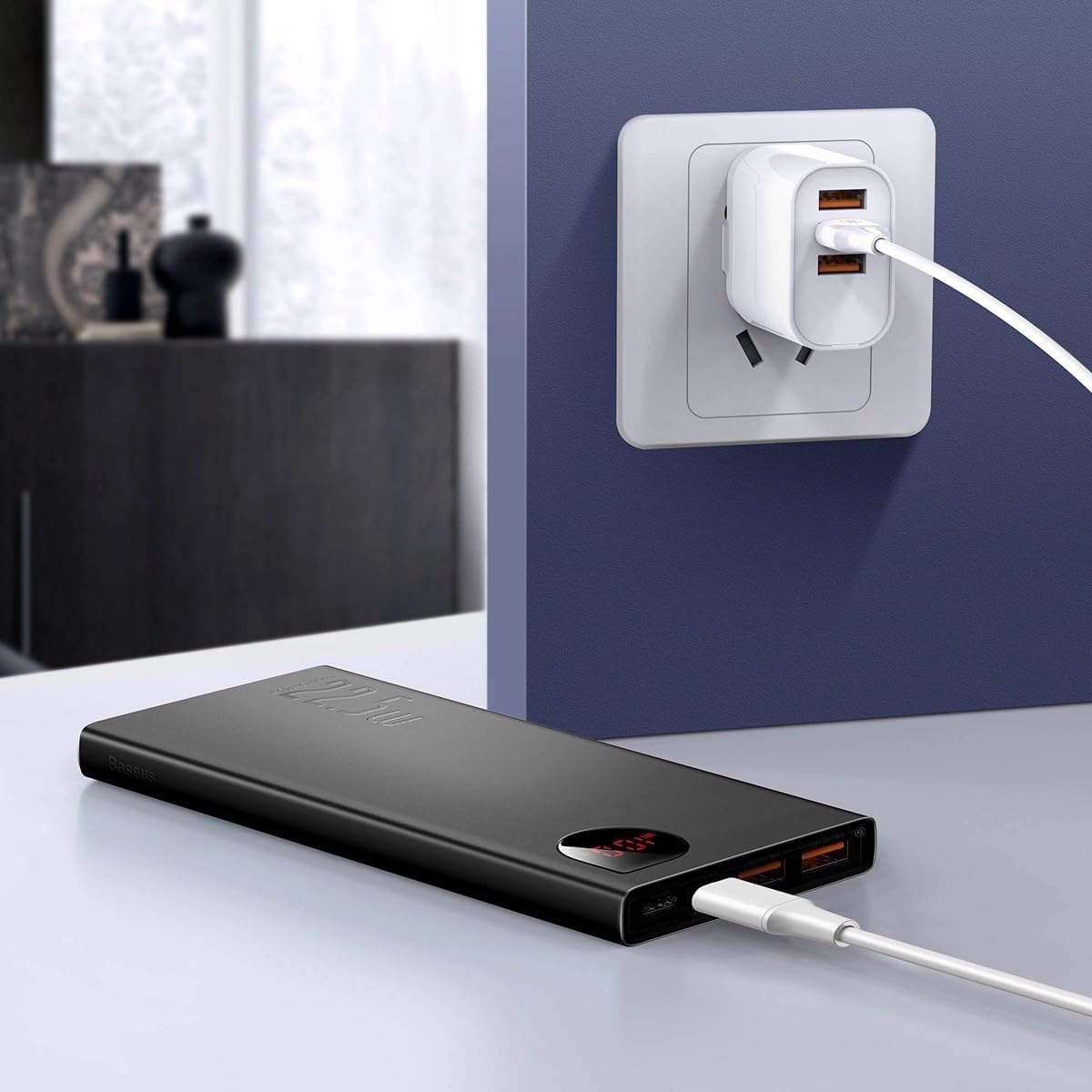
영상: The Baseus Adaman Power Bank connected to a wall charger via a USB cable, illustrating the process of recharging the power bank itself.
작동 지침
장치 충전하기
- Connect your device's charging cable to one of the output ports on the power bank (Type-C, USB1, or USB2).
- 케이블의 다른 쪽 끝을 장치에 연결합니다.
- 파워뱅크가 자동으로 기기 충전을 시작합니다. 디지털 디스플레이에 배터리 잔량이 표시됩니다.tage.
- 충전을 중지하려면 기기를 보조 배터리에서 분리하기만 하면 됩니다.

영상: A smartphone being charged by the Baseus Adaman Power Bank, demonstrating the device's charging capability for mobile phones.
배터리 수준 확인
The digital display on the power bank will show the current battery percentage when it is in use or when a device is connected. If the power bank is idle, you may need to briefly press the power button (if available, not explicitly mentioned but common) to activate the display.
유지
- 부드럽고 마른 천으로 보조 배터리를 닦으세요. 강한 화학 물질이나 연마재를 사용하지 마세요.
- 파워 뱅크를 사용하지 않을 때는 서늘하고 건조한 곳에 보관하십시오.
- For optimal battery health, fully charge and discharge the power bank at least once every three months if it's not used regularly.
문제 해결
| 문제 | 가능한 원인 | 해결책 |
|---|---|---|
| 모바일 기기가 충전되지 않습니다. | Low battery, faulty cable, incompatible device. | Charge the power bank. Try a different cable. Ensure your device is compatible. |
| 모바일 기기가 충전되지 않습니다. | Faulty charging cable/adapter, damaged port. | Try a different charging cable and wall adapter. Check ports for damage. |
| 디지털 디스플레이가 작동하지 않습니다. | Power bank is off, low battery, malfunction. | Ensure power bank is on or connected to a device. Charge the power bank. If issue persists, contact support. |
명세서
| 특징 | 세부 사항 |
|---|---|
| 모델 번호 | PPAD070001 |
| 상표 | 베이스어스 |
| 배터리 용량 | 10000mAh |
| 특별 기능 | 디지털 디스플레이 |
| 커넥터 유형 | Input: USB Type-C, Micro-USB, IP/IN; Output: USB Type-C, USB-A (x2) |
| 권tage | 5 볼트 |
| 현재의 | 5 Amps |
| 전력 출력 | Up to 22.5W (PD 3.0, QC 3.0) |
| 배터리 셀 구성 | 리튬폴리머 |
| 출력 포트 수 | 3개 (C 타입 1개, USB-A 2개) |
| Number of Input Ports | 3 (1x Type-C, 1x Micro-USB, 1x IP/IN) |
| 호환 장치 | All Smartphones and other USB-powered devices |
| 가지고 다닐 수 있는 | 예 |
보증 및 지원
이 제품에는 다음이 포함되어 있습니다. 보증 없음 as per the provided specifications. For any technical support or inquiries, please refer to the official Baseus web사이트를 방문하거나 판매점에 문의하세요.
자세한 내용은 다음을 방문하세요. www.baseus.com