
1. 서론
Thank you for choosing the Simrad NAC-1 Outboard Pilot Hydraulic Pack MkII PUMP-1 with POINT-1. This system is designed to provide reliable and precise autopilot control for outboard-powered vessels with hydraulic steering. The NAC-1 processor, combined with the PUMP-1 hydraulic pump and POINT-1 GPS antenna, offers advanced navigation capabilities, enhancing your boating experience. This manual provides essential information for the proper installation, operation, and maintenance of your Simrad autopilot system.
2. 안전 정보
Please read all safety warnings and instructions carefully before installing or operating the product. Failure to follow these instructions could result in product malfunction, property damage, serious injury, or death.
- 전기 안전: Ensure all power connections are made correctly and protected by appropriate fuses. Disconnect power before performing any installation or maintenance.
- 설치: All installation procedures should be performed by qualified personnel. Incorrect installation can lead to system failure.
- 항해: The autopilot system is an aid to navigation and should not be used as the sole means of navigation. Always maintain a proper lookout and be prepared to take manual control of the vessel.
- 유압 시스템: Exercise caution when working with hydraulic systems. Ensure the engine is off and the steering system is depressurized before connecting the hydraulic pump.
3. 패키지 내용
패키지에 모든 구성 요소가 들어 있는지 확인하세요.
- Simrad NAC-1 Autopilot Computer
- Simrad PUMP-1 Hydraulic Pump (MkII)
- Simrad POINT-1 GPS Antenna with Heading Sensor
- NMEA 2000 Starter Kit (includes power cable, backbone cable, T-connectors, terminators)
- 설치 하드웨어 키트
- 문서(빠른 시작 가이드, 보증 정보)
4. 설정 및 설치
Proper installation is crucial for the optimal performance of your Simrad autopilot system. Follow these steps carefully.
4.1 설치 계획
Before beginning, plan the location for each component. Consider cable routing, accessibility for maintenance, and environmental factors.
- NAC-1 Processor: Mount in a dry, protected area, away from heat sources and strong electromagnetic fields.
- PUMP-1 Hydraulic Pump: Install close to the steering cylinder, ensuring easy access for hydraulic line connections and fluid checks.
- POINT-1 GPS Antenna: Mount in a location with a clear, unobstructed view of the sky (360 degrees horizontally, 10 degrees above the horizon). Avoid mounting near radar, VHF antennas, or other transmitting devices.
4.2 Mounting the NAC-1 Processor
- 적합한 장착 표면을 선택하십시오.
- Use the provided template (if applicable) to mark drill holes.
- Secure the NAC-1 processor using the supplied mounting hardware.
4.3 Installing the PUMP-1 Hydraulic Pump
- Ensure the vessel's engine is off and the steering system is depressurized.
- Mount the pump securely to a rigid surface.
- Connect the hydraulic lines from the steering system to the pump according to the diagram in the quick start guide. Ensure all connections are tight and leak-free.
- Bleed the hydraulic system thoroughly after installation.
4.4 Mounting the POINT-1 GPS Antenna
- Choose a high, unobstructed location.
- Secure the POINT-1 antenna using the provided mounting hardware.
- Route the NMEA 2000 cable from the antenna to the NMEA 2000 backbone.
4.5 배선 연결
All components connect to a common NMEA 2000 network. Ensure the network is properly terminated at both ends.
- NMEA 2000 네트워크: Connect the NAC-1 processor, PUMP-1 pump, and POINT-1 antenna to the NMEA 2000 backbone using T-connectors.
- 힘: Connect the NMEA 2000 network power cable to a fused 12V DC power source. The NAC-1 processor and PUMP-1 pump draw power from the NMEA 2000 network.
- Steering Feedback: Connect the steering feedback unit (if external, otherwise integrated) to the NAC-1 processor as per the wiring diagram.
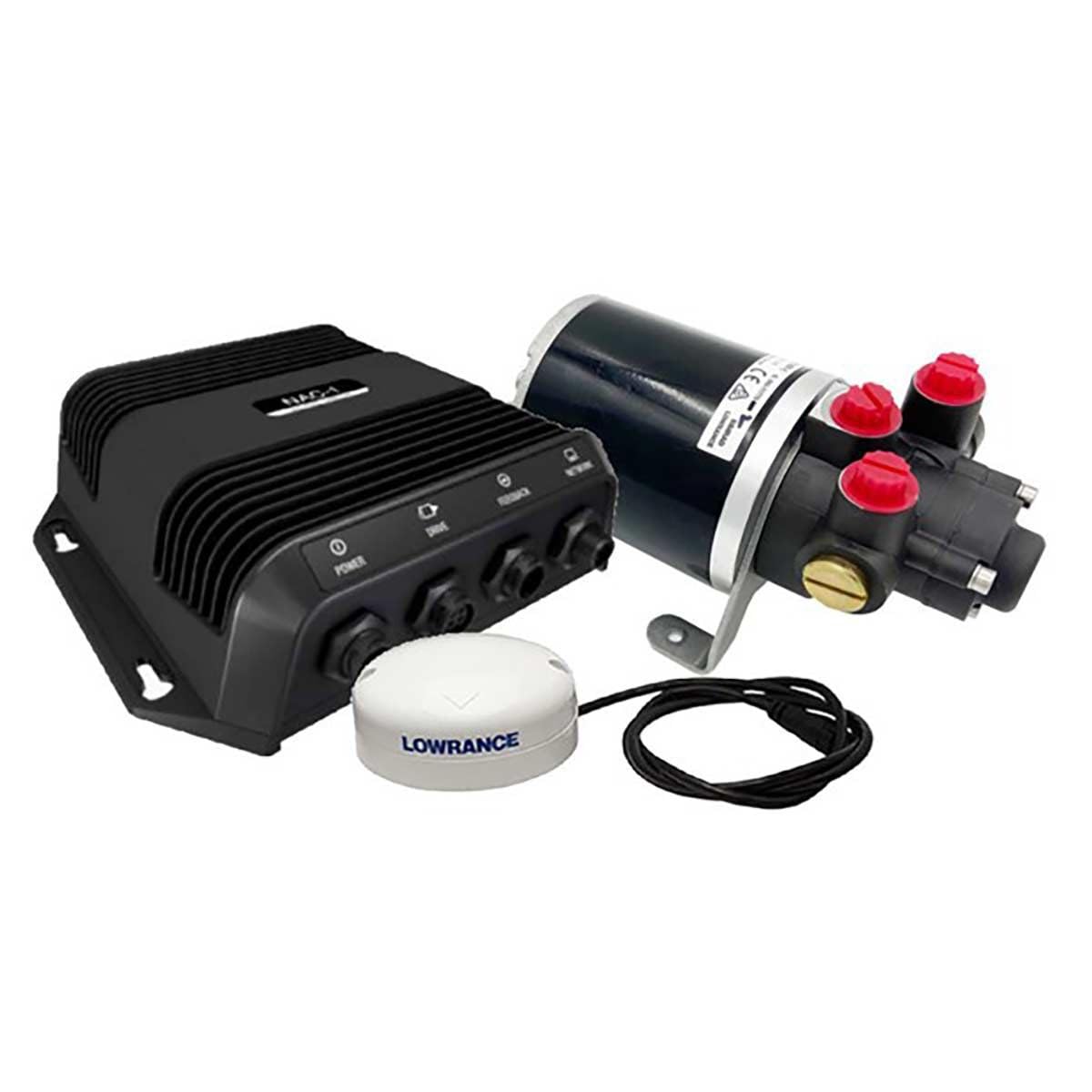
그림 4.5.1: 예ample of Simrad NAC-1 Outboard Pilot Hydraulic Pack components. This image illustrates the main units including the NAC-1 processor, PUMP-1 hydraulic pump, and POINT-1 GPS antenna, which are central to the autopilot system installation.
4.6 초기 전원 켜기 및 구성
- Apply power to the NMEA 2000 network.
- Turn on your Simrad multifunction display (MFD) or autopilot controller.
- Follow the on-screen prompts to perform initial setup, including compass calibration, rudder response calibration, and sea trial calibration. Refer to your MFD's manual for detailed calibration procedures.
5. 사용 설명서
Once installed and calibrated, your Simrad autopilot system is ready for operation.
5.1 기본 작업
- 전원 켜기/끄기: The autopilot system powers on with the NMEA 2000 network.
- 대기 모드: Press the 'Standby' button on your controller or MFD to disengage the autopilot and take manual control.
- 자동 모드 : Press the 'Auto' button to engage the autopilot and maintain the current heading.
- Heading Adjustments: Use the +/- 1 degree or +/- 10 degree buttons on your controller to adjust the heading in Auto mode.
5.2 고급 기능
- NoDrift Mode: This mode maintains your vessel's position over ground, compensating for wind and current. Activate from your MFD.
- 경유지 탐색: If connected to a chartplotter, the autopilot can steer to a selected waypoint or along a route. Select the waypoint/route on your MFD and engage 'Nav' mode on the autopilot.
- Turn Patterns: Access pre-defined turn patterns (e.g., U-turn, spiral turn) from your MFD for specific maneuvers.
6. 유지관리
Regular maintenance ensures the longevity and reliable performance of your autopilot system.
- 케이블 연결: Periodically check all NMEA 2000 and power cable connections for corrosion or looseness.
- 유압유: Check the hydraulic fluid level in the steering system reservoir regularly. Top up with the recommended fluid if necessary. Inspect hydraulic lines for leaks.
- 소프트웨어 업데이트: Check the Simrad website for the latest software updates for your NAC-1 processor and POINT-1 antenna. Updates can improve performance and add new features.
- 청소: Clean the exterior of the NAC-1 processor and POINT-1 antenna with a damp 옷감. 가혹한 화학 물질을 피하십시오.
7. 문제 해결
If you encounter issues with your Simrad autopilot, refer to the following common problems and solutions.
| 문제 | 가능한 원인 | 해결책 |
|---|---|---|
| Autopilot not engaging | System not calibrated; NMEA 2000 network issue; Low voltage | Perform full system calibration; Check NMEA 2000 connections and power; Verify battery voltage. |
| No GPS signal (POINT-1) | Antenna obstructed; Faulty cable; NMEA 2000 issue | 명확한 보장 view of sky; Check POINT-1 cable and NMEA 2000 connections. |
| Poor steering performance | Incorrect calibration; Air in hydraulic system; Rudder feedback issue | Recalibrate autopilot; Bleed hydraulic system; Check rudder feedback unit. |
| 펌프는 계속 작동합니다 | Leak in hydraulic system; Steering feedback issue | Inspect hydraulic lines for leaks; Check steering feedback unit and connections. |
For more complex issues or error codes not listed, consult the full Simrad support documentation or contact Simrad customer support.
8. 사양
Key technical specifications for the Simrad NAC-1 Outboard Pilot Hydraulic Pack MkII PUMP-1 (Model DSI-163):
- 모델 번호: DSI-163
- 제조업체: 심라드
- 품목 무게: 2.2 pounds (approximate, for the combined pack)
- 패키지 크기: 0.04 x 0.04 x 0.04인치(참고: 이 치수는 플레이스홀더 값이며 실제 제품 크기를 반영하지 않을 수 있습니다.)
- 전원 공급 장치: 12V DC (via NMEA 2000)
- 연결성: NMEA2000
- 첫 번째 가능한 날짜: 23년 2023월 XNUMX일
9. 보증 및 지원
Simrad products are backed by a limited warranty. For detailed warranty terms and conditions, please refer to the official Simrad web사이트 또는 제품에 포함된 보증서를 확인하세요. 보증 청구를 위해 구매 증빙 자료를 보관하세요.
For technical support, product registration, or to find authorized service centers, please visit the official Simrad website or contact their customer service department. Online resources often include FAQs, software downloads, and additional troubleshooting guides.
Simrad Official Web대지: www.simrad-yachting.com