
1. 서론
The Nobsound VFD253 is a versatile audio device that integrates multiple functions into a single unit. It serves as an audio spectrum analyzer, a Bluetooth receiver, an audio switcher, and a high-precision clock. This manual provides essential information for setting up, operating, and maintaining your VFD253 to ensure optimal performance.

이미지 1.1: The Nobsound VFD253 Audio Spectrum Analyzer Receiver displaying the time.
2. 주요 특징
- 다기능 디자인: Combines an audio spectrum analyzer, Bluetooth 5.0 receiver, 3.5mm AUX audio switcher, and a high-precision clock.
- 고해상도 VFD 디스플레이: Features a 25x15 dedicated green VFD display for accurate visualization of audio frequency bands.
- 다양한 오디오 입력: Includes a built-in microphone pickup, Bluetooth 5.0 connectivity, and two 3.5mm AUX inputs for compatibility with various audio sources like smartphones, PCs, game players, amp스피커 및 스피커.
- Adjustable Display Modes & Brightness: Offers 5 decorative music spectrum display modes and 2 clock display modes. The VFD backlight brightness can be adjusted manually (3 levels) or automatically to suit different environments.
- 고정밀 시계: Equipped with an RX8025T built-in crystal oscillator, providing a clock accuracy of ±3ppm, resulting in an annual error of less than 1 minute.
- 넓은 주파수 범위 및 AGC 표시: Supports an 80Hz-16KHz frequency sweep. A special Automatic Gain Control (AGC) algorithm and customized output curve ensure optimal visual effects across a wide range of input signal levels, preventing under-display for low inputs and over-display for high inputs.
- 사용자 지정 가능한 디스플레이 효과: Individual adjustments for gain, brightness, main light column fall speed, hold time, and peak fall speed.
- 전원 끄기 메모리: All settings are saved automatically and retained after power cycling, eliminating the need for re-configuration.
- 편리한 원격 제어: Allows easy adjustment of all settings from a distance.

이미지 2.1: 위에view of the VFD253's multi-functional capabilities, including audio spectrum analysis, Bluetooth, and AUX inputs.

이미지 2.2: The VFD253 displaying an audio spectrum in a typical home audio environment, highlighting its wide frequency range and AGC display.
3. 패키지 내용
다음 품목이 패키지에 포함되어 있는지 확인하세요.
- 1 × Nobsound VFD253 Audio Spectrum Analyzer Receiver
- 1 × USB 타입 C 케이블
- 리모컨 1개 (배터리는 포함되어 있지 않습니다)

이미지 3.1: The Nobsound VFD253 package contents: the main unit, a USB Type-C cable, and a remote control.
4. 제품 오버view (제어 및 포트)
Familiarize yourself with the various controls and connection ports on your VFD253 unit.

이미지 4.1: Front panel buttons and rear panel connections of the VFD253. Front buttons include 'Mode -', 'Mode +', and 'Audio source selection / Power switch'. Rear ports include 3.5mm AUX output, microphone pickup, 3.5mm AUX input (IN1), 3.5mm AUX input (IN2), and DC IN (Type-C).
- 전면 패널 버튼:
- Mode -: Decreases display mode or setting value.
- Mode +: Increases display mode or setting value.
- 오디오 소스 선택/전원 스위치: Short press to cycle through audio inputs; long press to power on/off.
- 후면 패널 포트:
- 3.5mm AUX 출력: 에 연결 amp리파이어 또는 액티브 스피커.
- 마이크 픽업: Built-in microphone for ambient sound analysis.
- 3.5mm AUX 입력(IN1): Connects to an audio source via 3.5mm cable.
- 3.5mm AUX 입력(IN2): Connects to a second audio source via 3.5mm cable.
- DC 입력(C형): 기기 전원 입력 단자.
5. 설정
- 전원 연결: Connect the provided USB Type-C cable to the DC IN port on the rear of the VFD253 and plug the other end into a suitable USB power adapter (5V DC, not included).
- 전원 켜기: Long press the 'Audio Source Selection / Power Switch' button on the front panel or press the power button on the remote control to turn on the unit.
- 오디오 입력 연결:
- 블루투스: Select Bluetooth input using the front panel button or remote. Enable Bluetooth on your audio source (e.g., smartphone, PC) and pair with 'VFD253'.
- 보조 입력: Connect your audio source (e.g., CD player, PC) to either the IN1 or IN2 3.5mm AUX input port using a 3.5mm audio cable. Select the corresponding AUX input.
- 마이크로폰: Select the microphone input to analyze ambient sound.
- 오디오 출력 연결(선택 사항): If using the VFD253 as an audio switcher, connect the 3.5mm AUX Output port to your amp리파이어 또는 액티브 스피커.
6. 사용 설명서
6.1. 기본 동작
- 전원 켜기/끄기: Long press the 'Audio Source Selection / Power Switch' button on the front panel or press the 힘 리모컨의 버튼을 누르세요.
- 입력 선택: Short press the 'Audio Source Selection / Power Switch' button on the front panel or use the 입력 button on the remote to cycle through AUX1, AUX2, Bluetooth, and Microphone inputs.
- 디스플레이 모드 선택: 사용하세요 방법 button on the remote to switch between the 5 music spectrum display modes and 2 clock display modes.
- 밝기 조정: 사용하세요 명도 button on the remote to adjust the VFD display brightness manually (3 levels). The unit also supports automatic brightness adjustment.
6.2. Advanced Settings (via Remote Control)
The remote control provides access to various advanced settings for customizing the display effects.
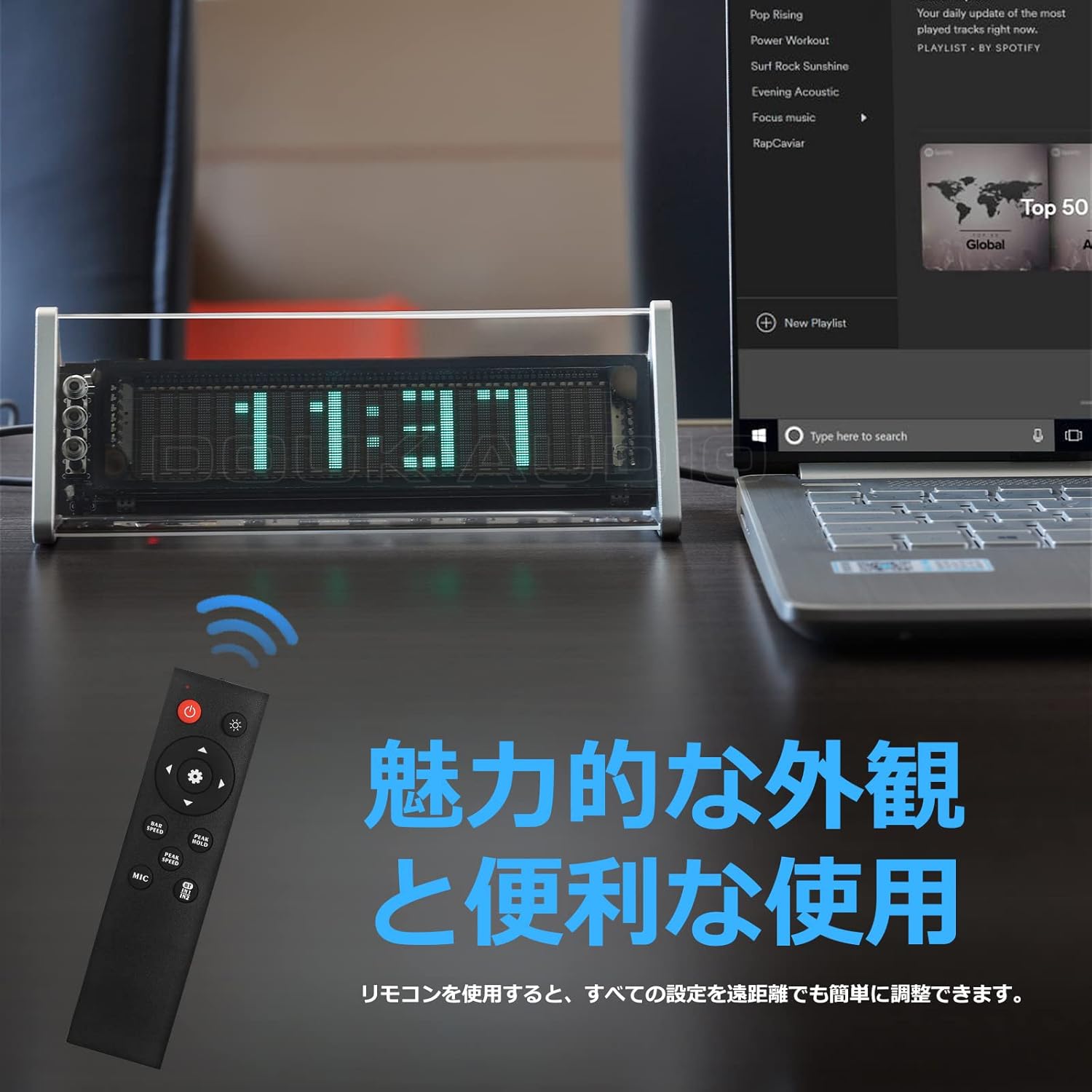
이미지 6.1: The remote control for the Nobsound VFD253, showing buttons for power, input, mode, brightness, gain, and speed adjustments.
- 이득 조정: 사용하세요 Gain +/- buttons to adjust the input sensitivity, affecting the height of the spectrum display.
- Fall Speed Adjustment: 사용하세요 속도 +/- buttons to adjust the fall speed of the main light column and peak indicators.
- Hold Time Adjustment: Adjust the duration for which peak indicators remain on screen.
- MIC Input Toggle: 사용하세요 마이크 button to enable or disable the built-in microphone input.
- 설정 메모리: All adjustments are automatically saved thanks to the power-off memory function.
7. 디스플레이 모드
The VFD253 offers a variety of visual display options to enhance your audio experience or provide time information.
7.1. Music Spectrum Display Modes (5 Types)
These modes visualize the audio input in different dynamic patterns on the VFD screen.

이미지 7.1: Examples of various music spectrum display modes available on the VFD253.

이미지 7.2: 자세한 view of one of the music spectrum display modes.
7.2. Clock Display Modes (2 Types)
When no audio signal is detected for a period, or when manually selected, the unit can display the time.

이미지 7.3: 자세한 view of one of the clock display modes.
8. 사양
| 특징 | 사양 |
|---|---|
| 상표 | 놉 사운드 |
| 모델 | VFD253 |
| 디스플레이 유형 | Digital VFD (25 × 15 resolution) |
| 주파수 범위 | 80Hz - 16KHz |
| 시계 정확도 | ±3ppm (annual error < 1 minute) |
| 연결성 | Bluetooth 5.0, 2 × 3.5mm AUX Input, 1 × 3.5mm AUX Output |
| 전원 입력 | DC 5V(USB Type-C) |
| 치수(L × H × D) | 184mm × 66mm × 75mm (approx. 7.24in × 2.60in × 2.95in) |
| 순중량 | 322g(0.71파운드) |
| 프레임 소재 | ABS |
9. 문제 해결
If you encounter any issues with your VFD253, please refer to the following common problems and solutions:
- 디스플레이 없음:
- Ensure the USB Type-C power cable is securely connected and receiving power.
- Press the power button on the unit or remote to ensure it is turned on.
- No Audio Output (when using AUX Out):
- Verify that the correct input source (AUX1, AUX2, or Bluetooth) is selected.
- Check all 3.5mm audio cable connections between the source, VFD253, and your amp스피커
- 귀하의 것을 확인하십시오 amp수신기/스피커의 전원이 켜져 있고 올바른 입력으로 설정되어 있습니다.
- Display Not Reacting to Audio:
- Ensure an audio source is playing and connected correctly.
- If using microphone input, ensure the MIC input is enabled and there is ambient sound.
- 조정하다 얻다 setting via the remote control to increase sensitivity.
- 블루투스 페어링 문제:
- Ensure the VFD253 is set to Bluetooth input mode.
- Disable and re-enable Bluetooth on your audio source device.
- Move the audio source closer to the VFD253 to ensure a strong signal.
- 원격 제어가 작동하지 않음:
- 리모컨의 배터리를 확인하고 교체하세요.
- Ensure there is a clear line of sight between the remote and the VFD253.
10. 유지관리
To ensure the longevity and proper functioning of your Nobsound VFD253, follow these maintenance guidelines:
- 청소: Use a soft, dry cloth to wipe the unit. Avoid using abrasive cleaners, solvents, or chemical sprays, as these can damage the finish or internal components.
- 환경: Place the unit in a dry, well-ventilated area away from direct sunlight, high temperatures, humidity, and strong magnetic fields.
- 손질: 기기를 조심스럽게 다루십시오. 떨어뜨리거나 강한 충격을 주지 마십시오.
- 분해 : 제품을 분해하거나 개조하지 마십시오. 이는 보증을 무효화하고 제품 손상이나 부상을 초래할 수 있습니다.
11. 보증 및 지원
Nobsound products are designed for reliability and performance. For warranty information, technical support, or service inquiries, please refer to the official Nobsound web사이트를 방문하거나 공인 딜러에게 문의하세요.
- 온라인 지원: Visit the official Nobsound website for FAQs, product updates, and contact information.
- 고객 서비스: If you require further assistance, please contact Nobsound customer support with your product model and purchase details.