
소개
Thank you for choosing the Setty 10000 mAh Solar Power Bank. This portable charger is designed to provide reliable power for your mobile devices, featuring a high-capacity battery, integrated charging cables, and a solar panel for emergency charging. Please read this manual carefully to ensure proper use and maintenance of your device.
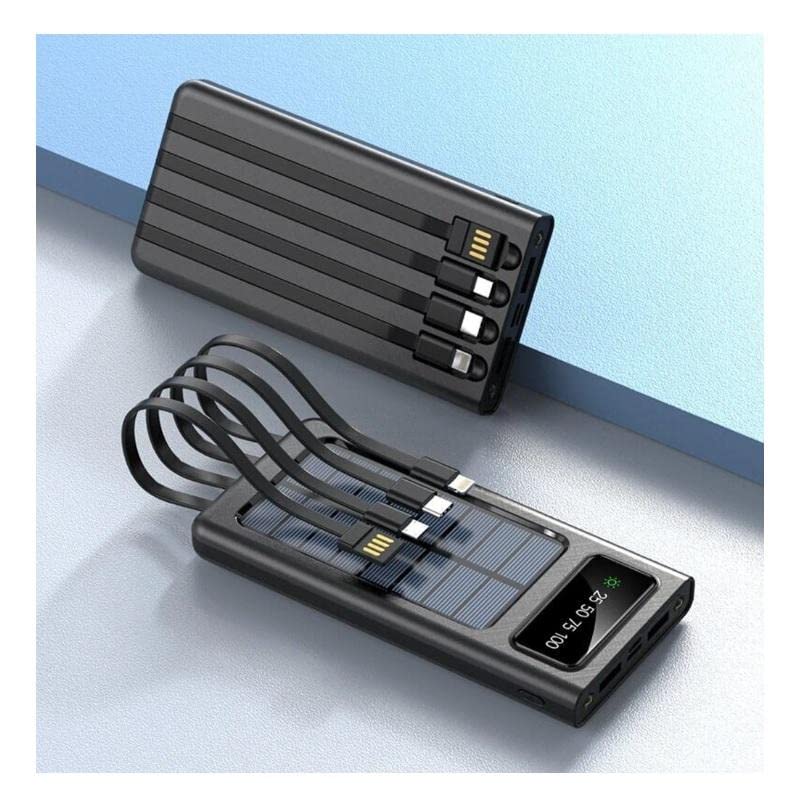
제품 특징
- 10000 mAh High Capacity: 대부분의 스마트폰을 여러 번 충전할 수 있습니다.
- Integrated Charging Cables: Includes built-in USB, USB-C, MicroUSB, and Lightning cables for universal compatibility.
- 태양광 충전 기능: Equipped with a solar panel for emergency power replenishment when conventional power sources are unavailable.
- 다중 출력 포트: Features a standard USB output port for charging various mobile devices.
- LCD 디스플레이: Digital screen indicates battery charge level.
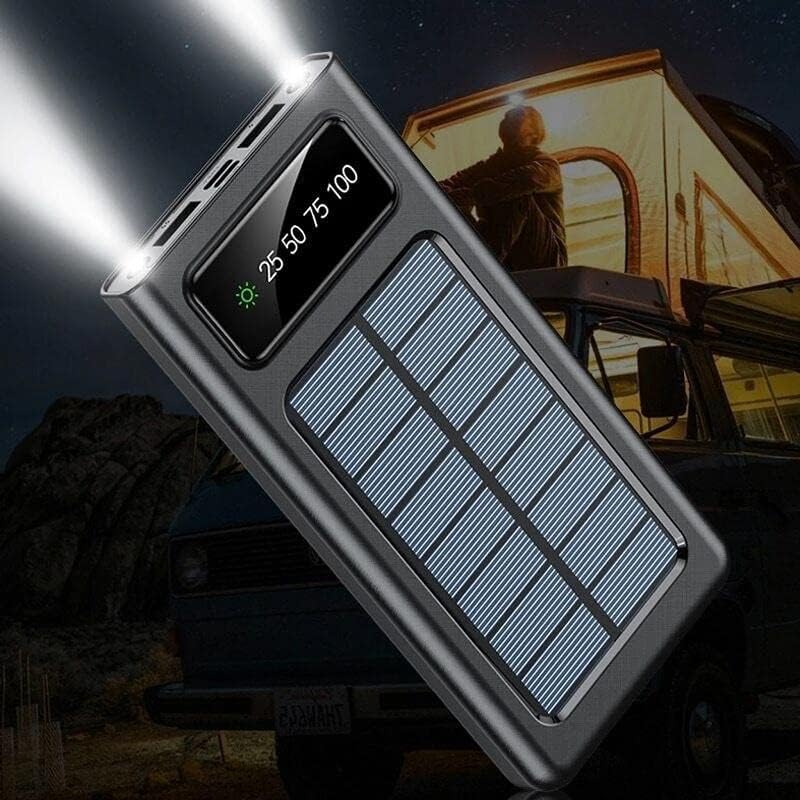
- LED 손전등: Built-in flashlight for convenience in low-light conditions.
패키지 내용
- Setty 10000 mAh Solar Power Bank (Model 84730235)
- 사용자 설명서
구성 요소 식별

- 태양광 패널: 비상시 태양광 충전용입니다.
- LCD 디스플레이: 배터리 비율을 표시합니다.tage 및 충전 상태.
- 통합 케이블: USB, USB-C, MicroUSB, Lightning output cables.
- USB-A 출력 포트: Standard USB port for connecting external cables.
- USB-C 입력 포트: 보조 배터리를 충전하기 위해서입니다.
- MicroUSB Input Port: 보조 배터리를 충전하기 위해서입니다.
- 전원 버튼: To turn on/off the device and activate the flashlight.
- LED 손전등: 통합된 광원.
설정
초기 충전
Before first use, fully charge the power bank using a wall adapter. This ensures the internal battery is properly calibrated and ready for optimal performance.
- Connect a USB-C or MicroUSB cable to the corresponding input port on the power bank.
- 케이블의 다른 쪽 끝을 USB 벽면 어댑터(별도 구매)에 연결하십시오.
- 벽면 어댑터를 전원 콘센트에 연결하세요.
- The LCD display will show the charging progress. Charge until the display shows 100%.
작동 지침
파워뱅크 충전하기
The power bank can be charged via a wall adapter or its solar panel.
Via Wall Adapter (Recommended for fastest charge)
- Use the USB-C or MicroUSB input port with a compatible cable and wall adapter.
- The LCD display will show the charging percentage.
Via Solar Panel (Emergency Charging)

- Place the power bank in direct sunlight. Ensure the solar panel faces the sun.
- The solar charging indicator on the LCD display will illuminate when charging via solar energy.
- Solar charging is slower than wall charging and is intended for emergency use to extend battery life, not as a primary charging method.
외부 장치 충전
The power bank can charge up to four devices simultaneously using its integrated cables and USB-A output port.
- Identify the correct integrated cable (USB, USB-C, MicroUSB, or Lightning) for your device.
- Connect the appropriate integrated cable to your device's charging port.
- Alternatively, use your device's original charging cable and connect it to the USB-A output port on the power bank.
- 보조 배터리가 자동으로 기기 충전을 시작합니다. 만약 충전이 시작되지 않으면 전원 버튼을 한 번 누르세요.
- The LCD display will show the remaining battery level of the power bank.
LED 손전등 사용
- 손전등을 켜려면 전원 버튼을 약 3초 동안 길게 누르세요.
- 손전등을 끄려면 전원 버튼을 약 3초 동안 다시 길게 누르세요.
LCD 디스플레이 정보

- 디스플레이에는 배터리 충전 수준이 백분율로 표시됩니다.tage (e.g., 25, 50, 75, 100).
- A sun icon will appear when the power bank is actively charging via its solar panel.
유지
- 청소: 보조 배터리를 부드럽고 마른 천으로 닦으십시오. 강한 화학 약품이나 연마제를 사용하지 마십시오.
- 저장: 모바일 배터리는 직사광선과 극한의 온도를 피해 서늘하고 건조한 곳에 보관하세요.
- 배터리 관리 : 배터리 수명을 연장하려면 자주 사용하지 않을 경우 최소 3개월에 한 번씩 보조 배터리를 완전히 충전하십시오. 배터리를 자주 완전히 방전시키지 마십시오.
- 물 노출: 이 기기는 방수 기능이 없습니다. 물이나 과도한 습기에 노출되지 않도록 하십시오.
문제 해결
| 문제 | 가능한 원인 | 해결책 |
|---|---|---|
| 보조 배터리가 충전되지 않음 | 케이블이 제대로 연결되지 않았거나, 케이블/어댑터에 문제가 있거나, 보조 배터리가 완전히 충전된 상태입니다. | Ensure cables are securely connected. Try a different cable or wall adapter. Check LCD display for 100% charge. |
| 보조 배터리에서 장치가 충전되지 않음 | Power bank battery low; incorrect cable; device not compatible; power bank not activated. | Charge the power bank. Use the correct integrated cable or a known good external cable. Press the power button to activate output. |
| 태양광 충전 속도가 느리거나 작동하지 않습니다. | Insufficient sunlight; solar panel obstructed; solar charging is inherently slow. | Place the power bank in direct, unobstructed sunlight. Solar charging is supplementary; use wall charging for faster results. |
| LED 손전등이 작동하지 않음 | Power bank battery low; incorrect operation. | Charge the power bank. Press and hold the power button for 3 seconds to activate/deactivate. |
명세서
| 특징 | 세부 사항 |
|---|---|
| 모델 번호 | 84730235 |
| 상표 | Setty |
| 제조업체 | 텔포스원 |
| 배터리 용량 | 10000mAh |
| 배터리 유형 | Lithium-polymer (1 Lithium-ion battery included) |
| 입력 포트 | USB Type C, MicroUSB |
| 출력 포트 | USB Type A, Integrated USB, USB-C, MicroUSB, Lightning cables |
| 권tage | 5 볼트 |
| Amp에라 지 | 2.1아 |
| 색상 | 검은색 |
| 권장 사용 | 휴대전화 |
| 호환 장치 | 휴대전화 |
안전 정보
- Do not expose the power bank to extreme temperatures, direct sunlight for prolonged periods (especially when not charging), or fire.
- Do not immerse the power bank in water or expose it to rain or excessive moisture.
- 기기를 직접 분해, 개조하거나 수리하려고 하지 마세요.
- 어린이의 손이 닿지 않는 곳에 보관하세요.
- 호환되는 충전 케이블과 어댑터만 사용하세요.
- 모바일 충전기를 떨어뜨리거나 강한 충격을 주지 마십시오.
- If the power bank swells, overheats, or shows any other abnormal behavior, discontinue use immediately.
보증 및 지원
This product is covered by a standard manufacturer's warranty. For specific warranty terms and conditions, please refer to the documentation provided at the time of purchase or contact your retailer. For technical support or inquiries, please visit the official Setty web사이트 또는 고객 서비스 부서에 문의하십시오.