
Pro-Ject Debut III Phono HG OM5e
Pro-Ject Debut III Phono SB Turntable User Manual
Model: Debut III Phono HG OM5e
소개
Welcome to the user manual for your new Pro-Ject Debut III Phono SB Audiophile Turntable. This manual provides essential information for setting up, operating, and maintaining your turntable to ensure optimal performance and longevity. Please read these instructions carefully before first use.

Figure 1: Pro-Ject Debut III Phono SB Turntable (Walnut)
The Pro-Ject Debut III Phono SB is an audiophile-grade turntable featuring an 8.6" aluminum tonearm, electronic speed selection, and a pre-mounted Ortofon OM5e phono cartridge. It includes a built-in phono preamp 다양한 연결성을 위해.
패키지 내용
Before beginning setup, please ensure all components listed below are present in your package:
- Pro-Ject Debut III Phono SB Turntable
- 먼지 덮개
- 펠트 매트
- 전원 공급 장치
- RCA Cable (semi-balanced shielded audio cable, 1.23m)
- Standard Flat Belt (for 33/45 RPM)
- 카트리지 정렬 각도기
- Round Belt (for 78 RPM)
- 안티 스케이팅 웨이트
- Adapter for 7" Singles
- Ortofon OM5e Phono Cartridge (pre-mounted)
설치 지침
Follow these steps carefully to set up your turntable.
1. 배치
턴테이블을 직사광선, 열원 및 강한 진동을 피해 안정적이고 평평한 곳에 놓으십시오. 기기 주변에 충분한 환기가 이루어지도록 하십시오.
2. 플래터 및 벨트 설치
- Carefully place the heavy steel platter onto the turntable spindle.
- Locate the drive motor pulley. Gently stretch the standard flat belt (for 33/45 RPM) around the motor pulley and the inner rim of the platter. For 78 RPM playback, use the round belt.

Figure 2: Turntable Platter
Ensure the drive belt is correctly seated around the motor pulley and the platter's inner rim for stable rotation.
3. 톤암 및 카트리지 설치
Your Ortofon OM5e cartridge is pre-mounted and pre-adjusted. However, you will need to set the tracking force and anti-skating.
- 추적력 설정: Rotate the counterweight at the rear of the tonearm until the tonearm floats freely and is balanced horizontally. Lock the tonearm in its rest. Rotate the tracking force dial (the numbered ring on the counterweight) to '0'. Then, rotate the entire counterweight (including the dial) counter-clockwise until the desired tracking force is set. For the Ortofon OM5e, the recommended tracking force is typically 1.75g.
- 안티스케이팅 설정: Attach the anti-skating weight to the small thread loop on the tonearm support. The thread should pass through the second groove for the Ortofon OM5e cartridge.

Figure 3: Tonearm with Anti-Skating Weight
Proper adjustment of tracking force and anti-skating is crucial for optimal sound quality and record preservation.
4. 연결 Amp리퍼
The Debut III Phono SB features a built-in phono preamp, offering two output options:
- 라인 아웃: Use this if your ampLifier는 않습니다 ~ 아니다 have a dedicated phono input. Connect the supplied RCA cable from the turntable's "Line Out" jacks to any standard line-level input on your amp변환기(예: AUX, CD, 튜너).
- 포노 출력: Use this if your amp리퍼 하다 have a dedicated phono input. Connect the supplied RCA cable from the turntable's "Phono Out" jacks to your amplifier's "Phono" input.
Always connect the ground wire from the turntable to the ground terminal on your amp험 노이즈를 최소화하기 위한 증폭기.

Figure 4: RCA Outputs and Ground Terminal
Choose the appropriate output based on your ampLifier의 능력.
5. 전원 연결
Connect the power supply to the DC input jack on the turntable and then plug it into a suitable wall outlet.
작동 지침
1. 전원 켜기 / 끄기
The power switch is located on the underside of the turntable plinth. Flip the switch to the 'ON' position to power on the unit.

그림 5: 전원 스위치 위치
The discreetly placed power switch maintains the clean aesthetic of the turntable.
2. 속도 선택
The Debut III Phono SB features electronic speed selection for 33, 45, and 78 RPM.
- To switch between 33 and 45 RPM, press the speed control button located on the underside of the plinth. The platter will adjust to the selected speed.
- For 78 RPM playback, you must manually change the drive belt to the larger diameter step on the motor pulley and use the round belt provided. Then, select 45 RPM using the electronic speed control.
3. 레코드 재생
- Place a record on the platter. If playing a 7" single, use the provided adapter.
- Select the correct playback speed (33, 45, or 78 RPM).
- 큐잉 레버를 사용하여 톤암을 부드럽게 들어 올리십시오.
- 톤암을 레코드의 원하는 시작 홈 위에 놓으십시오.
- Slowly lower the cueing lever to gently drop the stylus onto the record.
- At the end of the record, lift the tonearm using the cueing lever and return it to the tonearm rest. Secure it with the tonearm clip.
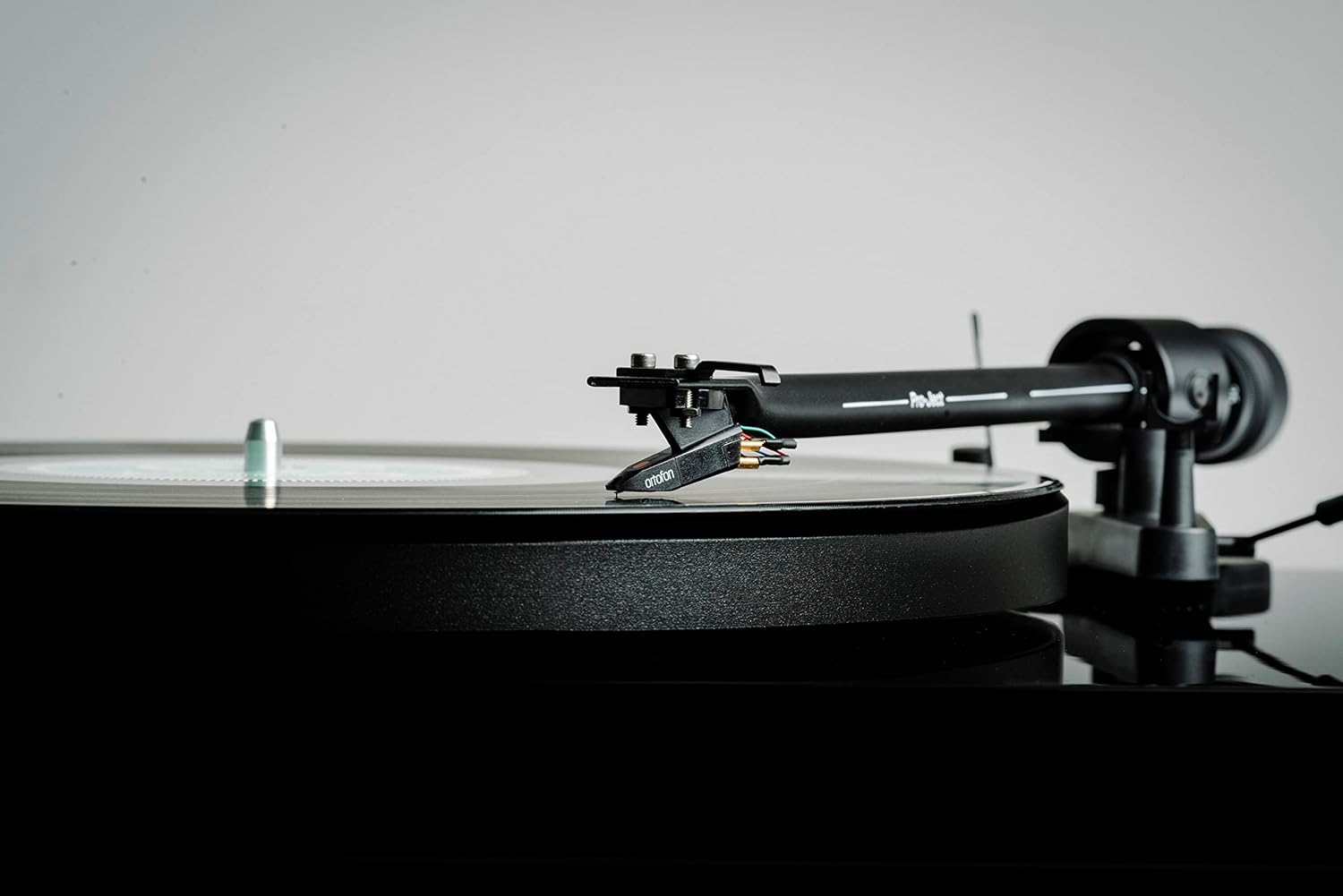
Figure 6: Cartridge on Record
Handle the tonearm and cartridge with care to prevent damage to the stylus or records.
유지
Regular maintenance will help preserve the performance and appearance of your turntable.
- Cleaning the Plinth and Dustcover: Use a soft, lint-free cloth to wipe down the plinth and dustcover. For stubborn marks, a slightly damp 천으로 닦은 후 마른 천으로 다시 닦아주세요. 연마성 세제나 용제 사용은 피해주세요.
- 스타일러스 청소하기: Use a dedicated stylus cleaning brush or fluid. Always brush from back to front (away from the cantilever). Clean the stylus regularly to prevent debris buildup, which can degrade sound quality and damage records.
- 벨트 교체: The drive belt may stretch over time. If you notice inconsistent speed or reduced torque, consider replacing the belt.
- 카트리지 관리: Avoid touching the stylus with your fingers. If the cartridge needs replacement, consult a qualified technician or refer to the cartridge manufacturer's instructions.

Figure 7: Turntable with Dustcover
Keep the dustcover closed when not in use to protect the turntable from dust and debris.
문제 해결
If you encounter issues with your turntable, refer to the following common problems and solutions.
| 문제 | 가능한 원인 | 해결책 |
|---|---|---|
| No power / No rotation | Power cable not connected; Power switch off; Faulty power supply. | Check power connections; Ensure power switch is ON; Test with another power outlet. |
| 소리가 나지 않거나 볼륨이 작음 | 잘못된 입력이 선택되었습니다. amplifier; RCA cables not connected properly; Phono/Line Out switch incorrect; Stylus dirty or damaged. | Select correct input (e.g., AUX, CD, Phono); Reconnect RCA cables firmly; Ensure Phono/Line Out switch matches amplifier input; Clean or replace stylus. |
| 윙윙거리는 소리 | Ground wire not connected; Nearby electrical interference; Loose connections. | Connect ground wire to amplifier; Move turntable away from other electronics; Check all cable connections. |
| 왜곡된 소리 | Incorrect tracking force; Dirty stylus; Damaged stylus; Worn record. | Adjust tracking force; Clean stylus; Replace stylus; Try a different record. |
| 속도가 일정하지 않음 | Drive belt stretched or dirty; Platter not seated correctly; Motor issue. | Clean or replace drive belt; Re-seat platter; Contact support if issue persists. |
명세서
Key technical specifications for the Pro-Ject Debut III Phono SB Turntable:
- 모델: Debut III Phono HG OM5e
- Drive Principle: 벨트 드라이브
- 속도: 33, 45, 78 RPM (electronic speed selection for 33/45)
- 플래터: 1.7kg heavy steel platter
- 톤암 : 8.6" Aluminum Tonearm
- 탄약통: Ortofon OM5e (pre-mounted)
- 포노 프리amp: Built-in (switchable Phono/Line Out)
- 모터 유형: 직류 모터
- 제품 크기(길이 x 너비 x 높이): 16.34 x 12.6 x 4.65인치(41.5 x 32 x 11.8cm)
- 품목 무게: 12.1파운드(5.5kg)
- 재료: Engineered Wood (Plinth)
- 색상: 호두
보증 및 지원
For warranty information and technical support, please refer to the official Pro-Ject Audio Systems web사이트를 방문하거나 공인 대리점에 문의하세요. 보증 청구를 위해 구매 증빙 자료를 보관하세요.
제조업체: Pro-Ject 오디오 시스템
Ask a question about this manual
Ask about setup, troubleshooting, compatibility, parts, safety, or missing instructions. Manuals+ will review the question and use this page’s manual context to help answer it.