
1. 서론
This manual provides instructions for the installation, operation, and maintenance of your NETGEAR GS305P 5-Port PoE Gigabit Ethernet Unmanaged Switch. This device is designed to expand your network connectivity with both standard Gigabit Ethernet and Power over Ethernet (PoE+) capabilities, ideal for small office or home network environments.
2. 패키지 내용
패키지에 다음 품목이 포함되어 있는지 확인하십시오.
- NETGEAR GS305P 5-Port PoE Gigabit Ethernet Unmanaged Switch (GS305Pv3)
- 전원 어댑터
- 월마운트 키트
- 빠른 설치 가이드

Image: The NETGEAR GS305P switch, power adapter, and power cord as typically found in the package.
3. 제품 오버view
The NETGEAR GS305P is an unmanaged switch featuring 5 Gigabit Ethernet ports, with 4 of these ports supporting PoE+ (Power over Ethernet Plus). It provides a total power budget of 63W for connected PoE devices. The switch is designed for plug-and-play operation, requiring no software installation or configuration.
비디오: 오버view of the NETGEAR 5-Port PoE Switch, demonstrating its features and ease of use.
전면 패널

Image: Front panel of the GS305P switch, highlighting the 5 Gigabit Ethernet ports and LED indicators for power, PoE Max, link/activity, and PoE fault.
- 전원 LED: 전원 상태를 나타냅니다.
- PoE 최대 LED: Illuminates when PoE power consumption is near maximum capacity.
- 링크/활동 LED(포트 1-5): Green for 1000Mbps link, Yellow for 10/100Mbps link. Blinks to indicate activity.
- PoE 상태 LED(포트 1-4): Green for PoE powered, Yellow for PoE fault.
- 이더넷 포트(1-5): RJ-45 ports for network connections. Ports 1-4 support PoE+.
4. 설정 및 설치
The NETGEAR GS305P switch is designed for simple plug-and-play installation. No software configuration is required.
4.1 스위치 연결
- Connect the power adapter to the switch's power input and then plug the power adapter into an electrical outlet. The Power LED on the switch will illuminate.
- 이더넷 케이블을 사용하여 라우터나 모뎀을 스위치의 5개 기가비트 이더넷 포트에 연결합니다.
- Connect your network devices (computers, printers, network storage) to the remaining Gigabit Ethernet ports. For PoE-powered devices (e.g., IP cameras, wireless access points), connect them to ports 1-4.

Image: A diagram illustrating the plug-and-play nature of the unmanaged switch, connecting various devices like WiFi Access Points, IP Cameras, Computers, and NAS.
4.2 장착 옵션
The GS305P switch can be placed on a desktop or mounted on a wall. A wallmount kit is included for secure installation.
- 데스크탑 배치: Ensure the switch is placed on a flat, stable surface with adequate ventilation.
- 벽걸이 : Use the provided wallmount kit to secure the switch to a wall. Refer to the quick installation guide for detailed steps on wall mounting.
5. 스위치 작동
Once connected, the switch operates automatically. The LEDs provide visual feedback on the network status.
- 전원 켜기: The Power LED will be green when the switch is receiving power.
- Network Activity: The Link/Activity LEDs will light up when a device is connected and blink to indicate data transmission.
- PoE 전원: For PoE-powered devices, the PoE Status LED will be green when power is being supplied. If a PoE fault occurs, the LED will turn yellow.
- 무음 작동 : The fanless design ensures quiet operation, making it suitable for noise-sensitive environments.
6. 유지관리
To ensure optimal performance and longevity of your switch, follow these maintenance guidelines:
- 청소: 부드럽고 마른 천으로 스위치 외부를 닦으세요. 액체나 에어로졸 세척제는 사용하지 마세요.
- 통풍: 과열을 방지하려면 환기구가 막히지 않았는지 확인하세요.
- 환경: Operate the switch within its specified temperature and humidity ranges. Avoid direct sunlight or extreme temperatures.
- 케이블 관리 : 네트워크 케이블을 정리하여 포트에 가해지는 부담을 줄이고 공기 흐름을 개선하십시오.
7. 문제 해결
If you encounter issues with your NETGEAR GS305P switch, refer to the following common troubleshooting steps:
- 전원 없음: Ensure the power adapter is securely connected to the switch and a working electrical outlet. Check the Power LED.
- 링크/활동 없음: Verify that Ethernet cables are properly connected to both the switch and the connected device. Try a different cable or port. Check the Link/Activity LED.
- PoE 장치가 켜지지 않음: Ensure the device is PoE-compatible and connected to one of the PoE+ ports (1-4). Check the PoE Status LED for the port; a yellow light indicates a fault. Verify the total power budget (63W) is not exceeded by all connected PoE devices.
- 네트워크 속도가 느립니다: Ensure all connected devices and cables support Gigabit Ethernet for optimal performance. Check for excessive network traffic.
8. 사양
Key technical specifications for the NETGEAR GS305P switch:
| 특징 | 설명 |
|---|---|
| 모델 | GS305P (GS305Pv3) |
| 포트 수 | 5개의 기가비트 이더넷 포트 |
| PoE+ 포트 | 4 (포트 1-4) |
| 총 PoE 전력 예산 | 63와트 |
| 데이터 전송 속도 | 1000Mbps(기가비트) |
| 스위치 유형 | 관리되지 않음 |
| 케이스 소재 | 금속 |
| 치수(길이 x 너비 x 높이) | 9.5" x 6.7" x 3.4" (approximate, from product data) |
| 권tage | 240 Volts (Power adapter input) |
| 운영 환경 | Designed for indoor use in U.S. & CA. |
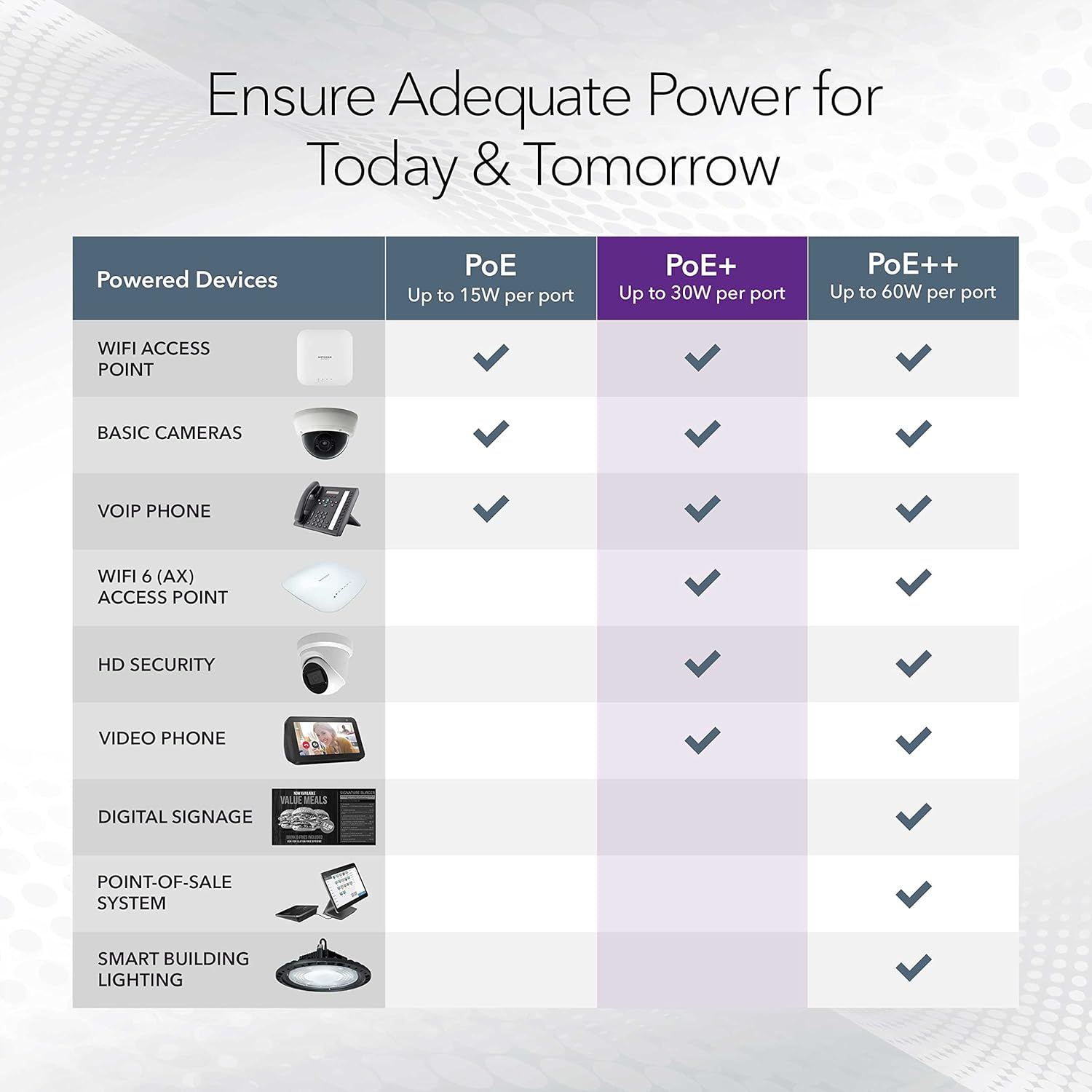
Image: A table illustrating the power capabilities of PoE, PoE+, and PoE++ for different powered devices.
9. 보증 및 지원
9.1 보증 정보
The NETGEAR GS305P switch comes with an industry-leading 3년 제한 하드웨어 보증. Please retain your proof of purchase for warranty claims. For full warranty terms and conditions, refer to the official NETGEAR web사이트나 제품에 포함된 설명서를 참조하세요.
9.2 기술 지원
For technical assistance, product registration, or to access additional resources, visit the official NETGEAR support website. You can find FAQs, firmware updates, and community forums there.
NETGEAR 지원 Web대지: www.netgear.com/support