
1. 서론
Thank you for choosing the MAGIC SELECT B2222 Portable 4-in-1 Air Pump and Vacuum Cleaner. This versatile device combines a cordless air compressor, a car and home vacuum cleaner, a tire pressure detection system, and an integrated SOS LED flashlight. Designed for convenience and efficiency, it is ideal for inflating car, motorcycle, and bicycle tires, as well as balls and other inflatables, and for quick cleaning tasks.
안전하고 최적의 성능을 위해 제품을 사용하기 전에 본 설명서를 주의 깊게 읽어 주십시오. 나중에 참조할 수 있도록 본 설명서를 보관하십시오.
2. 상자 안에 무엇이 들어있나요?
- 1 x Cordless Air Compressor / Vacuum Cleaner Unit
- 1 x Inflation Tube
- 1 x LED Emergency Light (integrated)
- 1 x USB 유형 C 충전 케이블
- Various inflation nozzles/adapters
- Vacuum cleaner attachments (e.g., brush nozzle)

3. 제품 특징
- 4-in-1 기능: Air compressor, vacuum cleaner, tire pressure detection, and SOS LED light.
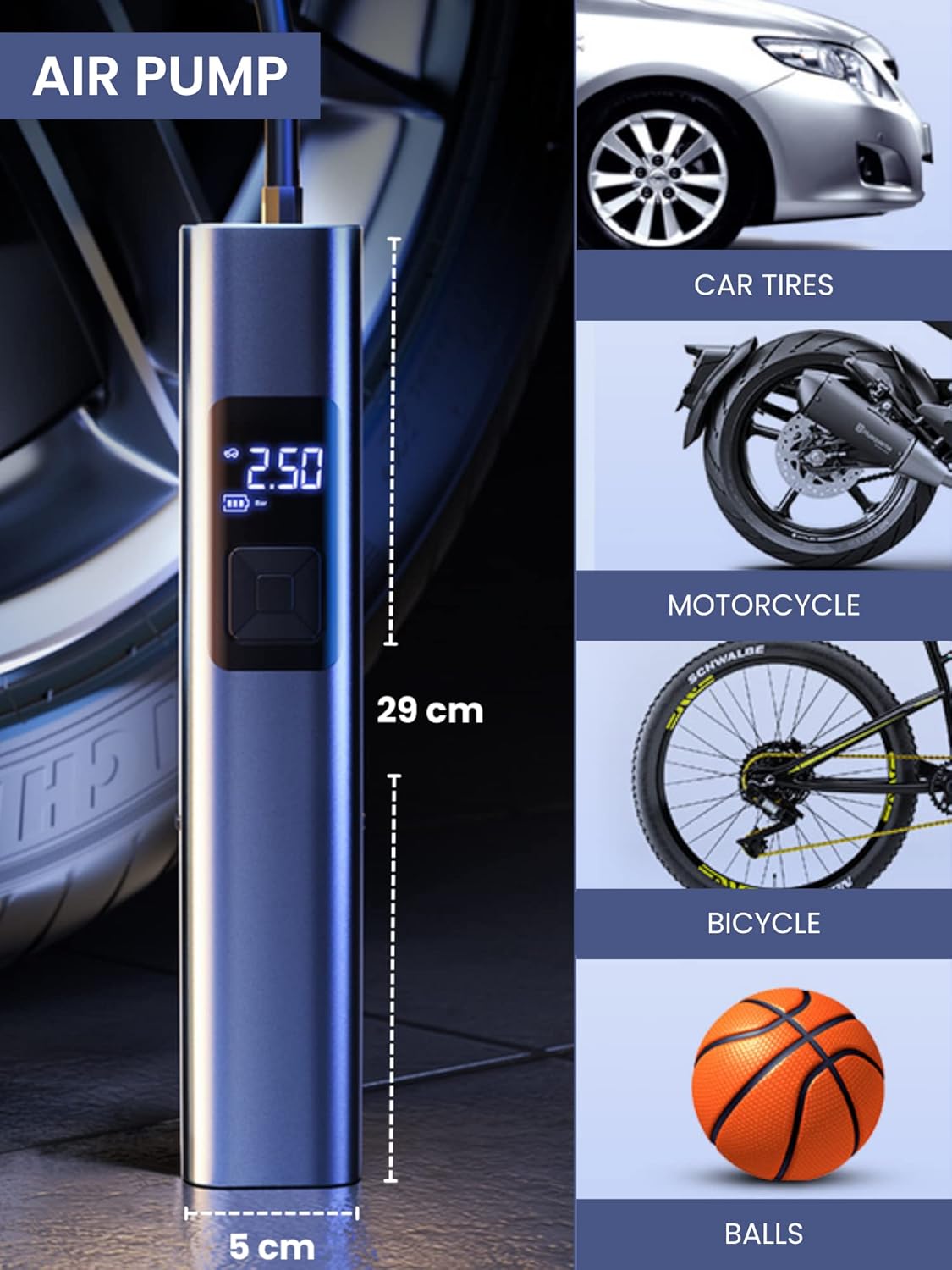
- 강력한 인플레이션: Suitable for car, motorcycle, bicycle tires, and various balls/inflatables.
- Smart Induction Chip: 설정된 압력에 도달하면 자동으로 공기 주입이 중단되어 안전을 확보하고 과팽창을 방지합니다.
- 통합 진공: Efficiently cleans car interiors and small areas in the home.
- LED 비상 조명: Features 3 lighting modes: steady light, medium-speed flashing, and alternating medium/high-speed flashing for emergency situations.
- 오래 지속되는 배터리: Equipped with a 4400mAh lithium-ion battery, rechargeable via USB Type-C.
- 디지털 디스플레이: Clear digital screen to monitor tire pressure and settings.
- 컴팩트한 디자인: 휴대가 간편하고 보관하기 쉽습니다.


4. 설정
4.1 장치 충전
- Locate the USB Type-C charging port on the upper side of the compressor.
- 제공된 USB Type-C 케이블을 장치에 연결하세요.
- USB 케이블의 다른 쪽 끝을 호환되는 USB 전원 어댑터(포함되지 않음)나 컴퓨터의 USB 포트에 꽂습니다.
- The digital display will indicate the charging status. Ensure the device is fully charged before first use for optimal battery life.
4.2 액세서리 부착하기
- For Inflation: Screw the inflation tube into the designated hole at the top of the unit. Attach the appropriate nozzle for your item (car tire, bicycle valve, ball needle, etc.) to the other end of the inflation tube.
- 진공 청소: Insert the vacuum attachment into the hole located at the bottom of the unit.

5. 사용 설명서
5.1 제어판 이상view
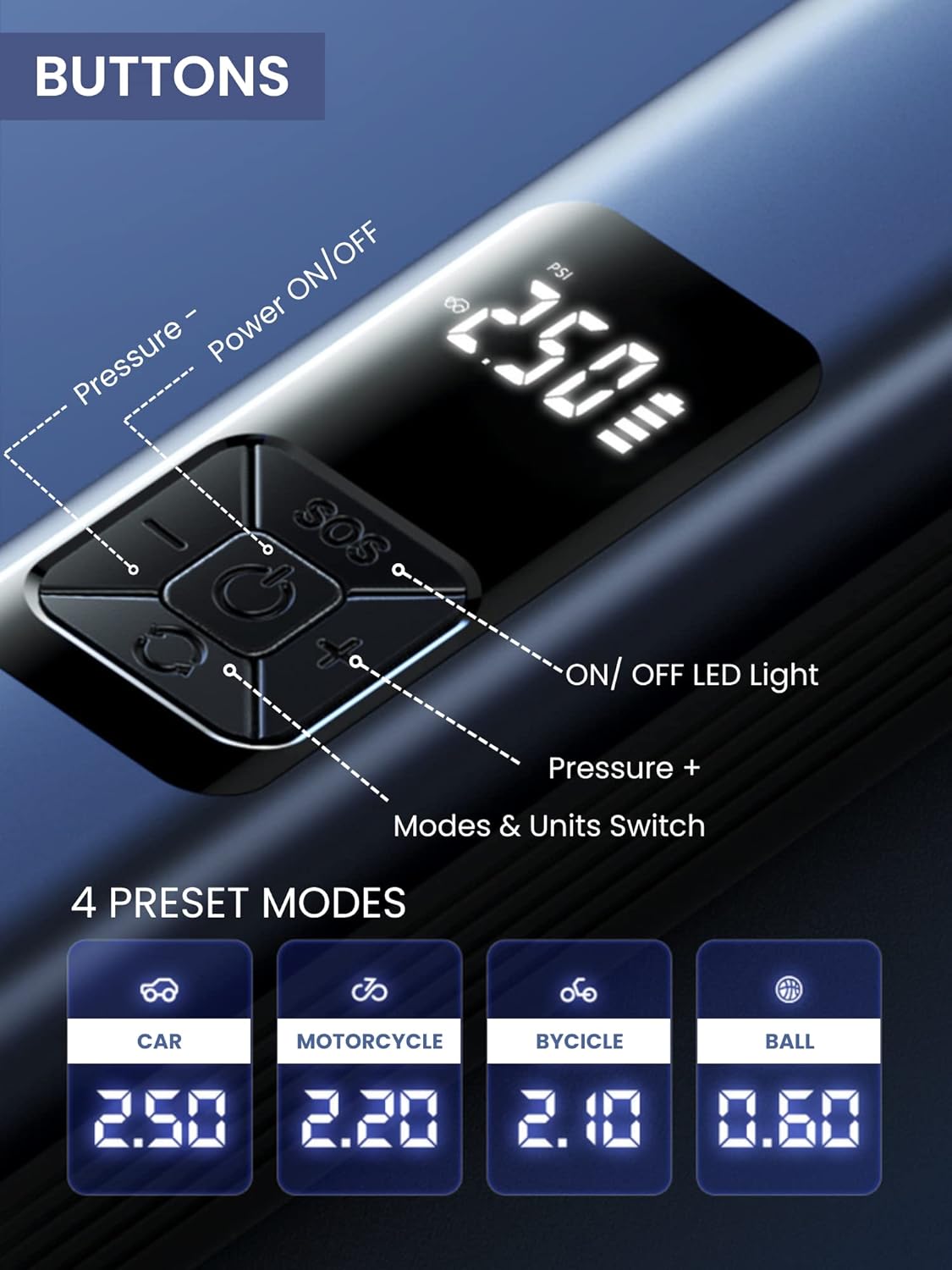
The device features a digital display and 5 control buttons:
- 전원 켜기/끄기 버튼: Central button to turn the device on/off and start/stop inflation or vacuuming.
- Pressure - Button: Decreases the target pressure.
- Pressure + Button: 목표 압력을 높입니다.
- LED 조명 켜기/끄기 버튼: Activates and cycles through LED light modes.
- Mode & Units Switch Button: Changes between preset inflation modes (Car, Motorcycle, Bicycle, Ball) and switches pressure units (e.g., PSI, Bar).
5.2 Using the Air Compressor (Inflation)
- 연결하다: Screw the inflation tube onto the device and attach the correct nozzle to the item you wish to inflate.
- 전원 켜기: Press the Power ON/OFF button to turn on the device. The digital display will show the current tire pressure.
- 모드 선택: Press the Mode & Units Switch button to cycle through preset modes (Car, Motorcycle, Bicycle, Ball) or to change pressure units (PSI, Bar).
- 압력 설정: Use the Pressure + and Pressure - buttons to set your desired target pressure.
- 인플레이션 시작: Press the Power ON/OFF button again to begin inflation. The device will automatically stop when the preset pressure is reached.
- 연결 해제: Once inflation is complete, disconnect the nozzle from the item and then unscrew the inflation tube from the device.
5.3 진공 청소기 사용
- 붙이다: Insert the desired vacuum attachment into the vacuum port at the bottom of the device.
- 전원 켜기: Press the Power ON/OFF button to activate the vacuum function.
- 깨끗한: Use the device to vacuum dust, crumbs, and small debris from car interiors (seats, trunk, center console) or small areas in your home (sofas, lamp tables, windowsills, keyboards).
- 전원 끄기 : Press the Power ON/OFF button again to turn off the vacuum.

5.4 Using the LED Emergency Light
- 활성화: Press the LED Light ON/OFF button to turn on the light.
- 사이클 모드: Press the LED Light ON/OFF button repeatedly to cycle through the three lighting modes:
- First press: Steady light
- Second press: Medium-speed flashing light
- Third press: Alternating medium/high-speed flashing light (SOS signal)
- 끄기: Continue pressing the LED Light ON/OFF button until the light turns off, or hold the button for a few seconds.
6. 유지관리
6.1 장치 청소
- 부드러운 천으로 기기 외부를 닦아주세요.amp 옷감. 강한 화학 물질이나 연마성 세제를 사용하지 마십시오.
- For the vacuum function, regularly empty the dust collection bin and clean the filter to maintain optimal suction power. The filter is washable; ensure it is completely dry before reinserting.
6.2 보관
- 기기 및 부속품은 직사광선과 극한 온도 변화를 피해 서늘하고 건조한 곳에 보관하십시오.
- 장기간 보관하기 전에 배터리 수명을 유지하려면 기기를 완전히 충전하십시오.
7. 문제 해결
| 문제 | 가능한 원인 | 해결책 |
|---|---|---|
| 장치가 켜지지 않습니다. | 배터리가 부족합니다. | 제공된 USB Type-C 케이블을 사용하여 기기를 충전하세요. |
| 공기압축기가 작동하지 않습니다. | Inflation tube or nozzle not properly connected. Incorrect pressure setting. | Ensure all connections are secure. Check and adjust the target pressure. |
| Vacuum suction is weak. | Dust bin full. Filter clogged. | 먼지통을 비우세요. 필터를 청소하거나 교체하세요. |
| 기기가 작동 중에 예기치 않게 멈춥니다. | Overheat protection activated. Battery low. | 기기를 식히세요. 배터리를 충전하세요. |
8. 사양
| 특징 | 세부 사항 |
|---|---|
| 모델 번호 | B2222 |
| 상표 | 매직 셀렉트 |
| 배터리 용량 | 4400mAh 리튬 이온 |
| Motor Speed (Vacuum) | 30000r/분 |
| 치수(길이 x 너비 x 높이) | 29 x 6 x 5.5cm (대략) |
| 무게 | 850g |
| 충전 포트 | USB 타입-C |
| 특별 기능 | LED Emergency Light, Digital Display, Automatic Shut-off (Inflation) |
9. 보증 및 지원
For warranty information and customer support, please refer to the documentation provided with your purchase or contact MAGIC SELECT customer service directly. Keep your proof of purchase for warranty claims.
For further assistance or inquiries, please visit the official MAGIC SELECT website or contact their support team through the contact details provided on their packaging or product page.