
1. 서론
This manual provides detailed instructions for the amazon basics Wired Gaming Mouse, Model ABIM03. This mouse is designed to enhance your gaming and computing experience with its adjustable DPI, customizable RGB lighting, and programmable buttons. Please read this manual thoroughly before use to ensure proper operation and longevity of your device.
2. 제품 특징
- 조정 가능한 DPI: Up to 6400 DPI for precise cursor control and quick movements.
- 맞춤형 RGB 조명: Personalize your mouse with various RGB lighting modes and driver customization options for PC.
- 프로그래밍 가능한 버튼: Equipped with multiple programmable buttons for assigning custom functions or macros.
- Gaming-Grade Sensor: Ensures accurate tracking and rapid response for gaming.
- 내구성 있는 디자인: Features extra durable switches and enhanced build quality for extended use.
- Honeycomb Grip: Ergonomic honeycomb design provides a comfortable and secure grip.

Image: The amazon basics Wired Gaming Mouse highlighting its adjustable DPI settings, ranging from 1200 to 7200 (though product states up to 6400).
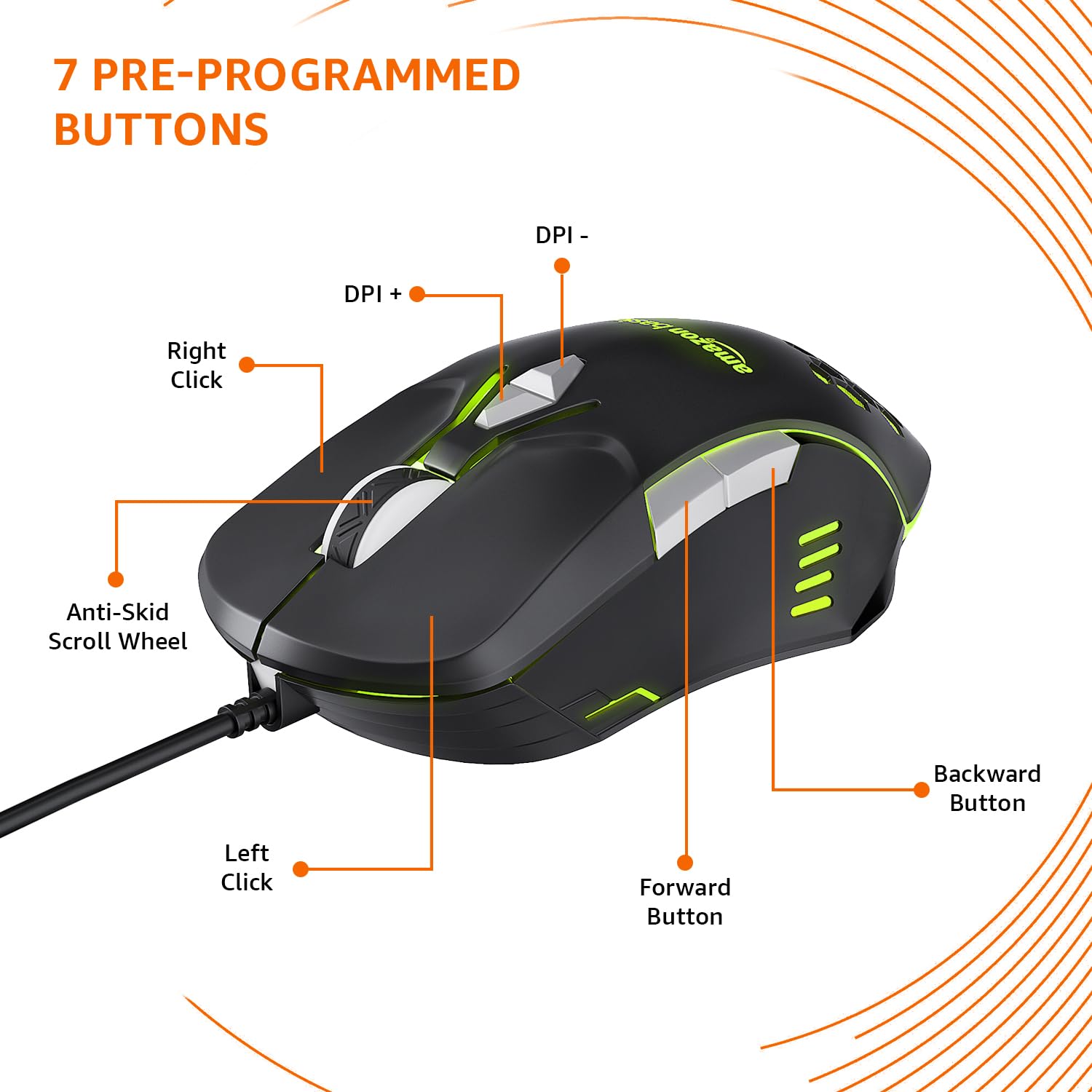
Image: The amazon basics Wired Gaming Mouse showing its 7 pre-programmed buttons, including Left Click, Right Click, Anti-Skid Scroll Wheel, DPI+, DPI-, Forward Button, and Backward Button.

이미지: 위에서 아래로 view of the amazon basics Wired Gaming Mouse, emphasizing its honeycomb-designed surface for improved grip and airflow.

Image: The amazon basics Wired Gaming Mouse illuminated with red RGB lighting, showcasing its light and comfortable design.
3. 설정 지침
- 마우스 풀기: 게임용 마우스를 포장에서 조심스럽게 꺼내세요.
- PC에 연결: 마우스의 USB 커넥터를 컴퓨터의 사용 가능한 USB 포트에 꽂습니다.
- 드라이버 설치: Your operating system (Windows, Linux) should automatically detect and install the necessary drivers. If prompted, follow the on-screen instructions. For advanced customization of RGB and programmable keys, refer to the manufacturer's website for specific driver software.
- 놓기: 최적의 성능을 위해 마우스를 평평하고 깨끗한 표면이나 마우스 패드 위에 놓으십시오.
4. 사용 설명서
4.1 기본 기능
- 좌 클릭: 1차적 행동, 선택.
- 마우스 오른쪽 버튼으로 클릭: 보조 작업, 상황별 메뉴.
- 스크롤 휠: Scroll up/down pages. Pressing the scroll wheel often acts as a middle click.
- 앞으로/뒤로 버튼: 일반적으로 탐색에 사용됩니다. web 브라우저 또는 file 탐험가.
4.2 DPI(인치당 도트 수) 조정
The mouse features dedicated DPI adjustment buttons (DPI+ and DPI-) to change cursor sensitivity on the fly. Press these buttons to cycle through different DPI levels up to 6400. A higher DPI setting results in faster cursor movement across the screen with less physical mouse movement.
4.3 RGB 조명 사용자 지정
The mouse includes customizable RGB lighting. Specific lighting modes can often be cycled through using a dedicated button (if present) or through the optional driver software. Refer to the driver software for advanced customization options, including color selection, effects, and brightness.
4.4 Programming Buttons
The mouse is equipped with programmable buttons. To assign custom functions, macros, or key combinations to these buttons, you will need to install and use the specific driver software provided by the manufacturer. This software typically allows you to create profile다양한 애플리케이션이나 게임에 적합합니다.
Video: A short product highlight video demonstrating the key features of the amazon basics Wired Gaming Mouse, including adjustable DPI, RGB lighting, programmable buttons, and durable design.
5. 유지관리
- 청소: 부드럽고 마른 천으로 마우스 외부를 닦으세요. 잘 지워지지 않는 얼룩은 약간 거친 천으로 닦아내세요.amp 천을 사용하여 액체가 마우스 내부로 들어가지 않도록 할 수 있습니다.
- 센서 청소: 가끔씩 면봉으로 가볍게 닦아주세요.ampened with isopropyl alcohol to gently clean the optical sensor on the underside of the mouse. Ensure the mouse is disconnected before cleaning.
- 액체를 피하세요: Do not immerse the mouse in water or any cleaning solutions.
- 저장: 마우스를 직사광선과 극한의 온도를 피해 시원하고 건조한 곳에 보관하세요.
6. 문제 해결
| 문제 | 해결책 |
|---|---|
| 마우스가 응답하지 않습니다. |
|
| 커서 움직임이 불규칙하거나 갑작스럽습니다. |
|
| Programmable buttons are not working. |
|
| RGB 조명이 작동하지 않거나 멈췄습니다. |
|
7. 사양
| 특징 | 세부 사항 |
|---|---|
| 상표 | 아마존 기본 |
| 모델 번호 | ABIM03 |
| 연결 기술 | 유선 (USB) |
| 움직임 감지 기술 | 광학 |
| DPI 범위 | 최대 6400 DPI |
| 프로그래밍 가능한 키 | 4 (in addition to standard left/right click and scroll) |
| 조명 | RGB |
| 색상 | 검은색 |
| 품목 무게 | 145g |
| 제품 크기(LxWxH) | 15.8 x 10.4 x 5.4cm |
| 하드웨어 플랫폼 | PC |
| 운영 체제 호환성 | Linux, Windows 7 and above |
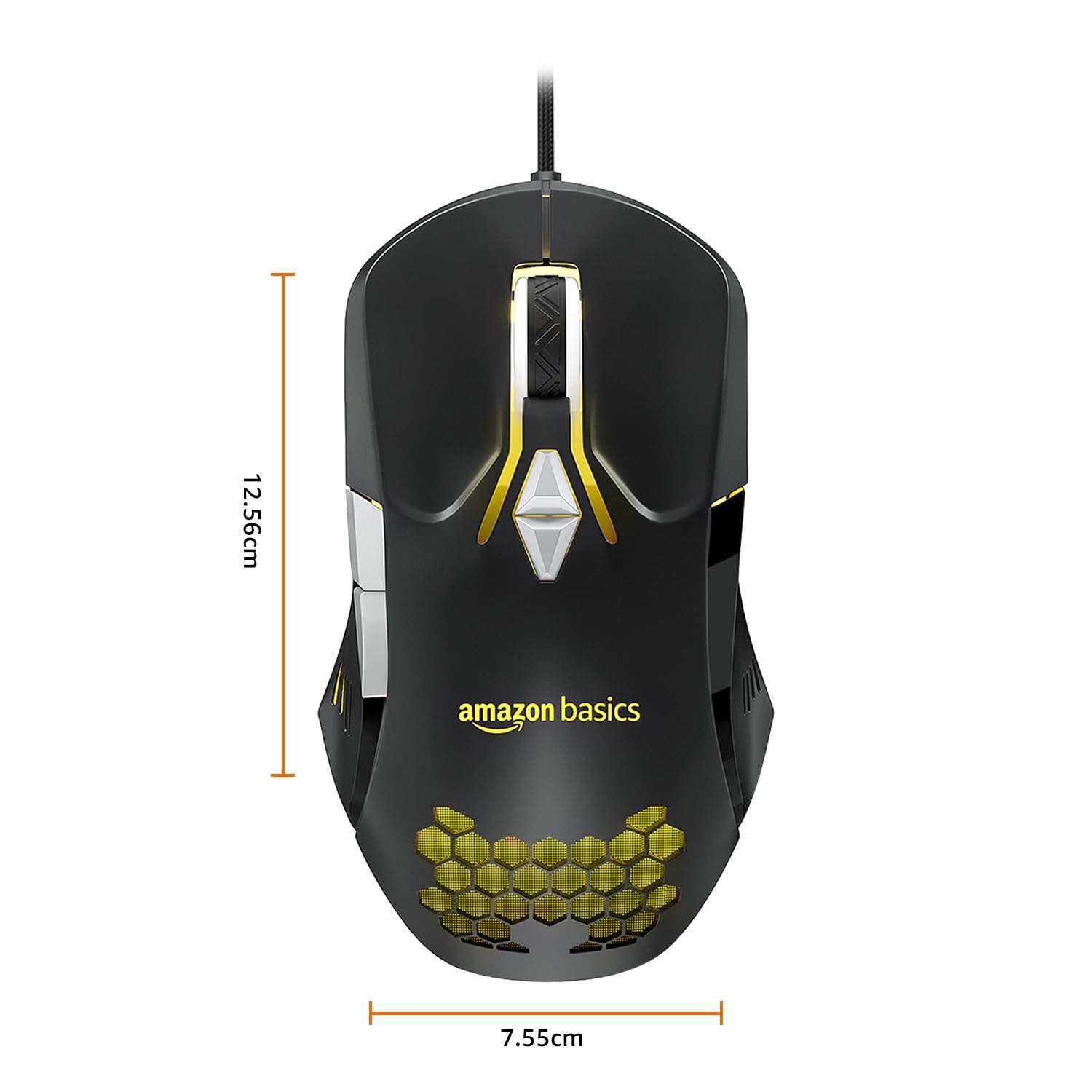
Image: The amazon basics Wired Gaming Mouse with its length (12.56cm) and width (7.55cm) dimensions indicated.
8. 보증 정보
This amazon basics Wired Gaming Mouse comes with a 1년 보증 from the date of purchase. This warranty covers manufacturing defects and issues arising from normal use. It does not cover damage caused by misuse, accidents, unauthorized modifications, or normal wear and tear. Please retain your proof of purchase for warranty claims.
9. 지원
For further assistance, technical support, or warranty claims, please visit the official amazon basics support page or contact customer service through your purchase platform. Ensure you have your product model number (ABIM03) and proof of purchase ready when contacting support.
온라인 리소스:
- 제품 페이지 : amazon.in/dp/B0BTD2YN6Y
- amazon basics Store: 아마존 베이직스 스토어