
제품 끝view
The Clarion JM-Carry On is a portable speaker designed for versatile audio playback. It features a wired microphone input, multi-color light effects, and an in-built battery for on-the-go use. Its compact and portable design allows for easy transport and setup in various environments.

Image: Clarion JM-Carry On Portable Bluetooth Speaker shown with its wired microphone.
비디오: 오버view of the Clarion Portable Bluetooth Speaker, highlighting its features and audio performance.
패키지 내용
다음 항목에 대한 상자를 체크해 주세요.
- Clarion JM-Carry On Portable Bluetooth Speaker
- 유선 마이크
- 충전 케이블
초기 설정
- 스피커 충전: Connect the provided charging cable to the speaker's charging port and a suitable power source. The LED indicator will show charging status. Ensure the speaker is fully charged before first use for optimal battery life.
- 전원 켜기/끄기: Locate the power switch on the speaker. Slide it to the 'ON' position to power on the device. Slide it to 'OFF' to power off.
- 블루투스 페어링 :
- 스피커 전원을 켜세요. 그러면 LED 표시등이 깜빡이면서 자동으로 블루투스 페어링 모드로 전환됩니다.
- 스마트폰이나 태블릿에서 블루투스를 활성화하고 사용 가능한 장치를 검색하세요.
- Select "Clarion JM-Carry On" from the list. A confirmation tone will sound upon successful pairing.
- Connecting Wired Microphone: Insert the wired microphone's plug into the designated microphone input jack on the speaker.
운영 가이드
- 모드 선택: Use the 'Mode' button to switch between Bluetooth (BT), FM Radio, USB, and AUX input modes.
- 블루투스 모드 : Once paired, audio from your connected device will play through the speaker. Use your device or the speaker's controls for volume and track navigation.
- FM 라디오 모드: In FM mode, press and hold the 'Play/Pause' button to auto-scan and save available radio stations. Use the 'Next/Previous' buttons to navigate through saved stations.
- USB/AUX 모드: Insert a USB drive into the USB port for MP3 playback or connect an external audio device via the AUX input using a 3.5mm audio cable.
- TWS (True Wireless Stereo) Functionality: To connect two JM-Carry On speakers for stereo sound, ensure both speakers are in Bluetooth mode and not connected to any device. Press and hold the TWS button on one speaker until you hear a pairing tone. The two speakers will connect, and then you can pair your device to the primary speaker.
- 사운드 컨트롤 : Adjust the master volume using the main rotary knob. Separate controls may be available for microphone volume and echo effects.
- LED 조명 효과: The speaker features multi-color LED light effects. Use the dedicated 'Light' button to cycle through different light modes or turn them off.
관리 및 유지 보수
- 청소: 부드럽고 마른 천을 사용하여 스피커 외부를 닦으세요. 연마성 세제나 용제를 사용하지 마세요.
- 저장: 스피커는 직사광선과 극한의 온도를 피해 시원하고 건조한 곳에 보관하세요.
- 배터리 관리 : 배터리 수명을 연장하려면 배터리를 자주 완전히 방전하지 마세요. 장시간 사용하지 않더라도 스피커를 정기적으로 충전하세요.
- 방수 기능: 이 스피커는 방수가 되지 않습니다. 물이나 습도가 높은 곳에 노출되지 않도록 하세요.
문제 해결 가이드
| 문제 | 해결책 |
|---|---|
| 스피커의 전원이 켜지지 않습니다. | Ensure the battery is charged. Connect the charging cable and try again. Check the power switch position. |
| 스피커에서 소리가 나지 않습니다. | Check the volume level on both the speaker and the connected device. Ensure the correct input mode (BT, AUX, USB) is selected. |
| 블루투스 페어링에 실패했습니다. | Ensure the speaker is in pairing mode. Turn off and on Bluetooth on your device. Move the device closer to the speaker. Disconnect from other Bluetooth devices. |
| 마이크가 작동하지 않습니다. | Ensure the microphone is securely plugged into the correct jack. Check the microphone volume control on the speaker. |
| FM 라디오 수신 상태가 좋지 않습니다. | Adjust the speaker's position. Extend any external antenna if available. |
기술 사양
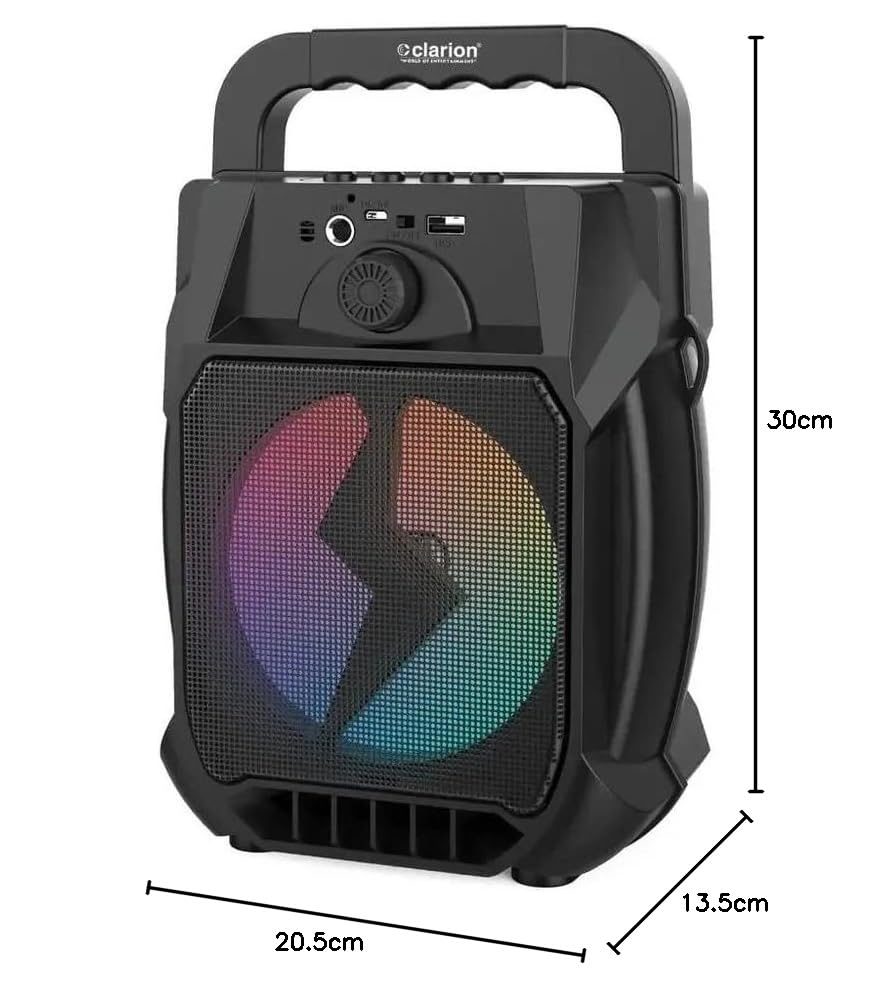
Image: Clarion JM-Carry On Portable Bluetooth Speaker with its dimensions indicated.
- 상표: Clarion (Generic)
- 모델 이름: JM-Carry On
- 스피커 최대 출력: 20 와트 RMS
- 연결 기술 : 보조, 블루투스, USB
- 오디오 출력 모드: 스테레오 재생
- 장착 유형: 플로어 스탠딩
- 스피커 유형: 위성
- 제품 특징: Built-In Microphone, Radio, Subwoofer, Multi-color Light Effect, Sound Controller
- 제어 방법: 만지다
- Woofer Driver Diameter: 6.5 인치
- 배터리 평균 수명: 3-4시간
- 배터리 용량: 1.2 Amp 시간 (3.7V)
- 품목 치수(깊이 x 너비 x 높이): 13.5 x 20.5 x 30 센티미터
- 호환 장치: 스마트폰, 태블릿
- 전원: 배터리 구동
보증 및 고객 지원
This Clarion JM-Carry On Portable Bluetooth Speaker comes with a 1년 보증 on the speaker unit from the date of purchase. Please retain your purchase receipt as proof of warranty.
For any technical assistance, troubleshooting, or warranty claims, please contact Clarion Computers customer support. Refer to your purchase documentation for specific contact details or visit the official Clarion Computers web지원 정보를 제공하는 사이트입니다.
Note: The warranty typically covers manufacturing defects and does not cover damage caused by misuse, accidents, unauthorized modifications, or normal wear and tear.