
1. 서론
구매해주셔서 감사합니다asing the Klipsch Reference Premiere RP-1400SW 14-inch High Excursion Subwoofer. This subwoofer is designed to deliver powerful and accurate low-frequency sound, enhancing your home theater or music listening experience. This manual provides essential information for proper setup, operation, and care of your new subwoofer.

Figure 1.1: Klipsch Reference Premiere RP-1400SW Subwoofer (Grille Removed)
2. 중요한 안전 정보
Please read all safety instructions before operating this product. Keep these instructions for future reference.
- 전원: Connect the subwoofer only to a power supply of the type described in the operating instructions or as marked on the appliance.
- 통풍: 적절한 환기를 확보하십시오. 환기구를 막지 마십시오. 제조업체의 지침에 따라 설치하십시오.
- 열: 라디에이터, 난방 조절기, 스토브 또는 기타 장치(다음을 포함)와 같은 열원 근처에 설치하지 마십시오. amp열을 생성하는 발전기.
- 물과 습기: 이 기기를 물이나 습기가 있는 곳에서 사용하지 마십시오.
- 청소: 마른 천으로만 닦으십시오.
- 서비스: 모든 서비스는 자격을 갖춘 서비스 담당자에게 의뢰하십시오. 전원 코드나 플러그가 손상되었거나, 액체가 쏟아졌거나, 물체가 기기에 떨어졌거나, 기기가 비나 습기에 노출되었거나, 정상적으로 작동하지 않거나, 떨어졌을 때와 같이 기기가 어떤 식으로든 손상된 경우 서비스가 필요합니다.
- 무거운 물체: This subwoofer is heavy (85 lbs). Exercise caution when moving to prevent injury.
3. 상자 안에 무엇이 들어있나요?
모든 구성 요소가 있는지 확인하세요.
- Klipsch Reference Premiere RP-1400SW Subwoofer
- 전원 코드
- 사용 설명서(본 문서)
4. 설정
4.1 서브우퍼 배치
The Klipsch RP-1400SW features a front-firing driver and Aerofoil front slot port, allowing for flexible placement within your room. Experiment with different locations to find the optimal bass response for your listening environment. Generally, corner placement can enhance bass output, while placement along a wall can provide a more balanced sound. The shock-absorbing rubber feet help isolate the subwoofer from the floor.

Figure 4.1: Front-Firing Driver and Aerofoil Front Slot Port

Figure 4.2: Subwoofer Design Features (Rounded Corners, Shock-Absorbing Feet)
4.2 연결
Your RP-1400SW subwoofer offers both wired and wireless connectivity options.

Figure 4.3: Subwoofer Rear Panel Connections and Controls
- Wired Connection (RCA/LFE):
Connect an RCA cable from the LFE output of your AV receiver to the LFE input on the subwoofer's rear panel. If your receiver does not have an LFE output, use a standard RCA stereo cable to connect the receiver's pre-out (subwoofer output) to both the left and right RCA inputs on the subwoofer.
- Wireless Connection (Optional WA-2 Kit):
For wireless operation, you can connect your subwoofer with a Klipsch WA-2 Wireless Subwoofer Kit (sold separately). This allows for flexible placement without the need for long RCA cables. Refer to the WA-2 kit's instructions for pairing and setup.

Figure 4.4: Wireless Connectivity with Optional WA-2 Kit
- 전원 연결:
오디오 연결이 완료되면 제공된 전원 코드를 서브우퍼의 전원 입력 단자에 꽂은 다음 적절한 벽면 콘센트에 꽂습니다.
5. 서브우퍼 작동
5.1 컨트롤 오버view
The rear panel of your subwoofer features several controls to fine-tune its performance:

Figure 5.1: Easy-to-Use Controls on Rear Panel
- 게인(볼륨): 서브우퍼의 출력 레벨을 조절합니다. 낮은 설정에서 시작하여 저음이 메인 스피커와 자연스럽게 어우러질 때까지 점차 높이세요.
- 저역 통과(크로스오버): This control sets the upper frequency limit for the subwoofer. If using an AV receiver with LFE output, set this to LFE (or bypass if available on your receiver). If connecting via stereo RCA, adjust this to blend with your main speakers' low-frequency cutoff.
- 위상(0°/180°): 메인 스피커에 대한 서브우퍼 출력의 위상을 조정합니다. 두 가지 설정을 모두 시도해 보고 가장 강력하고 일관성 있는 저음을 제공하는 설정을 찾으십시오.
- POWER (ON/AUTO/OFF):
- 에: 서브우퍼가 계속 켜져 있습니다.
- 자동 : Subwoofer automatically turns on when an audio signal is detected and enters a low-power standby mode after a period of inactivity.
- OFF : 서브우퍼의 전원이 꺼져 있습니다.
The 1/2-watt standby mode in AUTO setting ensures exceptional efficiency and reduces energy costs.
5.2 초기 전원 켜기 및 조정
- 모든 연결이 안전한지 확인하세요.
- Set the GAIN control to its minimum position.
- Set the LOW-PASS control to LFE if using an AV receiver, or to a suitable frequency (e.g., 80Hz) if connecting via stereo RCA.
- PHASE 스위치를 0°로 설정합니다.
- POWER 스위치를 AUTO로 설정하세요.
- Play some audio with significant bass content. Gradually increase the GAIN control until the subwoofer output blends with your main speakers.
- Experiment with the PHASE switch (0° vs. 180°) to determine which setting provides the most impactful and seamless bass response in your listening position.
For optimal performance, consider using your AV receiver's automatic room correction system (if available) after initial setup.
5.3 Product Video: Reference Premiere Subwoofers
Video 5.1: An official Klipsch video showcasing the features and design of the Reference Premiere Subwoofers, including the RP-1400SW. This video highlights advanced acoustics, balanced performance, front-firing Cerametallic woofers, high-efficiency Class D amplifier, front-firing slot port, detailed design, and easy-to-use controls.
6. 유지관리
To ensure the longevity and optimal performance of your Klipsch RP-1400SW subwoofer, follow these simple maintenance guidelines:
- 청소: Dust the cabinet regularly with a dry, soft cloth. Avoid using abrasive cleaners, solvents, or strong detergents, as these can damage the ebony vinyl finish.
- 놓기: Avoid placing the subwoofer in direct sunlight or near heat sources, which can cause discoloration or damage to the cabinet.
- 통풍: 후면이 amplifier panel has adequate airflow. Do not block the heat sink.
- 그릴: The durable woven cloth grille can be gently cleaned with a soft brush or vacuum cleaner attachment to remove dust.
7. 문제 해결
If you experience issues with your subwoofer, consult the following table for common problems and solutions:
| 문제 | 가능한 원인 | 해결책 |
|---|---|---|
| 서브우퍼에서 소리가 나지 않습니다 |
|
|
| 약하거나 왜곡된 저음 |
|
|
| 서브우퍼에서 윙윙거리는 소리 또는 잡음이 발생합니다 |
|
|
이러한 해결 방법을 시도한 후에도 문제가 지속되면 Klipsch 고객 지원팀에 문의하세요.
8. 사양
Key technical specifications for the Klipsch Reference Premiere RP-1400SW Subwoofer:
| 특징 | 세부 사항 |
|---|---|
| 모델 번호 | RP-1400SW |
| 상표 | 클립쉬 |
| 스피커 유형 | 서브우퍼 |
| 우퍼 직경 | 14 인치 |
| 오디오 드라이버 유형 | Dynamic Driver (Cerametallic) |
| 스피커 최대 출력 전력 | 600 와트 |
| RMS 전원 | 500 와트 |
| 주파수 응답 | 20Hz - 1kHz (approximate, based on A+ content) |
| 연결 기술 | Wired RCA, LFE, and WA-2 Wireless Port |
| 오디오 출력 모드 | 스테레오, 서라운드 사운드 |
| 장착 유형 | 플로어 스탠딩 |
| 인클로저 재료 | 목재 |
| 색상 | 흑단 |
| 전원 | 코드식 전기 |
| 품목 치수(D x W x H) | 25.67인치 깊이 x 20인치 너비 x 21.34인치 높이 |
| 품목 무게 | 85 파운드 |
| 한국어: | 743878047424 |
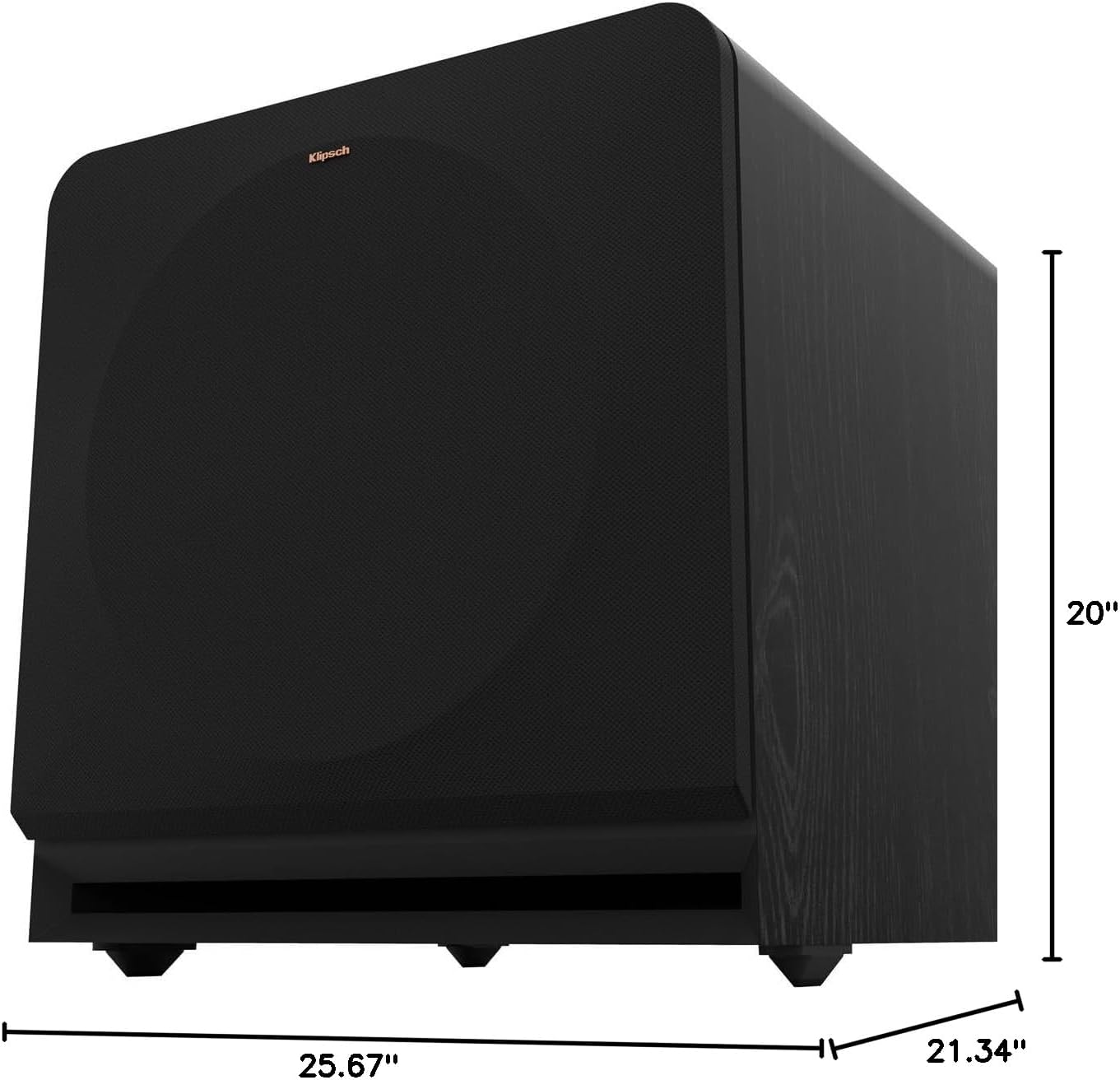
Figure 8.1: Subwoofer Dimensions
9. 보증 및 지원
9.1 보증 정보
The Klipsch Reference Premiere RP-1400SW Subwoofer comes with a limited warranty:
- 전자제품: 2년(XNUMX)
- Woofer, Cabinet, and Non-Electrical Mechanics: 5년
Please retain your proof of purchase for warranty claims. For full warranty terms and conditions, refer to the official Klipsch web사이트를 방문하거나 고객 지원팀에 문의하세요.
9.2 고객 지원
For further assistance, technical support, or warranty inquiries, please visit the official Klipsch website or contact their customer service department. Contact details can typically be found on the Klipsch web사이트의 "지원" 또는 "문의하기" 섹션을 참조하십시오.