
소개
This manual provides essential instructions for the safe and efficient use of your Olympia 2298 foldable 4G mobile phone. Please read it thoroughly before operating the device and keep it for future reference.
1. 설정
1.1 패키지 내용
- Olympia 2298 Mobile Phone
- 배터리(리튬이온)
- USB-C 충전 케이블
- 충전 거치대(포함된 경우)
- 사용자 설명서
1.2 Inserting the Battery and SIM Card
- Open the phone: Gently open the phone to access the battery compartment.
- 후면 덮개를 제거합니다. 휴대폰의 뒷면 커버를 조심스럽게 제거하세요.
- SIM 카드 삽입: Locate the SIM card slot(s). Insert your 4G compatible SIM card(s) into the designated slot(s) with the gold contacts facing down, ensuring it clicks into place.
- 배터리 삽입: Place the Lithium-ion battery into the battery compartment, aligning the contacts.
- 뒷면 덮개를 교체하세요: 뒷면 덮개를 딸깍 소리가 날 때까지 단단히 고정하십시오.
 이미지: 앞면 view of the Olympia 2298 foldable phone, showing the main display with time and date.
1.3 배터리 충전
처음 사용하기 전에 휴대폰 배터리를 완전히 충전하십시오.
- Connect charger: Plug the USB-C cable into the phone's USB-C port or place the phone in the charging cradle. Connect the other end of the cable to a suitable power adapter.
- 충전 표시기: The phone will display a charging indicator on the screen.
- 완전 충전: Allow the phone to charge until the battery indicator shows a full charge. This may take several hours for the initial charge.
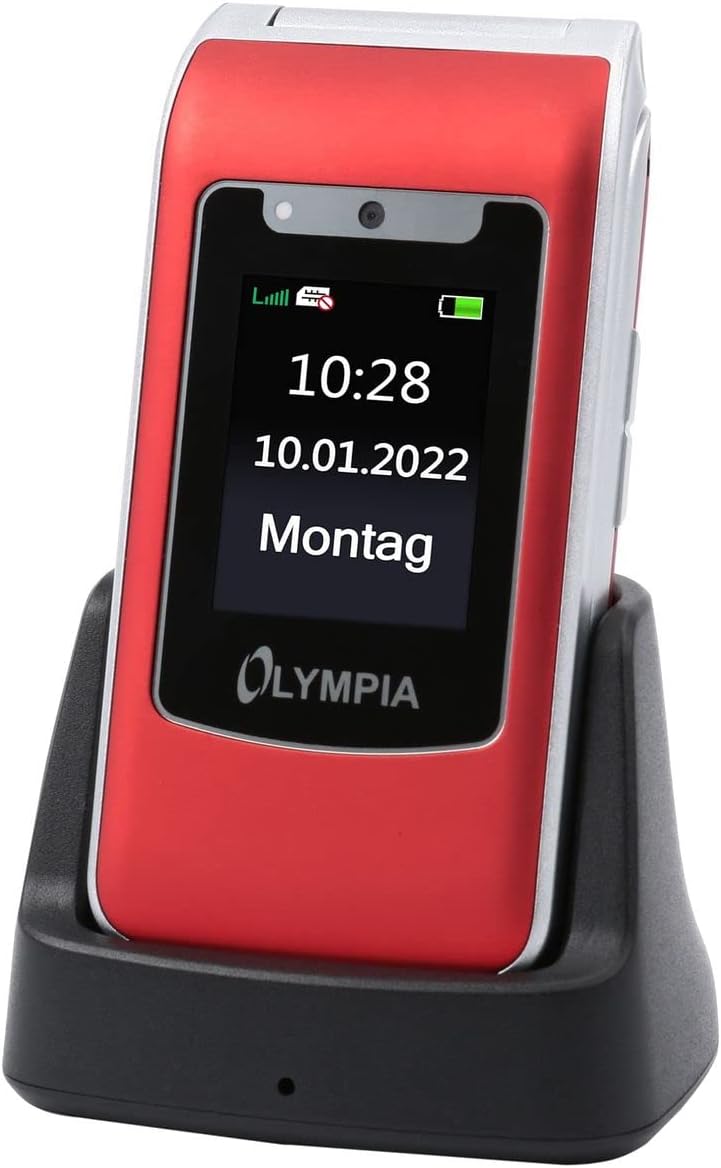 Image: The Olympia 2298 phone placed in its charging cradle, indicating ease of charging.
1.4 전원 켜기/끄기
- 전원을 켜려면: 화면이 켜질 때까지 전원/통화 종료 버튼을 길게 누르세요.
- 전원을 끄려면: 전원/통화 종료 버튼을 길게 누른 다음 화면에 나타나는 옵션에서 "전원 끄기"를 선택하세요.
2. 사용 설명서
2.1 기본 호출 함수
- 전화 걸기: 키패드를 사용하여 번호를 입력하고 녹색 통화 버튼을 누르세요.
- 전화 받기 : 전화벨이 울리면 초록색 통화 버튼을 누르세요.
- 통화 종료: 빨간색 통화 종료 버튼을 누르세요.
- 볼륨 조절: Use the volume buttons on the side of the phone during a call.
2.2 Emergency Call Button (SOS)
The Olympia 2298 features a dedicated SOS button for emergencies.
 이미지: 후면 view of the Olympia 2298 phone, highlighting the prominent SOS emergency call button.
- Setup Emergency Contacts: Before using, configure up to 5 emergency contacts in the phone's settings. Refer to the "Settings" section in the menu for details.
- SOS 활성화: In an emergency, press and hold the SOS button on the back of the phone for several seconds.
- Automatic Dialing: The phone will automatically dial the pre-set emergency contacts one by one until a connection is made. It will also send an emergency SMS message to these contacts.
중요한: Ensure emergency contacts are regularly updated and aware they are listed as such.
2.3 메뉴 탐색
Use the navigation keys (up, down, left, right) and the central "OK" button to browse the phone's menu. The "Back" button typically returns to the previous screen.
- 콘택트 렌즈: Store and manage phone numbers.
- 메시지: SMS 메시지를 보내고 받습니다.
- 통화 기록: View missed, dialed, and received calls.
- 설정: Customize phone preferences, including sound, display, and emergency contacts.
- 카메라: Access the integrated camera.
- 도구: Includes features like alarm, calendar, and calculator.
2.4 메시지 송수신
- To Send: Go to "Messages" -> "Write Message". Enter the recipient's number or select from contacts, type your message, and send.
- 받으려면: New messages will appear as a notification. Go to "Messages" -> "Inbox" to read them.
3. 유지관리
3.1 청소
- 부드럽고 마른 천으로 휴대폰 외부를 닦으세요.
- 액체 세척제, 에어로졸 또는 독한 화학 물질 사용을 피하십시오.
- USB-C 포트에 먼지나 이물질이 들어가지 않도록 하세요.
3.2 배터리 관리
- 배터리를 극한의 온도에 노출시키지 마십시오.
- 배터리 수명을 연장하려면 배터리를 자주 완전히 방전시키지 마세요.
- 장기간 휴대전화를 사용하지 않을 경우, 보관하기 전에 배터리를 약 50% 정도 충전해 두세요.
4. 문제 해결
| 문제 | 가능한 원인 | 해결책 |
|---|---|---|
| 전화기의 전원이 켜지지 않습니다. | 배터리가 방전되었거나 제대로 삽입되지 않았습니다. | 배터리를 충전하세요. 배터리가 올바르게 삽입되었는지 확인하세요. |
| 전화를 걸거나 받을 수 없습니다. | 네트워크 신호가 없거나, 유성 카드가 삽입되지 않았거나, 유성 카드에 문제가 있는 경우입니다. | 네트워크 신호 강도를 확인하세요. 유심 카드를 다시 삽입하세요. 서비스 제공업체에 문의하세요. |
| SOS 버튼이 작동하지 않습니다. | 비상 연락처가 설정되어 있지 않거나 잘못되었습니다. | Verify and update emergency contacts in settings. |
| 통화 품질이 좋지 않습니다. | 네트워크 신호가 약하거나 간섭이 발생하고 있습니다. | 신호가 더 잘 잡히는 곳으로 이동하세요. 장애물을 피하세요. |
5. 사양
- 모델 번호: 2298
- 상표: 올림피아
- 화면 크기: 2.4 인치
- 셀룰러 기술: 4세대(LTE)
- 연결 기술 : USB (USB Type C)
- 무선 캐리어: 모든 통신사
- 배터리: 1 리튬이온(포함)
- 품목 무게: 105그램
- 통화 시간: 6시간
- 치수: 5.3 x 2.1 x 10.5 센티미터
6. 보증 및 지원
For warranty information and technical support, please refer to the documentation provided with your purchase or visit the official OLYMPIA web사이트. 보증 청구를 위해 구매 증빙 자료를 보관하세요.
메모: Spare parts availability and software update guarantees are not specified in the product information provided.