
1. 서론
Thank you for choosing the Gevi 12 Cup Programmable Drip Coffee Maker. This manual provides essential information for the safe operation, maintenance, and troubleshooting of your new coffee maker. Please read it thoroughly before first use and retain it for future reference.

Image: The Gevi 12 Cup Programmable Drip Coffee Maker, showcasing its sleek design and digital display, ready to brew coffee.
2. 구성 요소
Your Gevi coffee maker includes the following components:
- 메인 커피 메이커 유닛
- Glass Coffee Pot (Carafe)
- 커피 특종
- 영구 필터
- 사용 설명서 (본 문서)

Image: An illustration showing the individual components of the Gevi Drip Coffee Maker, including the filter, filter basket, glass carafe, and coffee scoop, alongside the main unit.
3. 설정
- 짐 풀기: 커피 메이커에서 모든 포장재를 조심스럽게 제거하세요.
- 보호 필름: Remove the protective film from the control panel before use.
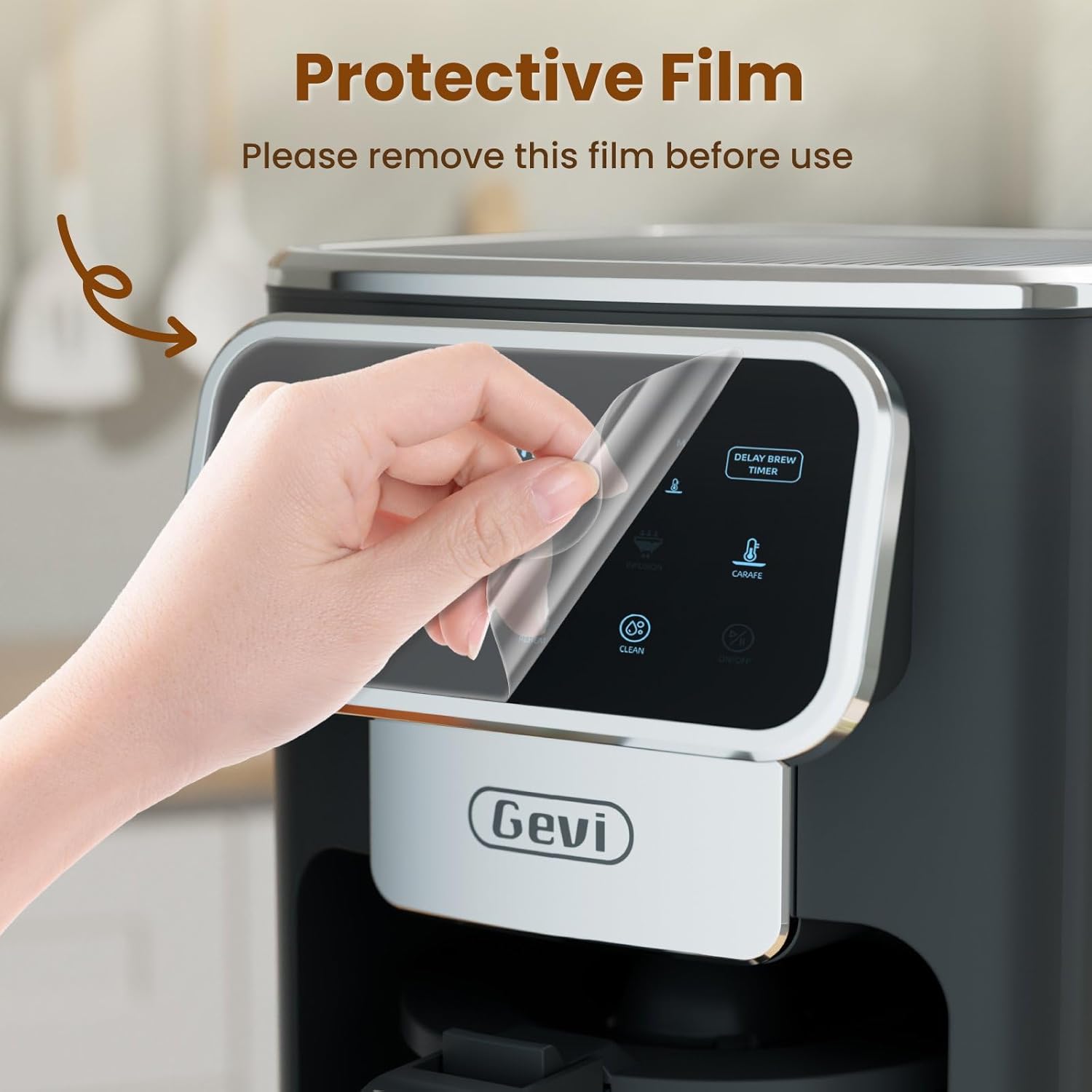
Image: A hand gently peeling off the protective film from the touchscreen control panel of the coffee maker.
- 초기 청소: Before first use, wash the permanent filter, glass carafe, and coffee scoop with warm, soapy water. Rinse thoroughly.
- 첫 번째 양조 사이클(청소): Fill the water reservoir to the maximum level with clean water. Do not add coffee grounds. Run a full brew cycle to clean the internal components. Discard the water.
4. 사용 설명서
4.1 시계 설정
- Press the "ON/OFF" button to turn on the coffee maker.
- When the timer display blinks, press the "Hour" and "Minute" buttons to adjust the time.
- Press the "ON/OFF" button again to confirm the clock time.
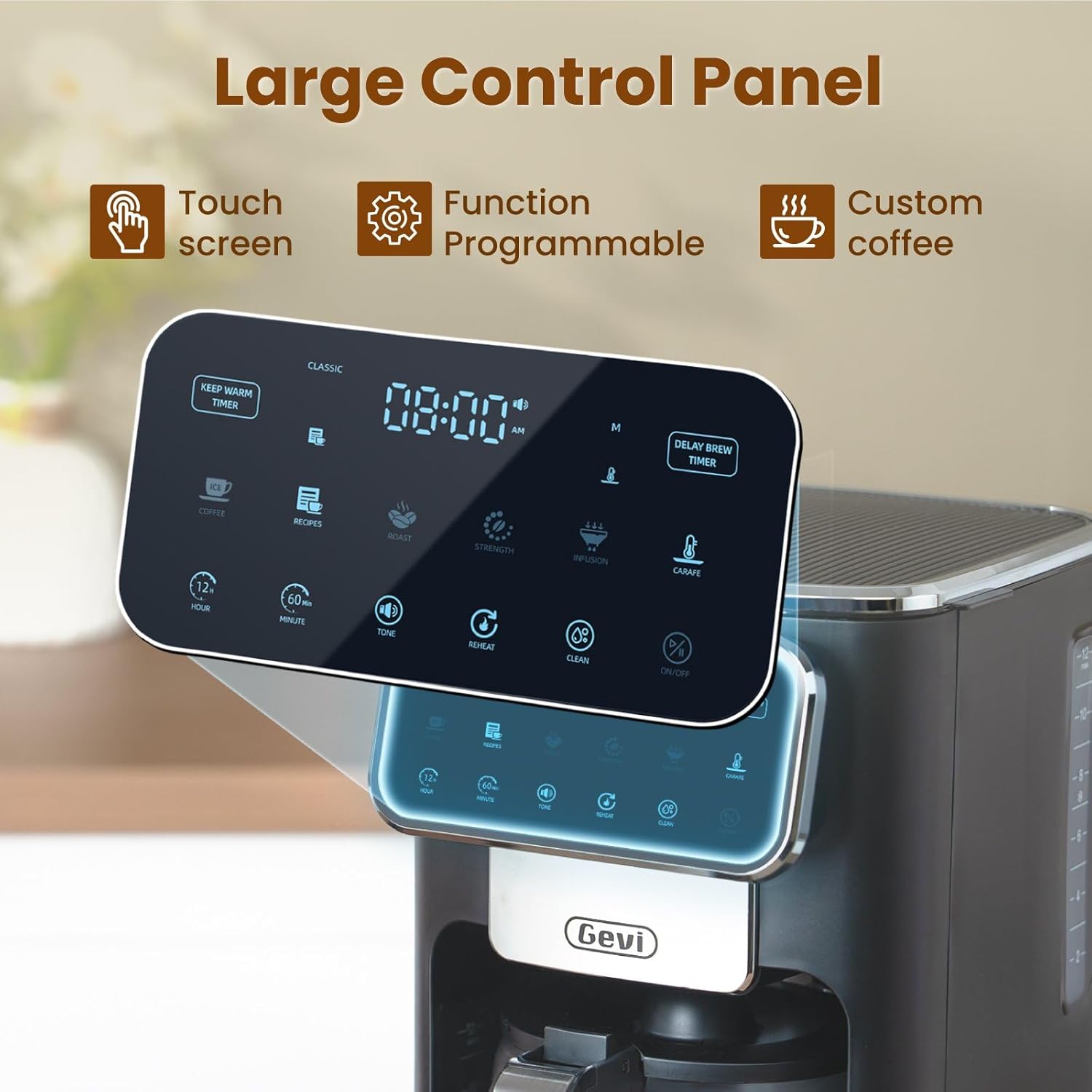
이미지: 자세한 view of the coffee maker's large touch control panel, showing various settings and the digital clock display.
4.2 Setting the Delay Brew Timer
- After setting the current clock time, press the "Delay Brew Timer" button.
- When the timer display blinks, use the "Hour" and "Minute" buttons to set your desired delay brewing time.
- Press the "Delay Brew Timer" button again to confirm the delay brewing time.
- 메모: Pressing the "ON/OFF" button after setting the delay brew timer will cancel the delay brew setting.
- The machine will automatically begin brewing at the preset time.
4.3 커피 끓이기
- 저수지 채우기: Open the top lid and pour fresh, cold water into the water reservoir. Use the water level markings on the side of the coffee maker as a guide.

Image: A hand pouring water into the transparent water tank of the coffee maker, showing the water level indicators.
- 커피 찌꺼기 추가: Place the permanent filter (or a paper filter) into the filter basket. Add your desired amount of ground coffee using the provided scoop. Close the top lid.

Image: A hand scooping coffee grounds into the reusable filter basket, which is placed inside the coffee maker.
- 양조 강도 선택: Use the touch screen to select your preferred coffee strength: 권위 있는, 극심한, 또는 부자.

Image: Four different coffee preparations: Classic, Intense, Rich, and Iced, demonstrating the various brewing strengths and options.
- 양조 시작: Press the "ON/OFF" button to begin the brewing process. The coffee maker features a pre-infusion system for optimal flavor extraction.

Image: A cutaway diagram showing the pre-infusion process, where water is evenly distributed over coffee grounds for deep extraction.
- 보온 기능: The coffee maker includes an adjustable keep-warm timer, typically ranging from 5 minutes to 3 hours and 59 minutes, to maintain coffee temperature after brewing.

Image: The coffee maker's warming plate, glowing red, indicating the keep-warm function is active, with a cup of hot coffee nearby.
4.4 아이스 커피 기능
To brew iced coffee, select the "Ice" option on the touch screen. This function is designed to provide a concentrated brew suitable for pouring over ice, ensuring a flavorful iced coffee experience.
4.5 비디오 가이드
For a visual demonstration of the coffee maker's features and operation, please watch the official product video below:
Video: An official product video demonstrating the Gevi 12 Cup Programmable Drip Coffee Maker's features and brewing process.
5. 유지관리 및 청소
정기적으로 청소하면 최적의 성능을 보장하고 커피 메이커의 수명을 연장할 수 있습니다.
- Filter and Carafe: The permanent filter and glass carafe can be easily cleaned with warm water and mild soap. Rinse thoroughly after washing.
- 외부: 광고로 커피메이커 외부 닦기amp 옷감. 본체를 물에 담그지 마십시오.
- 석회질 제거 : Periodically descale your coffee maker to remove mineral buildup. Refer to a general coffee maker descaling guide or contact customer support for specific instructions.
6. 문제 해결
| 문제 | 가능한 원인 | 해결책 |
|---|---|---|
| 커피 메이커가 켜지지 않습니다. | 플러그가 꽂혀 있지 않음; 전원이 꺼짐tage. | 전원 코드가 정상적으로 작동하는 콘센트에 단단히 꽂혀 있는지 확인하세요. 집의 회로 차단기를 확인하세요. |
| Clock loses time or runs fast. | Internal clock mechanism variation. | Reset the clock periodically as needed. If the issue persists significantly, contact customer support. |
| Brewing less than expected amount of coffee. | Water reservoir not filled sufficiently; clogged filter/drip system; carafe not properly seated. | Ensure water reservoir is filled to the desired level. Clean the filter and drip system. Verify the carafe is correctly positioned on the warming plate. |
| 커피 맛이 약하거나 너무 강해요. | Incorrect coffee-to-water ratio; wrong grind size; incorrect strength setting. | Adjust the amount of coffee grounds. Use a medium grind for drip coffee. Select a different brew strength setting (Classic, Intense, Rich). |
7. 사양
| 특징 | 세부 사항 |
|---|---|
| 상표 | 게비 |
| 모델명 | DCMA0-BK0A1 |
| 용량 | 12 Cups (60 oz / 1.8 L) |
| 색상 | 검은색 |
| 제품 크기(D x W x H) | 12.1인치 x 8인치 x 13.8인치 |
| 무게 | 7.48 파운드 |
| 특별 기능 | Iced Coffee, Keep Warm Timer, Permanent Filter, Programmable, Touchscreen |
| 커피 메이커 유형 | 드립 커피 머신 |
| 작동 모드 | 완전 자동 |
| 왓tage | 1100 와트 |
| 권tage | 120 볼트 |
| 휴먼 인터페이스 입력 | 터치스크린 |
| 커피 입력 유형 | 원두커피 |
| 전원 | AC 어댑터 |
| 식기 세척기 사용 가능 | 아니요(본체용) |

Image: The Gevi coffee maker with its physical dimensions (depth, width, height) clearly indicated.
8. 보증 및 지원
Gevi values your satisfaction. Every Gevi product purchased via official or authorized channels includes a 12-month warranty and lifetime technical support.
If you encounter any issues with your Gevi coffee maker, please refer to the operation videos on the official Gevi store or contact customer service directly for assistance.
더 자세한 도움을 받으시려면 다음을 방문하세요. 아마존에서 Gevi 스토어를 만나보세요.