
1. 서론
This manual provides essential instructions for the safe and efficient operation of your Rigol DHO1074 Digital Oscilloscope. The DHO1074 is a 4-channel, 70 MHz digital oscilloscope featuring a 12-bit resolution and a 2 GSa/s real-time sample rate, designed for precise signal analysis in various applications. Please read this manual thoroughly before using the device to ensure proper functionality and to prevent damage.
2. 안전 정보
부상 및 기기 손상을 방지하기 위해 다음 안전 수칙을 준수하십시오.
- Use only the power cord specified for this instrument.
- 감전을 방지하기 위해 기기가 제대로 접지되었는지 확인하십시오.
- 습기가 많거나 건조한 환경에서 기기를 작동하지 마십시오.amp 정황.
- 폭발성 환경에서 작동하지 마십시오.
- Do not remove the instrument cover. Refer servicing to qualified personnel.
- Use appropriate probes and accessories.
- 청소하기 전에 전원을 분리하세요.
3. 패키지 내용
아래 나열된 모든 품목이 패키지에 포함되어 있는지 확인하세요.
- Rigol DHO1074 Digital Oscilloscope (1 unit)
- 전원 코드 (1개)
- Passive Probes (4 units, one for each channel)
- USB 케이블(1개)
- 빠른 시작 가이드 (1개)
- Resource CD (1 unit)
4. 설정
4.1 전원 연결
- 오실로스코프의 전원 스위치가 OFF 위치에 있는지 확인하세요.
- 제공된 전원 코드를 오실로스코프 후면 패널의 AC 전원 입력 단자에 연결하십시오.
- 전원 코드의 다른 쪽 끝을 접지된 AC 전원 콘센트에 꽂습니다.
4.2 프로브 연결
- Connect the BNC connector of a passive probe to one of the input channels (CH1, CH2, CH3, or CH4) on the front panel.
- Attach the probe ground clip to a common ground point in your circuit.
- 프로브 끝을 회로의 테스트 지점에 연결하십시오.
- For accurate measurements, compensate the probe before use. Refer to the "Probe Compensation" section in the full user manual for detailed instructions.
4.3 초기 전원 켜기
- 전면 패널의 전원 스위치를 눌러 오실로스코프를 켜십시오.
- The instrument will perform a self-test and display the startup screen.
- Once the main interface appears, the oscilloscope is ready for use.
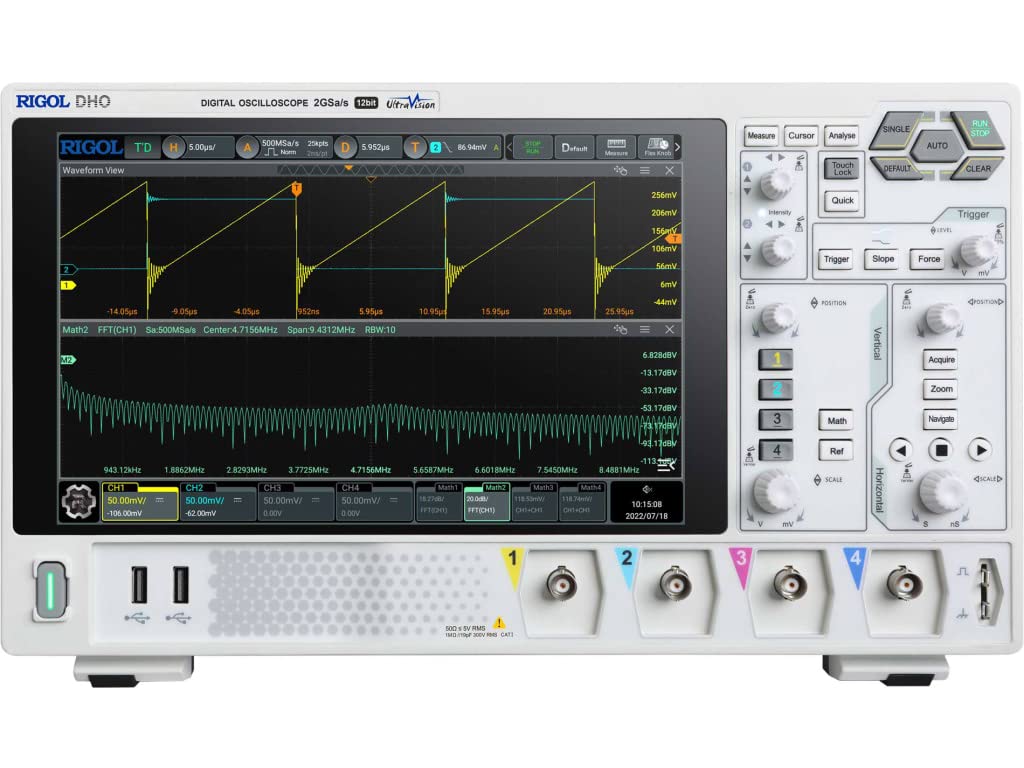
그림 4.1: 전면 view of the Rigol DHO1074 Digital Oscilloscope, showing the display, control panel, and input channels.
5. 오실로스코프 작동법
The Rigol DHO1074 offers a user-friendly interface for capturing and analyzing waveforms. Key features include 4 analog channels, 70 MHz bandwidth, and a 12-bit vertical resolution for enhanced signal fidelity.
5.1 기본 파형 획득
- 전원 켜기: Ensure the oscilloscope is powered on as described in Section 4.3.
- 연결 신호: Connect your signal source to an input channel using a compensated probe.
- 자동 설정: 를 누르세요 자동차 button on the front panel. The oscilloscope will automatically adjust vertical, horizontal, and trigger settings to display a stable waveform.
- 수동 조정:
- 사용하세요 세로 knobs (VOLTS/DIV) to adjust the vertical scale (voltage per division) for each channel.
- 사용하세요 수평의 knob (SEC/DIV) to adjust the horizontal scale (time per division).
- 사용하세요 방아쇠 controls to set the trigger level and mode for stable waveform capture.
5.2 고급 기능
- 고해상도: Benefit from the 12-bit vertical resolution, providing 16 times more quantization levels than standard 8-bit oscilloscopes, which improves measurement accuracy and reduces quantization noise.
- 심층 메모리: The DHO1074 features a 50 Mpts maximum memory depth (expandable to 100 Mpts with option DHO1000-RLU-01), allowing for longer waveform captures at high samp르 요금.
- 직렬 디코딩: Standard serial decoding capabilities include SPI, I2C, RS232/UART, CAN, and LIN, simplifying the analysis of common serial bus communications.
- 측정 기능: Access various automatic measurement functions (e.g., Vpp, Vrms, Frequency, Period) via the 측정하다 메뉴.
- 수학 함수: Utilize built-in math functions (e.g., Add, Subtract, Multiply, Divide, FFT) to perform waveform analysis.
6. 유지관리
6.1 장비 청소
- 청소하기 전에 항상 전원 코드를 분리하십시오.
- 부드러운 천을 사용하세요ampened with a mild detergent solution to clean the exterior surfaces.
- Do not use abrasive cleaners or solvents that could damage the plastic parts.
- 악기에 액체를 직접 분사하지 마십시오.
6.2 보관
- 오실로스코프는 직사광선과 극한 온도 변화를 피해 깨끗하고 건조한 곳에 보관하십시오.
- 화면에 흠집이 생기지 않도록 보호하세요.
6.3 교정
For optimal performance and measurement accuracy, periodic calibration by qualified service personnel is recommended. Refer to Rigol's official support channels for calibration services.
7. 문제 해결
| 문제 | 가능한 원인 | 해결책 |
|---|---|---|
| No power when turned on. | Power cord not connected; power outlet faulty; instrument fuse blown. | 전원 코드 연결 상태를 확인하고, 전원 콘센트를 테스트한 후, 퓨즈 교체를 위해 서비스 센터에 문의하십시오. |
| 파형이 표시되지 않습니다. | Probe not connected; signal source off; vertical/horizontal scale incorrect; trigger not set correctly. | Verify probe connection; check signal source; adjust VOLTS/DIV and SEC/DIV; adjust trigger level or use AUTO button. |
| 불안정한 파형. | Trigger settings incorrect; noisy signal. | Adjust trigger mode, source, and level; ensure proper grounding of the probe. |
| Incorrect measurements. | Probe compensation incorrect; wrong measurement settings. | Compensate probes; verify measurement parameters. |
If the problem persists after attempting these solutions, please contact Rigol customer support.
8. 사양
| 매개변수 | 값 |
|---|---|
| 모델 | DHO1074 |
| 대역폭 | 70MHz |
| 아날로그 채널 | 4 |
| 수직 해상도 | 12비트 |
| 맥스 Samp르 레이트 | 2 GSa/s (real-time) |
| 기억의 깊이 | 50 Mpts (100 Mpts with DHO1000-RLU-01 option) |
| 직렬 디코딩 | SPI, I2C, RS232/UART, CAN, LIN |
| 제품 치수 | 18 x 11 x 12 인치 |
| 품목 무게 | 12파운드 |
| 제조업체 | 리고르 테크놀로지스 USA 주식회사 |
9. 보증 및 지원
Rigol products are designed for reliability and performance. This instrument is covered by a standard manufacturer's warranty. For specific warranty terms and conditions, please refer to the warranty card included with your product or visit the official Rigol web대지.
For technical support, service, or inquiries regarding your Rigol DHO1074 Digital Oscilloscope, please contact Rigol Technologies USA Inc. customer service through their official web사이트 또는 제품 설명서에 제공된 연락처 정보를 참조하세요.
온라인 자료 및 추가 문서는 다음에서 확인할 수 있습니다. 리골 web대지.