
Sparkleiot ESP32-C3F
Sparkleiot ESP32-C3F WiFi Bluetooth Module User Manual
Model: ESP32-C3F
1. 서론
The Sparkleiot ESP32-C3F is a compact and powerful single-core Wi-Fi and Bluetooth 5 (LE) microcontroller System-on-Chip (SoC). Based on the open-source RISC-V architecture, it integrates a 32-bit RISC-V processor operating at up to 160 MHz, along with 4MB of built-in SPI flash memory. This module is designed for a wide range of Internet of Things (IoT) applications, offering robust wireless connectivity and versatile peripheral interfaces.
주요 특징:
- Single-core Wi-Fi and Bluetooth 5 (LE) microcontroller SoC.
- Based on open-source RISC-V architecture.
- 32-bit RISC-V single-core processor, up to 160 MHz.
- Built-in 4MB SPI flash memory.
- 400 KB SRAM (16 KB for cache) and 384 KB ROM.
- Comprehensive Wi-Fi subsystem (IEEE 802.11b/g/n, Station, SoftAP, promiscuous modes).
- Bluetooth LE subsystem supporting Bluetooth 5 and Bluetooth mesh.
- Multiple configurable GPIOs for various applications.
- Suitable for Smart Home, Industrial Automation, Health Care, Consumer Electronics, Smart Agriculture, and Audio Devices.
2. 패키지 내용
각 패키지에는 다음 항목이 포함되어 있습니다.
- 5 x Sparkleiot ESP32-C3F WiFi Bluetooth Modules
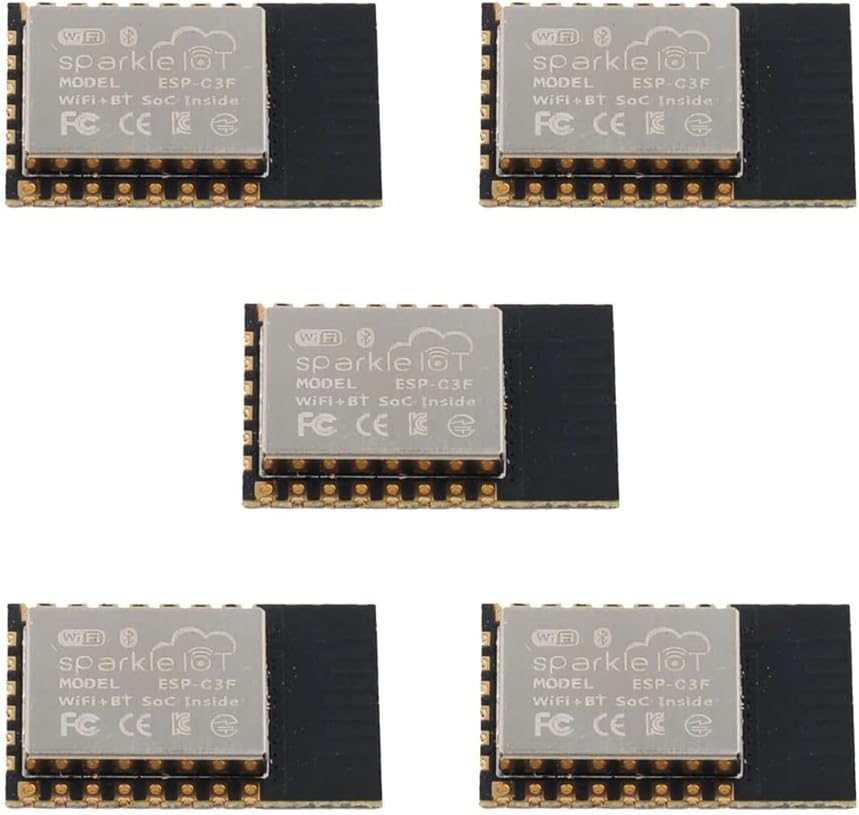
Figure 2.1: Five Sparkleiot ESP32-C3F WiFi Bluetooth Modules. This image shows a pack of five Sparkleiot ESP32-C3F WiFi Bluetooth Modules, highlighting the quantity included in the package.
3. 기술 사양
| 특징 | 설명 |
|---|---|
| 칩셋 | ESP32-C3FH4 (RISC-V single-core) |
| CPU 속도 | 최대 160MHz |
| 플래시 메모리 | 4MB SPI 플래시 |
| 에스램 | 400 KB (16 KB for cache) |
| 집시 남자 | 384킬로바이트 |
| 와이파이 표준 | IEEE 802.11b/g/n(2.4GHz) |
| 블루투스 표준 | Bluetooth 5 (LE) and Bluetooth Mesh |
| 운영 볼륨tage | 3.3V |
| 주변기기 인터페이스 | GPIO (x15), 2xUART, I2C, I2S, SPI, PWM, ADC, USB |
| 모듈 치수 | 16mm x 24mm x 3mm(0.63 x 0.94 x 0.12인치) |
| 작동 온도 | -40°C to 85°C (standard), -40°C to 105°C (optional) |
4. 모듈 오버view 및 핀아웃
The ESP32-C3F module features a compact design with clearly labeled pins for easy integration into various projects. Understanding the pinout is crucial for proper connection and functionality.

Figure 4.1: ESP32-C3F Module Views. Detailed views of the ESP32-C3F module, displaying the top side with the metal shield and the bottom side with pin assignments and model number.

Figure 4.2: ESP32-C3F Pinout and Dimensions. This diagram provides a detailed pinout configuration for the ESP32-C3F module, including GPIO assignments, power pins, and physical dimensions in millimeters.

Figure 4.3: Module Structure and Working Modes. A block diagram illustrating the internal components of the ESP32-C3F, such as the RISC-V CPU, 4MB Flash, and various peripherals. Below it, a table outlines different working modes and their corresponding GPIO9 levels.
5. Setup and Programming Guide
To begin using your ESP32-C3F module, you will typically need to flash firmware onto it. This section outlines the general steps for programming the module.
5.1 Basic Connection for Programming
The module operates at 3.3V. Ensure your power supply and logic levels are compatible. A common setup involves connecting the module to a USB-to-TTL converter for serial communication and power.

Figure 5.1: Basic 3.3V Circuit Diagram. This image presents a graph of the recommended soldering temperature profile for the module, along with a schematic diagram showing a basic circuit for operating the module at 3.3V, including buttons and a USB-to-TTL converter.
5.2 Firmware Flashing Process
Follow these steps to flash firmware onto your ESP32-C3F module using the ESP32 Download Tool:
- Download and install the ESP32 Download Tool (ESPFlashDownloadTool).
- Connect your ESP32-C3F module to your computer via a USB-to-TTL converter.
- Open the ESPFlashDownloadTool.
- Select "ESP32-C3" as the chip type and "develop" as the work mode. Click "OK".
- In the tool, upload the necessary
.bin펌웨어 files. Ensure the correct addresses are set (typically address 0 for the main firmware). - Select the correct COM port corresponding to your connected module and set the baud rate (e.g., 115200 or 921600).
- Press the "FLASH" button on the ESP32-C3F module and hold it down.
- Click the "START" button in the ESPFlashDownloadTool.
- Release the "FLASH" button once the download process begins.
- The tool will indicate "FINISH" upon successful programming.
Video 5.1: ESP32-C3F Firmware Programming Guide. This video demonstrates the process of flashing firmware onto the Sparkleiot ESP32-C3F module using the ESPFlashDownloadTool, including connecting the module and initiating the download.
6. 작동 조건
For optimal performance and longevity of your ESP32-C3F module, adhere to the following operating conditions:
- 전원 공급 장치: The module requires a stable 3.3V DC power supply. Exceeding this voltag모듈이 손상될 수 있습니다.
- 작동 온도: Standard operating temperature range is -40°C to 85°C. An optional version supports -40°C to 105°C. Ensure the module operates within these limits to prevent malfunction.
- 현재 소비량: Refer to the ESP32-C3 datasheet for detailed current consumption figures under various operating modes (e.g., Wi-Fi active, Bluetooth active, deep sleep).
7. 유지관리
The ESP32-C3F module is designed for low maintenance. However, consider the following for best practices:
- 저장: Store modules in an anti-static environment, away from moisture and extreme temperatures.
- 청소: 필요한 경우 부드럽고 마른 정전기 방지 브러시나 천으로 모듈을 부드럽게 닦으십시오. 액체나 연마성 물질은 사용하지 마십시오.
- 납땜: When soldering, follow the recommended temperature curve to prevent damage to the module components.
Figure 7.1: Recommended Soldering Temperature Curve. This image presents a graph of the recommended soldering temperature profile for the module, along with a schematic diagram showing a basic circuit for operating the module at 3.3V, including buttons and a USB-to-TTL converter.
8. 문제 해결
If you encounter issues with your ESP32-C3F module, consider the following troubleshooting steps:
- 모듈의 전원이 켜지지 않음:
- 3.3V 전원 공급 장치가 올바르게 연결되어 있고 안정적인지 확인하십시오.
- Check for any short circuits on the module or connected components.
- 펌웨어 플래싱 실패:
- Ensure the correct COM port is selected in the download tool.
- Confirm the baud rate setting matches the recommended value.
- Make sure the "FLASH" button is pressed and held during the initial phase of the download process.
- Check that the USB-to-TTL converter drivers are correctly installed.
- 무결성을 확인하십시오
.bin펌웨어 files.
- Wi-Fi/Bluetooth 연결 문제:
- Wi-Fi/블루투스 초기화 및 자격 증명이 올바른지 코드를 확인하십시오.
- Ensure the antenna area on the module is not obstructed or shielded by other components.
- 무선 간섭이 최소화된 환경에서 테스트하십시오.
- 예상치 못한 동작:
- Review 논리적 오류를 찾기 위한 코드입니다.
- Check all external connections for proper wiring.
- 모듈이 과열되지 않았는지 확인하세요.
9. 응용 프로그램
The versatility of the ESP32-C3F module makes it suitable for a wide array of applications, including but not limited to:
- Smart Home devices (e.g., smart lighting, environmental sensors)
- Industrial Automation (e.g., remote monitoring, control systems)
- Health Care (e.g., wearable health trackers, medical device connectivity)
- Consumer Electronics (e.g., smart toys, remote controls)
- Smart Agriculture (e.g., soil moisture sensors, automated irrigation)
- Audio Devices (e.g., wireless audio streaming, smart speakers)
- Generic Low-power IoT Sensor Hubs and Data Loggers
10. 보증 및 지원
For warranty information, technical support, or further inquiries regarding your Sparkleiot ESP32-C3F module, please refer to the official Sparkleiot web사이트를 방문하거나 고객 서비스에 직접 문의하세요. 보증 청구를 위해 구매 영수증을 보관하세요.
제조업체: 스파클리오트
브랜드 스토어: Visit the Sparkleiot Store on Amazon
Ask a question about this manual
Ask about setup, troubleshooting, compatibility, parts, safety, or missing instructions. Manuals+ will review the question and use this page’s manual context to help answer it.