
제품 끝view
The EPOS Adapt 361 is an over-ear Bluetooth headset designed for professional use. It features Active Noise Cancellation (ANC) to reduce background noise, optimizing focus in busy environments. The headset is optimized for Unified Communications (UC) and allows seamless switching between multiple devices. Its ergonomic design and comfortable ear pads provide noise dampening and comfort for extended wear. The headset is crafted from high-quality materials with a matt black finish.
Please note: During a brand transition period, products may feature either EPOS | SENNHEISER or EPOS branding.
상자 안에 무엇이 들어있나요?
- EPOS Adapt 361 헤드셋
- BTD 800 USB-C 동글
- USB-C Cable with USB-C Connector
- Audio Cable (2.5 mm Twist Lock and 3.5 mm Jack Plugs)
- 보관 파우치
- 준수 사항 시트
- 안전 가이드
설치 가이드
1. 헤드셋 충전
Before first use, fully charge the headset using the provided USB-C cable. Connect the USB-C end to the headset and the other end to a compatible USB power source. The LED indicator on the headset will show charging status.
2. 블루투스(무선)를 통한 연결
- 헤드셋의 전원을 켭니다.
- Activate Bluetooth pairing mode on the headset (refer to the headset controls for specific button presses, usually a long press on the power button or a dedicated Bluetooth button).
- On your device (PC, smartphone), enable Bluetooth and search for available devices.
- Select "EPOS Adapt 361" from the list to pair.
3. Connecting via USB-C Dongle (BTD 800)
For optimal performance with PC and Microsoft Teams, use the BTD 800 USB-C dongle.
- Plug the BTD 800 USB-C dongle into an available USB-C port on your computer.
- The dongle will automatically pair with your headset. The LED on the dongle will indicate connection status.
- Ensure the headset is selected as the audio input/output device in your computer's sound settings and communication applications (e.g., Microsoft Teams).
4. Connecting via Audio Cable (Wired)
For wired connection, use the provided audio cable.
- Connect the 2.5 mm twist-lock end of the audio cable to the headset.
- Connect the 3.5 mm jack end to the audio output of your device.
작동 지침
헤드셋 컨트롤
The EPOS Adapt 361 features intuitive controls for managing calls, media, and headset functions. These are typically touch-sensitive or button-based on the earcups.
- 전원 켜기/끄기: 전원 버튼을 길게 누르세요.
- 볼륨 조절: Use the dedicated volume buttons or touch controls.
- 능동형 소음 제거(ANC): Toggle ANC on/off to manage ambient noise.
- Microsoft Teams 버튼: A dedicated button on the BTD 800 USB-C dongle allows for quick access to Microsoft Teams functions.
- 통화 관리: Answer/end calls, mute microphone using designated buttons.
- 미디어 제어: 재생/일시정지, 트랙 건너뛰기.
- 음성 안내: The headset provides voice prompts for status updates.
마이크 사용
The headset features two advanced microphones optimized for voice pickup, ensuring clear communication during calls.
다지점 연결
The headset supports multipoint connectivity, allowing it to be connected to two Bluetooth devices simultaneously, enabling seamless switching between them.
접이식 디자인
The robust, foldable design allows for easy storage and portability in the included storage pouch.
유지
청소
Wipe the headset with a soft, dry cloth. Avoid using harsh chemicals or abrasive materials. Do not immerse the headset in water.
저장
When not in use, store the headset in the provided storage pouch to protect it from dust and damage. The foldable design facilitates compact storage.
문제 해결
- 소리가 나지 않음/오디오 품질이 좋지 않음:
- 헤드셋이 충전되어 있고 전원이 켜져 있는지 확인하세요.
- Verify Bluetooth connection or dongle connection.
- Check device's audio output settings.
- Ensure the audio cable is securely connected if using wired mode.
- 마이크가 작동하지 않음:
- 마이크가 음소거되어 있는지 확인하십시오.
- Verify headset is selected as the input device in your application settings.
- 연결 문제:
- 헤드셋과 연결된 장치를 다시 시작하세요.
- Re-pair the Bluetooth connection or re-insert the USB-C dongle.
- 다른 장치가 Bluetooth 신호를 방해하지 않는지 확인하세요.
- 능동 소음 제거(ANC) 성능:
- ANC가 활성화되어 있는지 확인하십시오.
- Check that the earcups are properly seated over your ears for optimal seal.
For advanced troubleshooting and firmware updates, utilize the EPOS Manager and EPOS Connect software.
명세서
| 모델명 | ADAPT 300 Series (Model 361) |
| 연결 기술 | 유선, 무선(블루투스 5) |
| 무선 통신 기술 | 블루투스 |
| 주파수 응답 | 22000Hz |
| 헤드폰 잭 | 2.5 mm 잭 |
| 귀 위치 | 귀 위 |
| 소음 제어 | 능동 소음 제거 |
| 호환 장치 | PC |
| 제어 유형 | 미디어 컨트롤, 터치 |
| 특별 기능 | ActiveGard, Comfortable, Detachable Cable, Ergonomic Design, Foldable, Hands-free, Microphone Included, Microsoft Teams Button, Multipoint, Noise Cancellation, Rechargeable Battery, Sub Band Coding (SBC), Unified Communication, Voice Prompt, apt-X Technology |
| 품목 무게 | 8.5 온스(241그램) |
| 제품 치수 | 7.8 x 5.4 x 4.2 인치 |
| 배터리 | 1개의 리튬 이온 배터리(포함) |
제품 이미지
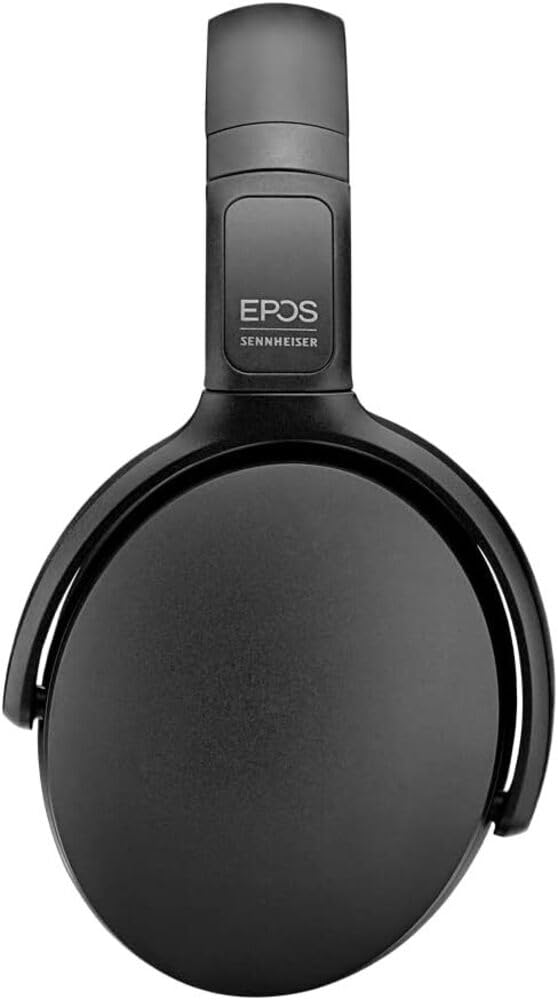
Image 1: The EPOS Adapt 361 Headset, showcasing its sleek black design and comfortable over-ear earcups. The adjustable headband is visible, designed for a secure and personalized fit.
보증 및 지원
보증 정보 및 기술 지원에 대해서는 EPOS 공식 웹사이트를 참조하십시오. website or contact EPOS customer service. Details regarding specific warranty periods and service procedures can be found in the documentation included with your product or on the manufacturer's support pages.
The included Compliance Sheet and Safety Guide provide additional important information.


