
소개
This manual provides comprehensive instructions for the installation, operation, and maintenance of your ASUS Prime B760M-K D4 Gaming Motherboard. Designed for Intel LGA 1700 processors, this mATX motherboard offers robust performance, extensive connectivity, and reliable stability for your computing needs. Please read this manual thoroughly before proceeding with installation to ensure proper setup and optimal performance.

Figure 1: ASUS Prime B760M-K D4 Motherboard and Retail Packaging.
주요 특징
The ASUS Prime B760M-K D4 motherboard is equipped with several features designed to enhance your system's performance and stability:
- 인텔 LGA 1700 소켓: Ready for the 13th and 12th Generation Intel Processors, ensuring compatibility with the latest CPUs.
- Ultra-fast connectivity: Features PCIe 4.0 support, two PCIe 4.0 M.2 slots for high-speed storage, Realtek 2.5Gb Ethernet for fast networking, and front USB 3.2 Gen 1 support for modern peripherals.
- 종합 냉각: Includes a VRM heatsink, PCH heatsink, hybrid fan headers, and Fan Xpert for efficient thermal management, ensuring stable operation under load.
- 오라 싱크 RGB 조명: Integrated addressable Gen 2 headers and Aura RGB headers allow for customizable RGB LED strip synchronization with other Aura Sync-enabled hardware, personalizing your build's aesthetics.
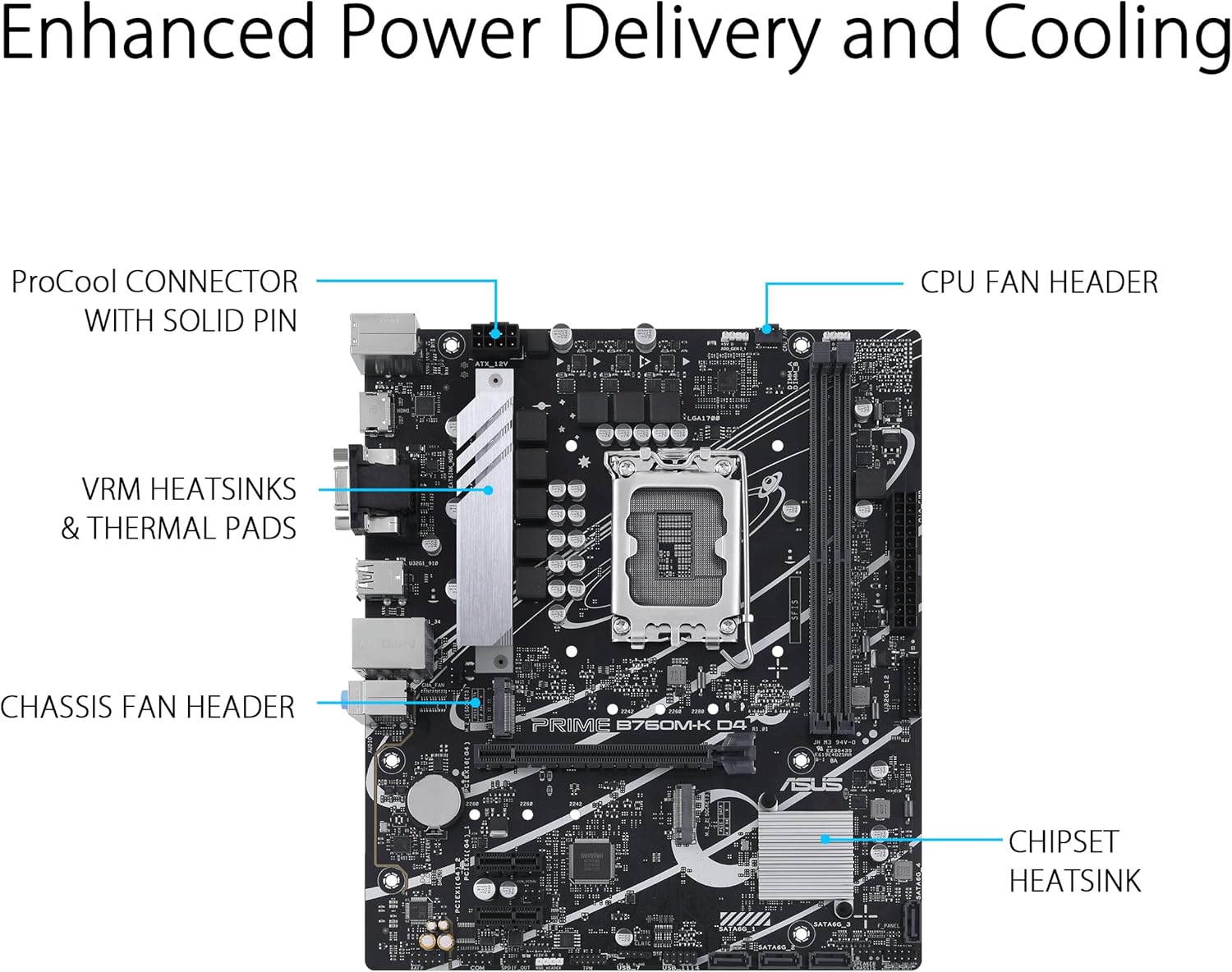
Figure 2: Enhanced Power Delivery and Cooling components, including VRM heatsinks and a chipset heatsink, ensuring stable operation.

그림 3: 이상view of memory (2x DDR4 DIMM) and storage (2x M.2 2280 PCIe 4.0 x4) slots, designed for productivity.

Figure 4: Personalization options including 2x 3-pin addressable Gen 2 headers and 1x 4-pin Aura RGB header for customizable lighting, alongside premium audio features.
설치 가이드
Follow these steps to properly install your ASUS Prime B760M-K D4 motherboard and its components:
- 사례 준비: Ensure your computer case is compatible with mATX motherboards. Install the I/O shield (if not pre-attached) into the case's rear opening.
- CPU 설치: Carefully open the CPU socket lever. Align the triangular mark on the CPU with the mark on the socket and gently place the CPU into the socket. Close the lever to secure the CPU.
- CPU 쿨러 설치: Apply thermal paste (if not pre-applied) to the CPU. Mount the CPU cooler according to its manufacturer's instructions, ensuring it is securely fastened and the fan cable is connected to the CPU_FAN header.
- RAM 설치: Open the clips on the DDR4 DIMM slots. Align the notch on the memory module with the key in the slot and press down firmly on both ends until the clips snap into place. For dual-channel performance, install memory modules into the recommended slots (refer to the motherboard's silkscreen or full manual for specific slot pairing).
- M.2 SSD 설치: Insert M.2 SSDs into the M.2 slots. Secure them with the provided M.2 anchors or screws.
- 마더보드 장착: 마더보드를 케이스에 조심스럽게 넣고 나사 구멍과 스탠드오프를 맞춰주세요. 나사를 사용하여 마더보드를 고정합니다.
- 전원 케이블 연결: Connect the 24-pin ATX power cable and the 8-pin (or 4+4-pin) CPU power cable from your power supply to the corresponding connectors on the motherboard.
- 전면 패널 케이블 연결: Connect the case's front panel connectors (Power SW, Reset SW, HDD LED, Power LED) to the F_PANEL header on the motherboard. Also connect USB and audio headers.
- 확장 카드 설치: Insert your graphics card into the PCIe 4.0 x16 slot and any other expansion cards into the PCIe 4.0 x1 slots. Secure them with case screws.
- 저장 장치 연결: Connect SATA data cables from your storage drives (HDDs/SSDs) to the SATA 6Gb/s ports on the motherboard. Connect power cables from your power supply to these drives.

Figure 5: Rear I/O Panel showcasing various connectivity options including PS/2, USB 2.0, HDMI, VGA, Realtek 2.5Gb Ethernet, USB 3.2 Gen 1, and audio jacks.
작동 지침
최초 부팅 및 BIOS/UEFI 설정
After assembling your system, connect a monitor, keyboard, and mouse. Power on your computer.
- BIOS/UEFI에 액세스: 시작 중에 반복해서 누르세요 델 키 또는 F2 BIOS/UEFI 설정 유틸리티에 들어가려면 키를 누르세요.
- 초기 구성: In the BIOS/UEFI, you can configure boot order, system time, fan speeds, and other hardware settings. For most users, the default settings are sufficient for initial boot.
- 운영 체제 설치: Insert your Windows or Linux installation media (USB drive or DVD). Set the boot priority in BIOS/UEFI to your installation media and proceed with the operating system installation.
드라이버 설치
After installing the operating system, it is crucial to install the latest drivers for your motherboard components to ensure optimal performance and stability.
- Included Driver CD/DVD: Your motherboard package may include a driver CD/DVD. Insert it and follow the on-screen instructions to install necessary drivers.
- ASUS 지원 Web대지: 최신 드라이버를 다운로드하려면 ASUS 공식 지원 페이지를 방문하세요. website. Navigate to the support page for your specific motherboard model (PRIME B760M-K D4) and download the latest chipset, audio, LAN, and other relevant drivers.
- ASUS 아머리 크레이트: Consider installing ASUS Armoury Crate software, which can help manage drivers, utilities, and Aura Sync lighting.
유지
정기적인 유지관리는 마더보드와 시스템의 수명과 안정적인 작동을 보장하는 데 도움이 됩니다.
- 먼지 청소: Periodically clean dust from inside your computer case, especially from heatsinks (CPU, PCH, VRM) and fan blades. Use compressed air or a soft brush. Ensure the system is powered off and unplugged before cleaning.
- BIOS/UEFI 업데이트: ASUS 지원을 확인하세요 webBIOS/UEFI 업데이트 사이트입니다. 업데이트를 통해 호환성, 안정성 및 성능을 향상시킬 수 있습니다. 시스템 손상을 방지하기 위해 업데이트 지침을 주의 깊게 따르십시오.
- 드라이버 업데이트 : Keep your drivers updated. Regularly check the ASUS support website for new versions of chipset, audio, LAN, and other drivers.
- 케이블 관리 : 내부 케이블은 공기 흐름을 개선하고 간섭을 방지하기 위해 깔끔하게 정리해야 합니다.
문제 해결
이 섹션에서는 일반적으로 발생할 수 있는 문제에 대한 해결책을 제공합니다.
| 문제 | 가능한 원인 | 해결책 |
|---|---|---|
| 시스템 전원이 켜지지 않습니다. | 전원 케이블이 헐거워졌거나, 전원 공급 장치가 불량이거나, 전면 패널 연결이 잘못되었을 수 있습니다. | 24핀 ATX 전원 케이블과 8핀 CPU 전원 케이블을 확인하십시오. 전면 패널 전원 스위치의 연결 상태를 확인하십시오. 전원 공급 장치를 테스트하십시오. |
| 모니터에 표시되지 않습니다. | 그래픽 카드가 제대로 장착되지 않았거나, 모니터 케이블이 헐거워졌거나, RAM에 문제가 있을 수 있습니다. | Reseat graphics card and RAM modules. Check monitor cable connections. Try a different display output or monitor. |
| System powers on but no POST/boot. | Incompatible RAM, CPU not seated correctly, BIOS settings. | Reseat RAM and CPU. Clear CMOS (refer to motherboard manual for jumper location). Check Q-LED indicators if available. |
| 운영 체제가 감지되지 않았습니다. | 잘못된 부팅 순서, SATA/M.2 연결 불량, 운영 체제 손상. | Check boot order in BIOS/UEFI. Verify SATA/M.2 cable connections. Reinstall OS if necessary. |
| 시스템이 충돌하거나 정지됩니다. | Overheating, unstable overclock, faulty drivers, corrupted OS. | Monitor temperatures. Reset BIOS to default. Update drivers. Run memory diagnostic. |
For more detailed troubleshooting, refer to the complete user manual available on the ASUS support web해당 웹사이트를 방문하거나 ASUS 기술 지원팀에 문의하십시오.
명세서
Below are the key technical specifications for the ASUS Prime B760M-K D4 Motherboard:
| 특징 | 세부 사항 |
|---|---|
| 상표 | 아수스 |
| 모델명 | 프라임 B760M-K D4 |
| 품목 모델 번호 | 90MB1DS0-M1EAY0 |
| CPU 소켓 | LGA 1700 |
| 호환 프로세서 | Intel® Celeron®, Intel® Core™ i3, Intel® Core™ i5, Intel® Core™ i7, Intel® Core™ i9, Intel® Pentium® Gold (12th/13th Gen Intel Processors) |
| 칩셋 유형 | 인텔 B760 |
| RAM 메모리 기술 | DDR4 |
| 메모리 슬롯 | DIMM 2 개, 최대 64GB, DDR4 |
| 메모리 클럭 속도 | 최대 4800MHz(OC) |
| 스토리지 인터페이스 | M.2 슬롯 2개(PCIe 4.0 x4), SATA 6Gb/s 포트 4개 |
| 확장 슬롯 | 1 x PCIe 4.0 x16, 2 x PCIe 4.0 x1 |
| 이더넷 | 리얼텍 2.5Gb 이더넷 |
| USB 포트(후면 I/O) | 2 x USB 2.0 Type-A, 4 x USB 3.2 Gen 1 Type-A |
| 비디오 출력 | HDMI, VGA |
| 오디오 | Realtek 7.1 서라운드 사운드 HD 오디오 코덱 |
| 폼 팩터 | mATX (9.61 x 8.31 x 1.42 inches) |
| 운영 체제 지원 | 윈도우 10, 윈도우 11 (64비트) |
상자 안에 무엇이 들어있나요?
Your ASUS Prime B760M-K D4 Motherboard package typically includes the following items:
- ASUS Prime B760M-K D4 Motherboard
- 사용자 가이드/사용 설명서
- 후면 I/O 패널 실드
- SATA 6Gb/s Cables (typically 2)
- M.2 Anchor / Screws for M.2 SSD installation
- Support DVD (for drivers and utilities, though online downloads are recommended for latest versions)

Figure 6: Typical contents included in the ASUS Prime B760M-K D4 retail box.
보증 및 지원
ASUS products are backed by a manufacturer's warranty. The specific terms and duration of your warranty may vary by region and product. Please retain your proof of purchase for warranty claims.
For technical support, driver downloads, BIOS updates, and detailed product information, please visit the official ASUS support website. You can typically find support resources by searching for your product model (PRIME B760M-K D4) on their web대지.
ASUS 공식 지원 Web대지: www.asus.com/support/