
소개
Welcome to the user manual for your new VERTU iVERTU-81 5G smartphone. This guide provides essential information to help you set up, operate, maintain, and troubleshoot your device. Please read this manual thoroughly to ensure optimal performance and longevity of your smartphone.
상자 안에 무엇이 들어있나요?
Upon unboxing your VERTU iVERTU-81, please verify that all components are present:
- VERTU iVERTU-81 5G Smartphone
- 전원 어댑터
- USB-C Cable (not explicitly listed but implied for charging)
- SIM Ejector Tool (not explicitly listed but implied for SIM tray)
- 빠른 시작 가이드 (명시적으로 나열되어 있지는 않지만 암시되어 있음)
품목이 누락되었거나 손상된 경우 고객 지원팀에 문의하세요.
설정
1. SIM 카드 삽입
The VERTU iVERTU-81 supports dual Nano SIM cards for 5G dual card dual standby functionality.
- 휴대폰 측면에서 SIM 카드 트레이를 찾으세요.
- SIM 꺼내기 도구를 트레이 옆에 있는 작은 구멍에 넣고 트레이가 튀어나올 때까지 가볍게 누르세요.
- Place your Nano SIM cards into the designated slots on the tray, ensuring the gold contacts face down.
- SIM 트레이가 딸깍 소리가 나면서 제자리에 고정될 때까지 조심스럽게 휴대폰에 다시 삽입하십시오.
2. 초기 전원 켜기 및 설정
- Press and hold the power button until the VERTU logo appears.
- 화면의 안내에 따라 언어를 선택하고, Wi-Fi 네트워크에 연결하고, Google 계정을 설정하세요.
- 지문 인식, 얼굴 인식 잠금 해제 또는 PIN/패턴과 같은 보안 설정을 구성하십시오.
3. 배터리 충전
Before first use, it is recommended to fully charge your device. Use the provided power adapter and USB-C cable.
- USB-C 케이블을 휴대전화 하단에 있는 충전 포트에 연결하세요.
- 케이블의 다른 쪽 끝을 전원 어댑터에 연결한 다음, 어댑터를 벽면 콘센트에 꽂습니다.
- The phone supports 55W fast charging. A full charge can be achieved rapidly.

Image: The VERTU iVERTU-81 smartphone connected to a charger, displaying a '55W Fast Charge' notification on its screen, indicating rapid battery replenishment.
장치 작동
디스플레이 및 탐색
The iVERTU-81 features a 6.67-inch OLED FHD+ display with a 120Hz high refresh rate, providing a clear and immersive viewing experience. The display is designed to adapt to blue light, caring for your eyes.
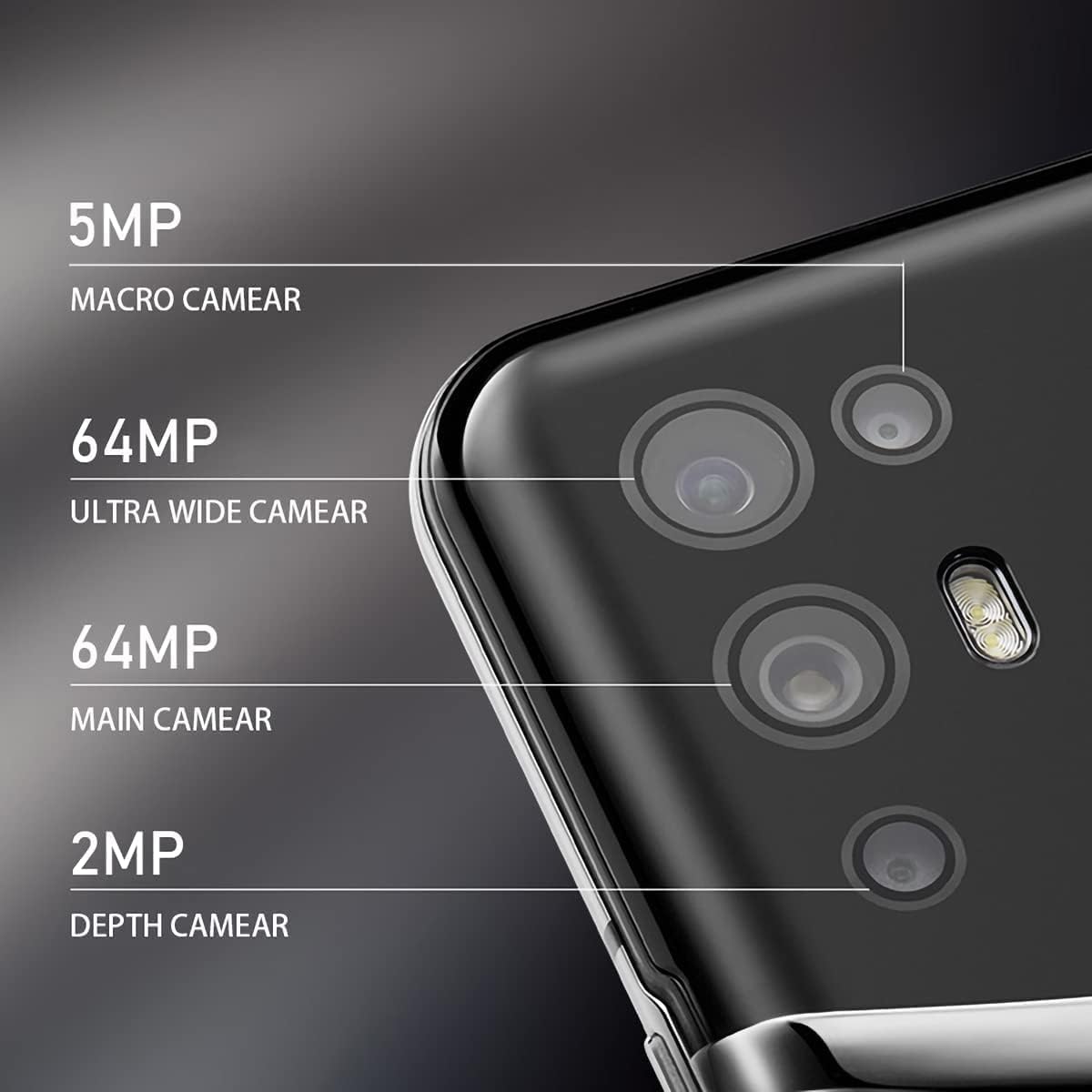
Image: The VERTU iVERTU-81 smartphone showcasing its 6.67-inch OLED display with vibrant colors, featuring a dancer and text highlighting '6.67" OLED Display' and '90hZ' (likely indicating refresh rate).
성능
Powered by a Snapdragon 888 octa-core chip and 12GB RAM, the iVERTU-81 delivers powerful performance for a smooth gaming and multitasking experience.

Image: Two hands holding the VERTU iVERTU-81 smartphone, which displays a graphically intensive game, illustrating the device's 'Powerful Performance'.
오디오 품질
Experience master sound quality with 3D audio technology and HiFi sound. The device also features exclusive ringtones compiled by the London Symphony Orchestra.

Image: The VERTU iVERTU-81 smartphone displaying an image of an orchestra, accompanied by text highlighting 'Master Sound Quality', '3D audio technology', 'HiFi sound quality', and 'London Symphony Orchestra compiled exclusive ringtones'.
카메라 기능
The iVERTU-81 is equipped with a professional photography configuration, allowing you to capture high-quality images and videos.
후방 카메라 시스템
- 64MP 메인 카메라: 고해상도 사진을 위해.
- 64MP Ultra Wide Angle Camera: For expansive landscape and group shots.
- 5MP 매크로 카메라: 자세한 클로즈업 사진 촬영을 위해.
- 2MP 깊이 카메라: For enhanced portrait mode with bokeh effects.
전면 카메라
- 16MP 전면 카메라: 선명한 셀카와 화상 통화를 위해.
비디오 녹화
Support for 4K 60FPS high-definition video shooting with two-way anti-shake technology ensures smooth and stable video capture. Intelligent focus assists in sharp and clear recordings.

이미지: 자세한 view of the VERTU iVERTU-81's rear camera module, labeling its four lenses: 5MP Macro, 64MP Ultra Wide, 64MP Main, and 2MP Depth cameras.

Image: The VERTU iVERTU-81 smartphone displaying its camera interface, capturing a snowboarder in action, with text emphasizing 'Professional Photography' and support for '4K 60FPS HD video shooting, two-way anti-shake, intelligent focus'.
유지
To ensure the longevity and optimal performance of your VERTU iVERTU-81 smartphone, follow these maintenance guidelines:
- 청소: 부드럽고 보풀이 없는 천을 사용하여 휴대폰 화면과 본체를 닦으세요. 연마재나 강한 화학 물질은 사용하지 마세요.
- 소프트웨어 업데이트: 기기에 최신 보안 패치와 기능이 적용되도록 정기적으로 시스템 업데이트를 확인하고 설치하십시오.
- 배터리 관리 : Avoid extreme temperatures. Do not fully discharge the battery frequently. Use only the provided or certified charging accessories.
- 스토리지 관리: 불필요한 것을 주기적으로 정리하세요 files and apps to maintain optimal performance. The phone comes with 512GB ROM.
- 보호: 물리적인 손상을 방지하기 위해 보호 케이스와 스크린 보호 필름을 사용하는 것을 고려하세요.
문제 해결
If you encounter issues with your VERTU iVERTU-81, refer to the following common troubleshooting steps:
장치가 켜지지 않음
- 배터리가 충전되어 있는지 확인하십시오. 전원을 다시 켜기 전에 최소 15분 동안 휴대폰을 충전기에 연결해 두십시오.
- 전원 버튼을 10~15초간 길게 눌러 강제로 다시 시작하세요.
네트워크 신호가 약함
- SIM 카드가 제대로 삽입되었는지 확인하세요.
- 네트워크 서비스가 더 좋은 지역으로 이동하세요.
- 휴대폰을 다시 시작하세요.
- Verify that your mobile data or 5G settings are correctly configured.
앱이 충돌하거나 멈춤
- 문제가 있는 앱을 닫았다가 다시 열어보세요.
- Clear the app's cache and data in the phone's settings.
- 앱이 최신 버전으로 업데이트되었는지 확인하세요.
- 휴대폰을 다시 시작하세요.
배터리가 빠르게 소모됨
- 화면 밝기를 낮추고 화면 시간 초과를 더 짧게 설정하세요.
- Disable unused features like Wi-Fi, Bluetooth, GPS, or 5G when not needed.
- 백그라운드에서 실행 중인 전력 소모가 많은 앱을 식별하고 종료하세요.
- 시스템 업데이트를 확인하세요. 업데이트에는 배터리 최적화 기능이 포함되어 있는 경우가 많습니다.

Image: The VERTU iVERTU-81 smartphone connected to a charger, displaying '4200mAh Long Battery Life' and '55W fast charge' text, emphasizing its battery capacity and quick charging capability.
Communication Encryption
The device features communication encryption for double protection of your data and privacy.

Image: A visual representation of a safe door, overlaid with various security-related terms such as 'encryption', 'firewalls', 'privacy', and 'information security', illustrating the concept of 'Communication Encryption Double Protection'.
명세서
| 특징 | 사양 |
|---|---|
| 모델명 | iVERTU-81 |
| 운영 체제 | 기계적 인조 인간 |
| 프로세서 | 스냅드래곤 888 (옥타코어) |
| 숫양 | 12GB (XNUMX기가바이트) |
| 메모리 저장 용량 | 512GB (XNUMX기가바이트) |
| 화면 크기 | 6.67 인치 |
| 디스플레이 유형 | OLED |
| 해결 | 2400 x 1080 |
| 새로 고침 빈도 | 120Hz |
| 후방 카메라 | 64MP Main + 64MP Ultra Wide + 5MP Macro + 2MP Depth |
| 전면 카메라 | 16MP |
| 배터리 용량 | 4200밀리amp 시간 |
| 충전 중 | 55W 급속 충전 |
| 무선 통신사 | 잠금 해제됨 |
| 셀룰러 기술 | 5G |
| 연결 기술 | 와이파이, GPS |
| 색상 | Calf Leather-Brown |
보증 및 지원
For warranty information and customer support, please refer to the warranty card included with your product or visit the official VERTU web사이트. 보증 청구를 위해 구매 증빙 자료를 보관하세요.
For technical assistance or service inquiries, please contact VERTU customer service through the channels provided on their official web대지.