소개
This manual provides comprehensive instructions for the Thomson ROC4301 4-in-1 Web-Programmable Universal Remote Control. This device allows you to control up to four different infrared-controlled electronic devices, such as TVs, DVD players, Blu-ray players, Set-Top Boxes (STB), VCRs, and audio equipment, using a single remote.
The ROC4301 features web-based programming for easy setup and a continuously updated code database to ensure compatibility with a wide range of brands and models.
주요 특징
- Controls up to 4 devices via one infrared remote control.
- Fast and easy programming via a web-based database accessible on PC, laptop, or tablet.
- Data transfer to the remote control is facilitated by a 3.5 mm jack cable (30 cm).
- Up to 4 devices can be programmed simultaneously.
- Compatible with TV, DVD, Blu-ray player, STB, VCR, and audio equipment.
- Continuously updated code database available online.
설정 및 프로그래밍
The Thomson ROC4301 remote control is programmed using an online database, ensuring access to the latest device codes. This method requires a computer (PC, laptop, or tablet) with internet access and the included 3.5 mm jack cable.
단계를 위한 Web-Based Programming:
- 리모컨 준비: Ensure fresh AAA batteries are installed in the remote control. (See "Maintenance" section for battery installation).
- Access the Programming Web대지: 열기 web browser on your PC, laptop, or tablet and navigate to the official Thomson remote control programming web(제품 포장 또는 제조업체의 웹사이트를 참조하십시오.) web정확한 사이트 URL).
- 리모컨 연결: Plug one end of the supplied 3.5 mm jack cable into the designated port on the remote control and the other end into the headphone jack of your computer.
- 기기를 선택하세요: On the programming website, follow the on-screen instructions to select the types of devices (e.g., TV, DVD, STB) and their respective brands and models you wish to control. The database will provide the necessary codes.
- Transfer Codes: Once you have selected your devices, initiate the data transfer process on the website. The codes will be transmitted through the audio jack to your remote control. Ensure your computer's volume is set to a suitable level as instructed by the web대지.
- 리모컨 테스트: After the transfer is complete, disconnect the remote control from your computer. Test the remote with each programmed device to ensure all functions work correctly. If a device does not respond or functions are incorrect, repeat the programming process, trying alternative codes if available on the web대지.
그만큼 web database is continuously updated, providing access to codes for new devices. You can program up to four devices simultaneously.
리모콘 조작하기
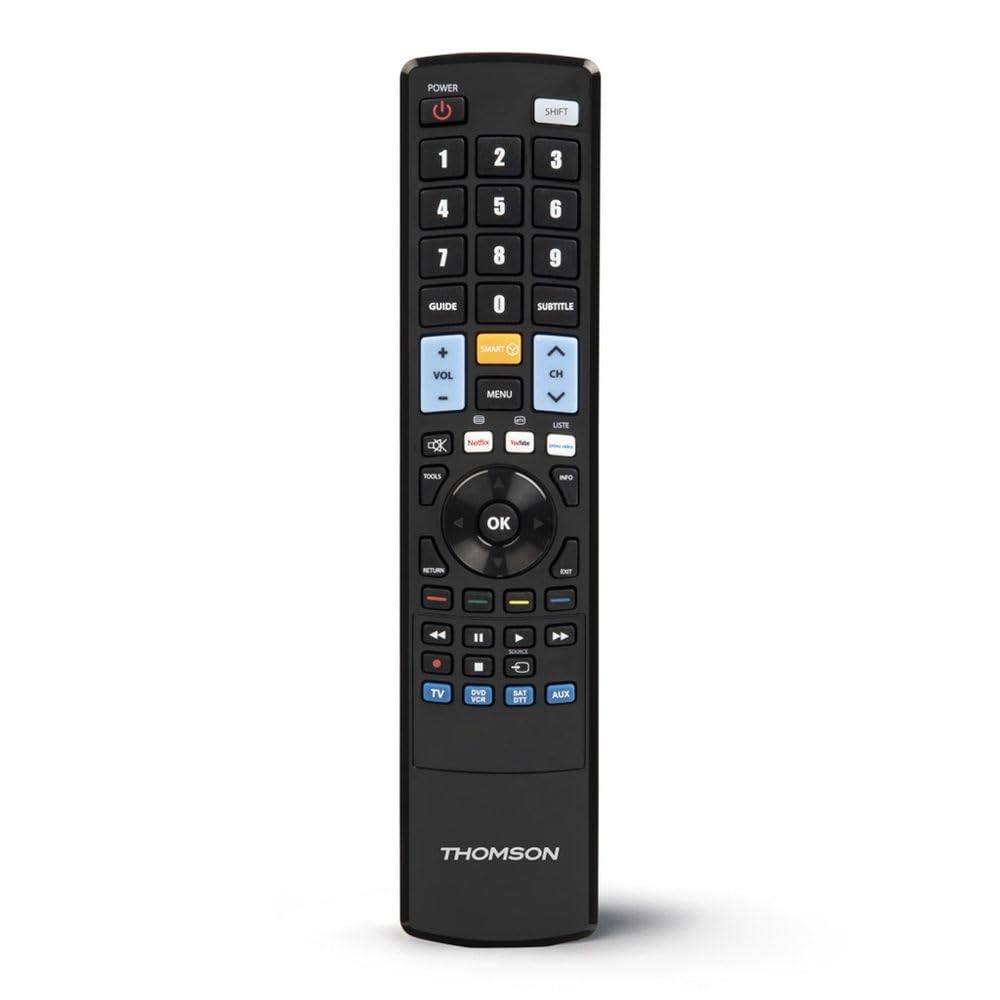
Once programmed, the Thomson ROC4301 functions like a standard remote control for your selected devices. It features 48 buttons designed for intuitive control.
일반 작업:
- 장치 선택: Use the dedicated device buttons (e.g., TV, DVD, STB, AUDIO) at the top of the remote to switch between controlling different devices. The remote will typically indicate which device is currently selected (e.g., via an LED indicator).
- 전원 켜기/끄기: 를 누르세요 힘 선택한 기기를 켜거나 끄는 버튼입니다.
- 채널/볼륨: 사용하세요 채널 +/- 그리고 볼륨 +/- buttons to adjust channels and volume respectively.
- 항해: 방향 패드(위, 아래, 왼쪽, 오른쪽)와 OK button are used for menu navigation on most devices.
- 숫자 키패드: Use the numeric buttons (0-9) to directly enter channel numbers or other numerical inputs.
- 기능 버튼: Other buttons such as Play, Pause, Stop, Fast Forward, Rewind, Menu, Exit, and colored function buttons will perform their corresponding actions on the selected device.
Ensure there is a clear line of sight between the remote control and the infrared receiver of the device you are operating. The maximum effective range is approximately 10 meters.
유지
배터리 설치 및 교체:
The Thomson ROC4301 remote control requires two AAA batteries (included). When the remote's performance degrades or it stops responding, it's time to replace the batteries.
- 리모콘 뒷면에 있는 배터리함 덮개를 찾으세요.
- 덮개를 아래로 밀거나 걸쇠를 누르고 들어 올려서 보관 공간을 엽니다.
- Remove the old batteries, if any.
- Insert two new AAA batteries, ensuring the positive (+) and negative (-) terminals match the markings inside the compartment.
- 배터리 칸 덮개를 딸깍 소리가 나며 제자리에 단단히 고정될 때까지 다시 끼웁니다.
중요한: Always dispose of used batteries responsibly according to local regulations. Do not mix old and new batteries, or different types of batteries.
청소:
리모컨을 청소하려면 부드럽고 마른 천을 사용하세요. 잘 지워지지 않는 오염의 경우, 가볍게 두드리세요.amp물에 적신 천으로 닦으십시오. 연마성 세제, 용제 또는 알코올은 리모컨 표면이나 내부 부품을 손상시킬 수 있으므로 사용하지 마십시오.
문제 해결
If you encounter issues with your Thomson ROC4301 universal remote control, try the following troubleshooting steps:
- 원격 응답 없음:
- Check the batteries. Ensure they are correctly inserted and have sufficient charge. Replace them if necessary.
- Ensure there is a clear line of sight between the remote's IR emitter and the device's IR receiver. Obstructions can block the signal.
- Make sure you have selected the correct device mode (e.g., TV, DVD) on the remote.
- 프로그래밍 후 장치가 응답하지 않음:
- Re-program the remote for that specific device. The web database often provides multiple codes for a single brand/model. Try the next available code if the first one doesn't work.
- Ensure the 3.5 mm jack cable connection was secure and the computer's volume was adequate during programming.
- Verify that the device you are trying to control is indeed an infrared-controlled device.
- 일부 기능이 작동하지 않습니다:
- Even with the correct code, some advanced functions might not be fully supported by a universal remote.
- Try alternative codes for your device, as some codes might offer better functionality mapping.
- Programming Issues (e.g., data transfer failure):
- 인터넷 연결을 확인하세요.
- 컴퓨터의 오디오 드라이버가 최신 버전인지 확인하십시오.
- Temporarily disable any sound enhancements or equalizers on your computer that might interfere with the audio signal.
- Try using a different computer or web browser if problems persist.
이러한 단계를 수행해도 문제가 해결되지 않으면 "지원" 섹션을 참조하여 추가 지원을 받으십시오.
명세서
| 상표 | 톰슨 |
| 모델명 | ROC4301 Web-Programmable Universal Remote Control 4-in-1 |
| 품목 모델 번호 | 00132679 |
| 연결 기술 | 적외선 (IR) |
| 지원되는 기기의 최대 개수 | 4 |
| 호환 장치 | TV, DVD, Blu-ray player, STB, VCR, Audio equipment |
| 컨트롤러 유형 | 버튼 제어 |
| 버튼의 수 | 48 |
| 최대 범위 | 10 미터 |
| 색상 | 검은색 |
| 배터리 | AAA 배터리 2개 (포함) |
| 제품 치수 | 22.9 x 5.2 x 2.5cm |
| 품목 무게 | 149.32g |
| 제조업체 | 톰슨 |
| 원산지 | 중국 |
보증 정보
The Thomson ROC4301 Universal Remote Control comes with a 2년 제조사 보증. Please retain your proof of purchase for warranty claims. For specific terms and conditions, refer to the warranty documentation included with your product or visit the official Thomson web대지.
지원하다
For further assistance, updated device codes, or to access the web-based programming tool, please visit the official Thomson support website. You may also find FAQs and additional resources there.
If you require technical support, please contact Thomson customer service through the channels provided on their official web대지.
제품 끝view