
1. 안전 지침
Please read all safety instructions carefully before operating the DATOUBOSS Pure Sine Wave Power Inverter. Failure to follow these instructions may result in electric shock, fire, or serious injury.
- 통풍: Ensure the inverter is installed in a well-ventilated area. Do not block the ventilation openings.
- 건조한 환경: Keep the inverter away from water, rain, and moisture.
- 적절한 연결: Connect the inverter only to a 48V DC power source. Incorrect voltage can damage the unit. Ensure correct polarity (+ to + and - to -).
- 과부하 보호: Do not exceed the rated power of the inverter (2000W continuous, 4000W peak). Overloading can cause damage and fire.
- 인화성 물질: Do not operate the inverter near flammable materials or gases.
- 어린이와 애완동물: 인버터를 어린이와 반려동물의 손이 닿지 않는 곳에 보관하십시오.
- 서비스: Do not attempt to disassemble or repair the inverter yourself. Refer all servicing to qualified personnel.
- 접지: 인버터가 현지 전기 규정에 따라 올바르게 접지되었는지 확인하세요.
2. 패키지 내용
패키지에 모든 품목이 들어 있는지 확인하세요.
- DATOUBOSS Pure Sine Wave Power Inverter (2000W 48V)
- 원격 제어
- 배터리 연결 케이블(빨간색 및 검은색)
- 사용자 설명서

Image: The DATOUBOSS Pure Sine Wave Power Inverter, remote control, and battery connection cables as they appear in the package.
3. 제품 오버view
The DATOUBOSS Pure Sine Wave Power Inverter converts 48V DC battery power to 100V AC household power, allowing you to operate various AC appliances from your vehicle, RV, boat, or off-grid solar system. It features a pure sine wave output, which is ideal for sensitive electronics, and includes multiple protection functions for safe and reliable operation. The integrated LCD display provides real-time operational status, and a remote control offers convenient power management.

이미지: 앞면과 뒷면 view of the DATOUBOSS Pure Sine Wave Power Inverter, highlighting its compact design and connection ports.
영상: 언박싱 및 전체 리뷰view of the DATOUBOSS Pure Sine Wave Power Inverter, showing its components and initial setup.
4. 설정
4.1 48V DC 전원에 연결
- Ensure the inverter is turned off.
- Connect the red battery cable to the positive (+) terminal of your 48V battery bank and the positive (+) terminal on the inverter.
- Connect the black battery cable to the negative (-) terminal of your 48V battery bank and the negative (-) terminal on the inverter.
- 연결이 헐거워져 스파크가 발생하는 것을 방지하기 위해 모든 연결부가 단단히 고정되었는지 확인하십시오.

Image: Rear panel of the inverter, illustrating the positive (+) and negative (-) battery connection terminals and cooling fans.
4.2 Frequency Switching (50Hz/60Hz)
The inverter supports both 50Hz and 60Hz output frequencies. To switch the frequency:
- Turn off the inverter and disconnect it from the power source.
- Carefully open the inverter casing를 눌러 내부 회로 기판에 접근합니다.
- Locate the frequency switch on the circuit board.
- Adjust the switch to your desired frequency (50Hz or 60Hz).
- Close the inverter casing securely before reconnecting power.
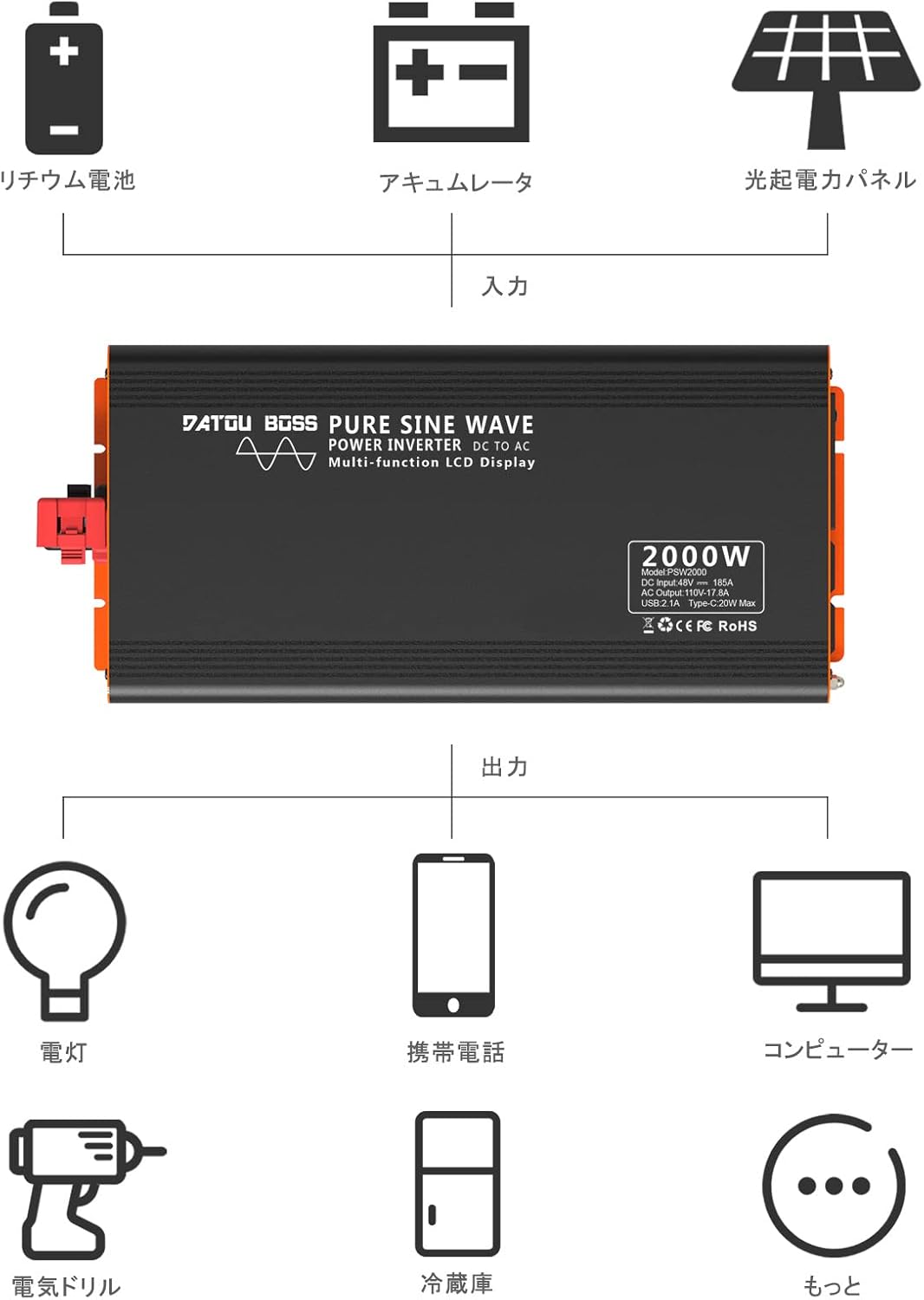
Image: A diagram indicating the location of the frequency switch inside the inverter, which can be set to 50Hz or 60Hz.
4.3 원격 제어 페어링
If the remote control does not operate the inverter, it may need to be paired:
- Long-press the ON button on the inverter. A small red dot will flash on the inverter's display.
- Point the remote control towards the inverter and press the ON button on the remote.
- The inverter and remote control are now paired.
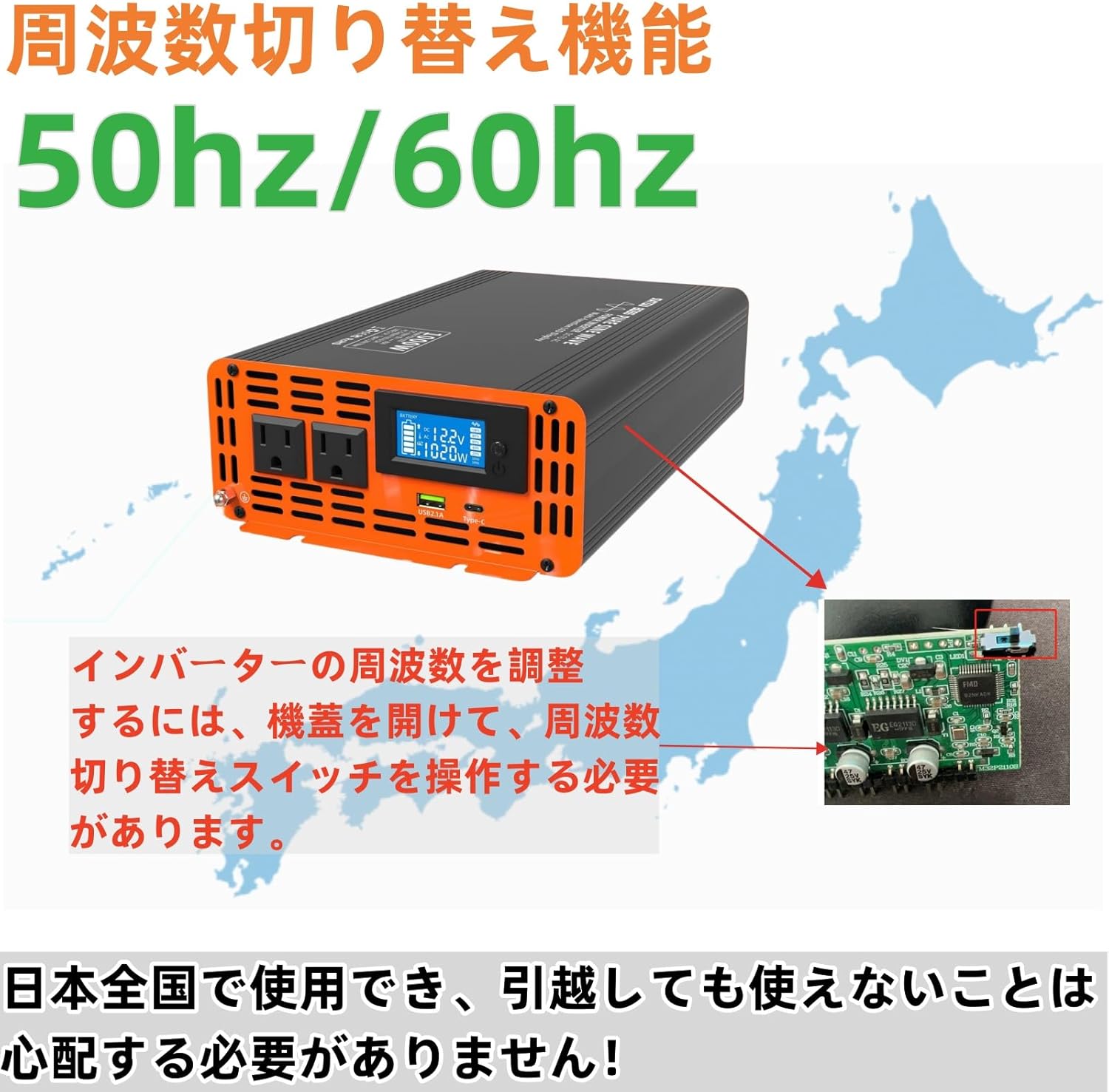
Image: Visual guide for pairing the remote control with the inverter, showing the steps to activate pairing mode and confirm connection.
5. 사용 설명서
5.1 전원 켜기/끄기
- After connecting the battery cables, press the power button on the inverter to turn it on. The LCD display will illuminate.
- To turn off the inverter, press the power button again.
- Alternatively, use the remote control's ON/OFF buttons for convenience.
5.2 LCD 디스플레이 이해
The multi-functional LCD display provides critical information about the inverter's operation:
- 입력 Voltage: DC 볼륨을 표시합니다.tag배터리 뱅크에서 e를 가져오세요.
- 출력 볼륨tage: AC 출력 볼륨을 표시합니다.tage(예: 100V).
- 전원 디스플레이: Indicates the current power consumption of connected appliances in Watts.
- 배터리 전원: Visual representation of the battery charge level.
- 주파수 표시: Shows the output frequency (50Hz or 60Hz).
- 파형 표시: Illustrates the pure sine wave output.
- 온도 표시 : 인버터의 내부 온도를 보여줍니다.
- Overload Protection Indicator: Will display if an overload occurs.

이미지: 자세한 view of the LCD screen, displaying input voltage, output power, battery level, and other operational data.
5.3 AC 기기 연결
- Plug your AC appliances into the output sockets on the inverter.
- Ensure the total power consumption of all connected appliances does not exceed the inverter's rated power (2000W).
- For optimal performance and safety, avoid running appliances that draw close to the maximum power for extended periods.
Video: Demonstration of the inverter powering various household appliances, including a fan, TV, hair dryer, and blender, showcasin다재다능함.
6. 특징
- High-Performance Pure Sine Wave Output: Provides stable and clean power suitable for a wide range of electrical products and precision instruments. Utilizes MCU microprocessor control with SPWM technology to deliver 100% pure sine wave power. Conversion efficiency exceeds 90%.
- Multiple Circuit Protection: Equipped with comprehensive safety features including input low voltage alarm, overvoltage protection, overload protection, low voltage protection, overheat protection, and short circuit protection. These safeguards ensure the complete protection of your connected circuits and devices. The waveform THD is ≤3%.
- LCD 액정 디스플레이: Features a multi-functional LCD display that shows input voltage, temperature, battery power, frequency, output voltage, waveform, and power. It also indicates overload protection status. Includes remote control functionality for convenient operation.
- Ultra-Quiet & High Durability: Designed to minimize noise for a quiet operating environment while ensuring safety. The body is made of high-quality materials for durability. Two built-in cooling fans provide excellent heat dissipation. The fans activate automatically based on product temperature, extending the product's lifespan.
- 다양한 용도: Suitable for various applications including home appliances (e.g., vacuum cleaners), kitchen appliances (e.g., coffee makers), home entertainment electronics (e.g., audio systems), office equipment (e.g., computers), industrial equipment (e.g., cloud servers), and power tools (e.g., electric drills).

Image: A visual representation of the inverter's multi-protection system, including overvoltage, overload, overheat, and short circuit safeguards.
Image: An illustration demonstrating the wide range of applications for the inverter, from powering lights and phones to computers and electric drills, connected to a battery or solar panel setup.
7. 유지관리
To ensure the longevity and optimal performance of your DATOUBOSS Pure Sine Wave Power Inverter, follow these maintenance guidelines:
- 깨끗하게 유지하십시오: 인버터 외부는 부드럽고 마른 천으로 정기적으로 청소하십시오. 액체 세척제나 용제는 사용하지 마십시오.
- 연결 확인: Periodically inspect all electrical connections (battery cables, AC plugs) to ensure they are tight and free from corrosion. Loose connections can lead to overheating and power loss.
- 통풍: Ensure the cooling fans and ventilation openings are free from dust and debris. Blocked vents can lead to overheating.
- 저장: 인버터를 장기간 보관할 경우 배터리에서 분리하여 서늘하고 건조한 곳에 보관하세요.
8. 문제 해결
인버터에 문제가 발생하면 다음의 일반적인 문제와 해결 방법을 참조하세요.
| 문제 | 가능한 원인 | 해결책 |
|---|---|---|
| No AC Output / Inverter not turning on |
|
|
| 과열 경보 |
|
|
| 리모컨이 작동하지 않음 |
|
|
| 비정상적인 소음 |
|
|
9. 사양
| 특징 | 사양 |
|---|---|
| 입력 Voltage | 직류 48V |
| 출력 볼륨tage | 교류 100V |
| 정격 전력 | 2000와트 |
| 피크 파워 | 4000와트 |
| 출력파형 | 순수한 사인 웨이브 |
| 출력 주파수 | 50Hz / 60Hz (Switchable) |
| 과열 보호 | 80℃±5℃ |
| 냉각 방식 | Built-in Cooling Fans |
| Waveform THD | ≤3% |
| 변환 효율성 | ≥90% |
| 제품 치수 | 36 x 17.3 x 7.6cm |
| 제품 무게 | 4.5kg |
| 포함된 액세서리 | Inverter, Remote Control |
10. 보증 및 지원
DATOUBOSS products are designed and manufactured to the highest quality standards. For warranty information, technical support, or service inquiries, please contact the DATOUBOSS customer service team through your purchase platform or the official DATOUBOSS web대지.
보증 청구를 위해 구매 증빙서류를 보관하세요.