
AM alphamount APMF5
TV 벽걸이 사용 설명서
AM alphamount Model: APMF5
1. 서론
Thank you for choosing the AM alphamount TV Wall Mount. This full motion articulating arm bracket is designed to securely hold most 26-60 inch flat or curved televisions weighing up to 77 lbs. Its robust construction and versatile adjustability provide an optimal viewing experience from various angles in your room. This manual provides detailed instructions for safe installation, operation, and maintenance of your TV wall mount.

Image 1.1: AM alphamount Full Motion TV Wall Mount
2. 중요한 안전 정보
Please read all instructions carefully before installation. If you do not understand these instructions, or have doubts about the safety of the installation, please contact a qualified installer or customer service.
- Do not install this product on walls that are not structurally sound. Ensure the mounting surface can safely support the combined weight of the mount and the television.
- This mount is intended for use with TVs weighing up to 77 lbs (35 kg). Exceeding this weight limit may result in instability and potential injury.
- Verify your TV's VESA mounting pattern (distance between mounting holes on the back of the TV) is within the supported range of 75x75mm to 400x400mm.
- Always use a stud finder to locate wood studs for secure mounting. For concrete or brick walls, use appropriate anchors (not always included, check package contents).
- Do not overtighten screws. Overtightening can damage the mounting surface or the TV.
- 설치하는 동안 어린이와 애완동물이 접근하지 못하도록 하세요.
- Periodically check the mount for any signs of wear, loose screws, or damage.
3. 패키지 내용
Please check to ensure all components are present and undamaged. If any parts are missing or defective, contact customer service for assistance.
- TV Wall Mount Assembly (Wall Plate and Articulating Arm)
- TV 브래킷 (2개)
- 설치 하드웨어 키트(TV와 벽 사이의 간격을 조절하는 다양한 나사, 와셔, 스페이서 포함)
- 버블 레벨
- 설치 템플릿(해당하는 경우)
- 사용 설명서(본 문서)
4. 제품 사양
| 특징 | 사양 |
|---|---|
| 상표 | AM alphamount |
| 모델 번호 | APMF5 |
| TV 크기 호환성 | 26~60인치 |
| 중량 용량 | 최대 77kg(35파운드) |
| VESA 호환성 | 75x75mm ~ 400x400mm |
| 회전 각도 | 180° (depending on TV size) |
| 기울기 각도 | +5° / -15° |
| 벽에서 연장된 부분 | 2.3인치(수축 시)에서 18.7인치(확장 시)까지 |
| 재료 | 합금강 |
| 색상 | 검은색 |

Image 4.1: Compatibility for TV sizes and VESA patterns.

Image 4.2: Comparison of arm thickness for stability.
5. 설정 및 설치
5.1 설치 전 체크리스트
- Ensure you have all necessary tools: stud finder, drill, level, Phillips head screwdriver, socket wrench, pencil.
- Identify your wall type: wood stud, concrete, or brick. Different hardware and drilling methods apply.
- Determine the desired TV height. The center of the TV should ideally be at eye level when seated.
- Check for any electrical wires or plumbing behind the wall in the intended mounting area.
5.2 TV 브래킷을 TV에 부착하기
- 화면 손상을 방지하려면 부드럽고 깨끗한 표면에 TV를 뒤집어서 조심스럽게 놓으세요.
- TV 뒷면에 있는 VESA 장착 구멍을 확인하세요.
- Select the correct diameter and length of screws from the hardware kit that fit your TV's mounting holes. Use washers and spacers if needed to ensure a snug fit without overtightening.
- Attach the two TV brackets to the back of your TV, ensuring they are level and securely fastened. The open ends of the brackets should face downwards.
5.3 벽면 플레이트 장착
- For wood stud installation: Use a stud finder to locate the center of a wood stud. Mark the drilling locations for the wall plate.
- Drill pilot holes at the marked locations. The drill bit size will be specified in the included hardware instructions.
- Align the wall plate with the pilot holes and secure it to the wall using the lag bolts and washers. Use the included bubble level to ensure the wall plate is perfectly horizontal before fully tightening.
- For concrete/brick wall installation: Mark the drilling locations. Drill holes using a masonry drill bit. Insert concrete anchors into the drilled holes. Then, attach the wall plate using the lag bolts and washers, ensuring it is level.

Image 5.1: Illustration of single stud mounting and post-installation leveling.
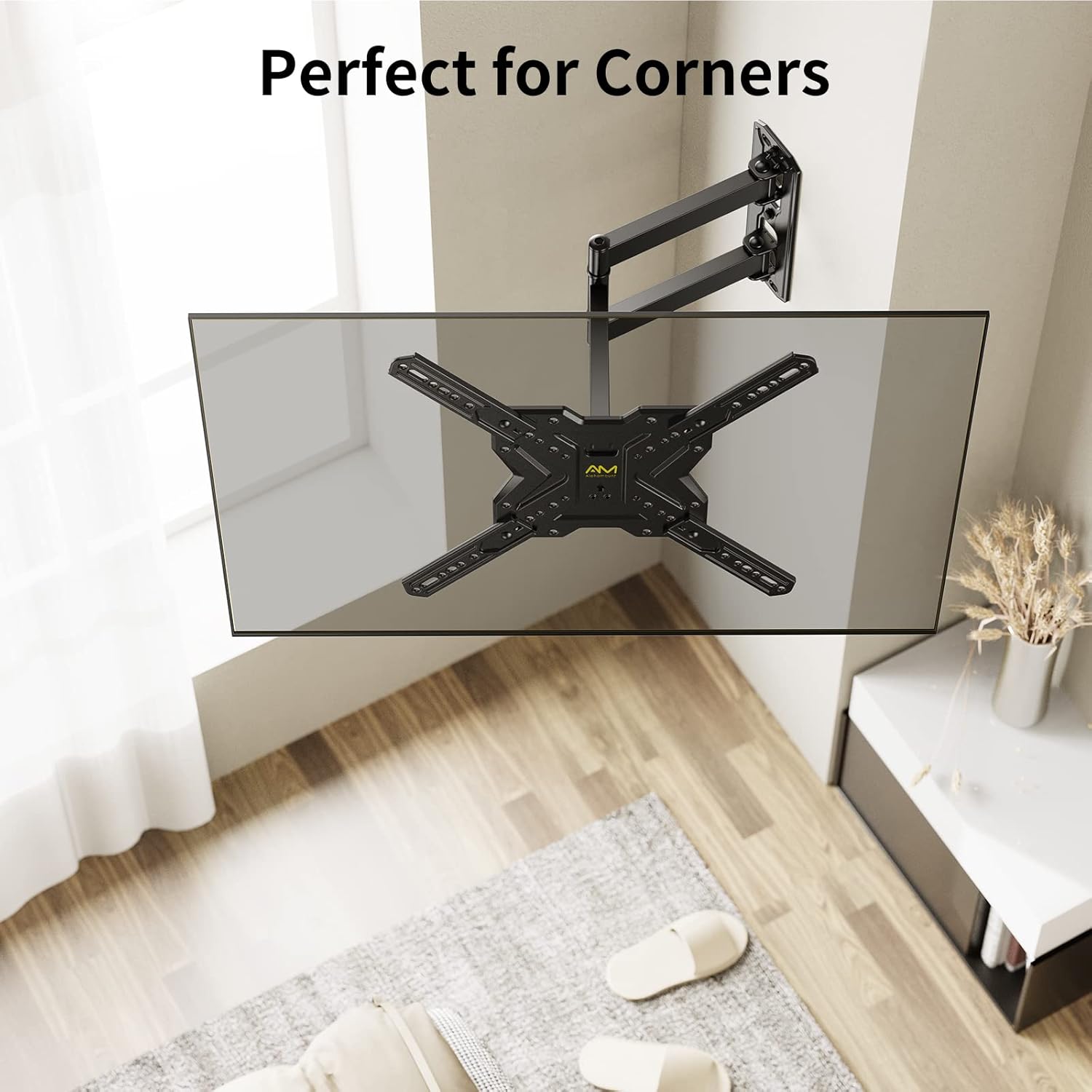
Image 5.2: The mount's design allows for effective corner placement.
5.4 TV 걸기
- 다른 사람의 도움을 받아 부착된 브래킷을 이용해 TV를 조심스럽게 들어 올려 벽면 고정판에 걸어주세요.
- TV가 벽걸이 받침대에 제대로 고정되었는지 확인하십시오.
- Engage the safety locking screws or mechanisms on the TV brackets to prevent accidental dislodging.
6. Operating Your TV Mount
Your AM alphamount TV wall mount offers flexible adjustments to achieve the best view잉 각도.
6.1 회전 조절
Gently push or pull the TV screen to the desired left or right angle. The articulating arm allows for up to 180° of swivel, depending on your TV size and wall clearance.

Image 6.1: Adjusting the TV for optimal view어떤 위치에서 ing.
6.2 기울기 조정
To adjust the vertical tilt, loosen the tilt knobs or bolts on the TV brackets (if applicable), tilt the screen to your preferred angle (+5° up to -15° down), and then re-tighten the knobs/bolts to secure the position. This helps reduce glare and improve view편안함을.

Image 6.2: Tilting the TV to minimize screen glare.
6.3 확장 및 수축
The articulating arm allows you to extend the TV up to 18.7 inches from the wall or retract it back to a slim 2.3 inches. Gently pull or push the TV to achieve the desired distance.
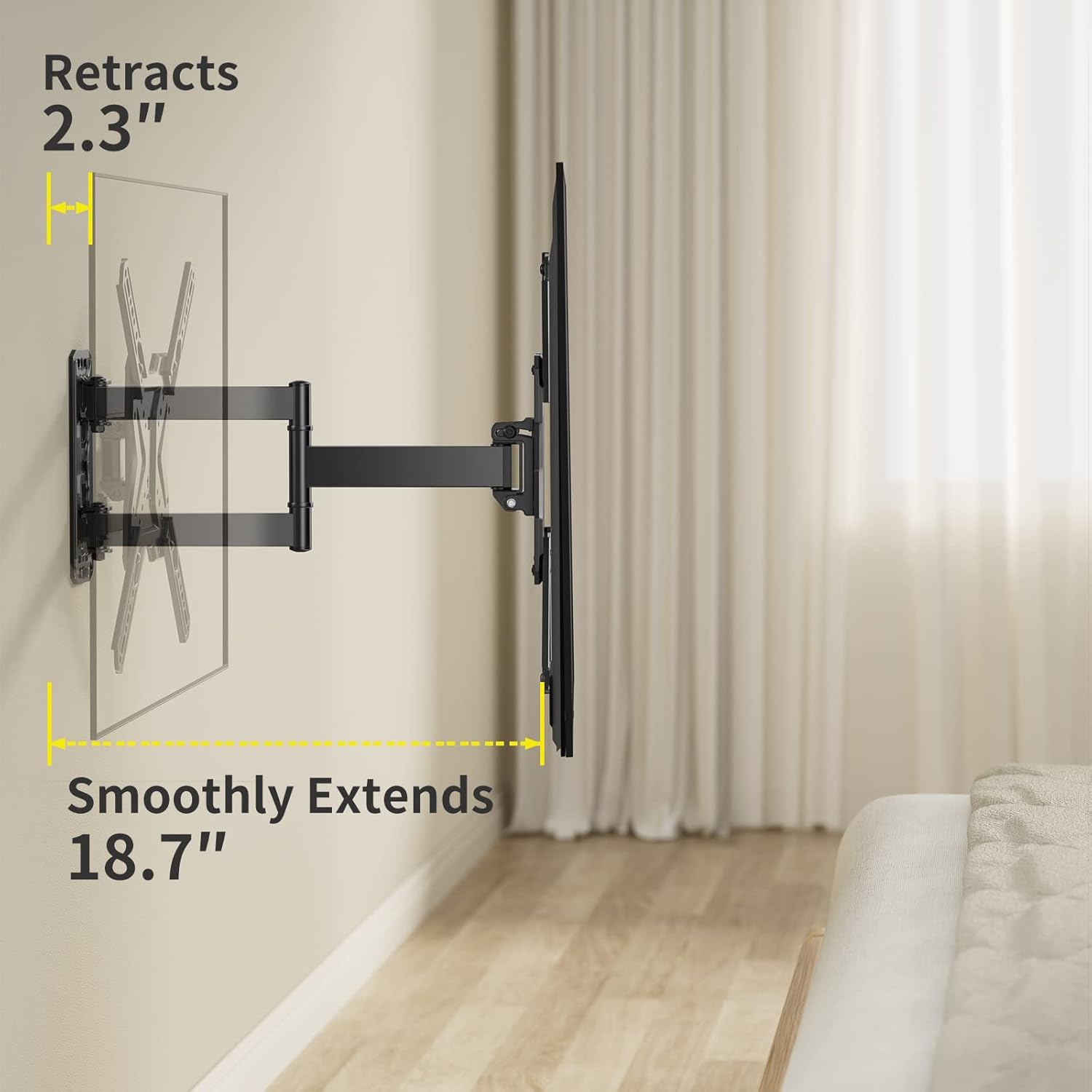
Image 6.3: Demonstrating the mount's extension and retraction capabilities.
7. 유지관리
- 청소: 부드럽고 마른 천으로 마운트를 닦으십시오. 마감재를 손상시킬 수 있는 연마성 세척제나 용제는 사용하지 마십시오.
- 정기 검사: Every 6-12 months, check all screws and bolts to ensure they are still tight and secure. Re-tighten if necessary.
- 매끄럽게 하기: 관절 부분은 부드러운 움직임을 위해 설계되었으며 일반적으로 윤활유가 필요하지 않습니다. 움직임이 뻑뻑해지면 고객 지원팀에 문의하십시오.
8. 문제 해결
| 문제 | 가능한 원인 / 해결책 |
|---|---|
| 설치 후 TV가 수평이 아닙니다. | The mount has a post-installation leveling feature (+/-3°). Loosen the leveling screws slightly, adjust the TV, and re-tighten. |
| 마운트가 흔들리거나 불안정하게 느껴집니다. | Ensure all wall plate bolts are securely tightened into a stud or appropriate anchors. Verify TV weight is within limits. Re-check all connections. |
| Cannot tilt or swivel the TV. | Check if tilt knobs/bolts are too tight. Loosen them slightly to allow movement, then re-tighten to secure. Ensure no cables are obstructing movement. |
| TV가 거치대에 맞지 않습니다. | Verify your TV's VESA pattern and weight are within the mount's specifications (75x75mm to 400x400mm, up to 77 lbs). |
9. 보증 및 지원
AM alphamount is committed to providing high-quality products. For specific warranty details, please refer to the product packaging or the official AM alphamount website. If you encounter any issues or require technical assistance, please contact AM alphamount customer support through their official channels or visit their Amazon store page:
10. 추가 리소스
For a downloadable PDF version of this user manual and other product information, please visit:
Ask a question about this manual
Ask about setup, troubleshooting, compatibility, parts, safety, or missing instructions. Manuals+ will review the question and use this page’s manual context to help answer it.